

PaintingProGuide is reader-supported. When you buy through links on this page we may earn an affiliate commission at no extra cost to you.
The most important fact about stylus pens for digital painting is that the pen and the screen work as a pair. A stylus that gives beautiful pressure-sensitive strokes on one device may do nothing at all on another. Before comparing features, you need to know which of three technologies your device uses: active styluses that communicate with a specific tablet, EMR (electromagnetic resonance) pens that draw power from compatible screens, or passive capacitive styluses that simply imitate a fingertip on any touchscreen.
This guide explains those three types, then compares six stylus pens currently on Amazon, from a pressure-sensitive EMR pencil and a Huion tablet pen to iPad-compatible and universal capacitive brush styluses. For each one, we spell out exactly which devices it works with, because compatibility mistakes are the most common reason stylus purchases get returned.
Quick answer: If your device supports EMR (check the maker’s list), the STAEDTLER Noris Digital Jumbo is the best painting stylus here, with 4,096 pressure levels, palm rejection and a soft digital eraser in a classic pencil shape. iPad owners who want a lower-cost alternative to Apple’s own pencil can look at the Hastraith iPad stylus, which offers tilt-based line variation and palm rejection on iPads from 2018 onward. If you own a supported Huion Inspiroy tablet, the HUION PW100 replacement pen offers 8,192 pressure levels. For brush-like strokes on any touchscreen, the BUTOUCH Professional 2 brush stylus is the creative wildcard.
Our Top Picks at a Glance
- STAEDTLER Noris Digital Jumbo (EMR) — Best for pressure-sensitive painting on EMR devices
- Hastraith Stylus Pen for iPad (2018–2026) — Best budget stylus for compatible iPads
- HUION PW100 Battery-Free Stylus — Best replacement pen for Huion Inspiroy tablets
- BUTOUCH Professional 2 Brush Stylus — Best brush-feel stylus for any touchscreen
- BUTOUCH Basic 2 Brush Stylus — Best low-cost brush stylus for beginners and kids
- Acempire 2-in-1 Stylus (7 pack) — Best universal capacitive pens for sharing
| Product | Best For | Key Spec | Key Strength | Price Tier |
|---|---|---|---|---|
| STAEDTLER Noris Digital Jumbo | EMR tablets and note devices | EMR; 4,096 levels; 0.7 mm tip | Pressure, palm rejection, eraser | $$$ |
| Hastraith iPad Stylus | iPads 2018 and later | Rechargeable; tilt sensing | Palm rejection, fast charge | $ |
| HUION PW100 | Listed Huion Inspiroy models | Battery-free; 8,192 levels | Two customizable buttons | $$ |
| BUTOUCH Professional 2 | Painterly strokes on any touchscreen | Passive; synthetic-hair brush | Real brush feel | $$ |
| BUTOUCH Basic 2 | Beginners and kids | Passive brush; 18.5 cm, 18 g | No battery or pairing | $$ |
| Acempire 7-Pack | Families, classrooms | Passive 2-in-1; aluminum | Works on almost any touchscreen | $ |
How We Chose
These styluses were chosen from Amazon listing details and specifications checked in October 2026, judged on how well each pen’s technology, pressure support and compatibility suit digital painting, and on how widely each is reviewed by Amazon buyers. We have not drawn with these styluses ourselves. Compatibility notes come directly from the listings; always confirm your exact device model before buying.
- Compatibility clarity — the listing must say which devices the pen works with.
- Pressure sensitivity — essential for natural brush strokes in painting apps.
- Palm rejection — lets you rest your hand on the screen while painting.
- Tip precision and feel — fine tips for detail, brush tips for expressive marks.
- Power — battery-free pens never need charging; active pens need managing.
Active, EMR or Passive: Which Stylus Do You Need?
| Type | How it works | Pressure? | Works with | Examples here |
|---|---|---|---|---|
| Active (device-specific) | Battery-powered pen recognized by the tablet | Varies; many third-party iPad pens offer tilt but not pressure | Specific device families | Hastraith |
| EMR | Screen’s digitizer powers the pen | Yes | EMR-equipped tablets and displays only | STAEDTLER, HUION PW100 (Huion tablets) |
| Passive capacitive | Conductive tip acts like a finger | No | Almost any touchscreen | BUTOUCH, Acempire |
For serious digital painting, pressure sensitivity is the feature that matters most, because it lets brush size and opacity respond to how hard you press. Passive styluses are still useful for sketching, coloring and casual painting, and brush styluses add a tactile, painterly feel that some artists love.
Best Stylus Pens for Digital Painting Reviewed
1. STAEDTLER Noris Digital Jumbo Stylus Pen — Best for pressure-sensitive painting on EMR devices

STAEDTLER took the shape of its familiar yellow-and-black Noris pencil, in a chunky triangular jumbo barrel, and turned it into an EMR stylus. The listing gives the key specs: a replaceable 0.7 mm tip, 4,096 pressure levels for varying line width and stroke intensity, palm rejection and a soft digital eraser on the end that you use by flipping the pencil around.
EMR means no battery, charging or pairing; the compatible screen powers the pen. EMR is the technology used in devices such as Samsung’s S Pen tablets and many e-ink note tablets, but the details are explicit that it is not compatible with Apple devices and that you should check STAEDTLER’s compatibility list.
For painting, the jumbo barrel is a real ergonomic benefit during long sessions, and the eraser end speeds up corrections. Five replacement nibs and a tool are included.
Best suited for: Owners of EMR tablets and pen-enabled devices who want a comfortable, pressure-sensitive painting pen.
Key features:
- EMR, battery-free; no pairing
- 4,096 pressure levels
- Replaceable 0.7 mm tip; 5 spare nibs
- Palm rejection and digital eraser
Pros:
- True pressure sensitivity
- Comfortable jumbo triangular grip
- Eraser end mimics a real pencil
Cons and limitations:
- Not compatible with Apple devices
- Only works on EMR screens on the compatibility list
- Highest tier in this guide
Buying consideration: Download and check STAEDTLER’s compatibility list for your exact model before ordering. EMR pens do not work on regular touchscreens.
2. Hastraith Stylus Pen for iPad (2018–2026) — Best for budget painting on compatible iPads

Hastraith’s stylus is built for iPads released from 2018 onward, and the listing names supported models across iPad, iPad Air, iPad Pro and iPad mini lines. It notes clearly that it does not work with older iPads, iPhones, Android or Microsoft devices.
For painting, the relevant features are tilt sensing, which the listing says changes line thickness based on the angle of the pen, and full-screen palm rejection so you can rest your hand while you work. It charges via USB-C in about 13 minutes, runs more than 10 hours on a charge, and shows battery level with three indicator lights.
The listing describes tilt-based line variation rather than pressure levels, so if you rely on pressure-controlled brush size and opacity in apps like Procreate, factor that into your choice.
Best suited for: iPad owners who want palm rejection and tilt shading at a lower tier than first-party pencils.
Key features:
- Compatible with listed iPads from 2018 onward
- Tilt sensing and palm rejection
- USB-C, 13-minute full charge; 10+ hours use
- Includes 3 spare nibs and protective covers
Pros:
- Palm rejection for comfortable painting
- Tilt shading for sketch-style strokes
- Fast charging
Cons and limitations:
- No pressure levels stated in the listing
- Not for older iPads or other platforms
- Needs charging
Buying consideration: If the pen does not respond, the listing suggests turning off the iPad’s Bluetooth. Check your iPad model number in Settings before buying.
3. HUION PW100 Battery-Free Stylus — Best for owners of supported Huion tablets

The PW100 is Huion’s own pen for a specific list of Inspiroy pen tablets, including the H640P, H950P, H1060P, H610Pro V2, HS610, HS64, H420X, H580X and H610X. The listing is explicit that it is not compatible with iPads, other graphics tablets or Huion’s GT display series.
If you have one of those tablets and need a spare or replacement, it offers 8,192 levels of pressure sensitivity, a 233 PPS report rate, 5080 LPI resolution and two customizable side buttons you can set to functions such as eraser.
Being battery-free, it never needs charging.
Best suited for: Huion Inspiroy owners replacing a lost or worn pen, or wanting a second pen.
Key features:
- 8,192 pressure levels
- Battery-free
- Two customizable buttons
- 233 PPS report rate, 5080 LPI
Pros:
- High pressure resolution
- No charging
- Mid tier
Cons and limitations:
- Only works with listed Huion models
- Not for iPads or displays
- Useless without a compatible tablet
Buying consideration: Match your tablet model exactly to the listing. Huion makes several pen generations that are not interchangeable.
4. BUTOUCH Professional 2 Digital Painting Brush Stylus — Best for painterly strokes on any touchscreen

BUTOUCH takes a different approach: a conductive synthetic-hair brush that works on any touchscreen without batteries or charging. Instead of a hard plastic tip, you get the feel of a real brush moving across the glass, which suits loose painting, watercolor-style apps and expressive mark-making.
Because it is passive, there is no pressure sensitivity or palm rejection. Painting apps will see it as a broad finger touch, so it works best for larger strokes and color blocking rather than fine line work.
The listing positions it for both kids and adults and highlights its compact, pocketable size.
Best suited for: Artists who want a tactile brush feel, and painters using phones or tablets without an active pen.
Key features:
- Conductive synthetic-hair brush tip
- No battery, no charging
- Works on touchscreen devices
- Compact and portable
Pros:
- Unique brush feel
- Universal compatibility
- No setup
Cons and limitations:
- No pressure or palm rejection
- Not for precise detail
- Mid tier for a passive stylus
Buying consideration: Turn on any app setting that simulates pressure from stroke speed; it can make passive brush styluses feel more natural.
5. BUTOUCH Basic 2 Digital Painting Brush Stylus — Best for beginners and kids

The Basic 2 is BUTOUCH’s simpler brush stylus: battery-free, no Bluetooth, no software, and compatible with capacitive touchscreens including iPads, Android tablets, touchscreen laptops and smartphones. It is 18.5 cm long and about 18 grams.
It is a good introduction to digital painting for kids or for adults trying a free painting app before investing in a pressure-sensitive setup.
The listing also emphasizes its reusable, battery-free design.
Best suited for: Kids, classrooms and first-time digital painters.
Key features:
- Battery-free capacitive brush
- 18.5 cm, about 18 g
- Works on most capacitive touchscreens
- No pairing or software
Pros:
- Low tier
- Easy for kids
- Lightweight and portable
Cons and limitations:
- No pressure sensitivity
- Broad strokes only
- No palm rejection
Buying consideration: Wipe the brush tip gently with a dry cloth; skin oils and screen grime reduce responsiveness over time.
6. Acempire 2-in-1 Stylus Pen (7 Pack) — Best for universal pens for families and classrooms
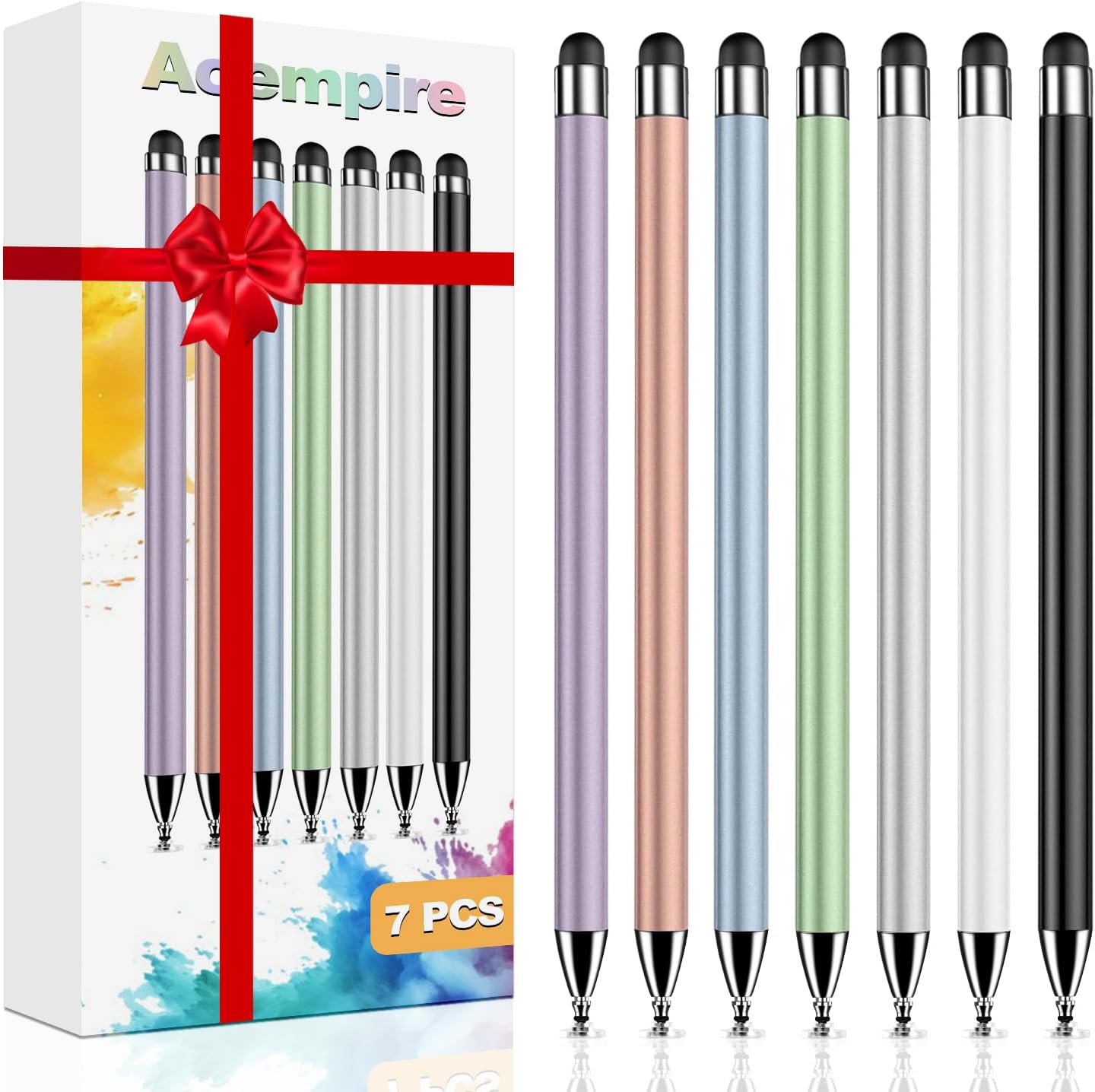
Seven aluminum 2-in-1 capacitive styluses that need no Bluetooth or charging. The listing describes them as working across touchscreen devices from Apple, Samsung and other brands, and even game consoles with touchscreens.
As passive pens, they are best for sketching, coloring apps and navigation rather than pressure-sensitive painting, but having several on hand is useful when a whole family or class shares tablets.
The lightweight alloy barrel is described as comfortable and screen-friendly.
Best suited for: Households and classrooms that need inexpensive styluses for many devices.
Key features:
- Pack of 7 styluses
- 2-in-1 capacitive design
- No charging or pairing
- Lightweight aluminum
Pros:
- Works on almost any touchscreen
- Low cost per pen
- Good for shared devices
Cons and limitations:
- No pressure sensitivity
- Not designed for detailed painting
- Tip types vary by design
Buying consideration: Use these for coloring and sketching, and save a pressure-sensitive pen for serious painting.
Buying Guide: How to Choose a Stylus for Digital Painting
Start with your device
Find your exact model number. iPads, Samsung tablets, Windows pen laptops, e-ink tablets and graphics tablets each use different pen technologies, and most active and EMR pens only work with specific models.
Prioritize pressure sensitivity
Pressure lets painting apps vary brush size and opacity as you press harder or softer. For painting, a pen with pressure levels is far more expressive than a tilt-only or passive pen.
Palm rejection
Resting your hand on the screen is natural when painting. Without palm rejection, your palm leaves stray marks. Wearing a two-finger drawing glove helps with passive pens.
Tip and feel
Hard plastic tips offer precision. Felt-like or textured nibs add friction. Brush tips feel painterly but sacrifice detail. Consider a matte screen protector if glass feels too slippery.
Power and charging
Battery-free EMR pens are always ready. Rechargeable active pens need charging but often work on devices without EMR digitizers.
Ergonomics
Barrel thickness and shape matter over hours of work. Jumbo and triangular barrels reduce grip fatigue for many artists.
Put Your Stylus to Work
Practice pressure control with our tutorials on painting digital waves and ocean scenes and digital night scene painting. Do not have a pen-capable device yet? See how to do digital painting without a tablet.
Common Mistakes to Avoid
- Buying by brand instead of compatibility. A great pen is useless on the wrong device.
- Assuming every stylus has pressure. Passive and many third-party pens do not.
- Ignoring nib wear. Worn nibs scratch protectors and feel scratchy; replace them.
- Painting without palm rejection or a glove. Stray touches ruin strokes.
- Skipping app pressure settings. Adjust the pressure curve to suit your hand.
- Leaving active pens uncharged. Charge before long sessions.
FAQs
Do I need a pressure-sensitive stylus for digital painting?
For serious painting, yes. Pressure sensitivity lets brush size and opacity respond to your hand. Passive styluses work for sketching and casual painting but feel less natural.
Will any stylus work on my iPad?
Passive capacitive styluses work on any iPad. Active pens such as the Hastraith only work on listed iPad models from 2018 onward, and pressure support depends on the pen.
What is an EMR stylus?
EMR (electromagnetic resonance) pens are powered by the screen’s digitizer, so they need no battery. They only work on devices with EMR technology, such as those on STAEDTLER’s compatibility list.
Can I use a Huion pen with an iPad?
No. The HUION PW100 is only compatible with specific Huion Inspiroy pen tablets and does not work on iPads or other tablets.
Are brush styluses good for digital painting?
They give a tactile brush feel and are fun for expressive strokes and kids. They lack pressure sensitivity and precision, so they complement rather than replace a pressure pen.
How many pressure levels do I need?
Most artists find modern pens with a few thousand levels smooth enough. The quality of the pressure curve and app support matter more than the exact number.
Final Recommendation
Buy the stylus your device supports first. On EMR devices, the STAEDTLER Noris Digital Jumbo offers the most painter-friendly mix of pressure, eraser and grip. iPad owners on a budget can choose the Hastraith for tilt shading and palm rejection, and Huion Inspiroy owners should stick with the matching HUION PW100. For brush-feel creativity on any screen, try the BUTOUCH Professional 2 or Basic 2, and keep an Acempire multipack for shared family or classroom tablets.


One Comment