
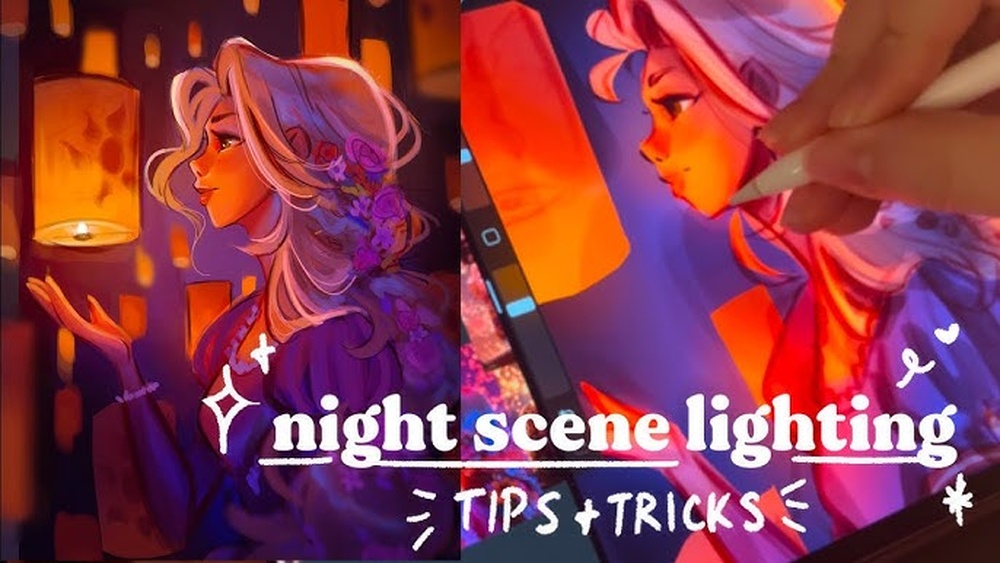
Quick answer: When working out how to paint digital night scenes, the key is to avoid black. Build the scene from dark, desaturated blues and violets, keep most of the image in a narrow low-value range, and let one or two light sources (the moon, a window, a streetlamp) carry the brightest values and warmest colors. Paint light with Add or Color Dodge layers at low opacity, keep edges soft in shadow and crisp near light, and check values in grayscale so the scene reads clearly without turning muddy.
Night is one of the most atmospheric things you can paint, and one of the easiest to get wrong. A first attempt often ends up as a black canvas with a few bright dots, or a daytime scene with a dark blue filter laid over it. Neither feels like night.
Convincing night scenes come from understanding how light behaves in darkness: how color drains away, how light sources glow and fall off, and how the eye adjusts to low light. These digital night scene tips work in any painting app with layers and blend modes, and they apply to moonlit landscapes, city streets, starry skies and lantern-lit interiors alike.
How Night Light Actually Works
A few facts about low light shape every decision in a night painting:
- Color perception drops. In dim light, human vision relies more on rod cells, which do not distinguish color well and are more sensitive to blue-green wavelengths. That is one reason night scenes are often painted in blues, even though moonlight is technically reflected sunlight.
- Contrast is concentrated. Most of the scene sits in deep shadow, while light sources and the surfaces right next to them are bright. The value range is lopsided rather than evenly spread.
- Light falls off quickly. A lamp’s light is strongest close to the source and fades fast with distance, so pools of light have clear boundaries.
- Artificial light is warm. Candles, fires, older streetlights and interior lamps lean orange or yellow. Against a cool blue night, that warm-cool contrast is what makes night scenes glow.
Painters treat these as conventions rather than strict physics. Viewers accept blue night scenes as natural because they match how night feels. The same conventions show up in traditional acrylic night canvases, which is why moonlit lakes and starry skies are staples of the step-by-step designs included in many at-home paint night kits. Learning them digitally first makes either medium easier.
Dusk, blue hour and deep night
“Night” covers a wide range of light, and picking the right moment shapes your palette:
- Dusk: the sky still holds warm color near the horizon, fading to blue overhead. Land is mostly silhouetted. Artificial lights are just turning on and look modest against the sky.
- Blue hour: the sky is a rich, even blue, still brighter than most of the land. Lit windows and streetlights start to stand out strongly. Many painters favor this moment because both sky and lights carry color.
- Deep night: the sky is dark, often only slightly lighter than the land. The moon, stars and artificial lights become the only real sources of value contrast.
Choosing one of these before you start prevents a common problem: a sky painted like blue hour over a landscape lit like midnight.
Setting Up a Night Scene
Start with a dark, not black, base
Fill the canvas with a dark, desaturated blue or blue-violet rather than black. Something around 10 to 20 percent brightness with low saturation is a good starting point. This gives you room to paint shadows darker and keeps the image from feeling dead.
Limit your palette
A night palette can be very small: two or three cool darks for the environment, one cool mid-tone for moonlit surfaces, and one or two warm colors for artificial light. Fewer colors make the scene feel cohesive and make the light sources stand out.
| Role | Example color direction | Where it goes |
|---|---|---|
| Deepest shadow | Very dark navy or blue-black violet | Under objects, deep foliage, far corners |
| Ambient night | Muted slate blue | Most surfaces not directly lit |
| Moonlit surfaces | Pale, desaturated blue-gray or teal | Tops of forms facing the moon |
| Warm light core | Pale yellow to near white | Bulbs, flames, lit windows |
| Warm light spill | Orange to amber | Surfaces near artificial light |
Use separate layers for light
Keep the environment on base layers and paint light effects on layers above. This lets you adjust glow strength and color without repainting the scene underneath.
Step-by-Step: Painting a Moonlit Scene
- Thumbnail in grayscale. Plan where the light sources sit and where the focal point is. Most of the thumbnail should be dark.
- Block shapes in dark values. Paint the sky, land, buildings or trees as flat shapes, separating them by small value differences. At night, objects are often defined by silhouette against a slightly lighter sky.
- Light the sky. The sky near the horizon is usually a little lighter than overhead, and a moonlit sky has a soft glow around the moon. Paint a gentle gradient, then add a soft halo around the moon with a large airbrush at low opacity.
- Add moonlight to forms. Pick the moon’s direction and paint a thin, cool light along the top and moon-facing edges of shapes. Keep it subtle. Moonlight is soft and fairly dim on most surfaces.
- Add artificial lights. Place warm light sources: windows, lanterns, campfires. Paint the source itself bright, then add a glow and the light spilling onto nearby surfaces.
- Refine edges. Sharpen edges near light, where detail is visible, and soften edges in darkness, where the eye cannot resolve detail.
- Atmosphere. Add haze, mist or light fog with a soft brush at low opacity, especially around light sources and near the horizon.
- Final color pass. Use a gradient map or color balance adjustment to unify shadows, and check values in grayscale.
Painting Light Sources That Glow
Glow is the signature effect of night painting. A light that just sits there as a bright dot looks flat; a glowing light seems to illuminate the air around it. Build glow in three parts:
- Core: a small, near-white or pale yellow center, painted on a Normal layer with a hard or slightly soft brush.
- Bloom: a soft, larger halo around the core in a saturated warm color, painted on an Add (Linear Dodge) or Screen layer at low to medium opacity.
- Spill: light landing on nearby surfaces, painted where it would physically hit: the ground below a lamp, the wall next to a window, the faces around a fire.
The most common mistake is making the bloom too big or too strong, which washes out the scene. A subtle halo usually looks more realistic. In misty or rainy scenes, increase the bloom, since moisture in the air scatters light more.
Blend modes for night lighting
| Mode | Effect | Use for |
|---|---|---|
| Add / Linear Dodge | Brightens strongly, can blow out | Light cores, intense glows, sparks |
| Screen | Gentle brightening | Soft halos, mist, moon glow |
| Color Dodge | Brightens and saturates | Warm rim light, vivid glows (use sparingly) |
| Overlay / Soft Light | Adds contrast and tint | Warm pools of light on surfaces |
| Multiply | Darkens | Deepening shadows, vignettes |
Different Kinds of Night Scenes
Starry skies
Stars look best with variety. Paint a scatter of tiny, dim dots with a small brush or a star scatter brush, then add a smaller number of brighter stars by hand. A few stars can get a slight glow. If you include the Milky Way, paint it as a soft, irregular band of light with darker dust lanes, and keep it subtle. Bright stars and a strong Milky Way generally appear only where there is little light pollution, so a starry sky above a brightly lit city can look contradictory.
City streets
Urban night scenes are full of light sources: streetlights, signs, car headlights, windows. Use wet pavement to double the effect: reflections stretch vertically below light sources. Vary the color of lights (warm sodium-style orange, cooler LED white, colored neon) to add interest, but keep one dominant temperature so the scene stays unified.
Campfire and lantern scenes
A single warm source in a dark environment creates dramatic contrast. Faces and objects near the fire are lit warmly from below or the side, with deep shadows on the far side. Add a cool rim light from the moon or sky on the opposite edge for separation.
Interiors at night
Indoors, lamps create warm pools of light with fast falloff, and windows show a dark blue outside. The contrast between a warm interior and a cool exterior is a reliable mood builder.
Common Night Painting Mistakes
Pure black shadows. Black kills atmosphere. Use dark blues, violets or deep teals instead.
Too much contrast everywhere. Night scenes need large areas of compressed dark values. If every object has bright highlights, it stops feeling like night.
Oversaturated night colors. Bright, saturated blues across the whole image look more like a cartoon than night. Keep the environment muted and save saturation for light sources.
Light without spill. A glowing window that does not light the ground or wall around it looks pasted on.
Huge glow effects. Oversized bloom washes out the image. Start small and increase only if needed.
Too much detail in shadows. The eye cannot see fine detail in darkness. Keep shadow areas simple and reserve texture for lit zones.
Value Checks and Readability
Dark scenes look different on different screens. A painting that reads well on your bright tablet may turn into a black rectangle on a dim phone. To keep your work readable:
- Add a gray layer set to Color or Saturation at the top of the stack to check values in grayscale.
- Check the darkest areas with the color picker; keep important shapes slightly above pure black.
- View the painting at reduced screen brightness to see whether the main shapes still read.
- Make sure the focal point has the strongest contrast in the image.
Digital Night Scenes vs. Traditional Paint Night Canvases
Night scenes are also one of the most popular subjects for traditional paint nights, from moonlit lakes to starry skies inspired by famous works. The same principles apply on canvas: start with dark blues instead of black, keep the light source warm and small, and build glow with soft blending. Many artists find that practicing digitally makes physical night paintings easier, because you can test palettes and compositions before committing paint. If you want to try a night scene with real acrylics at home, the guide to paint night kits for a home art session rounds up all-in-one sets with canvases, brushes and paint. For subject inspiration, the list of paint night ideas includes several night-sky and moonlit compositions that translate well to both formats.
Tips by Skill Level
Beginners
Start with silhouettes. Paint a simple gradient night sky, a large moon with a soft glow, and black-blue silhouettes of hills or trees. This teaches value control without the complexity of lighting forms.
Intermediate
Add one warm artificial light source to a cool moonlit scene. Practice light spill, falloff and the warm-cool contrast where the two light types meet.
Advanced
Tackle complex scenes with multiple light sources, reflections on wet surfaces, fog and characters. Study how different light colors mix where they overlap, and how atmosphere softens distant lights.
FAQs
What colors should I use for a digital night scene?
Use dark, desaturated blues, blue-violets and teals for the environment, a pale blue-gray for moonlit surfaces, and warm yellows and oranges for artificial lights. Avoid pure black for shadows.
How do you make light glow in digital art?
Paint a bright core on a Normal layer, add a soft saturated halo on an Add or Screen layer at low opacity, then paint the light spilling onto nearby surfaces. Keep the halo subtle to avoid washing out the image.
Why do my night paintings look muddy?
Muddy night scenes usually come from using black or gray for shadows, too many colors, or values that are all equally dark with no clear light source. Use a limited cool palette, one dominant light and a grayscale check.
How do I paint moonlight digitally?
Choose a moon direction, then add thin, cool, desaturated light along the moon-facing edges of forms. Moonlight is soft and fairly dim, so keep highlights restrained and shadows broad.
What blend mode is best for night lighting?
Add (Linear Dodge) works well for strong glows, Screen for softer halos and mist, and Overlay or Soft Light for warm pools of light on surfaces. Multiply helps deepen shadows.
How do I paint stars in a night sky?
Scatter many tiny dim dots, then hand-paint fewer bright stars, adding a slight glow to a handful. Vary size and brightness so the sky does not look like a uniform pattern.
Next Step
Once you can control darkness and glow digitally, try the same scene with real paint. Seeing how pigments handle dark blues and warm lights builds intuition that carries straight back to the screen. For a ready-to-go setup with everything included, browse our picks of the best paint night kits and turn your favorite digital night scene into a canvas.


One Comment