

PaintingProGuide is reader-supported. When you buy through links on this page we may earn an affiliate commission at no extra cost to you.
Most digital painters who improve quickly still keep a paper sketchbook nearby. Thumbnails, gesture drawings, value studies and quick color notes are faster on paper, cost nothing per undo, and train the eye without the distraction of a thousand brush presets. The best sketchbooks for digital painting practice are the ones you will actually fill: large enough for loose thumbnails, heavy enough to take marker or a wash, and cheap enough that you do not hesitate to make bad drawings in them.
This guide pairs three practical sketchbooks with four digital painting guidebooks that turn those paper studies into on-screen work. Paper builds the habit; the books give you a structured path inside Procreate and other apps.
Quick answer: For daily practice, the MOFUNY Mixed Media Sketchbook 9×12 gives you 60 sheets of 98 lb (160 gsm) paper in a ring binding, enough for thumbnails, ink and light washes. If you want a thinner, lighter pad to carry around, the Hapikalor 9×12 Mixed Media Sketchbook offers 30 perforated sheets of the same weight. To translate paper studies into iPad painting, pair either one with Drawing Digital by Lisa Bardot.
Our Top Picks at a Glance
- MOFUNY Mixed Media Sketchbook 9×12, 60 sheets — Best overall sketchbook for daily digital-art practice
- Hapikalor Mixed Media Sketchbook 9×12, 30 sheets — Best lightweight pad with tear-out pages
- Artistic Ground Sketch Book, 8.5 x 11 — Best budget book for high-volume gesture drawing
- Drawing Digital by Lisa Bardot — Best companion book for iPad drawing and painting
- Digital Painting for the Complete Beginner by Carlyn Beccia — Best foundation book for brand-new digital painters
- Beginner’s Guide to Digital Painting in Procreate (3dtotal) — Best project-based Procreate guide
- A Guide to Digital Painting in Procreate: Landscapes & Plein Air (3dtotal) — Best for landscape and outdoor studies
| Product | Best For | Key Spec | Key Strength | Price Tier |
|---|---|---|---|---|
| MOFUNY 9×12 Sketchbook | Daily practice | 60 sheets, 98 lb / 160 gsm, ring bound | Most pages per book | $ |
| Hapikalor 9×12 Sketchbook | Portable studies | 30 sheets, 98 lb / 160 gsm, spiral, perforated | Clean tear-out pages | $ |
| Artistic Ground Sketch Book | Gesture and volume drawing | 110 blank pages, 8.5 x 11 in | Lowest cost per page | $ |
| Drawing Digital (Bardot) | iPad workflow | Paperback guide | Bridges paper and iPad | $ |
| Digital Painting for the Complete Beginner | First steps | Paperback guide | Beginner-focused scope | $$ |
| Beginner’s Guide to Procreate (3dtotal) | Guided projects | Paperback guide | Procreate-specific | $$ |
| Procreate Landscapes & Plein Air (3dtotal) | Landscape painters | Paperback guide | Outdoor subject focus | $$ |
How We Chose
We did not draw in these books or work through the guides ourselves. Our picks are based on the Amazon listing details and specifications checked in October 2026, how well each product’s format, size and paper fit the way digital artists actually practice, and how widely each product is reviewed by Amazon buyers. For the guidebooks, the listings give titles, authors and formats rather than page-by-page descriptions, so we describe them by their stated scope only.
Criteria we weighed:
- Page size: 8.5 x 11 or 9 x 12 inches gives room for a grid of thumbnails or a single full study.
- Paper weight: around 98 lb (160 gsm) handles pencil, ink and marker with less show-through than thin copy paper.
- Binding: spiral or ring bindings lie flat next to a tablet and let you fold the cover back.
- Page count: practice is about volume, so more sheets per book means fewer interruptions.
- Relevance of guidebooks: titles that teach digital painting in the apps beginners actually use, especially Procreate on iPad.
Why Digital Painters Still Need a Sketchbook
A tablet removes friction from finishing, but it adds friction to thinking. Opening an app, picking a canvas size and choosing a brush takes longer than flipping a page. When the goal is fifty quick poses or twenty composition ideas, paper wins on speed. Many concept artists thumbnail on paper, then scan or photograph the strongest idea and paint over it digitally.
Paper also removes the undo button. That sounds like a drawback, yet it forces you to commit to a line and observe more carefully before making the mark. Those habits carry straight back into digital work, where confident strokes look cleaner than a pile of tiny corrections.
Finally, a sketchbook is a record. Flipping back through three months of value studies shows progress in a way that a folder of half-finished files rarely does.
Best Sketchbooks for Digital Painting Practice Reviewed
1. MOFUNY Mixed Media Sketchbook 9×12, 60 Sheets — Best for daily digital-art practice

MOFUNY packs 60 sheets of 98 lb (160 gsm) mixed media paper into a 9 x 12 inch, ring-bound book. For a digital painter, that size is a sweet spot: big enough to divide a page into six or eight thumbnails, small enough to sit beside a 13-inch tablet without crowding the desk. The listing names pencil, pen, charcoal, crayon and other dry and wet media, which covers everything you are likely to use for practice studies.
The ring binding matters more than it seems. It lets the book open flat, so you can photograph a page squarely for a paint-over, and it lets the cover fold all the way back when desk space is tight. The listing also describes the paper as recyclable.
Best suited for: Artists who want one book for thumbnails, value sketches in marker or graphite, and occasional ink or light wash studies.
Key features:
- 60 sheets per book
- 98 lb / 160 gsm mixed media paper
- 9 x 12 inch page
- Ring binding
- Listed for pencil, pen, charcoal and crayon
Pros:
- Highest sheet count among the mixed media picks
- Heavy enough for marker without much bleed
- Lies flat for scanning or photographing
- Large page for thumbnail grids
Cons and limitations:
- 160 gsm is not watercolor paper; heavy washes will buckle
- Bulkier to carry than a smaller pocket book
- Uncoated surface is not designed for alcohol-marker blending techniques that need bleed-proof stock
Buying consideration: If you plan to paint over scans, draw with a dark pen or soft pencil and keep lines decisive. Faint marks disappear when you photograph a page in ordinary room light.
2. Hapikalor Mixed Media Sketchbook 9×12, 30 Sheets — Best for lightweight pads with tear-out pages
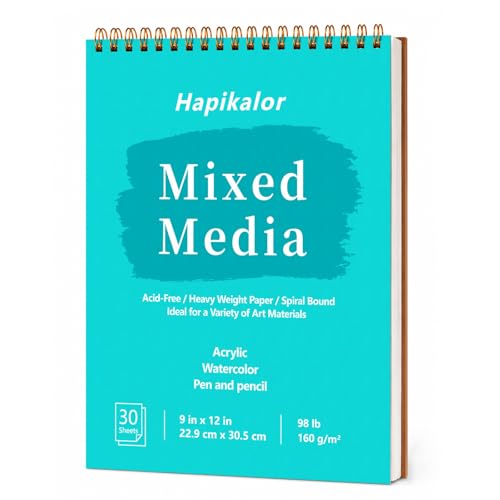
Hapikalor uses the same 98 lb (160 gsm) weight as MOFUNY but with half the sheets, so it is thinner and lighter. The pages are micro-perforated, which the listing highlights as a clean way to remove artwork without jagged edges. For digital painters that is handy when you want to tape a study to the wall beside your monitor as a reference.
The listing describes the paper as acid-free and fade-resistant, with a spiral binding that suits both left- and right-handed artists. A 30-sheet pad is a reasonable size for a single course, a monthly challenge, or a dedicated book for one project.
Best suited for: Artists who like to separate practice by project, carry a thinner book, or pin finished studies near their workstation.
Key features:
- 30 sheets per pad
- 98 lb / 160 gsm, acid-free
- 9 x 12 inch page
- Spiral binding
- Micro-perforated pages
Pros:
- Easy, clean page removal
- Light enough for a laptop bag
- Acid-free paper for keeping studies
- Same page size as most large sketchbooks
Cons and limitations:
- Fewer pages, so heavy users will replace it often
- Perforations can tempt you to tear out “bad” pages you could learn from
- Not intended for heavy water media
Buying consideration: Keep the weak drawings in the book. A practice sketchbook is most useful when you can see mistakes repeating and correct them.
3. Artistic Ground Sketch Book, 8.5 x 11, 110 Pages — Best for high-volume gesture drawing
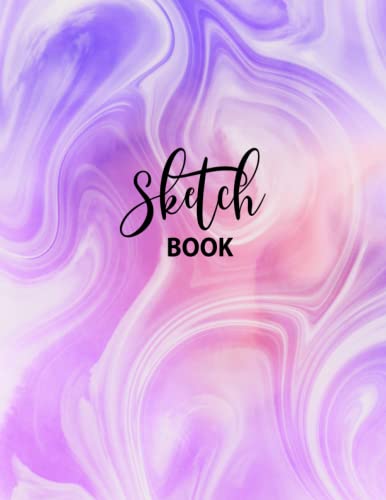
This is a paperback-style book with 110 blank white pages at 8.5 x 11 inches. The listing positions it for drawing, sketching, writing and doodling, and it sits in the lowest price tier of the group. Think of it as a volume book: timed gesture poses, daily figure warm-ups, and quick shape studies where paper quality matters less than page count.
Because the listing does not give a paper weight, treat it as a dry-media book. Graphite, ballpoint, colored pencil and fine liners are safe choices. Markers and wet media may show through.
Best suited for: Artists doing daily 30-second to two-minute gesture drills, or anyone who wants the cheapest possible way to fill pages.
Key features:
- 110 blank pages
- 8.5 x 11 inch page
- Paperback format
- Lowest price tier
Pros:
- Lowest cost per page
- Plenty of pages for warm-ups
- Letter size fits standard scanners
Cons and limitations:
- Paper weight not specified in the listing
- Paperback binding does not lie as flat as spiral
- Best limited to dry media
Buying consideration: Use this as a disposable warm-up book and keep a heavier sketchbook for studies you want to scan and paint over.
Guidebooks That Turn Paper Practice Into Digital Painting
A sketchbook builds observation; a structured guide shows how those skills map onto layers, brushes, blend modes and selection tools. The four books below appear in the Amazon listings we checked as paperbacks focused on digital drawing and painting. Their listings name the title, author and format, so the notes below stick to what each title states.
4. Drawing Digital by Lisa Bardot — Best for iPad drawing and painting

The full title describes it as a complete guide for learning to draw and paint on your iPad. That makes it a natural partner for a paper sketchbook: you can work out an idea in pencil, photograph it, then follow the book to build the digital version on an iPad.
It sits in the lowest price tier among the books here, which makes it an easy addition to a practice kit.
Best suited for: iPad owners who want one approachable book covering both drawing and painting on the device.
Key features:
- Paperback
- Focus stated in title: drawing and painting on iPad
- Author: Lisa Bardot
Pros:
- Clear iPad focus
- Covers drawing and painting together
- Low price tier
Cons and limitations:
- iPad-centered, so less useful for desktop pen-tablet users
- Listing gives no page-level contents to preview here
Buying consideration: If you paint on a Windows or Android device, check the preview on Amazon to confirm how app-specific the lessons are before buying.
5. Digital Painting for the Complete Beginner by Carlyn Beccia — Best for brand-new digital painters

As the title says, this book is written for complete beginners. It is the pick for someone who has a tablet but feels lost about where to start, before narrowing into a particular app or subject.
Use it alongside a sketchbook by drawing each new concept on paper first, then repeating it on screen. That two-step loop makes the ideas stick.
Best suited for: First-time digital painters who want fundamentals before app-specific tricks.
Key features:
- Paperback
- Beginner-focused scope
- Author: Carlyn Beccia
Pros:
- Pitched at true beginners
- Not tied to one app in its title
- Mid price tier
Cons and limitations:
- Experienced artists may find it too introductory
- Listing does not detail which software is shown
Buying consideration: Pair it with a cheap high-page-count sketchbook so you can repeat each lesson several times on paper.
6. Beginner’s Guide to Digital Painting in Procreate (3dtotal Publishing) — Best for project-based Procreate learning

Edited by 3dtotal Publishing, this guide focuses specifically on creating art in Procreate on an iPad. If Procreate is already your app of choice, a Procreate-specific book removes the translation step of mapping generic advice onto unfamiliar menus.
Use your sketchbook to plan each project before opening the app: rough composition, light direction and a simple value sketch.
Best suited for: Procreate users who learn best from guided projects.
Key features:
- Paperback
- Procreate on iPad focus
- Publisher: 3dtotal Publishing
Pros:
- Software-specific instruction
- Beginner level
- Mid price tier
Cons and limitations:
- Limited value outside Procreate
- App interfaces change over time, so some screenshots may differ from current versions
Buying consideration: Check which Procreate version your iPad runs and compare it with the preview pages to see how closely the menus match.
7. A Guide to Digital Painting in Procreate: Landscapes & Plein Air (3dtotal) — Best for landscape and outdoor studies

This second 3dtotal title narrows the focus to landscapes and plein air painting in Procreate. Landscape painting rewards sketchbook practice especially well, since quick value thumbnails of skies, trees and terrain teach you to simplify before you ever pick a brush.
It is a good next step once the basics feel comfortable and you want a subject to commit to.
Best suited for: Landscape painters and anyone who wants to paint outdoors on an iPad.
Key features:
- Paperback
- Landscape and plein air focus
- Procreate on iPad
Pros:
- Subject-specific depth
- Encourages outdoor observation
- Complements value-study sketchbooks
Cons and limitations:
- Narrow subject range
- Procreate-only workflow
- Upper end of the mid price tier
Buying consideration: Bring the Hapikalor pad on outdoor trips for quick graphite notes, then finish the painting in Procreate at home.
Buying Guide: How to Choose a Sketchbook for Digital Painting Practice
Match page size to your practice style
Letter (8.5 x 11) and 9 x 12 inch books are the most flexible sizes. They fit several thumbnails per page and scan well on a flatbed or phone camera. Smaller A5 books travel better but cramp composition studies. If most of your practice is thumbnails, go bigger; if it is portraits or hand studies, a smaller book is fine.
Pick paper weight by medium
Graphite and colored pencil work on almost anything. Markers, brush pens and ink need around 98 lb (160 gsm) or more to avoid ghosting through to the next page. Gouache and watercolor need dedicated watercolor paper, usually 140 lb (300 gsm) or more. Mixed media books like MOFUNY and Hapikalor cover the middle ground.
Choose a binding that lies flat
Spiral and ring bindings open fully, which helps when you photograph pages for paint-overs and when the book shares a desk with a tablet. Paperback and glue-bound books are cheaper but curl at the spine.
Think in cost per page
Practice is a numbers game. A book you are afraid to “waste” will stay empty. Keep one cheap high-page-count book for warm-ups and one better book for studies you plan to reuse.
Plan how pages get into the computer
If you intend to paint over sketches, draw with darker lines and leave margins. A phone scanning app or flatbed scanner works best with flat pages and even contrast. Perforated sheets make flatbed scanning easier.
Choose guidebooks for your actual software
Procreate-specific books are excellent for iPad users but less useful in Photoshop, Krita or Clip Studio Paint. A general beginner book covers principles that transfer anywhere. Read the preview pages to confirm the app and version shown.
A Simple Weekly Practice Routine Using Paper and Tablet
The point of a practice sketchbook is consistency. A routine that alternates paper and screen keeps both skills moving forward:
- Warm-up (paper, 10 minutes): timed gesture drawings or simple shapes in the budget book.
- Value thumbnails (paper, 15 minutes): four to six small rectangles with three values only: light, mid and dark.
- Pick one thumbnail: photograph or scan it and import it into your painting app as a locked bottom layer.
- Block in (digital, 20 minutes): paint large shapes on a new layer using the same three values.
- Add color and detail (digital): follow a lesson from your guidebook for the color or rendering stage.
- Review (paper): write one note in the margin about what worked and what to try next time.
For specific subjects, these tutorials show how studies become finished digital pieces: try painting digital waves and ocean scenes to practice value and edge control, or read about doing digital painting without a tablet if you are still deciding on hardware and want to start with a sketchbook and mouse.
Common Mistakes to Avoid
- Buying a precious sketchbook: expensive paper makes people hesitate. Practice books should feel disposable.
- Using thin paper with markers: bleed-through ruins the next page; choose 160 gsm or heavier for wet or marker work.
- Drawing too faintly to scan: light pencil vanishes in a photo. Darken final lines before importing.
- Skipping thumbnails: jumping straight into a full digital canvas often leads to weak compositions that no amount of rendering can fix.
- Collecting guidebooks without doing the exercises: one book worked through completely beats four skimmed.
- Tearing out every weak page: those pages show patterns in your mistakes, which is exactly what practice is for.
FAQs
Do digital artists really need a paper sketchbook?
Not strictly, but most benefit from one. Paper is faster for thumbnails and gesture drawing, has no learning curve, and builds commitment to each line. Many artists plan on paper and finish digitally.
What paper weight is best for a practice sketchbook?
For pencil-only practice, almost any weight works. For markers, brush pens or ink, look for about 98 lb (160 gsm) mixed media paper, like the MOFUNY and Hapikalor books, to limit bleed-through.
What size sketchbook should I use for thumbnails?
A 9 x 12 or 8.5 x 11 inch page fits six to eight thumbnails comfortably. Smaller books are fine for single studies but crowd composition practice.
How do I move sketches from paper into Procreate or Photoshop?
Photograph the page squarely in even light or use a scanning app, then import the image, set the layer to Multiply, lower its opacity and paint on new layers above it.
Which book should a beginner start with?
If you are on an iPad, Drawing Digital by Lisa Bardot or the 3dtotal Beginner’s Guide to Digital Painting in Procreate are logical starts. If you have not chosen an app yet, Digital Painting for the Complete Beginner is a broader introduction.
Can I use mixed media sketchbooks for gouache studies?
Light, thin layers are possible on 160 gsm paper, but heavy water will cause buckling. For regular gouache or watercolor studies, choose a dedicated watercolor sketchbook.
Final Recommendation
For most digital artists building a practice habit, the MOFUNY 9×12 Mixed Media Sketchbook is the most useful single book: plenty of pages, a weight that handles marker, and a binding that lies flat for scanning. Choose the Hapikalor 30-sheet pad if you want a lighter book or prefer clean tear-out pages, and add the Artistic Ground book as a cheap warm-up journal.
On the learning side, iPad painters should start with Drawing Digital or the 3dtotal Beginner’s Guide to Procreate, while undecided beginners get a broader footing from Digital Painting for the Complete Beginner. Landscape lovers can move on to the Procreate Landscapes & Plein Air guide once the basics feel comfortable. Whatever you choose, the sketchbook only works if it gets filled, so keep it open on the desk next to your tablet.


2 Comments