
PaintingProGuide is reader-supported. When you buy through links on this page we may earn an affiliate commission at no extra cost to you.
A wireless stylus gives you finer control than a finger on a tablet or phone, without cables or Bluetooth pairing. For iPad owners, the best budget options are active styluses that mimic Apple Pencil features such as palm rejection, tilt shading and magnetic attachment, at a fraction of the cost. For Android phones and mixed devices, universal active styluses and simple passive styluses work on almost any touchscreen.
One fact shapes every recommendation here: third-party iPad styluses generally do not offer true pressure sensitivity. Line weight changes with tilt, not with how hard you press. That is fine for note-taking, sketching and much digital art, but if pressure-sensitive painting is your main goal, an Apple Pencil remains the benchmark. With that in mind, here are the best wireless stylus options currently sold on Amazon.com.
Quick answer: For iPad, the Xpencifan Stylus Pen is the best wireless stylus value: magnetic wireless charging on supported iPads plus USB-C, tilt sensitivity, palm rejection and three spare tips. The Metapen A8 is a well-established alternative with fast USB-C charging and double magnets. For Android or mixed devices, the DRYMOKINI Universal Stylus works on iOS and Android touchscreens with a 1.5 mm tip.
Our Top Picks at a Glance
- Xpencifan Stylus Pen for iPad — Best overall wireless stylus for iPad
- Metapen A8 Stylus Pen for iPad — Best established budget iPad stylus
- Hastraith Stylus Pen for iPad — Best bundle with spare tips and cover
- DIGIROOT iPad Pencil — Best low-cost iPad stylus with LED battery display
- DRYMOKINI Universal Stylus Pen — Best for Android and iPhone
- ChaoQ 3-Pack Passive Stylus Pens — Best no-charging stylus for kids and casual use
| Product | Best For | Key Spec | Key Strength | Price Tier |
|---|---|---|---|---|
| Xpencifan Stylus Pen | iPad drawing and notes | Wireless + USB-C charging, 3 × 1.0 mm tips | Tilt, palm rejection, magnetic | $$ |
| Metapen A8 | iPad everyday use | 30-min USB-C charge, up to 10 h | Double magnets, durable tips | $$ |
| Hastraith Stylus Pen | iPad with accessories | 13-min charge, 10+ h, 3 nibs | Silicone cover and dust cap | $ |
| DIGIROOT iPad Pencil | Budget iPad stylus | 13-min charge, up to 9 h, 1.5 mm tip | LED battery indicators | $ |
| DRYMOKINI Universal Stylus | Android and iPhone | 1.5 mm tip, 20 h use per charge | Works across iOS and Android | $$ |
| ChaoQ 3-Pack Passive | Kids, casual use | Rubber tips 5 mm and 6.6 mm | No charging, any touchscreen | $ |
How We Chose
We did not draw with these styluses for this guide. Picks are based on the Amazon listing details and specifications checked in October 2026, how well each stylus’s compatibility, tip size, charging and drawing features suit digital art and note-taking, and how widely each product is reviewed by Amazon buyers.
- Compatibility: exact iPad models or universal touchscreen support.
- Drawing features: palm rejection, tilt shading and tip precision.
- Charging and battery life: charge time, runtime and auto sleep.
- Connection: no Bluetooth pairing needed for most budget styluses.
- Tips and accessories: spare nibs, covers and magnetic attachment.
Best Wireless Stylus Picks Reviewed
1. Xpencifan Stylus Pen for iPad 2018–2026 with Wireless Charging — Best for iPad drawing and notes

Xpencifan’s stylus is one of the few budget iPad styluses that offers wireless magnetic charging on iPads that support second-generation pencil features, plus direct USB-C charging. The listing claims a full charge in about 15 minutes and up to 12 hours of continuous use.
Drawing features include tilt sensitivity for shading and varied line thickness, palm rejection so you can rest your hand on the screen, and magnetic attachment. It ships with three replaceable 1.0 mm tips. Compatibility covers 2018–2026 iPad models including iPad, iPad Air, iPad mini and iPad Pro generations listed by the seller.
Best suited for: iPad users who want an Apple Pencil-style experience for sketching, note-taking and casual digital art on a budget.
Key features:
- Wireless magnetic charging on supported iPads, plus USB-C
- About 15-minute full charge, up to 12 hours use
- Tilt sensitivity and palm rejection
- Three replaceable 1.0 mm tips
- Aluminum body, 2.11 oz
Pros:
- Wireless charging is rare at this price tier
- Fine 1.0 mm tip for precision
- Spare tips included
Cons and limitations:
- No true pressure sensitivity
- Wireless charging only on compatible iPads
Buying consideration: Check your exact iPad model against the seller’s compatibility list before buying; budget styluses do not work with every iPad generation.
2. Metapen A8 Stylus Pen for iPad 2018–2026 — Best for everyday iPad use

Metapen is one of the better-known budget iPad stylus brands, and the A8 is its mainstream model. The listing claims a full USB-C charge in 30 minutes for up to 10 hours of use, with quick top-ups: one minute of charge for about 50 minutes of use. An LED indicator shows battery level by color.
It has an aluminum barrel, palm rejection and two built-in magnets for attaching to the iPad. There is no Bluetooth pairing; double-tap the end to power on and off. The listing says its polymer tips passed a 20 km durability test and includes one spare nib.
Best suited for: students and iPad owners who want a dependable budget stylus for notes and sketching.
Key features:
- USB-C charging, 30 minutes to full
- Up to 10 hours use
- Palm rejection
- Double magnets
- Spare durable nib
Pros:
- Established budget brand
- Fast top-up charging
- No pairing required
Cons and limitations:
- No pressure sensitivity
- No wireless charging
Buying consideration: Metapen’s listing stresses compatibility with 2018–2026 iPads only; older iPads will not work.
3. Hastraith Stylus Pen for iPad 2018–2026 — Best for a bundle with accessories

Hastraith’s stylus comes with the most accessories in this group: three replacement nibs, a dust cover, a silicone protective cover and a USB-C cable, according to the listing. It claims a full charge in 13 minutes and more than 10 hours of continuous use.
It offers tilt-based line thickness, full-screen palm rejection, no Bluetooth connection (touch the cap button to turn on), and three battery indicator lights. The listing mentions a 12-month manufacturer’s warranty.
Best suited for: iPad users who want spare nibs and a grip cover out of the box.
Key features:
- 13-minute charge, 10+ hours use
- Tilt and palm rejection
- 3 nibs, dust cover, silicone cover
- Battery indicator lights
- 12-month warranty per listing
Pros:
- Accessory-rich bundle
- Grip cover improves comfort
- Low price tier
Cons and limitations:
- Plastic body
- No pressure sensitivity
Buying consideration: A silicone cover makes thin styluses more comfortable for long drawing sessions.
4. DIGIROOT iPad Pencil for 2018–2026 — Best for a low-cost iPad stylus

DIGIROOT’s pencil covers the essentials at the lowest price tier for an active iPad stylus. The listing claims a full USB-C charge in 13 minutes with up to 9 hours of use, and auto shutdown after 10 minutes of inactivity.
It features palm rejection, a strong built-in magnet, tilt sensitivity and a 1.5 mm responsive tip, with three LED indicators for battery level. The listing says it is compatible with iPad models released in 2018–2025.
Best suited for: budget-conscious students and casual sketchers on recent iPads.
Key features:
- 13-minute charge, up to 9 hours use
- Palm rejection and tilt
- 1.5 mm tip
- 3 LED battery indicators
- Auto shutdown
Pros:
- Very affordable
- Clear battery display
- Strong magnet
Cons and limitations:
- Slightly thicker 1.5 mm tip
- No pressure sensitivity
Buying consideration: The listing’s compatibility range ends at 2025 models in one place; confirm support for your iPad before ordering.
5. DRYMOKINI Stylus Pen for Touchscreen, Android and iOS, 1.5 mm — Best for Android and iPhone

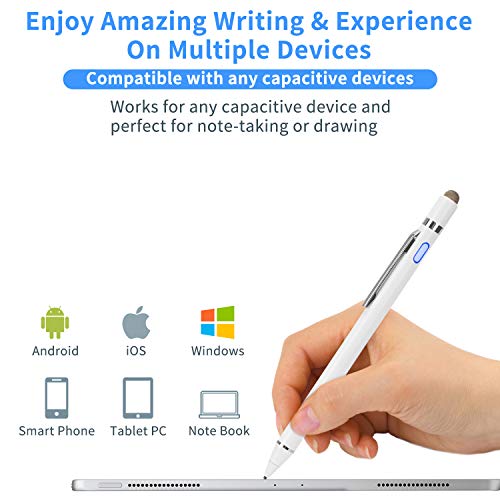
Most budget iPad styluses only work on iPads. DRYMOKINI’s universal active stylus is designed for iOS and Android phones and tablets, including iPhones, which cannot use Apple Pencil. The listing describes a 1.5 mm nib, tilt sensitivity and no apps to install; tap the cap to start.
Battery life is listed at 20 hours after about one hour of charging, with auto sleep after five minutes of inactivity. It includes a replacement nib and a Type-C cable.
Best suited for: Android tablet and phone users, iPhone users, and households with mixed devices.
Key features:
- Works on iOS and Android touchscreens
- 1.5 mm nib
- About 20 hours use per charge
- Auto sleep after 5 minutes
- Spare nib and USB-C cable
Pros:
- Cross-platform
- Long battery life
- No pairing
Cons and limitations:
- Universal styluses usually lack palm rejection
- No pressure sensitivity
Buying consideration: Use a drawing glove with universal styluses, since your palm may register as a touch without palm rejection.
6. ChaoQ Stylus Pens for Touchscreen, 3 Pack — Best for kids and casual use

Passive styluses need no charging, pairing or batteries; they work on any capacitive touchscreen the same way a fingertip does. ChaoQ’s pack includes three lightweight aluminum styluses with dual rubber tips (5 mm and 6.6 mm) and six replaceable tips, according to the listing.
Rubber tips are less precise than active fine tips, but they are durable, cheap and perfect for kids, games and casual sketching.
Best suited for: kids, shared family tablets, casual doodling and backup styluses.
Key features:
- Three styluses
- Dual rubber tips 5 mm and 6.6 mm
- No charging or Bluetooth
- Works on any capacitive touchscreen
- Six replacement tips
Pros:
- Never needs charging
- Universal compatibility
- Lowest price tier
Cons and limitations:
- Wide tips reduce precision
- No palm rejection or tilt
Buying consideration: Great as a kids’ stylus; adults who draw seriously will prefer an active fine-tip stylus.
Active vs Passive vs Apple Pencil
| Type | Charging | Precision | Palm Rejection | Pressure | Works On |
|---|---|---|---|---|---|
| Passive rubber tip | None | Low | No | No | Any capacitive screen |
| Universal active | Rechargeable | Medium to high | Usually no | No | Most iOS and Android devices |
| iPad-specific active | Rechargeable | High | Yes | No (tilt only) | Listed iPad models |
| Apple Pencil | Rechargeable | Very high | Yes | Yes | Compatible iPads |
If you draw seriously in Procreate or similar apps and rely on pressure for line weight and brush opacity, budget styluses are a compromise. For handwriting, sketching, annotation and most casual art, they offer excellent value.
Buying Guide: How to Choose a Wireless Stylus
Confirm device compatibility
iPad-specific styluses work only with listed iPad models, typically 2018 and newer. Universal active styluses work across iOS and Android. Passive styluses work on any capacitive screen.
Decide if you need palm rejection
Palm rejection lets you rest your hand on the screen while drawing, which is essential for comfortable art and writing. iPad-specific styluses usually offer it; universal styluses usually do not.
Understand tilt vs pressure
Tilt changes line width when you angle the stylus. Pressure changes width and opacity as you press harder. Budget styluses offer tilt; true pressure needs Apple Pencil or a dedicated pen tablet.
Check tip size
Fine tips around 1.0 to 1.5 mm give precision. Rubber tips around 5 mm are durable but less precise.
Look at battery and charging
Fast USB-C charging and auto sleep are convenient. Wireless magnetic charging is a bonus on compatible iPads.
Consider accessories
Spare nibs extend life, silicone covers improve grip, and a matte screen protector adds paper-like texture.
Which Stylus for Which Task
Handwritten notes and annotation: an iPad-specific active stylus with palm rejection, such as the Metapen A8 or DIGIROOT, is ideal. Tilt does not matter much, but a fine tip and palm rejection make writing feel natural.
Sketching and line art: choose a fine-tip iPad stylus like the Xpencifan and pair it with a drawing app that has stroke smoothing and tapered brushes. Tilt helps with shading.
Painterly digital art: budget styluses can work if you rely on opacity sliders and layered strokes rather than pressure. For pressure-driven painting, an Apple Pencil is worth the extra cost.
Phone drawing: iPhones and most Android phones need a universal active stylus or a passive stylus. A fine-tip universal stylus is far more precise than a rubber tip.
Kids and shared devices: passive rubber styluses are cheap, durable and never need charging, which makes them perfect for children.
Screen Protectors and Drawing Feel
Glass screens are slippery under a hard stylus tip. A matte, paper-textured screen protector adds friction that many artists prefer, improving control for lines and lettering. The trade-offs are slightly reduced clarity and faster tip wear. If you draw often, replace tips as they wear and consider keeping a spare pack. If you mostly watch video and occasionally sketch, a clear protector keeps the display crisp.
Getting Better Results From a Budget Stylus
Turn on stroke smoothing in your drawing app, since tilt-only styluses rely on smoothing and tapering to create expressive lines. Use brushes with built-in taper. Replace worn tips promptly so they do not scratch the screen. Charge the stylus before long sessions, keep it attached magnetically or in a case so it is not lost, and wipe the tip occasionally to remove grit that could mark the display. In apps that let you set a minimum and maximum brush size, narrowing the range can make tilt-based line variation feel more controlled. And if you are still exploring digital art without a pen, our guide to digital painting without a tablet covers what you can achieve with touch alone. When you are ready to paint, try a project like painting digital waves and ocean or painting digital night scenes.
Common Mistakes to Avoid
- Buying an iPad stylus without checking your exact model.
- Expecting pressure sensitivity from tilt-only styluses.
- Using a universal stylus without a glove and getting stray palm marks.
- Leaving Bluetooth-free styluses on, draining the battery (use auto sleep or the power switch).
- Ignoring worn tips, which reduce accuracy and can scratch screens.
- Using a passive rubber stylus for detailed drawing.
FAQs
What is the best wireless stylus for iPad?
For value, the Xpencifan stylus offers wireless charging on supported iPads, tilt and palm rejection. The Metapen A8 is a well-established alternative.
Do budget iPad styluses have pressure sensitivity?
Generally no. They offer tilt sensitivity and palm rejection. True pressure sensitivity requires an Apple Pencil on compatible iPads.
Do wireless styluses need Bluetooth?
Most budget styluses do not pair via Bluetooth. You turn them on with a tap or button and they work immediately.
What stylus works on Android and iPhone?
A universal active stylus like the DRYMOKINI, or a passive rubber-tip stylus like the ChaoQ, works on most iOS and Android touchscreens.
Can I use a stylus on an iPhone for drawing?
Yes. Apple Pencil does not work with iPhones, but universal active and passive styluses do.
How long do stylus tips last?
It depends on use and screen texture. Replace tips when they flatten, wobble or feel scratchy. Matte screen protectors wear tips faster.
Final Recommendation
For iPad owners, the Xpencifan stylus is the best wireless stylus value thanks to its wireless charging, fine tip and spare nibs, with the Metapen A8, Hastraith and DIGIROOT as solid alternatives. For Android and iPhone, choose the DRYMOKINI universal stylus, and for kids or casual use, the no-charge ChaoQ 3-pack. If pressure-sensitive digital painting is your priority, budget for an Apple Pencil or a dedicated pen tablet instead.


One Comment