Choosing the right digital art software can feel overwhelming, especially when you want tools that truly match your creative style and needs. If you’re torn between Clip Studio Paint and Procreate, you’re not alone.
Both are powerful, but they serve artists in different ways. What if you could quickly discover which one fits your workflow better? In this comparison, you’ll get clear insights on features, ease of use, and value—helping you make a confident choice that boosts your creativity.
Ready to find out which software will elevate your art? Let’s dive in.
Software Features
Software features define how an art program fits your creative needs. Both Clip Studio Paint and Procreate offer strong tools but differ in key areas. Understanding these features helps you choose the best software for your art style and projects.
Brush Variety And Customization
Clip Studio Paint offers hundreds of brush types with deep customization options. You can change shape, texture, and pressure settings easily. Procreate has a rich brush library too, but it focuses on simplicity. Custom brushes in Procreate are easy to create, but less complex than Clip Studio’s.
Layer Management
Clip Studio Paint supports unlimited layers with group and mask options. It also has advanced blending modes and layer effects. Procreate allows up to 250 layers, depending on canvas size. Its layer system is straightforward but lacks some advanced features found in Clip Studio.
Vector And Raster Support
Clip Studio Paint combines vector and raster tools well. Vector lines remain sharp at any zoom, ideal for comics and line art. Procreate works mainly with raster graphics, which can lose quality when scaled. Artists needing crisp lines prefer Clip Studio for this reason.
Animation Tools
Clip Studio Paint includes robust animation features like frame-by-frame drawing and onion skinning. It supports audio tracks and timeline editing. Procreate added animation support but it is more basic. It suits short animations but lacks advanced controls.
Comic Creation Features
Clip Studio Paint excels in comic creation. It offers panel layouts, speech balloons, and perspective rulers. These tools save time and improve workflow for comic artists. Procreate does not have dedicated comic tools but can be used with workarounds.
User Interface
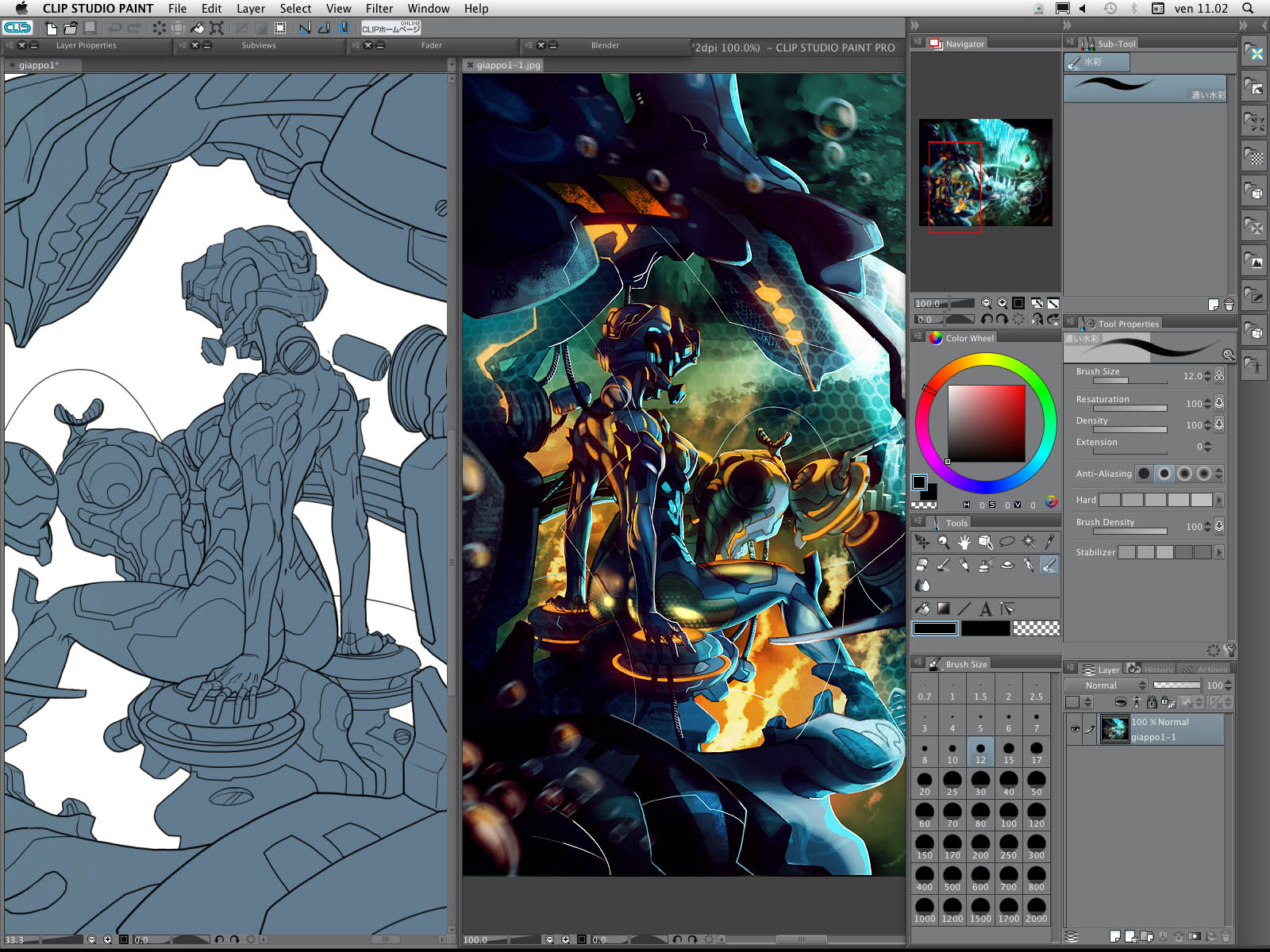
The user interface plays a vital role in digital art software. It shapes how artists interact with tools and create art. Both Clip Studio Paint and Procreate offer unique interfaces suited for different users. Understanding their interface features helps choose the right app for your needs.
Ease Of Use
Procreate has a simple and clean interface. Its layout is straightforward and easy to learn. Tools are easy to find, which suits beginners well. Clip Studio Paint has more features, making it feel complex. It may take time to learn all options. Professionals often prefer its detailed interface for advanced work.
Customization Options
Clip Studio Paint allows deep customization. Artists can change toolbars, shortcuts, and workspace layouts. This flexibility helps users work faster and more efficiently. Procreate offers fewer customization choices but keeps the interface minimal. It focuses on quick access to essential tools and a clutter-free workspace.
Touch And Stylus Support
Procreate is designed specifically for iPad and Apple Pencil. It supports touch gestures and pressure sensitivity smoothly. Clip Studio Paint works on many devices and supports various styluses. It offers advanced pen pressure controls and tilt recognition. Both apps provide excellent stylus support but cater to different platforms.
Performance And Compatibility
Performance and compatibility are key factors for digital artists choosing between Clip Studio Paint and Procreate. Both programs offer strong features but differ in how they run and the devices they support. Understanding these differences helps artists pick the right tool for their workflow and hardware.
Device Support
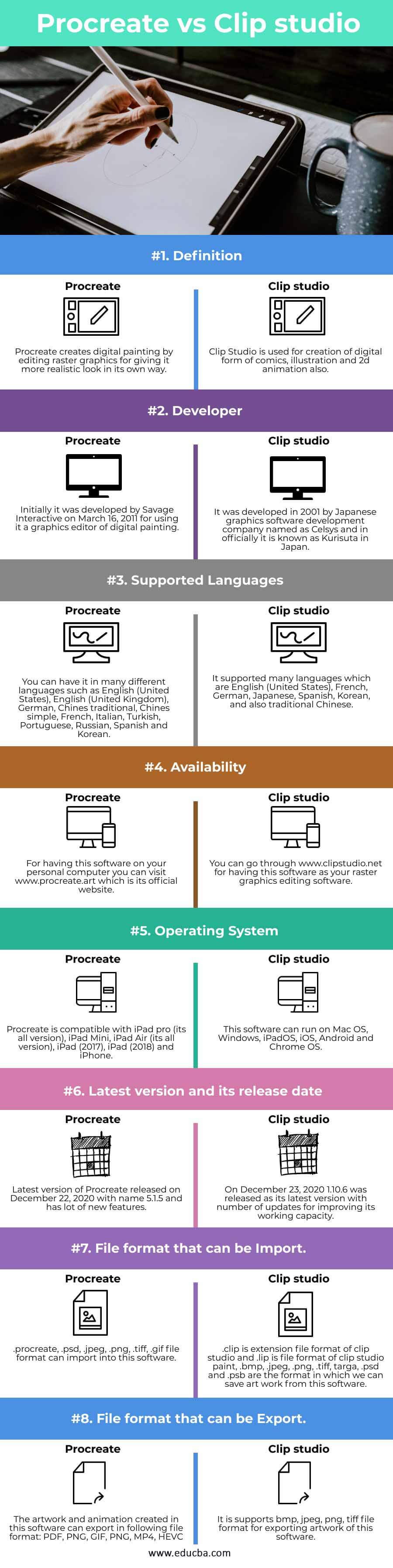
Procreate works exclusively on iPads. It uses the Apple Pencil for precise drawing. This limits users to Apple hardware only. Clip Studio Paint supports Windows, macOS, and iPad. It also works on some Android tablets. This wider range suits artists with different devices.
System Requirements
Procreate runs smoothly on recent iPad models. It requires iPadOS 14.4 or later. Clip Studio Paint needs more powerful computers for full features. On Windows and macOS, it demands at least 8GB RAM and a dedicated graphics card. The iPad version is less demanding but still needs iPadOS 13 or higher.
File Export Options
Procreate exports files in PSD, PNG, JPEG, and TIFF formats. It supports layered PSD files for Photoshop users. Clip Studio Paint offers more export types, including PSD, BMP, TIFF, and PDF. It also exports animation files like GIF and MP4. This makes Clip Studio Paint more versatile for different projects.

Credit: www.youtube.com
Pricing And Licensing
Understanding the pricing and licensing of Clip Studio Paint and Procreate helps you choose the best digital art tool. Both apps offer great features but differ in payment methods and platform availability. Knowing these differences can save money and match your needs.
One-time Purchase Vs Subscription
Clip Studio Paint offers a one-time purchase option for Windows and macOS users. Pay once and use the software forever with no extra fees. Procreate requires a one-time purchase only on the iPad. No subscription needed for either app, but Clip Studio Paint also has a subscription option with extra features.
Platform-specific Costs
Procreate is exclusive to iPad, so cost depends on your device choice. Clip Studio Paint works on Windows, macOS, iPad, and Android, but prices differ by platform. The desktop version is a one-time fee, while mobile versions may need subscriptions or separate purchases. Consider your device before deciding.
Free Trials And Updates
Clip Studio Paint offers a free trial period for new users to test its features. Updates are free for the one-time purchase version. Procreate does not have a free trial but provides free updates after purchase. Both apps keep improving with regular updates to enhance user experience.
Learning Curve
Understanding the learning curve is key when choosing digital art software. Both Clip Studio Paint and Procreate offer powerful tools but differ in how easy they are to learn. The learning process affects how fast artists can start creating with confidence. This section breaks down the learning curve into beginner friendliness, available tutorials, and community support.
Beginner Friendliness
Procreate has a simple, clean interface that new users find inviting. It focuses on essential tools, making it easier to start drawing quickly. Clip Studio Paint has more features and tools, which can overwhelm beginners. Its complexity suits users who want advanced options but requires more time to learn. Beginners may need patience with Clip Studio Paint before feeling comfortable.
Available Tutorials And Resources
Procreate offers many beginner tutorials that are easy to follow. These tutorials cover basic tools and common techniques. Clip Studio Paint has a larger library of tutorials, including detailed guides for comics and animation. Many tutorials come from official sources and user communities. Both programs have video lessons, written guides, and sample projects to help users learn step-by-step.
Community Support
Both Procreate and Clip Studio Paint have strong, active communities. Procreate users share tips and artwork on social media and forums. Clip Studio Paint’s community includes professional artists who offer advice and feedback. Forums and groups for both programs provide answers to questions and troubleshooting help. Community support makes learning easier by connecting users with shared experiences.
Credit: www.differencebetween.net
Professional Use
Professional artists demand software that meets high standards. Clip Studio Paint and Procreate both serve creative professionals, but they differ in features and usability. Understanding their strengths helps artists choose the right tool for their work.
Each app fits certain professional needs better. This section compares them in key areas for professional use.
Industry Adoption
Clip Studio Paint has strong adoption in comic and manga industries. Many professional illustrators and animators rely on it. Its tools suit detailed line work and frame-by-frame animation.
Procreate is popular among digital painters and concept artists. It is widely used for quick sketches and detailed paintings on iPads. The app fits artists who prefer a touch-based, portable workflow.
Suitability For Different Art Styles
Clip Studio Paint excels in comic art and detailed illustrations. Its brush engine mimics traditional media closely. The software supports multi-page projects and 3D models, helping complex creations.
Procreate suits painters and illustrators who focus on rich textures and colors. Its simple interface makes it easy to create expressive artwork. Artists enjoy its smooth blending and layering features.
Collaboration Features
Clip Studio Paint offers cloud syncing and team project sharing. These tools enhance teamwork on comics and animations. Professionals can share files and feedback efficiently within the app.
Procreate has limited collaboration tools. It supports exporting files in various formats for sharing. Artists often use other apps or cloud services to collaborate on projects.
Mobile And Tablet Experience
Choosing the right app for digital art on mobile and tablets depends on how well it fits your device and style. Both Clip Studio Paint and Procreate offer strong mobile experiences. Their features shape how you draw and create on the go. Below, we explore their strengths in iPad integration, touch controls, and portability to help you decide.
Ipad Integration
Procreate is built exclusively for iPad, making integration seamless. It uses the full power of iPadOS for smooth performance. Apple Pencil support is deep, offering pressure and tilt sensitivity. Clip Studio Paint also works on iPad but is a port from desktop. It supports Apple Pencil well but can feel heavier on system resources. Procreate updates often optimize for iPad features faster. Clip Studio Paint shines with advanced tools but may need more device power.
Touch Controls
Procreate’s touch controls are simple and intuitive. Gestures like pinch to zoom and two-finger tap for undo feel natural. The interface stays clean, focusing on drawing without clutter. Clip Studio Paint offers customizable gestures, which suit users wanting control. Its touch controls can be complex due to many features. Both apps handle touch well, but Procreate’s ease suits beginners. Clip Studio Paint appeals to users who want detailed control over their workflow.
Portability And Workflow
Procreate excels in portability with a lightweight design. It loads quickly and lets you start drawing immediately. File management is straightforward, syncing with iCloud for easy access. Clip Studio Paint offers a robust workflow with layers and animation tools. It supports cloud syncing but may require more setup. Procreate fits quick sketching and casual work. Clip Studio Paint suits artists focusing on comics or detailed projects on the move.
Credit: www.educba.com
Final Comparison
Both Clip Studio Paint and Procreate offer strong digital art features, but they serve different needs. Clip Studio Paint excels in comic and animation tools, while Procreate shines with simplicity and ease of use. Choice depends on your art style and project demands.
Choosing between Clip Studio Paint and Procreate depends on your needs and style. Both apps offer unique features that serve different artists well. Understanding their strengths helps you pick the right tool for your projects.
Strengths Of Clip Studio Paint
Clip Studio Paint offers a wide range of brushes and tools. It supports comics and animation workflows deeply. The software allows for detailed customization of brushes and effects. It works smoothly on Windows and macOS systems. Clip Studio Paint includes advanced layer and vector tools. Its timeline feature supports frame-by-frame animation easily. The program is ideal for artists who want more control over their work.
Strengths Of Procreate
Procreate is known for its simple and intuitive interface. The app feels natural for sketching and painting on iPads. It offers a strong brush engine with many preset options. Procreate supports high-resolution canvases and smooth brush strokes. The touch controls make drawing quick and fun. It integrates well with Apple Pencil features. Procreate is great for artists who want fast, mobile creativity.
Best Use Cases For Each
Clip Studio Paint fits best for comic artists and animators. Its tools help create complex layouts and frame sequences. Professionals needing deep customization will benefit from its features. Procreate suits illustrators and designers who prefer digital sketching. It works well for quick ideas and detailed paintings on the go. Casual artists and beginners find Procreate easy to start with. Both apps can serve many styles, but your workflow guides the choice.
Frequently Asked Questions
Is Procreate As Good As Clip Studio Paint?
Procreate offers a user-friendly, natural drawing experience ideal for beginners. Clip Studio Paint provides advanced tools, especially for comics and animation, favored by professionals. Both excel, but Clip Studio suits detailed, complex projects, while Procreate fits simpler, intuitive workflows on iPad.
Do Professionals Use Clip Studio?
Yes, many professionals use Clip Studio Paint for its versatile brushes and advanced comic and animation tools. It offers a natural drawing experience and robust features tailored for expert artists.
Can An Ipad Use Clip Studio Paint?
Yes, iPads support Clip Studio Paint through its dedicated app. It offers full drawing and animation features optimized for touch and Apple Pencil.
Is Clip Studio Paint A One Time Purchase?
Clip Studio Paint offers a one-time purchase license for Windows and macOS. This license provides unlimited use without recurring fees. The iPad version requires a subscription. Choose based on your device and usage needs.
Conclusion
Choosing between Clip Studio Paint and Procreate depends on your art style and needs. Clip Studio Paint offers many tools for comics and animation. Procreate feels simple and natural, great for beginners. Both apps work well on iPads but differ in features.
Think about what fits your workflow best. Try both if you can, and see which one feels right. Your choice will shape how you create digital art.