Becoming a digital painting master starts with the right guides and steady practice.
You have talent, but your colors feel off, your lighting looks flat, and your environments lack depth. Or maybe you need to paint faster without losing quality. I have been there. A smart path is to learn from proven masters and follow their steps. The right books show how pros think, plan, and finish. They turn guesswork into a system you can repeat. Below, I break down four trusted guides that can help you grow into a digital painting master with clear, practical methods that work in the real world.
Digital Painting Techniques: Masters Collection

This collection gathers proven workflows from top industry artists. You see how they plan, block in, refine, and polish. The steps are clear. The art spans characters, creatures, hard-surface props, and full environments. If you want a broad view of how pros think, this is a strong start.
The book reads like a private studio tour. You get layer logic, brush usage, and paintover moves that fix common issues. Each lesson shows how to build form, manage edges, and push contrast. I like how it teaches choices, not just tricks. It helps you think like a digital painting master, one page at a time.
Pros:
- Step-by-step workflows from many pro artists
- Wide range of subjects and styles
- Clear demos on layers, edges, and form
- Actionable tips that transfer to any software
- Great for building a repeatable process
- Strong coverage of composition and values
- Inspiration that sparks original ideas
Cons:
- Not a hand-holding beginner course
- Dense pages may require slow study
- Software specifics are limited
My Recommendation
If you want the big picture of how pros work, pick this first. It gives you a solid base you can use every day. The variety keeps you engaged. You get the mindset and the moves that help you grow into a digital painting master without guesswork.
| Best for | Why |
|---|---|
| Intermediate artists | Clear steps teach process, not shortcuts |
| Concept art learners | Strong on ideation, values, and polish |
| Portfolio builders | Varied subjects showcase range and skill |
Color and Light: Artists’ Master Series

Color and light control mood, depth, and story. This book drills into both with clear diagrams and friendly language. You learn palette design, value structure, and light models. It shows how materials react, how shadows behave, and how to set a film-like mood fast.
I found the exercises simple and effective. You do value thumbnails, gradient maps, and small studies that stick. The lessons translate to any style, from painterly to clean graphic work. If your art feels dull or muddy, this guide can unlock color choices that make you look like a digital painting master.
Pros:
- Strong, simple value and palette drills
- Explains lighting in plain words
- Helps fix muddy colors fast
- Great material and surface examples
- Useful for mood and story beats
- Works with Photoshop, Procreate, or Krita
- Applies to realism and stylization
Cons:
- Theory heavy; take time to digest
- Less focus on line drawing
- Needs practice to see results
My Recommendation
Choose this if your colors fight you. The drills are short and clear. You will see results in days, not months, if you keep at it. It is a key piece on your path to digital painting master skill because color and light sell the mood more than any other factor.
| Best for | Why |
|---|---|
| Beginners to intermediates | Simple drills fix common color issues |
| Environment painters | Clear mood and lighting setups |
| Illustrators and concept artists | Better palettes and value control |
Master the Art of Speed Painting
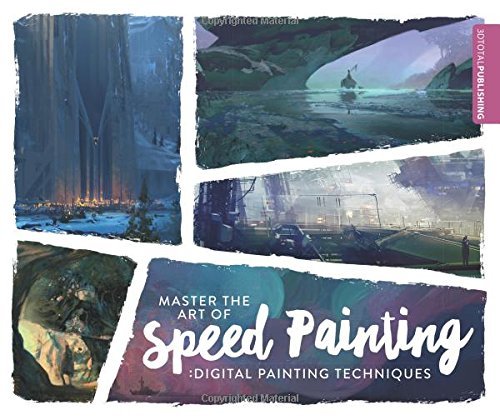
Speed painting builds taste, speed, and clarity. This book gives timed drills and step-by-steps that force bold choices. You focus on shapes, values, and edges under a clock. The habit trains your eye fast. It is ideal when you need to explore ideas and move on.
Each exercise has a clear goal. You learn to simplify, group values, and reserve detail for focal points. The prompts are fun and varied. If you practice daily, your brush economy improves. That makes you look like a digital painting master when time is tight and the brief is due.
Pros:
- Timed drills build speed and confidence
- Strong focus on big shapes and values
- Great prompts for daily practice
- Useful for ideation and thumbnails
- Teaches brush economy and edge control
- Fits any software and hardware
- Turns practice into a routine
Cons:
- Less focus on ultra-polished finishes
- Repetition can feel tough at first
- Not ideal if you dislike time limits
My Recommendation
Pick this if you struggle with speed or you over-render. The time box frees you from perfection and grows your instincts. It is a fast route to digital painting master decisiveness. Use it to warm up, test ideas, or build a 30-day challenge that shows real growth.
| Best for | Why |
|---|---|
| Busy learners | Short, timed sessions fit tight schedules |
| Concept artists | Rapid ideation and clear reads |
| Portfolio refresh | Quick studies show range and style |
Perspective and Depth: Artists’ Master Series

Depth makes art feel real. This guide shows perspective rules, depth cues, and lens effects in clear steps. You learn one, two, and three-point setups. You also learn overlap, scale, aerial haze, and edge control. The result is scenes that pop without guesswork.
The book balances math and art. Grids are easy to use. Examples break down complex shots into simple layers. It covers interiors, city scenes, and natural spaces. If your rooms warp or your landscapes feel flat, this can be the missing link to a digital painting master skill set.
Pros:
- Simple, usable perspective grids
- Depth cues beyond just vanishing points
- Helps with both interiors and exteriors
- Clear camera and lens concepts
- Improves composition and focal pull
- Great for environment concept art
- Teaches aerial perspective and scale
Cons:
- Technical in places; needs patience
- More focus on structure than style
- Practice is required to lock it in
My Recommendation
Buy this if you paint rooms, cities, or vast scenes. It makes hard topics simple. Your work will look sharp and believable. It is essential training on the road to digital painting master skills because correct space and depth lift every stroke you make.
| Best for | Why |
|---|---|
| Environment artists | Clear systems for accurate space |
| Storyboard and vis-dev | Fast shots with strong depth |
| Illustrators | Better scale, overlap, and clarity |
FAQs Of digital painting master
How do I become a digital painting master if I am a beginner?
Start with values, color, and perspective basics. Practice daily in short sessions. Use small studies. Follow step-by-step demos. Build one skill at a time.
Do I need a screen tablet to learn from these books?
No. A simple pen tablet works. You can also use an iPad with Procreate. Focus on core skills first. Gear comes second.
Will these methods work in Photoshop, Procreate, or Krita?
Yes. The steps are software-agnostic. Brush, layer, and blend concepts carry over. Translate tools as needed. Keep the process the same.
How long does it take to look like a digital painting master?
It varies. With daily practice, you can see big gains in 90 days. Solid control often takes 1–2 years. Keep it steady and track progress.
Which book should I buy first?
If you want a broad base, pick the Masters Collection. If color is weak, choose Color and Light. For speed, pick Speed Painting. For space, go with Perspective and Depth.
Final Verdict: Which Should You Buy?
If you need one book to start, get Digital Painting Techniques: Masters Collection. It builds strong habits and a repeatable workflow that leads toward digital painting master results.
Then add Color and Light to fix mood and palettes, Speed Painting to boost speed and clarity, and Perspective and Depth to lock space. Together, they cover the full path.