PaintingProGuide is reader-supported. When you buy through links on this page we may earn an affiliate commission at no extra cost to you.
Plenty of digital painters still start on paper. A pencil in a cheap sketchbook is the fastest way to work out a composition, and many artists find they think more freely away from undo buttons and layer panels. The best sketchbooks for digital painting fit that workflow: paper that takes pencil and marker well, pages that scan or photograph cleanly, and, increasingly, smart notebooks that capture your lines digitally as you draw.
This guide covers four sketchbooks from the October 2026 listings, each suited to a different stage of a digital painting workflow, plus two guidebooks that help you turn paper sketches into finished digital paintings. If you were actually looking for the Sketchbook drawing app, we touch on that too.
Quick answer: For the tightest link between paper and screen, the HUION Note smart notebook captures pen strokes on a regular A5 notepad and syncs them as vector lines to its app. For low-cost thumbnails, the Soucolor 9×12, 100-sheet sketchbook is hard to beat. If you rough out color with markers or light washes before painting digitally, choose the Hapikalor mixed media or Ohuhu marker pad.
Our Top Picks at a Glance
- HUION Note Digital Notebook — Best for syncing paper sketches straight to your device
- Soucolor 9×12 Sketch Book, 100 Sheets — Best for cheap, plentiful thumbnails
- Hapikalor Mixed Media Sketchbook 9×12 — Best for value and color studies before going digital
- Ohuhu 5.5×8.5 Bleedproof Marker Pad — Best for marker roughs and character concepts
- Digital Painting for the Complete Beginner — Best guide for turning sketches into paintings
- Drawing Digital (Lisa Bardot) — Best guide for iPad sketch-to-paint workflows
| Product | Best For | Key Spec | Key Strength | Price Tier |
|---|---|---|---|---|
| HUION Note | Paper-to-digital capture | A5 notepad, battery-free pen, Bluetooth 5.0 | Vector lines synced to app | $$$ |
| Soucolor 9×12 | Thumbnails, gesture | 100 sheets, 68 lb/100 gsm, acid-free | Very low cost per page | $ |
| Hapikalor Mixed Media | Value and color studies | 30 sheets, 98 lb/160 gsm | Takes light washes and ink | $ |
| Ohuhu Marker Pad | Marker roughs | 50 sheets, 160 lb/280 gsm, double-sided | Bleedproof pages | $$ |
| Digital Painting for the Complete Beginner | Learning the process | Book by Carlyn Beccia | Beginner-focused | $$ |
| Drawing Digital | iPad workflows | Book by Lisa Bardot | Draw and paint on iPad | $ |
How We Chose
We did not sketch in these books ourselves. Our picks come from Amazon listing details and specifications checked in October 2026, an assessment of how each product fits a digital painting workflow, and how widely each product is reviewed by Amazon buyers.
- Workflow fit: does it help at the thumbnail, sketch, color study or capture stage?
- Paper weight and surface: how it handles pencil, ink and markers.
- Scanning and capture: flat-lying binding, clean white paper or digital sync.
- Value per page: important for thumbnail-heavy workflows.
- Learning support: for the guidebooks, how directly they address going from sketch to digital painting.
We excluded a screenless drawing tablet that appeared in the results, since it is a digital input device rather than a sketchbook. If you are shopping for one, see our pen tablet and drawing tablet guides.
Where a Paper Sketchbook Fits in Digital Painting
Most digital paintings move through stages: idea thumbnails, a refined sketch, value and color decisions, then rendering. Paper is especially useful at the first two stages. Thumbnails the size of a postage stamp let you test a dozen compositions in minutes. A refined pencil sketch can be scanned or photographed, dropped onto a layer at low opacity and painted over.
Some painters also do quick value or color studies on paper with markers or light washes, then match those decisions digitally. Others carry a sketchbook purely for observational drawing, which builds the skills that make digital painting convincing.
And if by “sketchbook” you meant the app: Sketchbook is a long-standing free drawing app available on several platforms. It is a fine place to start painting digitally, but it is a different kind of tool from the paper books below.
Best Sketchbooks for Digital Painting Reviewed
1. HUION Note Digital Notebook — Best for Paper-to-Digital Sync

HUION Note combines a digital pen, a regular A5 notepad and a free app for iOS and Android. As you draw on paper, your strokes are captured as vector lines and transferred to your device in real time, or stored offline and synced later. The listing lists a battery-free pen, 8,192 pressure levels, automatic Bluetooth 5.0 pairing and sharing as images, PDF or MP4 replays.
For digital painters, the appeal is obvious: sketch on real paper with real tooth, then open the drawing on your device without scanning. Vector lines can be exported as clean line art to paint under. The app also records audio and organizes pages into groups, features aimed more at note-taking but handy for logging ideas.
Best suited for: painters who prefer sketching on paper but want lines ready to paint over digitally.
Key features
- Digital pen plus regular A5 notepad
- Real-time and offline sync
- 8,192 pressure levels listed
- Bluetooth 5.0, iOS and Android app
- Export as image, PDF or MP4
Pros
- No scanning step
- Real paper feel
- Replay feature shows your drawing process
Cons
- Highest price tier here
- A5 size is small for large compositions
- Captures pen lines only, not shading done with other tools
Buying consideration: Only strokes made with the included pen are captured. If you like to shade with graphite or markers, you will still need to scan those pages.
2. Soucolor 9×12 Sketch Book, 100 Sheets — Best for Thumbnails

Thumbnails need volume, not luxury. Soucolor’s 9×12 book has 100 sheets of 68 lb (100 gsm) paper, described as pH neutral and acid-free, with a top spiral binding that lets the pad lay flat for left- and right-handed artists. It is light and fits in most backpacks.
A 9×12 page holds a grid of eight to twelve small thumbnails, which makes it a good workhorse for composition planning before you open your painting app.
Best suited for: thumbnailing, gesture drawing and daily practice.
Key features
- 100 sheets, 9×12 in
- 68 lb / 100 gsm, acid-free
- Top spiral binding, lies flat
Pros
- Lowest cost per page
- Flat-lying pages scan or photograph easily
Cons
- Too light for markers or washes
- Not intended for finished drawings
Buying consideration: Draw thumbnails at the same aspect ratio as your planned digital canvas, so a chosen composition translates directly.
3. Hapikalor Mixed Media Sketchbook 9×12 — Best for Value and Color Studies
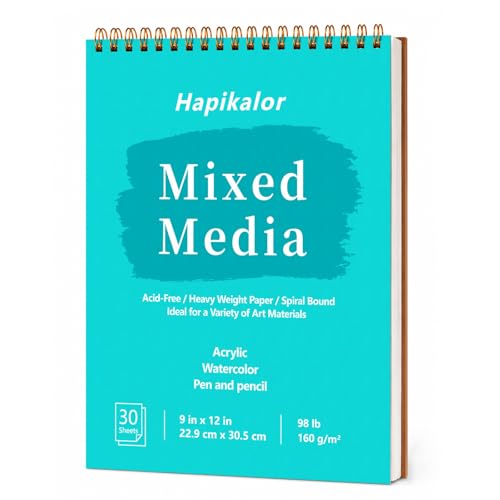
When you want to test values or a color scheme on paper first, you need a sheet that tolerates more than graphite. Hapikalor’s 9×12 book has 30 sheets of 98 lb (160 gsm) acid-free mixed media paper, described as lightly textured, heavily sized and resistant to bleed-through. The listing names acrylic, light watercolor washes, pen and ink as suitable media, and pages have micro-perforations for clean removal.
Best suited for: quick gouache, ink or marker value studies before painting digitally.
Key features
- 30 sheets, 9×12 in
- 98 lb / 160 gsm mixed media
- Spiral bound, lies flat
- Micro-perforated pages
Pros
- Handles light wet media
- Clean tear-out for scanning
Cons
- Fewer sheets than a sketch pad
- Not for heavy watercolor
Buying consideration: Scan or photograph studies under even daylight so colors match what you see on paper when you sample them digitally.
4. Ohuhu 5.5×8.5 Bleedproof Marker Pad — Best for Marker Roughs

Many concept artists and illustrators rough out characters and props with markers before painting digitally. Ohuhu’s hardcover marker pad has 50 double-sided sheets of 160 lb (280 gsm) FSC-certified bleedproof paper, 100 usable pages in total, with a warm white, smooth surface designed for alcohol markers. Pages are easy to tear out, and the PU leather cover can be customized with acrylic markers.
Best suited for: character and prop concepts, and marker value roughs.
Key features
- 50 double-sided sheets, 280 gsm
- Bleedproof, acid-free
- Hardcover, 5.5 x 8.5 in
Pros
- Markers will not bleed through
- Both sides usable
Cons
- Small format
- Warm white paper shifts colors slightly when scanned
Buying consideration: Use a few gray markers for value roughs; three or four values are enough to plan a painting.
5. Digital Painting for the Complete Beginner — Best Process Guide

Carlyn Beccia’s book is aimed squarely at people new to digital painting. It suits sketchbook users who want to learn how to take a drawing into a painting program and build it into a finished piece.
The value of a beginner guide here is structure. Sketchbook practice builds drawing skill, but the jump to layers, brushes, blending modes and color selection on screen is where many traditional sketchers stall. A step-by-step book fills that gap so your paper drawings have somewhere to go.
Best suited for: beginners bridging traditional sketching and digital painting.
Pros
- Beginner-focused
- Useful reference alongside sketchbook practice
Cons
- Not a sketchbook itself
Buying consideration: Work through the exercises using your own sketches as starting points.
6. Drawing Digital by Lisa Bardot — Best for iPad Workflows

Lisa Bardot’s guide covers learning to draw and paint on the iPad. If your workflow is sketch on paper, photograph with the iPad, then paint in an iPad app, this is a natural companion. The iPad’s camera makes the capture step especially quick: photograph the page, import it to a layer and start painting within a minute.
Best suited for: iPad painters who want structured guidance.
Pros
- Focused on iPad drawing and painting
- Complete-guide format
Cons
- iPad-specific
Buying consideration: If you paint on a computer instead, the general techniques still apply, but app instructions will differ.
Buying Guide: How to Choose Sketchbooks for Digital Painting
Decide which stage the sketchbook serves
Thumbnails need cheap, plentiful paper. Refined line drawings need smooth paper that scans cleanly. Color or value studies need heavier mixed media or marker paper. Pick the book for the job.
Paper weight
Around 60 to 70 lb (90 to 110 gsm) is fine for pencil. For markers, ink or light washes, look for 98 lb (160 gsm) or heavier, or bleedproof marker paper.
Binding
Spiral and flat-opening bindings make scanning and photographing easier. Perforated pages let you remove sketches for flatbed scanning.
Paper tone
Bright white scans most accurately. Warm white looks pleasant but shifts color slightly. You can correct this in software with a levels adjustment.
Size
9×12 suits desk work and thumbnail grids. Smaller formats like 5.5×8.5 are better for carrying everywhere.
Smart notebook or paper plus scanner
A smart notebook removes the scanning step but costs more and captures only its own pen. A phone scanning app plus regular paper is cheaper and captures every medium.
Getting Paper Sketches Into Your Painting App
- Photograph or scan the page in even light, flat and square to the camera.
- Crop to the drawing and increase contrast so the paper turns white.
- Set the sketch layer to Multiply so white disappears and lines stay visible.
- Lower opacity and paint on layers beneath or above.
Practice this process with a subject like our digital waves and ocean tutorial. If you do not yet own a tablet, our guide to digital painting without a tablet shows how paper sketches can carry more of the work.
A Sketchbook Routine That Improves Digital Painting
A sketchbook only helps if you use it often. These habits translate most directly into better digital work.
Daily thumbnails
Spend ten minutes a day drawing small boxes and filling them with simple compositions using three values: light, middle and dark. You are training your eye to see the big shapes that make a painting read from across a room. When you sit down to paint digitally, choose the strongest thumbnail and enlarge it.
Observational studies
Draw what is in front of you: a coffee cup, a hand, a street corner. Digital painting from imagination relies on a mental library of how light falls on forms, and that library is built by looking. Quick studies of five to fifteen minutes are enough.
Master copies
Copy the composition of a painting you admire in a few lines. You will notice how the artist placed the focal point and led the eye. These small analyses are easy to do in a sketchbook and hard to replicate by just looking at a screen.
Color notes
If you carry a mixed media book, add quick color swatches beside observational sketches: the color of a shadow on a wall, the sky at dusk. Later, sample those colors or their relationships in your digital paintings.
Keep the books
Old sketchbooks become a reference archive. Date them, and flip back through when you need ideas or want to see how far you have come.
Common Mistakes to Avoid
- Using precious paper for thumbnails. Cheap paper encourages more ideas.
- Markers on thin paper. Bleed-through ruins the next page.
- Scanning in uneven light. Shadows make cleanup harder.
- Drawing at the wrong aspect ratio. Match your planned canvas.
- Expecting a smart pen to capture pencil shading. Only the included pen is recorded.
- Skipping observational drawing. It is the foundation of believable digital painting.
FAQs
Do digital painters still use sketchbooks?
Many do. Paper is fast for thumbnails and observational drawing, and sketches are easy to scan or photograph and paint over digitally.
What is the best smart sketchbook for digital artists?
The HUION Note captures pen strokes on a regular A5 notepad and syncs them as vector lines to its iOS or Android app.
What paper weight is best for sketching before digital painting?
For pencil, 60 to 70 lb paper is fine. For markers or washes, use 98 lb (160 gsm) or heavier, or a bleedproof marker pad.
How do I transfer a paper sketch to a digital painting?
Scan or photograph it, boost contrast, set the layer to Multiply and paint on separate layers.
Is Sketchbook an app or a paper book?
Both exist. Sketchbook is also the name of a free drawing app. This guide covers paper and smart sketchbooks used alongside digital painting.
Can I paint directly over a scanned pencil sketch?
Yes. Clean up the scan, set the layer to Multiply and keep it on top while you paint on layers below, or lower its opacity and paint over it. Many painters gradually paint out the sketch lines as the forms develop, so the final image does not look like colored line art.
Final Recommendation
If you want your paper sketches on screen without scanning, the HUION Note is the most direct solution. For pure thumbnail volume, the Soucolor 100-sheet book is excellent value. Choose the Hapikalor mixed media book for value and color studies, or the Ohuhu marker pad for marker concepts. Pair any of them with Digital Painting for the Complete Beginner or Drawing Digital if you want guidance on turning those sketches into finished digital paintings.