PaintingProGuide is reader-supported. When you buy through links on this page we may earn an affiliate commission at no extra cost to you.
Printing a digital painting on canvas gives it the presence of a traditional painting: texture you can see, a surface you can stretch over bars, and a format collectors are used to hanging. It is also the most demanding kind of home printing. Canvas is thick, often supplied on rolls, absorbs ink differently from paper and usually needs a protective coating after printing. The best digital painting printers for canvas are wide-format inkjets that can feed thick media, use durable inks and reproduce smooth color, paired with an inkjet-compatible canvas.
This guide explains what canvas printing requires, how to prepare a painting for it and when a print lab is the better route. It then reviews three printers from the Amazon search, a 24-inch fine art printer, a 24-inch large-format printer and a wide-format photo ink tank printer, plus an inkjet canvas roll. Small portable photo printers in the same search were left out, since they cannot print on canvas.
Quick answer: For professional canvas prints at home, the Canon imagePROGRAF PRO-2100 is a 24-inch fine art printer designed for large-format art and photo work. For smaller canvas pieces on a lower budget, the Epson EcoTank Photo ET-8550 is a wide-format photo printer with refillable ink bottles. Pair either with an inkjet canvas such as the AD.HOOMAI 17-inch x 22-foot semi-gloss canvas roll, cut to fit where needed.
Our Top Picks at a Glance
- Canon imagePROGRAF PRO-2100 24″ Fine Art Printer — Best overall for professional canvas prints
- Epson EcoTank Photo ET-8550 Wide-Format — Best budget printer for small canvas pieces
- Canon imagePROGRAF TM-240 24″ Large Format — Best large-format printer for posters and proofs
- AD.HOOMAI Semi-Gloss Inkjet Canvas Roll, 17″ x 22 ft — Best canvas media for inkjet printing
| Product | Best For | Key Spec | Key Strength | Price Tier |
|---|---|---|---|---|
| Canon imagePROGRAF PRO-2100 | Professional canvas prints | 24-inch wide-format inkjet | Fine art printer class | $$$ |
| Epson EcoTank Photo ET-8550 | Small canvas and photo prints | Wide-format ink tank, refillable bottles | Low running cost | $$$ |
| Canon imagePROGRAF TM-240 | Large posters and proofs | 24-inch, 5-color ink, 2400 x 1200 dpi | UV and water-resistant ink | $$$ |
| AD.HOOMAI Canvas Roll | Canvas media | 17 in x 22 ft, semi-gloss poly-cotton | Dye and pigment compatible | $$ |
How We Chose
We did not print canvases with these products for this guide. Picks are based on the Amazon listing details and specifications checked in October 2026, well-established requirements for inkjet canvas printing (media width and thickness, ink durability, roll feeding), how well each product fits a digital painter’s canvas workflow, and how widely each product is reviewed by Amazon buyers. Some listings, such as the PRO-2100, include little technical detail, so we describe them by printer class and what the listing states.
- Media width: 13 inches for small canvases, 24 inches for larger work.
- Thick media support: canvas needs a suitable paper path or roll feed.
- Ink durability: resistance to water and fading.
- Running costs: ink and canvas per print.
- Canvas compatibility: media labeled for dye and pigment inkjets.
What Canvas Printing Requires
Wide-format capability
Canvas prints are usually larger than standard paper. Letter-size printers can manage small pieces, but 13-inch wide printers open up 11 x 14 and 13 x 19 canvases, and 24-inch roll printers make gallery-size work possible.
A paper path for thick media
Canvas is much thicker than photo paper. Printers designed for fine art media use rear or straight-through feeds or roll holders. Always check the maximum media thickness on the manufacturer’s specifications before buying canvas.
Inkjet-compatible canvas
Not all canvas takes ink. Inkjet canvas has a receptive coating so ink sits sharply on the surface. Choose canvas that states compatibility with your ink type; the AD.HOOMAI roll lists both dye and pigment inkjets.
Durable inks
Canvas prints are often displayed without glass, so ink durability matters. Pigment inks are generally preferred for lightfastness; water-resistant inks help if the canvas will be coated with liquid varnish.
Protective coating
Many artists coat canvas prints with a clear inkjet canvas varnish after printing to protect against moisture, scuffs and UV, and to even out sheen. Let prints dry fully before coating.
Preparing a Digital Painting for Canvas
- Plan the wrap. For gallery-wrapped canvas, add 1.5 to 2 inches of extra image or a mirrored border on each side to fold around the stretcher bars.
- Set resolution. Around 150 to 300 pixels per inch at the final size is typical; canvas texture forgives slightly lower resolution than fine paper.
- Adjust contrast. Canvas can soften blacks and saturation; a test print shows whether to boost shadows slightly.
- Use a canvas profile. Apply the ICC profile for your canvas and printer, or the closest recommended media setting.
- Print a test strip. Check color and ink absorption on a small piece of the same canvas.
- Dry, coat and stretch. Let ink dry, apply a protective coating, then stretch over bars or mount to a panel.
Stretching and Finishing a Canvas Print
Once the print is dry and coated, it needs a support. For a gallery wrap, cut stretcher bars to the image size, assemble them into a square frame and check the diagonals match. Lay the print face down on a clean surface, center the frame, and fold the canvas over each side, stapling from the center of each bar outward and alternating opposite sides to keep tension even. Fold the corners neatly like wrapping a gift. Add a dust cover and hanging wire on the back. For smaller pieces, mounting canvas to a rigid panel with archival adhesive is simpler and avoids stretching altogether.
Choosing a canvas finish
Matte canvas gives a traditional painting look with minimal glare. Satin or semi-gloss canvas, like the AD.HOOMAI roll, shows deeper color and slightly more contrast. Gloss canvas is vivid but reflective. Choose the finish that matches the style of your digital painting and the lighting where it will hang.
Adding Texture After Printing
Some artists add clear gel medium or acrylic texture paste by hand over printed canvas to mimic brushstrokes, then coat the whole piece. This blurs the line between print and painting. If you do this for sale, describe it honestly as an embellished print so buyers know what they are getting.
Best Printers and Canvas for Digital Paintings Reviewed
1. Canon imagePROGRAF PRO-2100 24″ Fine Art Printer — Best for professional canvas prints
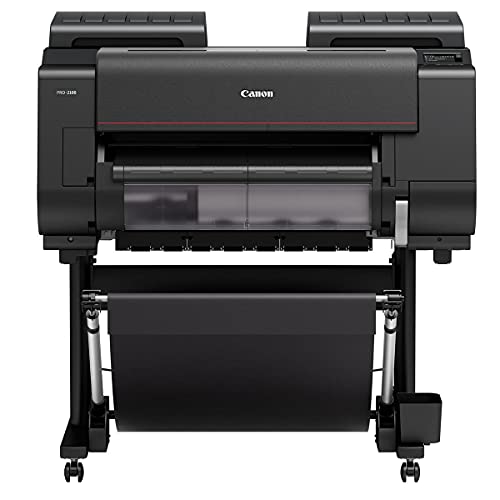
The imagePROGRAF PRO-2100 is a 24-inch wide-format fine art printer from Canon’s professional line. The Amazon listing is sold by a Canon Platinum Reseller and includes a one-year on-site warranty from Canon. Specifications list inkjet technology, USB and Ethernet connectivity, and a substantial footprint of about 35 x 49 x 33 inches and 289 pounds.
A 24-inch roll printer is the class of machine used for large canvas and fine art prints, accepting rolls like the 17-inch AD.HOOMAI canvas. The listing provides little additional technical detail, so check Canon’s specification sheet for ink set, media thickness and profiles before purchase.
This is a studio investment for artists who sell large prints regularly.
Best suited for: Professional artists and studios producing large canvas prints in-house.
Key features:
- 24-inch wide-format inkjet
- USB and Ethernet
- One-year on-site Canon warranty per listing
- About 289 lb, floor-standing
Pros:
- Large-format fine art class
- Roll media capable
- On-site warranty
Cons and limitations:
- Very high price and size
- Sparse listing details
- Requires dedicated space
Buying consideration: Confirm ink, media and profile details with Canon’s official specifications.
2. Epson EcoTank Photo ET-8550 Wide-Format — Best for small canvas pieces on a budget
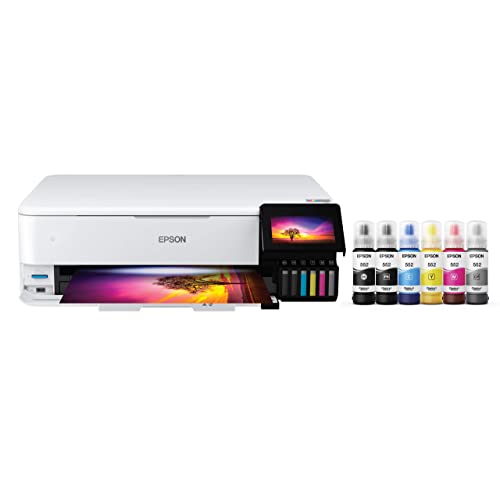
Epson’s EcoTank Photo ET-8550 is a wide-format all-in-one with cartridge-free, refillable ink tanks. The listing describes lab-quality photos and creative projects, very low cost per 4 x 6 photo, and up to two years of ink in the box. It also prints, scans and copies.
For canvas, it suits smaller pieces cut from canvas sheets or rolls to the printer’s maximum width. Check Epson’s specifications for maximum media thickness and use the appropriate rear or specialty feed. Ink tank printers keep running costs low, which makes test prints and proofs inexpensive.
Best suited for: Artists making small canvas prints, cards and photo-quality proofs.
Key features:
- Wide-format ink tank printer
- Refillable ink bottles
- Print, scan and copy
- Wireless and USB
Pros:
- Low running costs
- Wide-format for its class
- Good for proofs and small prints
Cons and limitations:
- Not a roll printer
- Canvas must be cut to size
- Check thickness limits
Buying consideration: Cut canvas a little larger than needed and trim after printing and coating.
3. Canon imagePROGRAF TM-240 24″ Large Format — Best for large posters and proofs

The imagePROGRAF TM-240 is a 24-inch large-format printer with a high-density six-channel printhead at up to 2400 x 1200 dpi and a five-color ink set, which Canon describes as UV and water-resistant and formulated for fine lines and sharp text. It is about 30 percent faster than previous models according to the listing, and supports printer calibration for consistent color.
The TM series is aimed at technical drawings, posters and signage rather than fine art reproduction. With five colors it will not match a multi-ink fine art printer for subtle gradients, but its width and durable inks make it a practical choice for large proofs, posters and casual canvas pieces.
Best suited for: Artists who want large proofs and posters with occasional canvas use.
Key features:
- 24-inch large format
- 5-color UV and water-resistant ink
- Up to 2400 x 1200 dpi
- Ethernet, USB and Wi-Fi
Pros:
- Wide output at a lower price than fine art models
- Durable inks
- Calibration support
Cons and limitations:
- Fewer inks than fine art printers
- Designed mainly for technical and poster work
Buying consideration: Use it for large proofs and decor prints; choose a fine art printer or lab for premium canvas editions.
4. AD.HOOMAI Semi-Gloss Inkjet Canvas Roll, 17″ x 22 ft — Best for canvas media

AD.HOOMAI’s canvas roll is a 17-inch by 22-foot semi-gloss polyester-cotton canvas described as compatible with all dye and pigment inkjet printers and waterproof. The listing names uses including oil painting reproductions, murals and displays, and the satin paper finish noted in specifications gives moderate sheen.
A 17-inch roll fits 24-inch roll printers and can be cut into sheets for smaller wide-format printers within their size and thickness limits. Twenty-two feet yields several medium canvases.
Best suited for: Artists printing canvas at home on inkjet printers.
Key features:
- 17 in x 22 ft roll
- Semi-gloss poly-cotton canvas
- Dye and pigment inkjet compatible
- Waterproof per listing
Pros:
- Compatible with both ink types
- Good length for multiple prints
- Mid price tier
Cons and limitations:
- Width may not suit all printers
- Semi-gloss may not suit matte styles
Buying consideration: Test a small strip with your printer and profile before printing a full piece.
Buying Guide: How to Choose a Printer for Canvas Prints
Decide your largest size
Small canvases fit 13-inch printers; large canvases need 24-inch roll printers or a lab.
Check media thickness limits
Canvas is thick; confirm the printer’s maximum thickness and feed path.
Prefer durable inks
Pigment or water-resistant inks hold up better for unglazed canvas.
Look for roll support
Roll feeding saves canvas and allows long prints.
Budget for media and coating
Canvas, varnish and stretcher bars add to the cost of each print.
Compare with a lab
For occasional canvas prints, a lab can deliver stretched, finished pieces for less total cost.
Home Canvas Printing or a Lab?
Printing canvas at home makes sense when you produce many prints, want rapid proofing and have space for a wide-format printer. A lab is usually better for occasional orders, very large sizes or when you want finished, stretched and coated canvases delivered ready to hang. Many artists test at home on a smaller printer and send final editions to a lab.
Costing a Canvas Print
To price canvas prints fairly, add up the canvas used (including the wrap border and test strips), ink, protective coating, stretcher bars or panels, hanging hardware, packaging and shipping. Large canvases are bulky to ship, so many artists offer local pickup or use a lab that ships directly. Track the time spent stretching and finishing, too; it adds up quickly and should be part of the price.
Storing canvas media
Keep rolls in their original box, stored horizontally or suspended on a core so the canvas does not develop flat spots. Avoid humid rooms, which can affect ink absorption, and handle the printable side by the edges with clean hands or cotton gloves to prevent fingerprints that show up in prints.
Paint for the Canvas Format
Bold, painterly subjects suit canvas texture. Try our digital waves and ocean tutorial or digital night scene painting tips, then plan a wrap border before printing.
Common Mistakes to Avoid
- Using plain artist canvas instead of inkjet-coated canvas.
- Forgetting extra image area for gallery wraps.
- Coating canvas before the ink is fully dry.
- Feeding canvas thicker than the printer allows.
- Expecting deep blacks without adjusting for canvas.
- Buying a huge printer for a few prints a year when a lab would cost less.
FAQs
Can any printer print on canvas?
No. You need an inkjet printer that can feed thick media, ideally wide-format or roll-fed, and inkjet-compatible canvas. Laser printers and basic home inkjets are not suitable.
What size printer do I need for canvas prints?
A 13-inch wide-format printer handles small canvases; 24-inch roll printers handle large, gallery-size work.
Do I need to coat canvas prints?
Coating is recommended to protect against moisture, scuffs and UV, and to even out sheen. Use a varnish made for inkjet canvas and apply it only after the ink has fully dried.
How much extra image do I need for a gallery wrap?
Typically 1.5 to 2 inches per side, depending on stretcher bar depth. Many artists mirror the edge of the image so nothing important wraps around the side.
Is pigment ink better for canvas?
Pigment inks are generally preferred for lightfastness on displayed canvas prints.
Should I print canvas at home or use a lab?
Labs are often better for occasional or large prints. Home printing suits high volume and fast proofing.
Final Recommendation
For in-house professional canvas prints, the Canon imagePROGRAF PRO-2100 is the fine art class choice, though it is a major investment. The Epson EcoTank Photo ET-8550 suits small canvas pieces and inexpensive proofing, while the Canon TM-240 offers 24-inch width for posters and casual canvas work. Whichever printer you use, choose inkjet canvas like the AD.HOOMAI roll, test with a strip, coat after drying and plan your wrap border before you print.
If you are just starting, send your first few canvas editions to a lab and study the results. Once you know the look you want and your sales justify it, bringing canvas printing in-house becomes a far safer investment.