

PaintingProGuide is reader-supported. When you buy through links on this page we may earn an affiliate commission at no extra cost to you.
There is no single best canvas size for digital painting, but there is a best way to choose one: pick the shape first, then the pixels. The aspect ratio decides whether your painting will fit a standard frame, a canvas print, a phone screen or a social feed without awkward cropping. Once the shape is right, set the pixel dimensions large enough for the biggest version you might ever need. For most artists, a 3:4 or 4:5 portrait canvas around 3000 to 4500 pixels on the long edge is a versatile default that prints well and runs smoothly on most devices.
This guide gives you ready-made canvas sizes by use, a table of standard print and canvas ratios with their pixel equivalents, tips for working within device limits, and a section for artists who move between digital and traditional work. It also reviews six physical canvases on Amazon in standard sizes, including a printable canvas roll for turning digital paintings into canvas prints.
Quick answer: A strong all-purpose digital canvas is 3600 x 4800 pixels (3:4), which prints at 12 x 16 inches at 300 ppi, scales cleanly to 18 x 24 inches, and crops easily to 4:5 for social media. For square work use 4000 x 4000; for landscapes, 5400 x 3600 (3:2). If you print your digital art on canvas, a printable roll such as the VViViD double-primed cotton canvas lets you cut prints to any size; if you translate digital studies into traditional paintings, match your digital ratio to a standard stretched canvas like the PHOENIX 18 x 24 inch pack.
Recommended Canvas Sizes by Use
| Use | Aspect ratio | Suggested canvas (pixels) | Why |
|---|---|---|---|
| All-purpose portrait illustration | 3:4 | 3600 x 4800 | Prints 12×16 at 300 ppi; matches 18×24 and 30×40 canvases |
| Frameable portrait print | 4:5 | 4800 x 6000 | Prints 16×20 at 300 ppi; also 8×10 |
| Landscape scenes | 3:2 | 5400 x 3600 | Prints 18×12 at 300 ppi; also 24×36 at 150 ppi |
| Square art and album covers | 1:1 | 4000 x 4000 | Square prints and posts |
| Widescreen wallpaper or concept frames | 16:9 | 3840 x 2160 | 4K displays and film-style frames |
| Phone wallpaper | About 9:19.5 | Match your phone or use about 1290 x 2796 and up | Fills tall modern screens |
| Quick sketches and studies | Any | 1500–2500 on the long edge | Fast and light on memory |
Standard Print and Canvas Ratios
Choosing a ratio that matches standard frames and canvases saves money on custom framing and avoids cropping important parts of your painting.
| Ratio | Standard sizes (inches) | Pixels at 300 ppi (smallest listed) |
|---|---|---|
| 4:5 | 8×10, 16×20, 24×30 | 2400 x 3000 |
| 3:4 | 9×12, 12×16, 18×24, 30×40 | 2700 x 3600 |
| 2:3 | 4×6, 12×18, 24×36 | 1200 x 1800 |
| 5:7 | 5×7 | 1500 x 2100 |
| 11:14 | 11×14 | 3300 x 4200 |
| 1:1 | 8×8, 12×12, 20×20 | 2400 x 2400 |
A useful habit is to work at the ratio of your most likely print size and at a pixel size that covers it at 300 ppi. Larger prints of the same ratio can then be made at slightly lower ppi without visible loss when viewed from normal distance.
Working Within Your Device’s Limits
Bigger is not always better. Every layer stores a full set of pixels, so a canvas twice as wide and tall uses about four times the memory per layer. Tablet painting apps limit how many layers you can have at a given size, and desktop apps slow down as files grow.
- Start sketches small and enlarge before rendering, or redraw at full size.
- Merge finished layers to free memory.
- Keep a master and export copies for web and social rather than painting separate versions.
- Use 8-bit color unless you need 16-bit for smooth gradients.
If you paint in Procreate, our guide on how to make a custom Procreate canvas size walks through entering exact dimensions, DPI and color profile.
Cropping for Social Media Without Losing Your Composition
Social platforms favor square, 4:5 portrait and vertical story formats. If you paint at 3:4, you can crop to 4:5 by trimming a little from the top or bottom, and to square by trimming more. Keep important elements away from the extreme top and bottom tenth of the canvas to leave room for these crops. Add a temporary guide layer showing the 4:5 and 1:1 crop areas while you paint.
From Digital Canvas to Physical Canvas
Many artists plan compositions digitally, then paint them traditionally or print them onto canvas. In both cases, matching ratios matters:
- Choose the physical canvas first (for example, 18 x 24 inches).
- Set the digital canvas to the same ratio (3:4, such as 3600 x 4800 pixels).
- Paint the study digitally, experimenting with color and composition freely.
- Transfer it: print a reference, grid both the print and the canvas, or project the image.
- For canvas prints, export at 300 ppi for the final size and add any bleed your printer needs for wrapping the edges.
Our Top Picks at a Glance
- VViViD Double Primed Cotton Canvas Roll, 36 in wide — Best for printing digital art on canvas
- PHOENIX 18 x 24 in Stretched Canvas, 2 Pack — Best 3:4 canvas for digital-to-traditional work
- KINGART 24 x 36 in Stretched Canvas, 2 Pack — Best 2:3 statement size
- CONDA 30 x 40 in Stretched Canvas, 2 Pack — Best large 3:4 format
- ESRICH 12 x 16 in Canvas Boards, 3 Pack — Best small 3:4 studies
- KEFF 24-Pack Canvas Boards in Four Sizes — Best for testing ratios
| Product | Best For | Key Spec | Key Strength | Price Tier |
|---|---|---|---|---|
| VViViD Canvas Roll | Canvas prints of digital art | 36 in wide; double primed; cut to size | Printable, acid-free | $$ |
| PHOENIX 18×24 | 3:4 traditional finishes | 2 stretched; 11 oz triple primed; 3/4 in bars | Standard frame size | $$ |
| KINGART 24×36 | 2:3 large pieces | 2 stretched; triple primed; 5/8 in profile | Statement size at mid tier | $$ |
| CONDA 30×40 | Very large 3:4 works | 2 stretched; triple primed; pine strips | Biggest format here | $$$ |
| ESRICH 12×16 | 3:4 studies | 3 boards; cotton; acid-free primer | Rigid, warp-resistant | $ |
| KEFF 24-Pack | Trying four ratios | 6 each 5×7, 8×10, 9×12, 11×14 | Variety of standard sizes | $$ |
How We Chose
Size recommendations reflect standard print, frame and display formats. The canvases were selected from Amazon listing details and specifications checked in October 2026, based on how well each matches a common digital canvas ratio or supports printing digital work, and on how widely each is reviewed by Amazon buyers. We have not painted on or printed to these canvases ourselves.
- Standard ratios — sizes that match common digital presets.
- Printability — whether the listing mentions printing.
- Build quality — priming and stretcher bar details.
- Range — small studies to statement sizes.
Physical Canvases for Digital Artists Reviewed
1. VViViD Double Primed Cotton Canvas Roll, 36 in wide — Best for printing digital paintings on canvas

VViViD’s cotton canvas comes on a 36-inch-wide roll in a choice of lengths (this listing is 5 feet by 36 inches). The listing calls it ideal for printing, drawing, oil, acrylic or water-based painting, with an acid-free, double-primed acrylic surface that resists yellowing and fading.
For digital artists who own or have access to a wide-format printer, a printable roll is the most flexible way to make canvas prints in exactly the size and ratio of your digital painting. Check that your printer supports canvas media of this thickness.
It can be cut or trimmed to any size, then stretched or mounted.
Best suited for: Digital artists making their own canvas prints, and painters who want custom sizes.
Key features:
- 36 in wide; length options
- Double-primed, acid-free cotton
- Suitable for printing and painting
- Cut to any size
Pros:
- Custom print sizes
- Archival-oriented surface
- Low-to-mid tier
Cons and limitations:
- Requires a compatible printer for printing
- Needs stretching or mounting
- Fabric weight not stated
Buying consideration: Add a wrap margin around your digital image (often 1.5 to 2 inches) before printing if you plan to stretch the print on bars.
2. PHOENIX 18 x 24 in Stretched Canvas, 2 Pack — Best for 3:4 digital-to-traditional work

PHOENIX’s 18 x 24 inch canvases are a 3:4 ratio, matching popular digital presets such as 3600 x 4800 pixels. The listing describes hand-stretched cotton, back-stapled onto 3/4-inch pinewood bars, with heavy-duty 11 oz triple gesso-primed medium-grain canvas.
18 x 24 is a standard frame size, so a finished painting can be framed without custom work. It is also a manageable size for translating a digital study into paint.
AP and CE certifications are noted.
Best suited for: Artists painting traditional versions of 3:4 digital studies.
Key features:
- 18 x 24 in (3:4), 2 pack
- 11 oz triple-primed cotton
- 3/4 in pinewood bars, back-stapled
- AP and CE certified
Pros:
- Matches common digital ratio
- Standard frame size
- Heavier canvas weight
Cons and limitations:
- Two canvases only
- Mid tier per canvas
- Medium grain may show in fine detail
Buying consideration: Print your digital study at 6 x 8 inches (also 3:4) and grid both for an accurate transfer.
3. KINGART 24 x 36 in Stretched Canvas, 2 Pack — Best for 2:3 statement pieces

KINGART’s 24 x 36 inch canvases are a 2:3 ratio, the same as 12 x 18 and 4 x 6 prints and common camera images. The listing describes 100% cotton, triple gesso-primed, acid-free medium-grain canvas on pine bars with a 5/8-inch profile, back-stapled.
For landscape or panoramic digital compositions at 3:2, this size gives a big, wall-ready traditional or hybrid piece.
Two canvases come in the pack.
Best suited for: Painters scaling up 2:3 digital compositions.
Key features:
- 24 x 36 in (2:3), 2 pack
- 100% cotton, triple primed
- Pine bars, 5/8 in profile
- Acrylic, oil and mixed media
Pros:
- Statement size
- Good value for size
- Common ratio
Cons and limitations:
- Slim profile may need framing
- Large for small spaces
- Medium grain
Buying consideration: Set a 2:3 digital canvas (for example 3600 x 5400) to plan pieces for this size.
4. CONDA 30 x 40 in Stretched Canvas, 2 Pack — Best for very large 3:4 work

CONDA’s 30 x 40 inch canvases share the 3:4 ratio with 18 x 24 and 12 x 16, so a single digital composition can scale to all three. The listing describes 100% cotton (4 oz unprimed, 8 oz primed), triple primed, stretched over pine strips.
A 30 x 40 canvas makes a dramatic final piece from a digital study, or a large surface for mixed media and collage.
Canvases are individually vacuum packed according to the listing.
Best suited for: Painters creating large wall pieces from 3:4 digital plans.
Key features:
- 30 x 40 in (3:4), 2 pack
- 100% cotton, 8 oz primed
- Triple primed
- Pine strip frame
Pros:
- Biggest format here
- Shares ratio with common presets
- Two large canvases
Cons and limitations:
- Highest tier here
- Lighter cotton weight than PHOENIX
- Needs space to paint and store
Buying consideration: Use a digital canvas of at least 3600 x 4800 for planning; you do not need print resolution for a reference you will repaint.
5. ESRICH 12 x 16 in Canvas Boards, 3 Pack — Best for small 3:4 studies

ESRICH’s 12 x 16 inch boards are 3:4, the same ratio as the all-purpose digital canvas recommended above. They are pure cotton with an acid-free primer over a sturdy, warp-resistant board core according to the listing.
Boards are ideal for traditional studies of digital compositions, and they are flat enough to scan or photograph cleanly.
Three boards at the lowest tier here.
Best suited for: Artists testing digital compositions as small traditional studies.
Key features:
- 12 x 16 in (3:4), 3 pack
- Pure cotton, acid-free primer
- Rigid board core
- Suitable for oil, acrylic and more
Pros:
- Lowest tier
- Flat and easy to scan
- Matches 3:4 presets
Cons and limitations:
- Not for hanging without a frame
- Smooth surface has less tooth
- Three pieces only
Buying consideration: Paint the study, photograph it, and compare it side by side with your digital version to see which choices worked better.
6. KEFF 24-Pack Canvas Boards in Four Sizes — Best for testing different ratios
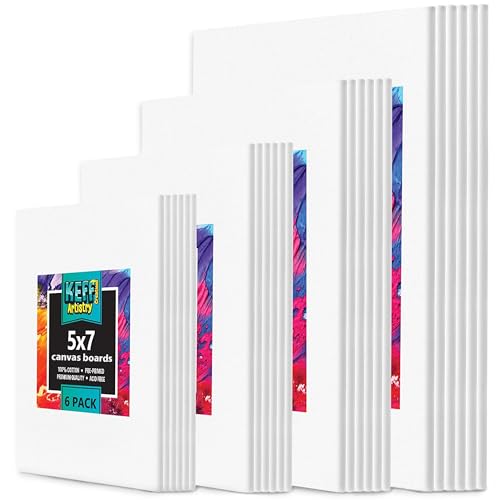
KEFF’s pack includes six boards each of 5 x 7, 8 x 10, 9 x 12 and 11 x 14 inches, covering four different ratios (5:7, 4:5, 3:4 and 11:14). The listing describes 100% cotton, triple-primed surfaces.
Painting the same simple composition on each size is a quick way to learn how ratio changes the feel of an image, a lesson that carries straight back into choosing digital canvas sizes.
It is also a convenient supply of study boards.
Best suited for: Artists exploring how aspect ratio affects composition.
Key features:
- 24 boards: 5×7, 8×10, 9×12, 11×14
- 100% cotton, triple primed
- Four standard ratios
- Multi-media
Pros:
- Variety of ratios
- Good value per board
- Standard frame sizes
Cons and limitations:
- Small formats only
- Heavy box
- Boards need frames to hang
Buying consideration: Create matching digital presets for each of the four sizes so you can plan studies at the right ratio.
Buying Guide: Choosing a Canvas Size
Decide the destination
Print, canvas, screen or social. The destination decides the ratio and minimum pixels.
Pick a standard ratio
3:4, 4:5 and 2:3 match most frames and canvases. Custom ratios mean custom framing.
Size for the largest output
Use 300 ppi at the largest likely print size; screens only need their pixel dimensions.
Respect device limits
Check how many layers your app allows at the size you choose.
Plan for cropping
Keep key elements away from the edges if you will crop for social media.
Save presets
Create presets for your most common sizes so every project starts correctly.
Practice With a Well-Sized Canvas
Try our tutorials on digital waves and ocean painting and digital night scenes using a 3:4 canvas so the results can be printed or repainted on a standard canvas.
Common Mistakes to Avoid
- Starting at screen size, then printing. The print will be soft.
- Choosing an odd ratio. Framing becomes expensive.
- Going huge for every sketch. It wastes memory and time.
- Ignoring bleed or wrap for canvas prints. Edges get cut off.
- Placing key details at the very edge. Crops remove them.
- Painting separate versions for each platform. Export from one master.
FAQs
What is a good default canvas size for digital painting?
3600 x 4800 pixels (3:4) is a versatile default. It prints 12 x 16 inches at 300 ppi, matches 18 x 24 and 30 x 40 canvases, and crops easily for social media.
What canvas size should I use for Instagram?
Paint larger, such as 2160 x 2700 for a 4:5 post, and export at the platform’s recommended size. Check current platform guidelines, as they change.
Does canvas size affect painting performance?
Yes. Larger canvases use more memory per layer, which reduces how many layers you can have and can slow brush response.
What canvas size is best for printing?
Multiply the print size in inches by 300 for pixels. An 8 x 10 print needs 2400 x 3000 pixels; an 18 x 24 needs 5400 x 7200.
Can I change canvas size after painting?
You can crop or reduce cleanly. Enlarging adds pixels without detail and can look soft, so start at the size you need.
Which aspect ratio is most versatile?
3:4 and 4:5 are versatile for portrait work because they match many frames, canvases and social formats with light cropping.
Final Recommendation
Choose a standard ratio first, then size it for your largest output; 3600 x 4800 pixels at 3:4 is a dependable default. If you print digital work onto canvas, the VViViD printable canvas roll lets you make any size. If you repaint digital studies traditionally, match ratios with the PHOENIX 18 x 24, CONDA 30 x 40 or ESRICH 12 x 16 for 3:4 work, or the KINGART 24 x 36 for 2:3, and use the KEFF 24-pack to explore how ratio shapes composition.



One Comment