PaintingProGuide is reader-supported. When you buy through links on this page we may earn an affiliate commission at no extra cost to you.
Printing digital paintings well is a different job from printing documents or snapshots. The best printers for digital painting use many ink colors to reproduce subtle gradients, handle heavy fine art papers, and, for work you plan to sell, use pigment inks that resist fading far longer than standard dye inks. Size matters too: a 13 x 19-inch printer covers most home print sales, while 24-inch and 44-inch wide-format machines are for studios producing large editions.
This guide compares four printers from our October 2026 Amazon check, from a pocket-sized 4 x 6 photo printer for proofs and stickers to Canon’s professional large-format imagePROGRAF machines. We also explain pigment versus dye ink, color management and when sending files to a print lab makes more sense than buying a printer.
Quick answer: For a home studio printing up to 13 x 19 inches, the Epson Artisan 1430 offers borderless prints with six-color Claria ink and Wi-Fi, though its dye-based ink is better for proofs and personal prints than long-life gallery editions. Professional studios selling large prints should look at the Canon imagePROGRAF PRO-4100, a 44-inch, 12-ink pigment printer with built-in color calibration, or the 24-inch Canon PRO-2100. For small proofs and stickers, the Liene M100 prints 4 x 6 dye-sublimation photos from a phone.
Our Top Picks at a Glance
- Canon imagePROGRAF PRO-4100 44in Large Format — Best for professional fine art editions
- Canon imagePROGRAF PRO-2100 24in Fine Art Printer — Best 24-inch studio printer
- Epson Artisan 1430 Wide-Format Inkjet — Best for 13 x 19 home prints and proofs
- Liene M100 4×6 Photo Printer — Best for small proofs, stickers and art cards
| Product | Best For | Key Spec | Key Strength | Price Tier |
|---|---|---|---|---|
| Canon PRO-4100 | Large editions and gallery prints | 44 in, 12 LUCIA PRO pigment tanks, 2400 x 1200 dpi | Color density sensor for calibration | $$$ |
| Canon PRO-2100 | Studios printing up to 24 in | 24 in wide format, USB and Ethernet | Fine art focused, Canon on-site warranty | $$$ |
| Epson Artisan 1430 | Home prints up to 13 x 19 | 6-color Claria ink, borderless, Wi-Fi | Large format in a desktop footprint | $$$ |
| Liene M100 | Proofs, art cards, stickers | 4 x 6 dye-sublimation, Wi-Fi hotspot | Laminated, water-resistant prints | $$$ |
How We Chose
We compared these printers based on the Amazon listing details and specifications checked in October 2026, including maximum print width, ink system, resolution where stated, connectivity, size and weight, and how widely each is reviewed by Amazon buyers. We did not run test prints. Our search also returned several nail art printers, which we excluded because they are not designed for printing artwork on paper.
- Ink type: pigment inks for longevity, dye inks for vivid color and proofs.
- Number of inks: more ink channels generally mean smoother gradients and a wider gamut.
- Maximum print size: 4 x 6, 13 x 19, 24 inch or 44 inch.
- Paper handling: support for heavy fine art papers and borderless printing.
- Workflow: connectivity, calibration features and physical size.
Pigment vs Dye Ink: Why It Matters for Art Prints
| Pigment ink | Dye ink | |
|---|---|---|
| Longevity | Much more fade-resistant, preferred for giclee and archival prints | Fades faster, especially in light |
| Color | Excellent on matte fine art papers | Very vivid, especially on glossy photo paper |
| Water resistance | Better | Lower unless laminated |
| Typical use | Prints for sale, galleries, editions | Proofs, personal prints, cards |
If you sell prints as art, buyers increasingly expect pigment-based, archival printing on acid-free paper. Dye-based printers are still useful for checking color and composition before sending a file to a lab, and for prints that are not meant to last decades.
Best Printers for Digital Painting Reviewed
1. Canon imagePROGRAF PRO-4100 — Best for Professional Fine Art Editions

The PRO-4100 is a 44-inch large-format printer built for professional photo and fine art output. The listing highlights a maximum resolution of 2400 x 1200 dpi from a 12-channel integrated print head, Canon’s L-COA PRO image processing engine for large prints, an integrated color density sensor for automatic calibration, and 12 individual LUCIA PRO pigment ink tanks available in 160, 330 and 700 ml sizes.
Connectivity includes USB 2.0, gigabit Ethernet and Wi-Fi. At about 345 pounds it is a piece of studio equipment, not a desktop printer. For an artist selling large editions or running a print service, the combination of pigment inks, large ink tanks and built-in calibration is what you are paying for: consistent, long-lasting prints across a run.
Best suited for: Professional artists, studios and print services producing large, archival editions.
Key features:
- 44-inch maximum width
- 12 LUCIA PRO pigment ink tanks (160, 330 or 700 ml)
- 2400 x 1200 dpi, 12-channel print head
- Integrated color density sensor
- USB, Ethernet and Wi-Fi
Pros:
- Archival pigment inks
- Very large print sizes
- Automatic calibration for consistency
Cons:
- Highest price tier by far
- About 345 pounds; needs dedicated space
- Overkill for occasional prints
Buying consideration: Factor in ongoing ink and paper costs; large tanks reduce cost per print but the initial ink set is a significant investment.
2. Canon imagePROGRAF PRO-2100 — Best 24-Inch Studio Printer
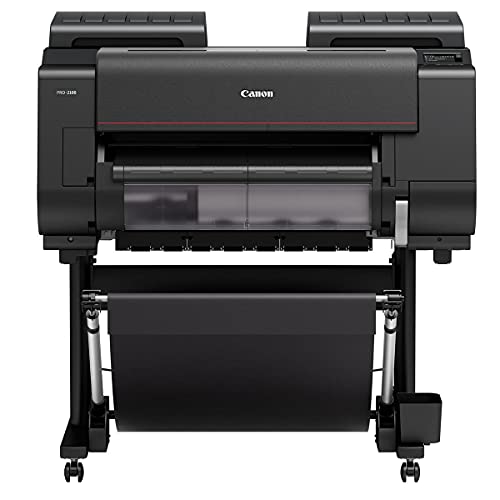
Canon’s PRO-2100 is a 24-inch wide-format printer described as a fine art printer. This listing, from Canon Platinum Reseller CES Imaging, is light on detail, mentioning a one-year on-site Canon warranty, USB connectivity with Ethernet, color inkjet output and a weight of about 289 pounds.
As part of Canon’s PRO series it sits below the 44-inch PRO-4100, and 24 inches is a popular width for artists producing prints up to roughly 24 x 36 inches. Because the listing gives few specs, confirm the ink system and media support with the reseller before buying.
Best suited for: Studios and serious artists printing up to 24 inches wide.
Key features:
- 24-inch wide format
- USB and Ethernet
- Fine art printer per listing
- 1-year on-site Canon warranty via reseller
Pros:
- Large prints without 44-inch bulk
- On-site warranty
- Studio-grade machine
Cons:
- Sparse listing detail
- About 289 pounds
- Very high price tier
Buying consideration: Ask the reseller for the ink configuration and the maximum paper thickness so you know it suits your preferred fine art papers.
3. Epson Artisan 1430 — Best for 13 x 19 Home Prints and Proofs

The Artisan 1430 prints borderless images up to 13 x 19 inches using six-color Claria ink, with Wi-Fi and printing from phones and tablets. It also prints on CD and DVD. At about 35 pounds it fits on a sturdy desk.
Claria is a dye-based ink, so this printer is best for proofs, personal prints, portfolio samples and cards rather than archival editions you plan to sell as fine art. It is also an older model, which affects availability of inks and support; check before committing. Note that its listed price at our check placed it in the top price tier, so compare it carefully against newer 13 x 19 photo printers.
Best suited for: Home artists who want to proof and print up to 13 x 19 inches.
Key features:
- Borderless prints up to 13 x 19 inches
- 6-color Claria ink
- Wi-Fi and mobile printing
- CD/DVD printing
Pros:
- Large prints on a desktop
- Wireless convenience
- Vivid color on photo paper
Cons:
- Dye-based ink is less archival
- Older model
- Slow print speed listed at 2.8 pages per minute
Buying consideration: Use it to check color and crop before ordering archival prints from a lab, and keep dye prints out of direct sunlight.
4. Liene M100 4×6 Photo Printer — Best for Small Proofs, Stickers and Art Cards

Liene’s M100 is a compact thermal dye-sublimation printer for 4 x 6-inch prints. It connects via its own Wi-Fi hotspot, supports up to five devices at once, and works with iPhone, Android and PC. Dye-sublimation prints receive a laminated layer that the listing says resists water, scratches, fingerprints and fading. The package includes three cartridges and 100 sheets of photo paper.
For digital painters, it is a fun tool for quick physical proofs of a color palette, small art cards, stickers for social media giveaways and reference prints to pin by your desk. It is not a fine art printer.
Best suited for: Artists making small cards, proofs and promotional prints from a phone or tablet.
Key features:
- 4 x 6-inch dye-sublimation prints
- Built-in Wi-Fi hotspot, up to 5 devices
- Laminated, water- and fingerprint-resistant
- 3 cartridges and 100 sheets included
Pros:
- Very portable
- Durable laminated prints
- Simple phone workflow
Cons:
- Small format only
- Not for fine art paper
- Ongoing cartridge and paper cost
Buying consideration: Export a cropped 4 x 6 version of your painting at 300 ppi for the cleanest prints.
Color Management: Getting Prints to Match Your Screen
- Calibrate your monitor with a hardware colorimeter so the screen shows accurate color and brightness.
- Lower screen brightness for editing prints; most screens are far brighter than a print under normal light.
- Use ICC profiles for your printer and paper combination, and let the application or printer manage color, not both.
- Soft-proof in software that supports it to preview how the print will look.
- Print a test strip before committing to a large print.
- View prints under consistent light, ideally daylight-balanced.
Choosing Paper for Digital Art Prints
Paper changes the look of a print as much as the printer does. Fine art inkjet papers fall into a few families:
| Paper type | Look | Suits |
|---|---|---|
| Matte cotton rag | Soft, velvety, no glare, textured or smooth | Painterly work, watercolor-style pieces, illustration |
| Matte smooth (hot press style) | Flat and crisp | Detailed linework, graphic art |
| Baryta / fiber gloss | Rich blacks, slight sheen, traditional photo feel | High-contrast paintings and dark scenes |
| Luster or satin photo | Moderate sheen, vivid color | Bright illustrations, portfolio prints |
| Canvas inkjet media | Woven texture, can be stretched | Prints meant to resemble paintings |
For prints you sell, choose acid-free papers, ideally cotton rag, and match each paper with its ICC profile. Matte papers absorb more ink and show a slightly smaller color range than glossy ones, so very saturated digital colors may look softer; soft-proofing helps you anticipate that.
Preparing a Digital Painting File for Print
- Work at print size. Set up or resize the canvas to the final dimensions at 300 ppi before adding fine detail.
- Flatten a copy. Keep your layered file and export a flattened TIFF or high-quality file for printing.
- Check edges. Add bleed if the print will be trimmed or wrapped on canvas.
- Sharpen for output. Light output sharpening compensates for ink spreading into paper.
- Name versions clearly. Keep separate files for web and print so you never send a low-resolution copy to a lab.
Print at Home or Use a Print Lab?
For many digital painters, a professional giclee print lab is the better option at first. Labs already own calibrated pigment printers and a range of fine art papers, and you pay only per print. Buying a printer makes sense when you sell enough prints to justify the equipment, ink and paper, when you need fast turnaround, or when you want full control over every print in an edition.
Understanding Running Costs
The sticker price is only the start. Before buying any printer for art, estimate what each print will really cost you.
- Ink: small desktop cartridges cost more per milliliter than the large tanks used by wide-format printers like the PRO-4100.
- Paper: cotton rag fine art papers cost several times more per sheet than photo paper.
- Maintenance: inkjet printers use ink to clean their heads, especially if they sit idle. Printing regularly reduces waste and clogs.
- Test prints: budget a few proof prints per new image or paper.
- Packaging and shipping: if you sell prints, sleeves, backing boards and mailers add up.
A simple spreadsheet with ink, paper and packaging per print size will tell you quickly whether home printing beats a lab for your volume.
Buying Guide: How to Choose a Printer for Digital Art
Decide what you are printing
Proofs and cards, home portfolio prints, or prints for sale. Each points to a different class of printer.
Choose pigment for prints you sell
Pigment inks resist fading far better; dye is fine for proofs and personal prints.
Pick the right width
13 x 19 covers most print sales up to 11 x 14 with borders; 24 and 44-inch printers are for large editions.
Check paper support
Fine art papers are thick; confirm the printer’s paper path and maximum thickness.
Consider running costs
Ink, paper and maintenance often cost more than the printer over its life.
Space and weight
Wide-format printers weigh hundreds of pounds and need dedicated space and power.
Create Work Worth Printing
Prints reward strong values and clean color. Practice both with our guides to digital night scenes and digital waves and ocean.
Common Mistakes to Avoid
- Editing on an uncalibrated, overly bright screen and getting dark prints.
- Selling dye-based prints as archival fine art.
- Printing at low resolution; aim for 300 ppi at final size.
- Letting both the application and the printer driver manage color, which double-corrects.
- Using cheap paper with a fine art printer.
- Buying a large-format printer before you have steady print sales.
FAQs
What printer is best for printing digital art at home?
For home prints up to 13 x 19 inches, a multi-ink photo inkjet like the Epson Artisan 1430 works for proofs and personal prints. For archival prints you sell, choose a pigment-ink printer or a professional lab.
What is a giclee print?
A high-quality inkjet print, typically using pigment inks on archival fine art paper, intended to last for decades.
What resolution should I print digital paintings at?
Aim for 300 pixels per inch at the final print size.
Why do my prints look darker than my screen?
Screens are backlit and usually too bright. Calibrate your monitor, lower brightness and use the correct paper profile.
Are dye-sublimation prints good for art?
They are durable and vivid for small prints, cards and stickers, but they are not fine art prints on archival paper.
Should I buy a printer or use a print lab?
Start with a lab unless you sell many prints or need quick turnaround; it avoids large equipment and ink costs.
Final Recommendation
For professional, archival editions at large sizes, the Canon imagePROGRAF PRO-4100 is the most capable printer here, with the 24-inch PRO-2100 as the smaller studio option. For home proofs and personal prints up to 13 x 19 inches, the Epson Artisan 1430 is workable, keeping in mind its dye-based ink and age.
For small cards, proofs and stickers, the Liene M100 is a fun, portable add-on. Whatever you choose, calibrate your screen first, and use a giclee lab for important prints until your sales justify owning a fine art printer. When you do buy, choose the smallest printer that covers the print sizes you actually sell; a machine that runs every week performs better and wastes less ink than a larger one that sits idle.