

PaintingProGuide is reader-supported. When you buy through links on this page we may earn an affiliate commission at no extra cost to you.
A digital painting can look perfect on screen and disappointing on paper. Shadows block up, skin tones turn orange, smooth gradients band and the whole image looks darker than you painted it. Getting high quality prints is less about any single brand and more about choosing the right class of printer, ink, paper and color workflow. This guide explains how to choose the best digital painting printers for high quality prints, and when a professional print lab is the better investment.
A note on what you will find here. Alongside a short list of printer models on Amazon, chosen from listing specifications checked in October 2026, this page gives you the criteria professionals use, a comparison of printer categories, and a step-by-step workflow so you can evaluate any printer, or any lab, with confidence.
Quick answer: For the highest quality prints of digital paintings, use a pigment-ink photo or fine art printer with at least eight individual inks, support for heavyweight cotton rag papers and accurate ICC profiles, paired with a calibrated monitor. If you print only occasionally or need sizes above 13 x 19 inches, a professional giclée lab will usually give better results for less money than buying a high-end printer. Of the models available on Amazon, the Canon imagePROGRAF PRO-310 is the pigment-ink choice for prints you sell, and the Epson EcoTank Photo ET-8550 suits frequent proofing.
Our Top Picks at a Glance
- Pigment-ink fine art printer (13 x 19 in or larger) — Best for artists who sell prints regularly
- Professional giclée print lab — Best for occasional, large or premium editions
- Multi-ink photo printer (letter size) — Best for small prints, cards and proofing
- Ink tank photo printer — Best for high-volume proofs with low running costs
- Basic home inkjet — Best only for drafts and reference prints
| Product | Best For | Key Spec | Key Strength | Price Tier |
|---|---|---|---|---|
| Pigment fine art printer | Selling archival prints | 8 to 12 pigment inks, fine art paper path | Lightfastness and gamut | Varies |
| Giclée print lab | Premium and large editions | Large-format pigment printers | Expert color, big sizes | Varies |
| Multi-ink photo printer | Small prints and proofs | 6 or more inks, letter to 13 x 19 in | Smooth gradients | Varies |
| Ink tank photo printer | High-volume proofing | Refillable bottles | Low cost per print | Varies |
| Basic home inkjet | Drafts and references | 2 cartridges | Low entry price | Varies |
How We Chose
We did not test printers for this guide. Because the product data available to us for this topic did not include suitable fine art printers, our guidance is based on well-established printing practice: the role of pigment versus dye inks, ink count, paper handling, color management and print resolution. These are the same criteria you will see on manufacturer specification sheets, so you can apply them to any printer or lab you consider.
- Ink type: pigment inks for archival work, dye inks for drafts.
- Ink count: more channels for smoother tones and neutral grays.
- Paper support: heavyweight fine art media and maximum size.
- Color management: ICC profiles, soft-proofing and calibration.
- Running costs: ink, paper, maintenance and waste.
What “High Quality” Means for a Digital Painting Print
Color accuracy
The print should match your intent, not your uncalibrated screen. That depends on the printer’s gamut, the paper and a correct ICC profile, plus a monitor calibrated to a sensible brightness.
Tonal smoothness
Digital paintings often include soft gradients in skies and skin. Printers with light cyan, light magenta and gray inks render those transitions more smoothly and with less visible dot pattern.
Deep, detailed shadows
Dark paintings test a printer’s black density and shadow detail. Matte papers need a dedicated matte black ink; glossy and luster papers use photo black. Good printers switch or carry both.
Longevity
Pigment inks on archival, acid-free paper are known for resisting fading far better than dye inks on standard paper. Buyers of art prints expect that durability.
Sharpness at the final size
A print is only as sharp as the file. Painting at around 300 pixels per inch at the final size gives the printer enough detail.
Printer Types for High Quality Prints Reviewed
1. Pigment-Ink Fine Art Printer — Best for Selling Archival Prints
Professional fine art printers use eight to twelve pigment inks, including multiple blacks and grays, and offer a straight or rear paper path for thick cotton rag and baryta papers. Desktop models often print up to 13 x 19 inches; larger roll-fed models go to 17 or 24 inches wide and beyond. They are the home equivalent of what giclée labs use.
Best suited for: artists who sell prints often and want full control over editions.
Key features:
- 8 to 12 pigment ink channels
- Matte and photo black options
- Heavyweight fine art paper support
- Manufacturer and paper-maker ICC profiles
Pros:
- Archival quality at home
- Same-day prints and proofs
- Full control over paper and color
Cons and limitations:
- High upfront and ink costs
- Nozzles can clog if unused for long periods
- Requires a color-managed workflow
Buying consideration: print regularly; these printers stay healthiest with frequent use.
2. Professional Giclée Print Lab — Best for Premium and Large Editions
Labs run large-format pigment printers maintained and profiled by specialists. Many offer paper sample packs, test strips and color adjustments, plus drop-shipping to your buyers.
Best suited for: artists who print occasionally, need big sizes or want expert color handling.
Key features:
- Large-format printing
- Wide paper selection
- Proofing and color correction services
Pros:
- No equipment to buy or maintain
- Consistent professional results
- Large sizes without large costs
Cons and limitations:
- Turnaround and shipping time
- Less hands-on control
- Per-print costs add up for high volume
Buying consideration: order a test strip on two or three papers before your first edition.
3. Multi-Ink Photo Printer — Best for Small Prints and Proofing
Mid-range photo printers with six or more inks produce smooth, vivid prints up to letter or 13 x 19 inches. Some use dye inks, which look vibrant but are less archival, so check the ink type before selling prints made on them.
Best suited for: greeting cards, small prints, portfolio proofs and testing compositions.
Key features:
- Six or more ink cartridges
- Photo and fine art paper support (varies)
- Borderless printing on many models
Pros:
- Good tonal quality for the price
- Compact
- Easier to maintain than pro printers
Cons and limitations:
- Dye inks may fade faster
- Limited heavy paper handling on some models
Buying consideration: confirm the ink is pigment-based if prints are for sale.
4. Ink Tank Photo Printer — Best for High-Volume Proofing
Ink tank printers use refillable bottles rather than cartridges, which can lower cost per print substantially. Photo-oriented ink tank models add extra colors for better image quality.
Best suited for: artists who print many proofs, references and small giveaways.
Key features:
- Refillable ink bottles
- Low running cost
- Often wide-format options
Pros:
- Very low cost per print
- Fewer ink replacements
Cons and limitations:
- Usually dye-based inks
- Higher upfront price than basic inkjets
Buying consideration: ideal for proofs; pair with a lab for archival sale prints.
5. Basic Home Inkjet — Best Only for Drafts
Two-cartridge inkjets are inexpensive and convenient for reference prints and rough proofs, but their limited inks and paper handling cannot produce gallery-quality art prints.
Best suited for: references, layout checks and scanning sketches.
Key features:
- Low price
- Print, copy and scan on many models
Pros:
- Cheap and simple
- Useful for workflow tasks
Cons and limitations:
- Limited color and gradients
- Not archival
Buying consideration: never sell prints from a basic inkjet as fine art.
Recommended Printers for Digital Painting Prints on Amazon
To put the categories above into concrete terms, here are printers on Amazon that fit them. They were chosen from listing specifications checked in October 2026, mainly ink type, number of inks, maximum print size and paper handling. We have not printed with these models, and only the first uses pigment inks, which matters if you sell prints.
| Product | Best For | Key Spec | Price Tier |
|---|---|---|---|
| Canon imagePROGRAF PRO-310 | Selling archival prints from home | 9-color pigment + Chroma Optimizer, 13 in | $$$ |
| Canon PIXMA PRO-200S | Vivid proofs and personal prints up to 13 x 19 | 8-color dye ink, borderless to 13 x 19 in | $$$ |
| Epson EcoTank Photo ET-8550 | High-volume proofing with low running costs | 6-color ink tank, wide format | $$$ |
| Epson Expression Photo HD XP-15000 | 13 x 19 prints on a mid-range budget | 6-color Claria Photo HD with red and gray, 13 x 19 in | $$$ |
| Epson Expression Photo XP-980 | Smaller studio prints and scanning | 6-color, borderless to 11 x 17 in | $$$ |
Price tiers: $ under $15, $$ $15 to $40, $$$ over $40, based on listing prices checked in October 2026. Prices change often, so confirm on Amazon.
1. Canon imagePROGRAF PRO-310 — Best for selling archival prints from home

This is the one model in the list that matches the pigment-ink fine art printer category recommended above for prints you sell. The listing describes a 9-color plus Chroma Optimizer pigment ink system and a dedicated matte black ink for denser blacks and better shadow detail on matte papers.
It prints at 13 inches wide, which covers 13 x 19 inch prints, and the listing mentions an anti-clogging system and skew correction for more consistent output.
Best suited for: Artists who sell prints regularly and want archival-oriented pigment inks with strong shadow detail.
Key features:
- 9 colors plus Chroma Optimizer, pigment-based (LUCIA PRO II)
- Matte black ink for deep blacks on fine art papers
- 13 inch wide format, Wi-Fi, 3 inch color LCD
Pros:
- Pigment inks suit prints for sale
- Handles the cotton rag and matte papers fine art printing relies on
- Anti-clogging system helps occasional users
Limitations:
- Highest cost in this list
- Pigment ink sets are expensive to replace
- Slow print speed (about 2 pages per minute)
Buying consideration: Budget for ink and paper as well as the printer, and check that ICC profiles are available for the papers you plan to use.
2. Canon PIXMA PRO-200S — Best for vivid proofs and personal prints up to 13 x 19

A step down from the PRO-310 in archival terms, because the listing describes an 8-color dye-based ink system. Dye inks typically give vibrant color and smooth gradients, but they are generally considered less lightfast than pigment, so this printer suits proofs, portfolio pieces and personal prints rather than editions for sale.
The listing gives borderless printing from 3.5 x 3.5 up to 13 x 19 inches and a bordered A3+ print in about 90 seconds.
Best suited for: Digital painters who want large, vibrant proofs at home and send final editions to a giclée lab.
Key features:
- 8-color dye ink system
- Borderless 3.5 x 3.5 to 13 x 19 inch prints
- Wi-Fi with 3 inch color LCD
Pros:
- Large borderless prints
- Faster than many pigment printers
- Vibrant color for proofs
Limitations:
- Dye ink is less suited to archival sale prints
- Cartridge running costs
- Large desktop footprint
Buying consideration: If most of your prints will be sold, the pigment PRO-310 or a lab is the better fit; this one shines as a proofing tool.
3. Epson EcoTank Photo ET-8550 — Best for high-volume proofing with low running costs
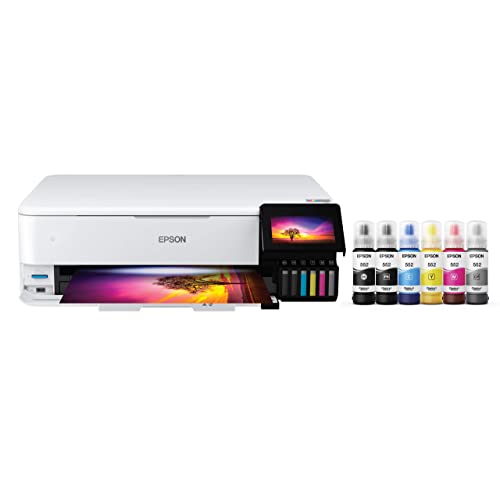
This matches the ink tank category above. The listing describes Claria ET Premium 6-color inks fed from refillable bottles instead of cartridges, with a 4 x 6 inch photo costing about 4 cents in ink by Epson’s estimate, and up to two years of ink in the box.
It is a wide-format all-in-one with a scanner and copier, which is handy for scanning sketches before painting over them digitally.
Best suited for: Artists who print a lot of test prints, cards or reference sheets and want to keep ink costs down.
Key features:
- Claria ET Premium 6-color ink, refillable bottles
- Wide-format printing
- Built-in scanner and copier
Pros:
- Very low cost per print
- Fewer ink replacements
- Scanner useful for traditional sketches
Limitations:
- Higher purchase price than cartridge models
- Fewer inks than dedicated fine art printers
- Not marketed as archival pigment
Buying consideration: Ideal as a second printer for proofs alongside a lab or a pigment printer for final work.
4. Epson Expression Photo HD XP-15000 — Best for 13 x 19 prints on a mid-range budget
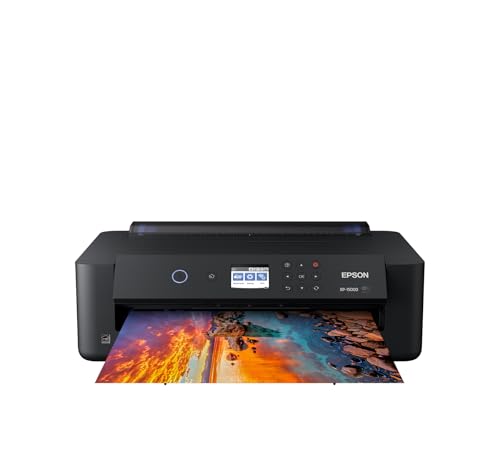
A compact wide-format printer that the listing says produces borderless prints up to 13 x 19 inches. Its 6-color Claria Photo HD inks add red and gray, which Epson describes as giving a wider color gamut and better black and white prints.
A 50-sheet rear tray handles specialty media including cardstock, which helps with heavier art papers.
Best suited for: Painters who want large prints at home for portfolios, gifts and proofs without paying for a professional printer.
Key features:
- Borderless prints from 4 x 6 to 13 x 19 inches
- 6-color ink including red and gray
- Rear specialty paper tray
Pros:
- Large print size at a lower price
- Gray ink helps neutral and monochrome work
- Compact for an A3+ printer
Limitations:
- Cartridge inks raise running costs
- Not a pigment fine art system
- Rear tray thickness limits for very heavy papers
Buying consideration: Run a test on your chosen paper and check the profile before printing an edition.
5. Epson Expression Photo XP-980 — Best for smaller studio prints and scanning

A smaller all-in-one that the listing says prints borderless up to 11 x 17 inches using 6-color Claria Photo HD inks at 5760 x 1440 dpi. It has separate trays for plain and photo paper plus a rear feed for specialty paper.
The built-in flatbed scanner and copier make it a practical studio machine for artists who move between traditional and digital work.
Best suited for: Artists who print at 11 x 17 or smaller and want a scanner in the same machine.
Key features:
- Borderless up to 11 x 17 inches
- 6-color Claria Photo HD ink
- Flatbed scanner, 4.3 inch touchscreen
Pros:
- Compact multitasker
- Rear feed for specialty paper
- Lower cost than 13 x 19 printers
Limitations:
- Smaller maximum print size
- Dye-based photo inks, not archival pigment
- Cartridge running costs
Buying consideration: Choose this over the XP-15000 only if you never need 13 x 19 prints and value the scanner.
Buying Guide: How to Choose a Printer for High Quality Prints
Decide home printing or lab
Estimate how many prints you will make per month. Low volume favors labs; steady volume can justify a printer.
Insist on pigment inks for sale prints
Pigment inks are the standard for archival art prints.
Look for eight or more inks
Extra light inks and grays smooth gradients and neutralize gray tones.
Check paper handling
Confirm support for heavyweight fine art paper and your target maximum size.
Use ICC profiles
Download profiles for each printer and paper combination and soft-proof before printing.
Calibrate your monitor
A calibrated screen at moderate brightness is the single biggest fix for dark prints.
Calculate running costs
Include ink, paper, test prints and maintenance cleaning cycles in your price per print.
Choosing Paper for High Quality Prints
Paper is half of print quality. Smooth matte cotton rag gives a soft, painterly look with no glare, flattering illustration and textural digital paintings, but blacks are less deep. Textured matte papers mimic watercolor sheets and suit traditional-looking work. Luster and pearl papers sit between matte and gloss, with rich color and good blacks while controlling reflections. Baryta papers have a classic darkroom feel with deep blacks and excellent detail. Gloss maximizes saturation but shows reflections and fingerprints. Buy a sample pack and print the same painting on each to decide.
Paper weight and archival notes
Heavier papers, around 300 gsm and up, feel premium and resist curling. Look for acid-free, archival papers without optical brighteners if longevity is important, since brighteners can change appearance over time.
Understanding Color Spaces
sRGB is the standard color space for screens and the web. Wider spaces such as Adobe RGB and Display P3 contain more saturated colors, some of which good printers can reproduce. If you paint in sRGB, prints will look predictable but may not use the full range of a fine art printer. If you paint in a wider space, convert carefully and soft-proof, because colors outside the printer’s gamut will shift. Ask your lab which color space it prefers, and keep your workflow consistent from canvas to export.
Pricing and Presenting Prints
Calculate the true cost per print: ink, paper, test prints, sleeves, backing boards and shipping, or lab fees. Many artists offer open editions on matte paper at accessible prices and smaller, signed and numbered limited editions on premium cotton rag or baryta. Include a certificate or card noting the paper and ink type and care instructions: frame behind UV-filtering glazing and keep out of direct sunlight.
Workflow: From Canvas to High Quality Print
- Set up the canvas at the final print size and around 300 pixels per inch.
- Paint in a wide color space if your software supports it, then convert carefully for print.
- Calibrate your monitor and lower brightness to a print-friendly level.
- Soft-proof with the printer and paper ICC profile; adjust shadows and saturation if needed.
- Export a flattened TIFF at full resolution, keeping the layered master.
- Print a test strip of a key area on the final paper.
- Evaluate under neutral daylight-balanced lighting, then make final tweaks.
- Print, dry and package prints flat in archival sleeves.
Viewing and Evaluating Prints
Judge prints under consistent, neutral light. Daylight-balanced bulbs around 5000K, or indirect daylight, show colors most accurately; warm household bulbs make prints look yellow and dim. Let prints dry for a while before final judgment, because some inks shift slightly as they settle. Compare the print side by side with the soft-proof on screen, noting whether shadows, skin tones and saturated areas match. Keep a printed log of settings, paper and adjustments so you can reproduce a successful print exactly later.
Printer Maintenance for Consistent Quality
Inkjet printers stay sharp when they are used. Print a small image or nozzle check at least weekly to keep pigment inks flowing, store paper flat in its original packaging away from humidity, and keep the printer covered to reduce dust. Run cleaning cycles only when a nozzle check shows gaps, since each cycle uses ink. If you go weeks without printing, a lab may be more economical than keeping a pigment printer primed.
Learn to Paint for Print
Printing well starts while you paint. Our guide on how to paint a digital illustration for print covers canvas setup, color and resolution in detail. For subjects that print beautifully, try the digital night scene painting tips, which test shadow detail, or the digital waves and ocean tutorial for smooth gradients.
Questions to Ask Before Buying a Printer
- How many prints will I make each month, and at what sizes?
- Is the ink pigment-based, and how many ink channels does it use?
- What is the thickest paper it accepts, and through which paper path?
- Are ICC profiles available for the papers I want to use?
- What do replacement inks cost, and how much ink do cleaning cycles use?
- Would a giclée lab meet my needs for less total cost?
Common Mistakes to Avoid
- Printing from a bright, uncalibrated screen and wondering why prints look dark.
- Using generic printer settings instead of the correct paper ICC profile.
- Upscaling a low-resolution painting for a large print and expecting crisp detail.
- Selling dye-ink prints on plain paper as archival art.
- Letting a pigment printer sit unused for weeks, which can cause nozzle clogs.
- Judging prints under warm household bulbs instead of neutral light.
FAQs
What printer gives the best quality prints of digital art?
A pigment-ink fine art printer with eight or more inks and heavyweight paper support, used with correct ICC profiles and a calibrated monitor. A professional giclée lab achieves the same quality without owning the printer.
Is pigment or dye ink better for art prints?
Pigment ink is preferred for archival art prints because it is known for better resistance to fading. Dye ink can look vivid but is better suited to drafts and short-term use.
Why do my digital paintings print too dark?
Usually because the monitor is too bright or uncalibrated. Calibrate, reduce brightness and soft-proof with the paper profile.
What resolution should I use for high quality prints?
Around 300 pixels per inch at the final print size is a reliable target. Set the canvas up at that size from the start rather than enlarging later, which softens detail.
Should I buy a printer or use a print lab?
If you print occasionally or need large sizes, a lab is usually better value. If you sell many prints and want control, a pigment printer can pay off.
What paper is best for digital painting prints?
Cotton rag matte papers give a painterly look; luster and baryta papers give deeper blacks and richer color. Test a few before choosing.
Final Recommendation
For truly high quality prints of digital paintings, choose pigment inks, eight or more ink channels, heavyweight fine art paper and a color-managed workflow. If your volume is low or you need large sizes, a professional giclée lab is the smartest route. Use a multi-ink or ink tank photo printer for proofs and small prints, and keep a basic inkjet only for drafts. Whichever path you take, calibrating your monitor and soft-proofing will improve your prints more than any single purchase.
Start small: order a few lab prints on different papers, learn how your colors translate, and only then decide whether owning a fine art printer makes sense for your volume and budget.



One Comment