PaintingProGuide is reader-supported. When you buy through links on this page we may earn an affiliate commission at no extra cost to you.
Digital painting does not use ink in the literal sense, yet “ink” shows up everywhere in it. Painting apps have inking brushes for line art. Comic and illustration workflows often start with real ink on paper that is scanned and colored digitally. And many digital artists build their own texture libraries by photographing ink washes, alcohol ink blooms and acrylic ink pours, then layering them into paintings. The best inks for digital painting are the ones that serve those hybrid uses: dense, water-resistant line inks that scan cleanly, and vivid flowing inks that make interesting textures.
This guide explains how ink fits into digital work, then reviews three ink sets and two air tools on Amazon chosen for scanning and texture-making. A note up front: some products returned for this search, such as printer and nail-printer cartridges, are not artist inks and were left out.
Quick answer: For ink line art you will scan and color digitally, the Mont Marte Acrylic Ink Premium 12-color set is the best all-round choice: it is permanent and water-resistant once dry, so you can layer washes over linework, and its pipette bottles make controlled application easy. For a wider palette of flowing acrylic inks for texture painting, the Artecho 18-color set adds more hues in 20 ml dropper bottles. To create alcohol ink textures for digital backgrounds, the Limino 12-color alcohol ink set paired with a CYFUN hand air blower is an inexpensive start.
How Ink Fits Into Digital Painting
| Use | What you do | Ink to choose |
|---|---|---|
| Scanned line art | Ink drawings on paper, scan, color digitally | Opaque, waterproof black or acrylic ink |
| Ink washes as values | Paint gray washes, scan as a value layer | Diluted acrylic ink |
| Texture library | Photograph blooms, pours and splatters for overlays | Alcohol inks, fluid acrylic inks |
| Digital inking | Use an app’s ink brushes with a stylus | No physical ink; adjust stabilization and pressure |
| Printing finished work | Print digital paintings for sale or display | Pigment-based printer inks are generally more fade-resistant than dye inks |
Our Top Picks at a Glance
- Mont Marte Acrylic Ink Premium (12 x 20 ml) — Best overall for scanned line art and washes
- Artecho Acrylic Ink Set (18 x 20 ml) — Best palette for fluid texture painting
- Limino Alcohol Ink Set (12 x 0.35 oz) — Best for alcohol ink textures
- CYFUN DESIGN Ink Air Blower (2 pack) — Best manual tool for moving ink
- Drankin Cordless Paint Pouring Blower — Best powered blower for pour and ink textures
| Product | Best For | Key Spec | Key Strength | Price Tier |
|---|---|---|---|---|
| Mont Marte Acrylic Ink | Line art and washes | 12 x 20 ml; pipette bottles | Permanent, water-resistant once dry | $$ |
| Artecho Acrylic Ink | Texture painting, pours | 18 x 20 ml; dropper bottles | Intermixable, high flow | $$ |
| Limino Alcohol Ink | Bloom and cell textures | 12 x 0.35 oz; concentrated | Highly saturated color | $ |
| CYFUN Air Blower | Steering wet ink | 2 rubber bulb blowers | No power needed | $ |
| Drankin Pouring Blower | Faster, stronger airflow | 5 speeds; 3 nozzles; 8000 mAh | Cordless, lightweight | $$ |
How We Chose
These picks are based on Amazon listing details and specifications checked in October 2026, judged on how well each ink or tool suits scanning, line art and texture-making for digital painters, and on how widely each product is reviewed by Amazon buyers. We have not used these products ourselves. Scanning and texture advice reflects common hybrid digital art practice.
- Water resistance — line art that will not bleed when washed over or handled.
- Flow and saturation — strong color and movement for photogenic textures.
- Application control — pipettes and droppers for precise amounts.
- Relevance — artist inks and tools only; printer and nail cartridges were excluded.
Best Inks for Digital Painting Workflows Reviewed
1. Mont Marte Acrylic Ink Premium (12 x 20 ml) — Best for scanned line art and washes

Mont Marte’s 12-color acrylic ink set includes White, Cadmium Yellow, Orange, Scarlet, Bright Green, Sap Green, Teal, Phthalo Blue, Violet, Yellow Ochre, Burnt Umber and Black. The listing says it is permanent and water-resistant once dry, so you can layer other media on top, and lists comic book art among suitable uses.
That combination makes it a strong pick for hybrid illustrators. Ink your linework in black, let it dry, add diluted washes for shading, then scan and color digitally. The lines will not lift when you wash over them.
Pipette bottles help with precise application and mixing, and the listing notes suitability for airbrush and pouring as well.
Best suited for: Comic artists and illustrators who ink on paper and finish digitally.
Key features:
- 12 colors including Black and White
- 20 ml pipette bottles
- Permanent and water-resistant once dry
- Suitable for paper, card and canvas
Pros:
- Water-resistant lines for layering
- Includes earth tones for wash studies
- Mid tier
Cons and limitations:
- Only 20 ml per color
- Black may run out first for line work
- Cadmium Yellow name suggests careful handling
Buying consideration: Use a nib pen or brush with black for lines and dilute Burnt Umber or Black for value washes; they scan into clean grayscale layers.
2. Artecho Acrylic Ink Set (18 x 20 ml) — Best for fluid texture painting

Artecho offers 18 intermixable acrylic-based inks in 20 ml tapered bottles with precision pipettes. The listing describes a high-flow liquid formula that spreads evenly and dries water-resistant on paper, cardstock and canvas, and names pouring, pen and ink, calligraphy and mixed media among techniques.
For texture-making, high-flow inks are ideal: they bloom on wet paper, blend into each other and create organic shapes that look great as overlay layers in digital paintings. You can dilute with water for transparent effects.
It conforms to ASTM D4236 and cleans up with soap and water while wet.
Best suited for: Digital painters building a personal texture library and mixed media artists.
Key features:
- 18 colors, 20 ml each
- High-flow acrylic-based ink
- Precision pipette bottles
- Water-resistant once dry; ASTM D4236
Pros:
- Wider palette than the Mont Marte set
- Good flow for organic textures
- Controlled dispensing
Cons and limitations:
- Best on absorbent surfaces
- Small bottles
- Colors are not listed individually
Buying consideration: Paint textures on heavy watercolor paper, let them dry flat, and scan at 600 dpi so you can scale them up in large digital canvases.
3. Limino Alcohol Ink Set (12 x 0.35 oz) — Best for alcohol ink textures

Alcohol inks create the swirling cells, rings and blooms many digital artists use as background textures. Limino’s set offers 12 highly pigmented colors in 0.35 oz squeeze bottles, described as concentrated so a little goes a long way.
The listing focuses on resin art, petri dishes and tumblers, but alcohol inks are also commonly used on non-porous synthetic paper and tiles, which is where their most photogenic effects appear.
Because the ink is concentrated, a single bottle makes many texture sheets.
Best suited for: Artists making abstract textures to scan or photograph for digital overlays.
Key features:
- 12 colors, 0.35 oz each
- Concentrated, alcohol-based
- Squeeze bottles for drop control
- Strong diffusion and layering effects
Pros:
- Very saturated color
- Low tier
- Creates distinctive organic textures
Cons and limitations:
- Alcohol inks need ventilation
- Not lightfast for finished traditional art
- Designed mainly for resin uses
Buying consideration: Work on non-porous surfaces such as synthetic paper or ceramic tile, and photograph textures under even, diffused light to avoid glare.
4. CYFUN DESIGN Ink Air Blower (2 Pack) — Best for steering wet ink by hand

A rubber squeeze bulb is the simplest way to move alcohol ink and fluid acrylic around a surface. CYFUN’s two-pack lets you control airflow by how hard you squeeze, steady or fast, and needs no electricity or batteries.
The listing mentions alcohol ink art directly, and notes the bulbs are also useful for removing dust from cameras, screens and electronics, which is handy for keeping your scanner glass and stylus screen clean.
It is the lowest-cost tool in this guide.
Best suited for: Anyone experimenting with alcohol ink textures.
Key features:
- Two hand-squeeze air blowers
- Adjustable airflow by pressure
- No power or refills needed
- Doubles as a dust blower for electronics
Pros:
- Very low tier
- Precise, gentle airflow
- Useful for cleaning scanner glass
Cons and limitations:
- Limited airflow strength
- Tiring for large pieces
- No nozzles
Buying consideration: Keep one blower ink-free just for cleaning your scanner glass and screen.
5. Drankin Cordless Paint Pouring Blower — Best for stronger airflow for pours and inks

For larger texture sheets, a powered blower saves effort. Drankin’s cordless blower has three interchangeable nozzles, five speed settings and a brushless motor rated at 180,000 RPM, powered by an 8000 mAh battery. It weighs about 0.54 lbs and measures 5.2 x 1.9 inches.
The listing names acrylic pouring, Dutch pour, fluid art and watercolor drying. For digital artists, it speeds up both pushing ink into shapes and drying sheets before scanning.
Five speeds give gentle control for delicate blooms and strong air for dramatic pours.
Best suited for: Artists making many large texture sheets or pours.
Key features:
- Five adjustable speeds
- Three interchangeable nozzles
- 8000 mAh rechargeable battery
- About 0.54 lbs
Pros:
- Much stronger than a hand bulb
- Cordless and portable
- Doubles as a dryer
Cons and limitations:
- Highest tier here
- Strong air can splatter ink
- Needs charging
Buying consideration: Start on the lowest speed and hold the nozzle at a low angle to push ink rather than blasting it.
Turning Ink Into Digital Assets
- Create on good paper. Heavy watercolor or bristol paper for acrylic ink; synthetic paper for alcohol ink.
- Dry completely and flat. Warped paper scans with shadows.
- Scan or photograph evenly. Scan at 300–600 dpi; photograph in diffused daylight with the camera parallel to the sheet.
- Clean up. Adjust levels, remove dust spots and crop edges.
- Separate line art. For ink drawings, set the scanned layer to Multiply or convert lines to transparency.
- Use textures as overlays. Try Overlay, Soft Light or Multiply blend modes at low opacity, and mask them into specific areas.
- Save a library. Name and tag textures so you can find them again.
Five Ink Texture Techniques Worth Scanning
Wet-in-wet blooms
Wet a sheet of watercolor paper, then drop diluted acrylic ink onto it. The color spreads in soft, feathered shapes that work beautifully as cloud, smoke or atmospheric overlays.
Salt and alcohol reactions
Sprinkle coarse salt onto a wet acrylic ink wash, or drip rubbing alcohol into it. Both push pigment away and leave speckled or ringed patterns useful for stone, rust and starfields.
Air-blown branches
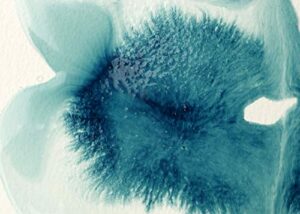
Drop a pool of ink and blow it outward with a bulb or blower. The branching lines read as cracks, lightning, veins or bare winter trees once scanned.
Alcohol ink cells
On synthetic paper, layer two or three alcohol ink colors and add a drop of blending solution or isopropyl alcohol. The resulting cells and rings make striking abstract backgrounds.
Splatter and dry brush
Flick ink from a stiff brush or toothbrush for spray patterns, or drag a nearly dry brush across rough paper. These make natural-looking grit, dust and foliage texture that digital brushes often struggle to imitate.
Scan each sheet in full color even if you plan to use it in grayscale; you can always desaturate later, but you cannot recover color you did not capture.
Digital Inking Tips
If by ink you meant inking line art inside the app, a few settings matter more than the brush you choose: increase stroke stabilization or smoothing for long confident lines, map line thickness to pressure (or tilt if your stylus lacks pressure), work at a larger canvas size than your final output so lines look crisp when reduced, and draw quick strokes rather than slow ones. Many artists rotate the canvas constantly to draw lines in their most comfortable direction.
Buying Guide: How to Choose Ink for a Digital Workflow
Waterproof for line art
If you will add washes over lines or color traditionally before scanning, choose ink that is water-resistant once dry.
Flow and saturation for textures
High-flow acrylic inks and alcohol inks create the most interesting shapes and colors for overlays.
Paper choice for ink
The surface changes the result as much as the ink. Smooth bristol keeps nib and brush lines sharp for line art that needs minimal cleanup. Cold-press watercolor paper adds tooth and lets acrylic ink washes granulate slightly, which reads as natural texture once scanned. Synthetic, non-absorbent papers keep alcohol ink moving on the surface for cells and blooms. Buy a small pad of each before committing to large quantities.
Control tools
Pipettes, droppers and air blowers give you control over where ink goes.
Ventilation
Alcohol inks and their solvents need a well-ventilated space.
Ignore cartridge results
Searches for “digital painting ink” can return printer, nail-printer or check-scanner cartridges. These are not artist inks and should only be bought for the specific device they are made for.
Printing finished work
If you print your digital paintings, pigment-based printer inks on archival paper generally last longer than dye-based inks. Follow your printer’s recommendations.
Practice Digital Painting
Once you have built a few textures, put them to work in our tutorials on digital waves and ocean painting and digital night scenes. No stylus? See digital painting without a tablet.
Common Mistakes to Avoid
- Scanning before ink is dry. Wet ink smears and can damage scanner glass.
- Using non-waterproof ink under washes. Lines bleed.
- Photographing textures in harsh light. Glare and shadows ruin overlays.
- Overusing textures. Mask them in subtly; a painting covered in texture looks noisy.
- Working with alcohol ink in a closed room. Ventilate.
- Buying device cartridges by mistake. Check that ink is for artists, not printers.
FAQs
Do digital painters use real ink?
Many do, especially illustrators and comic artists who ink line art on paper and color it digitally, and artists who create ink textures to scan and use as overlays.
What ink is best for scanning line art?
Opaque, water-resistant inks like acrylic inks or waterproof black inks scan with crisp edges and do not bleed if you add washes.
How do I use ink textures in digital paintings?
Scan or photograph them, clean them up, then place them on a layer above your painting using blend modes like Overlay, Soft Light or Multiply, masked into specific areas.
Are alcohol inks good for digital art textures?
Yes. Alcohol inks produce cells, blooms and gradients that make striking abstract backgrounds and overlays.
What is an inking brush in digital painting?
A brush designed for clean line art, usually with pressure-controlled width and stabilization to smooth strokes.
Which printer ink is best for printing digital paintings?
Pigment-based inks are generally more fade-resistant than dye-based inks, especially on archival paper. Use the inks recommended for your printer.
Final Recommendation
For hybrid line art and value washes, choose the water-resistant Mont Marte Acrylic Ink set. For a wider fluid palette to build textures, add the Artecho 18-color acrylic inks. Alcohol ink textures start with the Limino set and a CYFUN hand blower, and the Drankin cordless blower speeds things up if you make textures often.