PaintingProGuide is reader-supported. When you buy through links on this page we may earn an affiliate commission at no extra cost to you.
Android is a more capable painting platform than many artists assume. Desktop-class programs like Clip Studio Paint and Krita run on Android tablets, free apps like ibis Paint X and Sketchbook have millions of users, and Infinite Painter offers a natural-media brush engine built for touchscreens. Even an Android phone can become a painting station when connected to a pen tablet over USB. The best digital painting software for Android depends on what you paint and what device you paint on.
This guide first compares the leading Android painting apps by strengths, pricing model and best use. Then it covers the hardware from our Amazon check that makes those apps shine: a 12-month Clip Studio Paint PRO license usable on Android, the Frunsi RubensTab T12 standalone tablet that ships with Sketchbook, Krita and Infinite Painter, and pen tablets that connect to Android phones and tablets for pressure-sensitive painting.
Quick answer: For comics and detailed illustration, Clip Studio Paint is the most powerful Android painting app, and a 12-month Clip Studio Paint PRO license covers one device including Galaxy and other Android tablets. For free painting, Krita and ibis Paint X lead. For natural brushes, Infinite Painter. To run them on a dedicated device, the Frunsi RubensTab T12 comes with Sketchbook, Krita and Infinite Painter; to add pressure to an Android phone, the XPPen Deco 01 V3 connects with its included OTG adapter.
Our Top Picks at a Glance
- Clip Studio Paint — Best for comics and professional illustration
- Krita — Best free desktop-class painter
- ibis Paint X — Best free all-round drawing app
- Infinite Painter — Best natural media brushes
- Sketchbook — Best for sketching
- Frunsi RubensTab T12 (hardware) — Best Android tablet for these apps
Android Painting Apps Compared
| App | Pricing Model | Standout Feature | Best For |
|---|---|---|---|
| Clip Studio Paint | Subscription or plan | Comic tools, vector inking, 3D models | Comics, manga, illustration |
| Krita | Free, open source | Desktop-class brush engine | Painting on large tablets |
| ibis Paint X | Free with ads; paid upgrade | Large brush library, stroke stabilization | All-round drawing |
| Infinite Painter | Free trial plus purchase | Natural brushes, perspective guides | Painterly illustration |
| Sketchbook | Free | Clean, focused interface | Sketching and ideation |
| MediBang Paint | Free | Comic panels and cloud | Free comic creation |
App pricing and features change; check Google Play for current terms.
How We Approached This Guide
We have not benchmarked these apps side by side for this article. App descriptions reflect each one’s well-established reputation and publicly stated features. Hardware and license picks are based on the Amazon listing details checked in October 2026, how well each fits Android painting, and how widely each product is reviewed by Amazon buyers.
- Brush engine: quality and responsiveness on touch and pen.
- Pressure support: works with active pens and USB pen tablets.
- Export: PSD and high-resolution output.
- Device requirements: Android version and RAM.
- Pricing: free, one-time or subscription.
The Main Android Painting Apps in Detail
Clip Studio Paint
Clip Studio Paint on Android offers essentially the same toolset as desktop: vector line art, rulers, screentones, panel tools, 3D posing models and animation. It is the strongest option for comic and manga creators and detailed illustrators. Its interface is dense on small screens, so it is happiest on tablets of 10 inches or more.
Krita
Krita is a free, open-source painting program that began on desktop. Its Android version brings a powerful brush engine, wrap-around mode and many file formats. The interface was designed for large screens, so it works best on 11 to 12-inch tablets with a keyboard or shortcut keys nearby.
ibis Paint X
ibis Paint X is one of the most widely used mobile drawing apps. It offers layers, a big brush library, stroke stabilization and process recording. It is free with ads, with paid options to remove them, and tutorials for it are everywhere.
Infinite Painter
Infinite Painter focuses on realistic brushes and painting tools such as perspective guides, symmetry and pattern tools. It suits painterly illustrators who want a traditional feel.
Sketchbook and MediBang
Sketchbook offers a clean interface ideal for sketching and planning. MediBang Paint is free and includes comic tools and cloud features, a useful entry point for webcomic artists.
Which Android App Should You Choose?
| If You Want To… | Choose |
|---|---|
| Make comics with professional tools | Clip Studio Paint |
| Paint seriously for free | Krita |
| Start drawing quickly with lots of tutorials | ibis Paint X |
| Paint with realistic brushes | Infinite Painter |
| Sketch ideas | Sketchbook |
Hardware and Licenses That Help Android Painters
| Product | Best For | Key Spec | Key Strength | Price Tier |
|---|---|---|---|---|
| Clip Studio Paint PRO, 12 Months | Android comics and illustration | 1 device, 12 months; Android and others | 10,000+ free assets | $$ |
| Frunsi RubensTab T12 | Standalone Android painting | 12 in FHD laminated, 6GB/128GB, 4,096 levels, tilt | Sketchbook, Krita, Infinite Painter included | $$$ |
| XPPen Deco 01 V3 | Pen for Android phones and tablets | 10 x 6.25 in, 16,384 levels, tilt, OTG | Works with Android 6.0+ per listing | $$ |
| UGEE M708 V3 | Budget pen tablet | 10 x 6 in, 16,384 levels, 8 keys | Android 10.0+ compatible | $$$ |
| UGEE M708 V2 | Older Android devices | 10 x 6.25 in, 8 keys, tilt | Android 6.0+ compatible | $$$ |
| Wacom Intuos Small (wired) | Trusted pen tech | USB-A, 4,096 levels | Works with Windows, Mac, Android | $$ |
| BUTOUCH Basic 2 | Brush feel on touchscreens | Passive brush stylus | No battery or pairing | $$ |
1. Frunsi RubensTab T12 Standalone Drawing Tablet, 12 Inch — Best for standalone Android painting

The RubensTab T12 is a 12-inch standalone Android drawing tablet with a Full HD fully laminated screen and anti-glare coating for a paper-like feel. It has an octa-core CPU, 6GB RAM, 128GB storage and an active pen with 4,096 pressure levels and 60-degree tilt support.
The listing says it comes loaded with Sketchbook, Krita, Infinite Painter and FlipaClip, plus a case, a drawing glove, a power adapter and a pre-applied screen protector. A 12-inch screen is a good size for Krita and Clip Studio, whose interfaces need room.
Best suited for: Artists who want a dedicated Android painting device.
Key features:
- 12 in FHD laminated, anti-glare
- 6GB RAM, 128GB storage
- 4,096 levels, 60-degree tilt
- Painting apps and accessories included
Pros:
- Large screen for desktop-style apps
- Tilt support
- Apps preinstalled
Cons and limitations:
- Active pen needs charging
- Full HD on 12 in is less sharp than 2K
- Android version not specified in listing
Buying consideration: Check that Clip Studio or your preferred app supports the tablet’s Android version before relying on it for paid work.
2. CLIP STUDIO PAINT PRO, 12 Months License, 1 Device — Best for Android comics and illustration

This license runs Clip Studio Paint PRO for 12 months on one device of your choice, including Galaxy and other Android devices, Chromebook, iPad, PC or macOS. The listing describes it as fully featured on smartphones and tablets, with brushes, rulers, balloons, screentones, 3D assets and more than 10,000 free downloadable assets.
Best suited for: Comic artists and illustrators painting on Android tablets.
Key features:
- 12 months, 1 device
- Android and other platforms
- Comic, illustration and animation tools
- 10,000+ free assets
Pros:
- Full feature set on Android
- Device flexibility
- Large asset library
Cons and limitations:
- Time-limited
- One device
- Dense interface on phones
Buying consideration: Use it on a 10-inch or larger tablet for the most comfortable interface.
3. XPPen Deco 01 V3 10×6 Drawing Tablet, 16K Battery-Free Stylus — Best for adding a pressure pen to Android phones and tablets

The Deco 01 V3 has a 10 x 6.25-inch active area, a battery-free stylus with 16,384 pressure levels and 60-degree tilt, and eight customizable express keys. The listing states compatibility with Windows, macOS, Chrome OS and Android, connecting to Android phones or tablets via the included OTG adapter.
For artists who already own an Android phone or tablet without a pressure pen, this turns the device into a pressure-sensitive painting setup. Check that your painting app supports external pen tablets.
Best suited for: Android users without an active pen, and Chromebook painters.
Key features:
- 10 x 6.25 in active area
- 16,384 levels, 60-degree tilt
- 8 express keys
- OTG adapter for Android
Pros:
- Adds pressure to Android devices
- Large active area
- Battery-free pen
Cons and limitations:
- Phone screens are small for painting
- App support for external tablets varies
- Cable connection
Buying consideration: Rotate the phone or tablet to landscape so the drawing area maps better to the screen.
4. UGEE M708 V3 Drawing Tablet, 10×6 Inch — Best for a budget pen tablet

UGEE’s M708 V3 has a 10 x 6-inch active area with a paper-texture surface, a passive stylus with 16,384 pressure levels, 60-degree tilt and eight customizable express keys. The listing lists compatibility with Windows, macOS and Android 10.0 or later, with USB to USB-C connectivity and adapters.
It is a low-cost way to add a pressure pen to a newer Android tablet or phone, or to a computer.
Best suited for: Budget painters with newer Android devices.
Key features:
- 10 x 6 in, paper texture
- 16,384 levels, tilt
- 8 express keys
- Android 10.0+ listed
Pros:
- Low price tier
- High pressure levels
- USB-C adapters included
Cons and limitations:
- App support varies
- Wired
- Pen is passive (no battery)
Buying consideration: Test pressure in your app immediately after connecting; some apps need a setting enabled.
5. UGEE M708 V2 Drawing Tablet, 10×6.25 Inch — Best for older Android devices

The M708 V2 is listed as compatible with Android 6.0 or later, Chrome OS 88 or later, Linux, macOS and Windows. It has a 10 x 6.25-inch working area, eight customizable express keys and tilt. The listing mentions both 8,192 and 16,384 pressure figures, so treat the higher number with caution.
Its wider Android support makes it the option for older tablets and phones.
Best suited for: Painters with older Android devices.
Key features:
- 10 x 6.25 in
- Android 6.0+ listed
- 8 express keys, tilt
- Ultra-thin
Pros:
- Broad OS support
- Low price tier
- Large area
Cons and limitations:
- Conflicting pressure specs
- Wired
- App support varies
Buying consideration: Confirm your device supports USB OTG before buying.
6. Wacom Intuos Small, Wired Graphic Drawing Tablet with Pen — Best for trusted pen technology
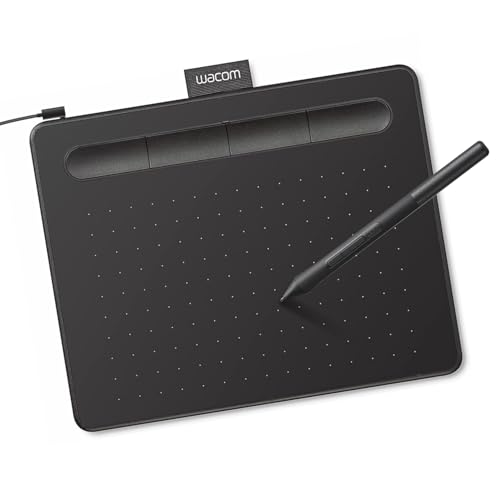
The wired Intuos Small uses Wacom’s battery-free EMR pen technology with 4,096 pressure levels. The listing details say it works with Windows, macOS and Android, and it is plug-and-play with Chromebook. Registration unlocks included software and training.
Wacom’s pen feel and driver support are widely trusted, and Android compatibility makes it a cross-device option.
Best suited for: Painters who want Wacom reliability across devices.
Key features:
- USB-A connection
- 4,096 pressure levels
- Battery-free EMR pen
- Windows, macOS, Android listed
Pros:
- Trusted pen technology
- Software included
- Chromebook plug-and-play
Cons and limitations:
- Small active area
- USB-A may need adapter for phones
- Lower pressure figure than others
Buying consideration: Use a USB-A to USB-C OTG adapter for Android phones and tablets.
7. BUTOUCH Basic 2 Digital Painting Brush Stylus — Best for brush feel on touchscreens

BUTOUCH Basic 2 is a passive brush stylus for capacitive touchscreens, including Android tablets and phones. It is about 18.5 cm long and 18 g, and needs no battery, pairing or charging.
It gives a real brush sensation for loose painting in apps like ibis Paint or Infinite Painter, though without pressure sensitivity.
Best suited for: Casual painters and kids on Android tablets.
Key features:
- Passive brush tip
- No battery or pairing
- 18.5 cm, about 18 g
- Most capacitive touchscreens
Pros:
- Tactile brush feel
- Low price tier
- Portable
Cons and limitations:
- No pressure
- Less precise than active pens
- Not for fine detail
Buying consideration: Use soft, large brushes in your app to match the stylus’s loose feel.
Buying Guide: How to Choose Digital Painting Software for Android
Match the app to your work
Comics and detailed illustration point to Clip Studio; free serious painting to Krita; quick all-round drawing to ibis Paint X; painterly work to Infinite Painter.
Check device requirements
Large canvases and many layers need RAM. Tablets with 6GB or more give noticeably more room.
Check minimum Android versions on Google Play.
Pressure input
Active pens or USB pen tablets provide pressure. Capacitive styluses and fingers do not. Confirm your app supports your pen.
Screen size
Desktop-style apps like Krita and Clip Studio are most comfortable on 10 to 12-inch screens.
Export and sync
PSD export and cloud sync help if you finish work on a computer.
Pricing model
Free apps are excellent for learning. Paid licenses add features and remove ads.
Connecting a Pen Tablet to Android
- Confirm your phone or tablet supports USB OTG.
- Connect the tablet with the included OTG adapter or a USB-C cable.
- Rotate the device to landscape for a better aspect ratio match.
- Open your painting app and check that pressure responds.
- If pressure does not work, check the app’s input settings or try a different app.
Practice Projects
Try your Android setup with our tutorials on painting digital waves and ocean and digital night scenes. Without a pen yet? See digital painting without a tablet.
Common Mistakes to Avoid
- Using desktop-style apps on small phones. Interfaces get cramped.
- Expecting pressure from capacitive styluses. Only active pens or pen tablets provide it.
- Ignoring RAM limits. Big canvases cap layer counts.
- Not backing up. Export layered files regularly.
- Skipping OTG checks. Not every device supports USB pen tablets.
- Judging color with blue light filters on. Turn them off while painting.
FAQs
What is the best digital painting app for Android?
Clip Studio Paint is the most powerful for illustration and comics; Krita and ibis Paint X are the best free options; Infinite Painter offers natural brushes.
Is Krita available on Android?
Yes. Krita runs on Android tablets and works best on larger screens.
Can I use a drawing tablet with an Android phone?
Many pen tablets, including the XPPen Deco 01 V3 and UGEE M708 models, list Android compatibility via OTG.
Do Android painting apps support pressure?
Yes, with active pens or compatible USB pen tablets. Capacitive styluses do not provide pressure.
What Android tablet is good for digital painting?
A tablet with a laminated screen, a pressure pen and 6GB or more RAM, such as the Frunsi RubensTab T12.
Is Clip Studio Paint free on Android?
It offers limited free use; full features require a paid plan or license, such as the 12-month PRO license.
Final Recommendation
For professional comics and illustration on Android, Clip Studio Paint is the strongest app, available as a 12-month PRO license. Krita and ibis Paint X are the best free painters, and Infinite Painter suits natural-media work. For hardware, the Frunsi RubensTab T12 is a well-equipped standalone with the key apps preinstalled, while the XPPen Deco 01 V3, UGEE M708 models and Wacom Intuos Small add pressure-sensitive pens to Android phones and tablets. The BUTOUCH Basic 2 is a fun brush-feel stylus for casual painting.