PaintingProGuide is reader-supported. When you buy through links on this page we may earn an affiliate commission at no extra cost to you.
Android is a better home for painting than its reputation suggests. The best digital painting apps for Android tablets now include full layer stacks, pressure-sensitive brush engines, blend modes and PSD export, and several of them cost nothing to start. The catch is that an app can only be as good as the screen and stylus underneath it. A great brush engine on a laggy tablet with a 1,024-level pen still feels like drawing through a pillow.
This guide does two jobs. First it sorts the main Android painting apps by what they are actually good at, so you can pick one for sketching, painting, comics or animation. Then it looks at five standalone Android drawing tablets sold on Amazon that run those apps without a computer, because for many artists the hardware decision is the bigger one.
Quick answer: For most painters, start with a free raster app such as ibis Paint X, Krita or Sketchbook, then move to Infinite Painter or Clip Studio Paint if you want deeper brush control or comic tools. To run them comfortably, the Frunsi RubensTab T12 pairs a 12-inch laminated screen with a 4,096-level pen and comes with Sketchbook, Krita and Infinite Painter listed as included apps. The Simbans PicassoTab A12 is the strongest alternative for students, with Android 14 and a Concepts PRO upgrade in the box.
Our Top Picks at a Glance
- Frunsi RubensTab T12 — Best overall Android tablet for painting apps
- Simbans PicassoTab A12 — Best for students and sketch-to-vector work
- Callsky-Kids Cpad 12 Pro — Best for heavy layer counts and large files
- Frunsi T11 Pro 10.1-inch — Best mid-size tablet for beginners
- Frunsi T8 8-inch — Best compact tablet for sketching on the go
| Product | Best For | Key Spec | Key Strength | Price Tier |
|---|---|---|---|---|
| Frunsi RubensTab T12 | All-round painting | 12 in FHD, 4,096-level pen, 6GB/128GB | Painting apps listed as included | $$$ |
| Simbans PicassoTab A12 | Students, school projects | 12 in laminated, Android 14, 6GB/128GB | Concepts PRO upgrade bundled | $$$ |
| Callsky-Kids Cpad 12 Pro | Big files, many layers | 12 in 2000×1200, 100% sRGB, 256GB | Most storage and memory | Varies |
| Frunsi T11 Pro 10.1 in | First drawing tablet | 10.1 in 1920×1200, 1,024-level pen | Balanced size and weight | $$$ |
| Frunsi T8 8 in | Pocket sketching | 8 in 1200×800, 2,048-level pen, Android 13 | Smallest and lightest | $$$ |
How We Chose
We did not paint on these tablets ourselves. The app recommendations below are based on what each app is publicly known for and how it is positioned by its developer. The hardware picks are based on the Amazon listing details and specifications checked in October 2026, how well each tablet’s screen size, pen pressure, memory and Android version fit painting apps, and how widely each product is reviewed by Amazon buyers.
- Pen pressure levels: 4,096 levels gives smoother tapering than 1,024 levels in brush-heavy apps.
- Laminated display: reduces the gap between pen tip and line, which matters for fine linework.
- RAM and storage: painting apps cap your layer count based on memory, so 6GB or more is noticeably freer.
- Android version: newer versions keep app compatibility longer.
- Screen size: 10 to 12 inches suits painting; 8 inches suits sketching.
The Best Digital Painting Apps for Android Tablets, by Job
There is no single best Android painting app because the apps are built for different work. Think about what you paint most often, then pick the app built for it. Most of the apps below offer a free tier, so you can try two or three before committing money.
ibis Paint X: best free all-rounder
ibis Paint X is one of the most widely used drawing apps on mobile. It offers layers, a large brush library, stabilization for smooth lines and screen-recording of your process. The free version is ad-supported, and a paid tier removes ads and unlocks extra features. It is a sensible first app because tutorials for it are everywhere.
Krita: best free desktop-style painter
Krita is a free, open-source painting program that started on desktop and also runs on Android tablets. It brings a desktop-class brush engine, wrap-around mode for textures, and support for many file formats. The interface was designed for large screens, so it is far more comfortable on a 12-inch tablet than on an 8-inch one.
Infinite Painter: best for natural media brushes
Infinite Painter focuses on realistic brushes, blending and painting tools such as perspective guides and symmetry. It is a strong pick for illustrators who want oil- or gouache-like results on Android. Basic tools are free to try, with a one-time or subscription upgrade for the full kit depending on the current offer.
Clip Studio Paint: best for comics and manga
Clip Studio Paint is the industry favorite for comics, with panel tools, vector line layers and excellent inking. On Android it runs on a subscription model after a trial period. If you plan to publish comics or webtoons, it is worth the cost.
Sketchbook: best clean, distraction-free sketching
Sketchbook keeps the interface minimal so the canvas stays large. Its pencils and inking pens feel natural, and it is free. It is less suited to heavy painting with dozens of layers, but it is a pleasant daily sketch app.
ArtFlow and Concepts: specialist options
ArtFlow is a lightweight painting app that runs well on modest hardware, which makes it a good match for smaller tablets. Concepts uses an infinite canvas with vector strokes, which suits design sketching, product drawing and planning before you paint. The PicassoTab listing includes a Concepts PRO upgrade, which is a nice extra for students.
A practical approach: pick one raster painting app (ibis Paint X, Krita or Infinite Painter) and one sketch or planning app (Sketchbook or Concepts). Learn the raster app deeply. Switching apps every month is the quickest way to stall.
Best Android Tablets for Digital Painting Apps Reviewed
1. Frunsi RubensTab T12 — Best for all-round painting

The RubensTab T12 is a 12-inch standalone tablet built for drawing. The listing says it comes loaded with Sketchbook, Krita, Infinite Painter and other drawing and animation apps, so it covers three of the strongest Android painting options out of the box. The fully laminated Full HD display and 4,096-level pen with 60-degree tilt support are the specs that matter for painters, since tilt lets brush tips behave more like a pencil laid on its side.
With 6GB of RAM, 128GB of storage and an octa-core CPU, it has enough headroom for multi-layer canvases at a reasonable resolution. The box also includes a case, drawing glove, power adapter and a pre-applied screen protector, which saves extra purchases.
Best suited for: Hobbyists and art students who want a single device for painting, sketching and light animation.
Key features:
- 12-inch Full HD laminated display
- 4,096-level active pen with 60-degree tilt
- 6GB RAM, 128GB storage, octa-core CPU
- Case, glove, adapter and screen protector included
Pros:
- Large canvas for Krita and Infinite Painter interfaces
- Tilt support for shading strokes
- Painting apps named in the listing
Cons and limitations:
- Heavier and less pocketable than 8 to 10 inch models
- Android tablet color accuracy is not stated in the listing
Buying consideration: If you plan to paint more than sketch, the 12-inch size and 4,096-level pen are worth the step up from 10-inch models.
2. Simbans PicassoTab A12 — Best for students and sketch-to-vector work

The PicassoTab A12 is a 12-inch Android 14 tablet aimed at sketching, painting, animation and school projects. Its laminated screen and Picasso Pen 3 with 4,096 pressure levels and palm rejection are well matched to painting apps, and the newer Android version is an advantage for long-term app support.
The bundle includes a case, glove, adapter, screen protector and two app upgrades, one of them a lifetime PRO upgrade for Concepts. With 6GB RAM and 128GB storage expandable to 1TB, it can hold a large library of projects and reference images.
Best suited for: Students who want one device for art class, note-taking and personal painting projects.
Key features:
- 12-inch laminated display
- Picasso Pen 3: 4,096 levels with palm rejection
- Android 14, 6GB RAM, 128GB storage expandable to 1TB
- Front and rear cameras for reference photos
Pros:
- Newest Android version in this group alongside the Callsky
- Bundled Concepts PRO upgrade
- Large expandable storage
Cons and limitations:
- Premium tier among standalone tablets
- Bundled app upgrades may not match the app you prefer
Buying consideration: If you like planning with vector sketches before painting, the Concepts upgrade adds real value.
3. Callsky-Kids Cpad 12 Pro — Best for heavy layer counts and large files
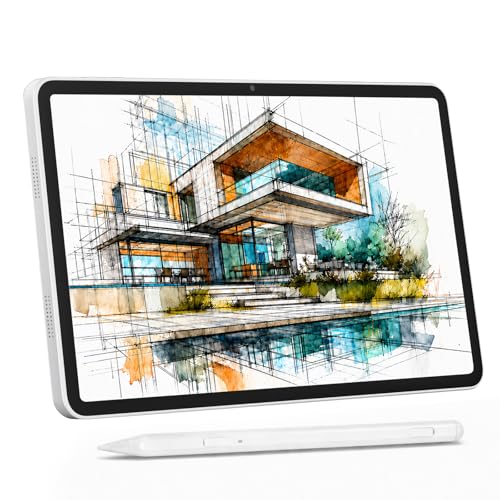
Despite the brand name, the Cpad 12 Pro is specified like a grown-up painting tablet. The listing calls out a 12-inch IPS display at 2000 x 1200, 100% sRGB coverage, full lamination and a 4,096-level USI 2.0 stylus with 60-degree tilt. It runs Android 15 with 256GB storage expandable to 2TB.
Memory is listed as 16GB, but that figure is 8GB physical plus 8GB virtual. Physical RAM is what painting apps lean on most, so treat it as an 8GB device, which is still more than the other picks here.
Best suited for: Painters who work at higher resolutions or keep many layers and want room for a big reference library.
Key features:
- 12-inch 2000 x 1200 IPS, 100% sRGB stated
- 4,096-level USI 2.0 stylus with tilt
- Android 15, 256GB storage expandable to 2TB
- Pre-applied anti-glare screen protector
Pros:
- Most storage in this guide
- Stated sRGB coverage for color work
- Anti-glare protector for daylight use
Cons and limitations:
- RAM figure includes virtual memory
- Brand is less established than Frunsi or Simbans
- Price was not shown on the listing check
Buying consideration: Compare current pricing against the T12 and A12, since the spec sheet is stronger but the price varies.
4. Frunsi T11 Pro 10.1-inch — Best for beginners

The T11 Pro is a 10.1-inch Full HD tablet with Android 12, a quad-core MTK processor, 4GB RAM and 64GB storage. The listing says it works with SketchBook, ArtFlow and ibis Paint X, which are the lighter apps best suited to this level of hardware.
The pen has 1,024 pressure levels and needs no battery. That is enough for sketching and simple painting, though heavier brush engines will feel less nuanced than on 4,096-level models. Battery life is listed at over five hours from a 5,800mAh cell.
Best suited for: Beginners and younger artists learning layers and brushes in ibis Paint X or Sketchbook.
Key features:
- 10.1-inch 1920 x 1200 IPS display
- Battery-free pen with 1,024 pressure levels
- Android 12, 4GB RAM, 64GB storage
- Pre-installed drawing app and tutorials
Pros:
- Comfortable size for lap or desk
- Works with popular lightweight apps
- No pen charging needed
Cons and limitations:
- Older Android version
- 4GB RAM limits layer counts in heavy apps
- Lower pen pressure resolution
Buying consideration: Buy this as a learning tablet; if you already know you will paint seriously, step up to a 12-inch model.
5. Frunsi T8 8-inch — Best for sketching on the go

The T8 is the compact option: an 8-inch, 1200 x 800 display running Android 13 with a 2,048-level pen. Inside are an MTK quad-core CPU, 4GB RAM and 64GB storage expandable to 256GB. The listing names SketchBook, ArtFlow and ibis Paint X as compatible apps.
An 8-inch screen is tight for painting with docked panels, but it is pleasant for quick sketches, thumbnails and color notes on a commute. Think of it as a digital sketchbook rather than a main studio device.
Best suited for: Artists who want a small second device for thumbnails and daily sketches.
Key features:
- 8-inch 1200 x 800 display
- 2,048-level pen
- Android 13, 4GB RAM, 64GB expandable storage
- 4,000mAh battery
Pros:
- Highly portable
- Newer Android than the T11 Pro
- Higher pen resolution than the T11 Pro
Cons and limitations:
- Small canvas and lower resolution
- Cramped for Krita-style interfaces
Buying consideration: Pair it with Sketchbook or ArtFlow, which keep the interface minimal on small screens.
Buying Guide: How to Choose an Android Tablet for Painting Apps
Match the app to the hardware
Krita, Clip Studio Paint and Infinite Painter scale up with memory and screen size. ibis Paint X, Sketchbook and ArtFlow stay responsive on modest tablets. Decide on your main app first, then buy hardware that runs it comfortably.
Pressure levels and tilt
Pressure lets strokes taper from thin to thick. 4,096 levels is the comfortable standard for painting, while 1,024 is workable for sketching. Tilt support lets brushes shade when the pen is angled, which helps pencil and charcoal brushes feel natural.
Lamination and screen protector
A laminated screen keeps the line close to the pen tip. A matte or anti-glare protector adds paper-like friction and reduces reflections, but it slightly softens the image.
RAM, not just storage
Painting apps limit how many layers you can create based on canvas size and available memory. Storage holds finished files; RAM determines how complex a single file can be.
Android version and updates
Newer Android versions keep compatibility with app updates longer. Android 13 to 15 is a safer long-term bet than Android 12.
Screen size versus portability
Twelve inches gives room for panels and a decent canvas. Eight inches is easy to carry but cramped. Ten inches is a reasonable middle ground for beginners.
Keep Learning
Once your app is set up, practice with a focused subject. Our walkthrough on painting digital waves and ocean scenes is a good first project for layer blending, and the guide to digital night scene painting tips covers glow and value control that any Android app can handle.
Common Mistakes to Avoid
- Buying the biggest app subscription before learning a free app well.
- Working at a huge canvas size on a 4GB tablet, then hitting the layer limit halfway through.
- Ignoring pen pressure settings; most apps let you adjust the pressure curve to match your hand.
- Skipping backups. Export finished pieces to cloud storage or a PC regularly.
- Using a glossy screen without a glove, which causes smudging and accidental palm marks.
- Assuming every Android tablet supports every stylus. Standalone tablets ship with a matched pen for a reason.
FAQs
What is the best free digital painting app for Android tablets?
ibis Paint X and Krita are the strongest free starting points. ibis Paint X is easier to learn and has huge tutorial coverage, while Krita offers a desktop-style brush engine that rewards a larger screen.
Is Procreate available on Android?
No. Procreate is made for iPad only. On Android, Infinite Painter and ibis Paint X are the closest in feel for painting, and Clip Studio Paint is the best match for comics.
Do I need a special tablet for Android painting apps?
Any Android tablet runs the apps, but a pressure-sensitive pen is what makes painting feel natural. Standalone drawing tablets bundle a matched active pen with pressure levels, which ordinary tablets with a rubber-tip stylus cannot match.
How much RAM do I need for Krita or Clip Studio Paint on Android?
Four gigabytes runs them, but layer limits arrive quickly at print resolutions. Six to eight gigabytes of physical RAM gives far more room for complex paintings.
Can I export Android paintings as PSD files?
Several Android apps, including ibis Paint X, Krita and Clip Studio Paint, can export layered files that open in desktop software. Check the export options inside the app you choose.
Is an 8-inch tablet big enough for digital painting?
It works for sketches and thumbnails, but painting with panels open is cramped. For regular painting, 10 to 12 inches is more comfortable.
Final Recommendation
Pick your app first. For a free start, learn ibis Paint X or Krita; move to Infinite Painter for painterly brushes or Clip Studio Paint for comics. Then match the hardware: the Frunsi RubensTab T12 is the best all-round host for those apps, the Simbans PicassoTab A12 suits students who want the newest Android and a Concepts upgrade, and the Callsky Cpad 12 Pro gives the most storage for big files. Beginners on a smaller budget can start with the Frunsi T11 Pro, and the T8 makes a handy pocket sketchbook.