

PaintingProGuide is reader-supported. When you buy through links on this page we may earn an affiliate commission at no extra cost to you.
An iPad’s glass screen is beautiful to look at and slippery to draw on. Apple Pencil skates across it, which makes controlled linework and lettering harder than it needs to be. A paper-feel screen protector adds a fine matte texture that grips the pencil tip, reduces glare and makes drawing feel closer to pencil on paper. The trade-offs are a slightly softer image and faster pencil tip wear.
The best screen protector for iPad art depends on how much you draw versus watch, and on your exact iPad model. Below we compare seven current options on Amazon.com, from permanent paper-feel films to removable magnetic and static-cling designs and clear tempered glass, and explain how to choose.
Quick answer: For artists who want the most paper-like drawing feel, Astropad Rock Paper Pencil v3.0 is the best screen protector for iPad art on 13-inch iPad Pro and iPad Air: a removable matte film paired with matching Apple Pencil tips. On iPad 10th and 11th generation, the ESR Magnetic Paper-Feel Protector lets you snap texture on for drawing and off for video. For a budget permanent option, the MOBDIK Paperfeel film fits iPad 10th/11th generation and iPad Air 11.
Our Top Picks at a Glance
- Astropad Rock Paper Pencil v3.0 (13-inch) — Best removable paper feel with matching pencil tips
- ESR Magnetic Paper-Feel Protector (iPad 10/11) — Best switchable option for drawing and video
- MOBDIK Paperfeel Protector — Best budget permanent paper feel
- KCT 2-Pack Paperfeel Protector — Best two-pack value for paper feel
- bersem 2-Pack Paperfeel Protector — Best alternative two-pack paper feel
- ESR 2-Pack 9H Tempered Glass — Best clear glass for maximum display clarity
- JETech 2-Pack 9H Tempered Glass — Best budget clear glass protection
| Product | Best For | Key Spec | Key Strength | Price Tier |
|---|---|---|---|---|
| Astropad Rock Paper Pencil v3.0 | Serious artists on 13-inch iPads | Removable NanoCling matte PET + 2 pencil tips | Most paper-like pairing | $$ |
| ESR Magnetic Paper-Feel | Switching between art and video | Magnetic removable PET, iPad 10/11 only | Snap on and off | $ |
| MOBDIK Paperfeel | Budget permanent texture | 0.17 mm Japanese PET, matte | Anti-glare, oleophobic | $ |
| KCT Paperfeel 2-Pack | Spare for replacement | Two 0.17 mm PET films | Micro-grit surface | $ |
| bersem Paperfeel 2-Pack | Value two-pack | Two 0.17 mm PET films | Matte anti-glare | $ |
| ESR 9H Glass 2-Pack | Clear display | 0.3 mm tempered glass, UltraFit tray | Bubble-free install | $$ |
| JETech 9H Glass 2-Pack | Budget clear protection | 9H tempered glass | Oleophobic coating | $ |
How We Chose
We did not draw on these protectors for this guide. Picks are based on the Amazon listing details checked in October 2026, how well each protector’s surface, thickness, installation method and compatibility suit drawing with Apple Pencil, and how widely each product is reviewed by Amazon buyers.
- Drawing feel: paper-feel matte texture versus smooth glass.
- Removability: permanent films versus magnetic or static-cling designs.
- Display impact: clarity, glare reduction and possible graininess.
- Compatibility: exact iPad models and generations.
- Installation: alignment aids and bubble-free application.
- Tip wear: how aggressively the texture wears Apple Pencil tips.
Best Screen Protector for iPad Art Reviewed
1. Astropad Rock Paper Pencil v3.0 Paper Screen Protector, 13-inch — Best for serious artists on 13-inch iPads

Astropad’s Rock Paper Pencil pairs a matte paper-feel screen protector with replacement Apple Pencil tips designed to work together, which the listing describes as delivering the most realistic pen-on-paper feeling. Version 3.0 uses NanoCling static-cling technology for secure attachment, easy removal and residue-free reuse.
The listing says the NanoCling border is 40% thinner than a magnetic border, for a flush surface without ridges. Because it is removable, you can switch between matte for drawing and the pristine display for photo editing or video. This model fits iPad Pro 13-inch (M4, M5) and iPad Air 13-inch (M2, M3, M4), and the included tips work with Apple Pencil 1st and 2nd generation and Pencil Pro.
Best suited for: illustrators and letterers using 13-inch iPads who want the most paper-like feel and the option to remove it.
Key features:
- Removable matte paper-feel protector
- NanoCling static-cling attachment
- Two replacement Apple Pencil tips included
- Fits iPad Pro 13 (M4, M5) and iPad Air 13 (M2-M4)
- Optical-grade PET
Pros:
- Strong paper-like feel
- Removable and reusable
- Thin border for a flush surface
Cons and limitations:
- Highest price tier
- Only for 13-inch models in this version
Buying consideration: Check that you are buying the size and version for your exact iPad; Astropad sells different models for other iPads.
2. ESR Paper-Feel Magnetic Screen Protector for iPad A16 11th/10th Gen — Best for switching between art and video

ESR’s magnetic protector attaches to the iPad’s edges with magnets, so you can snap it on for drawing and remove it for watching video with full clarity. A protective envelope stores it when not in use, per the listing.
The surface is treated to feel like paper. The listing notes it can be used over a tempered glass protector under 0.33 mm thick for double protection. Compatibility is strict: iPad 11-inch (A16) 2025 and iPad 10th generation 2022 only.
Best suited for: iPad 10th and 11th generation owners who draw but also watch a lot of video.
Key features:
- Magnetic attachment and removal
- Paper-feel matte surface
- Storage envelope
- Works over thin tempered glass
- iPad 10th and 11th gen only
Pros:
- Best of both worlds: texture and clarity
- Bubble-free snap-on fit
- Reusable
Cons and limitations:
- Narrow compatibility
- Edges can shift slightly if bumped
Buying consideration: Wipe the screen before attaching so dust is not trapped under the film.
3. MOBDIK Paperfeel Screen Protector for iPad A16 11th/10th and iPad Air 11 — Best for budget permanent paper feel
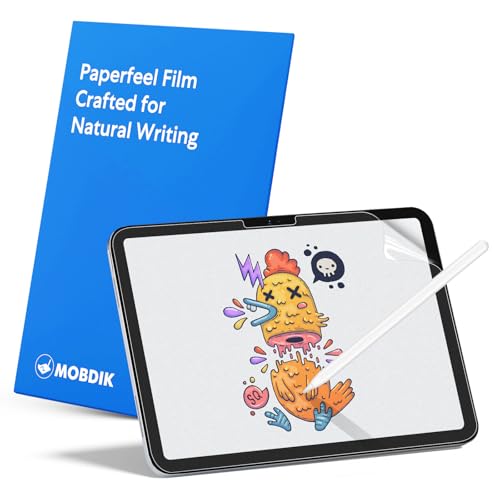
MOBDIK’s paper-feel film is a permanent adhesive protector at a low price tier. The listing describes a textured surface that replicates paper friction, made from 0.17 mm Japanese PET film that maintains touch sensitivity.
A matte coating diffuses light to reduce glare and an oleophobic layer repels smudges. Compatibility includes iPad 11th generation (2025), iPad 10th generation (2022) and iPad Air 11 (M2, M3, M4); the listing warns it does not fit iPad Pro 11 or older 10.9-inch iPad Air models.
Best suited for: budget-minded artists and students who draw most of the time.
Key features:
- 0.17 mm PET paper-feel film
- Matte anti-glare coating
- Oleophobic layer
- Fits iPad 10/11 and iPad Air 11 (M2-M4)
Pros:
- Low cost
- Thin film keeps touch responsive
- Reduces glare
Cons and limitations:
- Permanent once applied
- Matte texture softens display slightly
Buying consideration: Apply in a steamy bathroom or dust-free room to minimize dust bubbles.
4. KCT 2 Pack Paperfeel Screen Protector for iPad A16 11th/10th and iPad Air 11 — Best for a spare for replacement

Paper-feel films wear down over time and can be damaged during installation, so a two-pack is practical. KCT’s set includes two PET films with a uniform micro-grit surface and an ultra-thin 0.17 mm design, according to the listing.
It offers anti-glare and an oleophobic coating to reduce fingerprints. Compatibility covers iPad 11th generation, iPad 10th generation and iPad Air 11-inch M2, M3 and M4 per the listing, but not iPad Pro 11 or older Air models.
Best suited for: artists who want a spare film, or who share setup across two iPads.
Key features:
- Two paper-feel PET films
- 0.17 mm thickness
- Micro-grit surface
- Anti-glare, oleophobic
Pros:
- Spare for when the first wears
- Good value
- Thin and responsive
Cons and limitations:
- Permanent adhesive
- Same display softening as all matte films
Buying consideration: Keep the spare in its packaging, flat and away from heat, until you need it.
5. bersem 2 Pack Paperfeel Screen Protector for iPad A16 11/10th and Air 11 — Best for value two-pack paper feel

bersem’s two-pack is a close alternative to KCT, with a paper-feel surface using materials imported from Japan and a 0.17 mm ultra-thin design, per the listing. It is designed to prevent pencil slippage for more precise control.
A matte finish disperses light to cut glare. The listing reminds users to peel off the printed protective layer before use, since it is not the paper-feel surface, a useful tip for avoiding confusion. Compatibility matches iPad 11th, 10th and iPad Air 11 (M2-M4).
Best suited for: students and hobbyists wanting a low-cost two-pack.
Key features:
- Two paper-feel films
- 0.17 mm thickness
- Matte anti-glare
- Fits iPad 10/11 and Air 11
Pros:
- Low cost per film
- Clear installation guidance
- Reduces pencil slip
Cons and limitations:
- Permanent adhesive
- Graininess on bright white screens
Buying consideration: Line up using the camera cutout first, then lower the film slowly from one edge.
6. ESR 2 Pack Screen Protector for iPad A16 11th/10th, 9H Tempered Glass — Best for maximum display clarity

Not every artist wants texture. If you draw occasionally but mostly care about a crisp display, clear tempered glass is the better choice. ESR’s two-pack uses 9H-hardness tempered glass 0.3 mm thick, with an UltraFit tray for precise, bubble-free installation, according to the listing.
It is ultra-clear with an anti-stain, anti-fingerprint coating and keeps the original screen feel. Compatibility is limited to iPad 11-inch (A16) 2025 and iPad 10th generation 2022. It can be paired with ESR’s magnetic paper-feel protector for drawing sessions.
Best suited for: photo editors, video watchers and artists who prefer smooth glass.
Key features:
- 9H tempered glass, 0.3 mm
- UltraFit installation tray
- Anti-fingerprint coating
- iPad 10th and 11th gen only
Pros:
- Full display clarity
- Strong scratch and impact protection
- Easy, aligned installation
Cons and limitations:
- No drawing texture
- Slippery for pencil work
Buying consideration: Pair with a removable paper-feel film if you want both clarity and texture.
7. JETech Screen Protector for iPad (A16) 11th/10th Gen, 2-Pack, Tempered Glass — Best for budget clear protection

JETech’s two-pack offers premium 9H tempered glass, an HD-clear surface and a hydrophobic and oleophobic coating, per the listing. It adheres automatically without air bubbles.
It fits iPad (A16) 11th and 10th generation models, and the listing helpfully explains how to check your model number in Settings.
Best suited for: anyone who wants inexpensive glass protection and keeps drawing occasional.
Key features:
- 9H tempered glass, 2-pack
- HD clarity
- Hydrophobic and oleophobic coating
- Fits iPad 10th and 11th gen
Pros:
- Low price tier for glass
- Spare included
- Keeps original display quality
Cons and limitations:
- Smooth, slippery drawing feel
- Glossy finish shows glare
Buying consideration: Check your model number under Settings, General, About before ordering.
Paper-Feel vs Tempered Glass vs Removable
| Type | Drawing Feel | Display Clarity | Pencil Tip Wear | Best For |
|---|---|---|---|---|
| Permanent paper-feel film | Textured, controlled | Slightly softened, less glare | Faster | Daily drawing and writing |
| Removable paper-feel (magnetic or static) | Textured when attached | Full clarity when removed | Faster when attached | Art plus media use |
| Tempered glass | Smooth, slippery | Excellent | Normal | Media, photo editing, protection |
Buying Guide: How to Choose a Screen Protector for iPad Art
Confirm your iPad model
Screen sizes and camera positions differ between generations. Find your model number in Settings, General, About, and match it to the listing. Many protectors are not cross-compatible even between iPads with similar screen sizes.
Decide how much texture you want
Heavier texture feels more like paper and gives more control, but softens the display and wears tips faster. Lighter textures are a compromise.
Consider removable designs
If you watch video or edit photos often, a magnetic or static-cling paper-feel protector lets you switch.
Plan for tip wear
Matte films act like fine sandpaper. Budget for replacement Apple Pencil tips, and replace them when they flatten or feel scratchy.
Think about protection
Tempered glass resists impact and scratches better than thin PET film. Some removable paper-feel protectors can sit over a thin glass protector for both.
Installation matters
Alignment trays, guide stickers and dust-removal stickers make bubble-free installation easier. Install in a clean, still room.
How to Install a Screen Protector Without Bubbles
Prepare the room: install in a clean, still space. Some people run a hot shower for a few minutes first so steam settles airborne dust.
Clean the screen: use the included wet wipe, then the dry cloth, then the dust-removal sticker to lift any remaining specks. Check the screen at an angle under a bright light.
Align before peeling: place the protector on the screen with its backing still on and use the camera cutout and edges to line it up. Some kits use guide stickers or a tray to hold alignment while you peel.
Lower from one edge: peel the backing and let the film settle from one side to the other, rather than dropping it flat. Paper-feel films do not self-adhere as quickly as glass, so smooth gently from the center outward with the included card.
Deal with bubbles: small air bubbles often disappear within a day. Dust bubbles will not; lift the corner with tape, touch the dust with a dust sticker and lay the film back down.
Remove the top layer: many paper-feel films have a printed transport layer on top. Peel it off to reveal the textured surface.
Drawing Tips on a Paper-Feel Surface
Expect a short adjustment period: lines feel slower and more deliberate at first. Lower your pressure slightly and let the texture do the work. Increase brush streamline less than you would on bare glass, since the friction already steadies your hand. Our guides to drawing line art in Procreate and coloring line art in Procreate pair well with a paper-feel surface, and environment painters will notice the extra control in loose brushwork covered in our guide to painting digital environment art.
Common Mistakes to Avoid
- Ordering by screen size instead of exact iPad model.
- Leaving the printed protective layer on top of a paper-feel film.
- Installing in a dusty room and trapping debris.
- Ignoring pencil tip wear until the tip scratches the surface.
- Choosing heavy matte texture when you mostly watch video.
- Stacking thick protectors that interfere with magnetic attachments.
FAQs
Are paper-feel screen protectors worth it for iPad art?
For many artists, yes. They add grip and control for Apple Pencil, reduce glare and make drawing feel closer to paper.
Do paper-feel screen protectors wear out Apple Pencil tips?
Yes, they wear tips faster than glass. Keep spare tips and replace them when they flatten.
Do matte screen protectors reduce image quality?
They slightly soften the display and can add a faint grain on bright backgrounds. Removable designs avoid this when you do not need texture.
Can I use a paper-feel protector with tempered glass?
Some removable paper-feel protectors, like ESR’s magnetic model, can be used over a thin tempered glass protector.
What is the best removable paper-feel protector?
Astropad Rock Paper Pencil v3.0 for 13-inch iPads and ESR’s magnetic protector for iPad 10th and 11th generation are strong choices.
Will a screen protector affect Apple Pencil accuracy?
Thin films like 0.17 mm PET are designed to maintain touch sensitivity. Very thick or stacked protectors can affect feel.
Final Recommendation
For 13-inch iPad artists, Astropad Rock Paper Pencil v3.0 is the best screen protector for iPad art thanks to its removable design and matched pencil tips. On iPad 10th and 11th generation, the ESR magnetic paper-feel protector is the best switchable option, while MOBDIK, KCT and bersem offer budget permanent paper feel. If you value clarity over texture, choose ESR or JETech tempered glass.


One Comment