PaintingProGuide is reader-supported. When you buy through links on this page we may earn an affiliate commission at no extra cost to you.
Android tablets built for drawing have quietly become one of the best ways to paint digitally without a computer. Unlike general-purpose tablets, they ship with a pressure-sensitive pen, a matte or etched screen and painting apps preinstalled, and the best of them now rival far more expensive setups on pen response and color. The best Android tablet for digital painting combines a precise pen, a laminated, color-accurate display, enough memory for big layered files and a recent Android version that keeps apps like Krita and Clip Studio Paint running well.
We compared six Android drawing tablets from the October 2026 listings. Here is how they differ and who each one suits.
Quick answer: The HUION Kamvas Pad 12 is the best Android tablet for painting on paper: 16,384-level pen with ±60° tilt, a factory-calibrated 99% sRGB display (ΔE under 1.8), 90Hz refresh, 8GB RAM, 256GB storage and Android 16. If you want Wacom’s battery-free Pro Pen 3 and etched glass, choose the Wacom MovinkPad 11. For a lighter budget pick, the UGEE UT2 10.36 inch offers a 2K laminated screen at 466 g.
Our Top Picks at a Glance
- HUION Kamvas Pad 12 — Best Android tablet for digital painting overall
- Wacom MovinkPad 11 — Best pen experience
- UGEE UT2 10.36 in Standalone — Best lightweight 2K tablet
- RubensTab T12 — Best 12-inch value with tilt
- RubensTab T11 Pro — Best entry tablet with a stand case
- Frunsi T8 — Best compact Android sketcher
| Product | Best For | Key Spec | Key Strength | Price Tier |
|---|---|---|---|---|
| HUION Kamvas Pad 12 | Overall painting | 12.2 in 3:2 2K+, 16K pen, Android 16 | Calibrated 99% sRGB, 90Hz | $$$ |
| Wacom MovinkPad 11 | Premium pen feel | 11.45 in, Pro Pen 3, 8GB/128GB | Battery-free pen, etched glass | $$$ |
| UGEE UT2 10.36 in | Light and portable | 2K laminated, 6GB/128GB, 466 g | 7000mAh, 100% sRGB | $$$ |
| RubensTab T12 | 12-inch value | 12 in FHD laminated, 6GB/128GB | Tilt, Krita preloaded | $$$ |
| RubensTab T11 Pro | Entry level | 10.1 in FHD, Android 12 | Stand case, battery-free pen | $$$ |
| Frunsi T8 | Pocket sketching | 8 in, 4GB/64GB, Android 13 | Up to 20 hours listed | $$$ |
How We Chose
We did not test these tablets. Picks are based on Amazon listing details and specifications checked in October 2026, on how well each tablet’s pen, display, memory and Android version suit painting apps, and on how widely each product is reviewed by Amazon buyers.
- Pen: pressure levels, tilt, activation force and power source.
- Display: lamination, resolution, color gamut, calibration and surface texture.
- Performance: RAM, storage and processor.
- Software: Android version and listed app support.
- Portability: weight and battery.
We excluded a PicassoTab model whose listing names a custom graphics tablet OS rather than Android, since this guide focuses on Android app compatibility.
Why the Android Version Matters for Painting
Painting apps update regularly, and newer versions often require newer Android releases. A tablet on Android 14, 15 or 16 is more likely to run the latest Krita, Clip Studio Paint, ibis Paint X and Infinite Painter builds than one on Android 12. Newer Android also tends to handle stylus input and memory more efficiently. When two tablets look similar, the one with the newer Android version usually ages better.
Best Android Tablet for Digital Painting Reviewed
1. HUION Kamvas Pad 12 — Best Overall
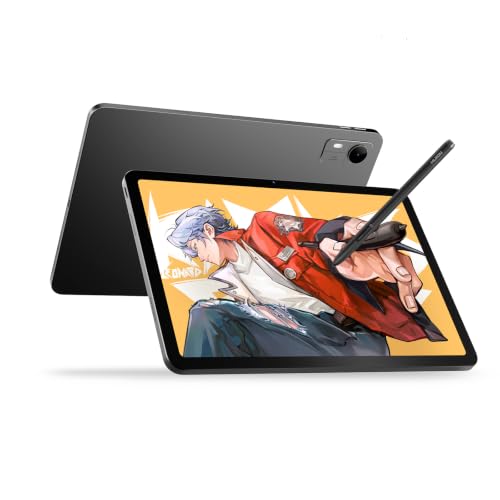
HUION’s Kamvas Pad 12 has the most painting-focused spec sheet in this group. The listing describes PenTech 4.0 with 16,384 pressure levels, ±60° tilt and a 2 g initial activation force, which means very light strokes register. The 12.2-inch 3:2 display runs at 2K+ (236 PPI), 350 nits and 90Hz, covers 99% sRGB with factory calibration at ΔE under 1.8, and uses Canvas Glass 3.0 nano-etched glass on a fully laminated panel.
Performance comes from an 8-core processor, 8GB RAM and 256GB storage expandable to 1TB, running Android 16. It ships preloaded with HiPaint, Clip Studio Paint, ibisPaint X and MediBang Paint. The 3:2 shape gives more vertical space than 16:9 screens, which suits portrait-format paintings.
Best suited for: painters who care about color accuracy and smooth pen response without a computer.
Key features
- 16,384 levels, ±60° tilt, 2 g activation force
- 12.2 in 3:2, 2K+, 90Hz
- 99% sRGB, ΔE < 1.8 calibrated
- 8GB RAM, 256GB, Android 16
Pros
- Calibrated color out of the box
- Light activation force for delicate strokes
- Newest Android version here
Cons
- 350 nits may feel dim outdoors in bright sun
- Etched glass wears nibs faster
Buying consideration: Keep the display in its sRGB preset for consistent color, as the listing recommends for design work.
2. Wacom MovinkPad 11 — Best Pen Experience

Wacom’s MovinkPad 11 runs Android 14 on an 11.45-inch display with matte etched glass, 8GB memory and 128GB storage, weighing a listed 1.3 lb. Its slim Pro Pen 3 is battery-free with 8,192 pressure levels and three buttons, with spare nibs stored inside the pen. It ships with Wacom Canvas, two years of Clip Studio Paint Debut and trials of ibis Paint and other apps, and supports compatible pens from Dr. Grip, LAMY and STAEDTLER.
Best suited for: painters who prioritize pen feel and Wacom’s pen technology.
Key features
- Battery-free Pro Pen 3, 8,192 levels
- Matte etched glass
- 8GB/128GB, Android 14
Pros
- Pen never needs charging
- Paper-like surface
- Light for its size
Cons
- Less storage than the HUION
- Clip Studio included is Debut edition
Buying consideration: The tap-and-hold quick sketch feature is handy for capturing ideas fast.
3. UGEE UT2 10.36 in Standalone — Best Lightweight 2K Tablet

UGEE’s UT2 is about A5 size, 6.95 mm thin and 466 g. The listing describes a 10.36-inch fully laminated 2K display (2000 x 1200, 277 PPI) with 100% sRGB, a 4,096-level pen, Android 14, a MediaTek Helio G99 8-core processor, 6GB RAM and 128GB storage expandable to 1TB. The 7000mAh battery is rated for over nine hours, with 18W fast charging. The listing names support for apps including Krita and Clip Studio Paint.
Best suited for: painters who want a light, sharp tablet for daily carry.
Key features
- 10.36 in 2K laminated, 100% sRGB
- 6GB/128GB, Android 14
- 7000mAh, 18W charging
- 466 g
Pros
- Very light and thin
- Sharp 277 PPI screen
Cons
- 4,096 levels, no tilt listed
- Smaller canvas
Buying consideration: Great as a travel sketchbook; for long studio sessions, the larger HUION is more comfortable.
4. RubensTab T12 — Best 12-Inch Value

The T12 offers a fully laminated 12-inch Full HD screen, 4,096 pressure levels with 60° tilt, an octa-core CPU, 6GB RAM and 128GB storage. Sketchbook, Krita, Infinite Painter and FlipaClip are preloaded, and the box includes a case, glove, power adapter and screen protector.
Best suited for: students and hobbyists who want a 12-inch canvas with tilt.
Key features
- 12 in FHD laminated
- 4,096 levels, 60° tilt
- 6GB/128GB
Pros
- Tilt at a lower tier
- Useful apps preloaded
Cons
- Android version not specified in the listing
- FHD at 12 inches is less sharp
Buying consideration: Check the Android version on the product page before buying if you need specific app versions.
5. RubensTab T11 Pro — Best Entry Tablet with a Stand Case

The T11 Pro pairs a 10.1-inch Full HD IPS screen with a battery-free pen, a 5800mAh battery rated for up to five hours, Android 12 and an adjustable stand case. Pressure is listed at 1,024 levels.
Best suited for: beginners and casual sketchers.
Key features
- 10.1 in FHD IPS
- Battery-free pen
- Stand case
Pros
- Built-in stand
- No pen charging
Cons
- Oldest Android version here
- Lowest pressure levels
Buying consideration: Check app compatibility with Android 12 before relying on newer app releases.
6. Frunsi T8 — Best Compact Android Sketcher

The T8 has an 8-inch 1200 x 800 display, Android 13, 4GB RAM, 64GB storage expandable to 256GB, 2,048 pressure levels and a 4000mAh battery rated for up to 20 hours. The listing names SketchBook, ArtFlow and ibis Paint X.
Best suited for: sketching on the go and kids.
Key features
- 8 in, Android 13
- 4GB/64GB
- Up to 20 hours listed
Pros
- Pocketable
- Long battery life
Cons
- Low resolution
- Limited RAM
Buying consideration: Treat it as a digital sketchbook rather than a main painting device.
Head to Head: HUION Kamvas Pad 12 vs Wacom MovinkPad 11
These two lead the group, and they take different approaches. The HUION wins on listed specifications: double the storage, a newer Android version, a higher refresh rate, factory color calibration and a pen with 16,384 levels, tilt and a very light 2 g activation force. Its 3:2 screen is also slightly larger.
The Wacom’s advantages are in the pen ecosystem. The Pro Pen 3 design is battery-free, carries spare nibs inside, and the tablet supports compatible third-party EMR-style pens from established stationery brands. Wacom also bundles two years of Clip Studio Paint Debut. If you already love Wacom pens or want a lighter tablet at a listed 1.3 lb, the MovinkPad makes sense. If you want the most painting hardware for the money, the Kamvas Pad 12 is the stronger choice on paper.
Spec Terms Explained
- Initial activation force (IAF): the lightest pressure that registers a stroke. Lower is better for delicate glazes and hair strands. The HUION lists 2 g.
- Refresh rate: how many times per second the screen updates. 90Hz makes pen strokes and scrolling look smoother than 60Hz.
- ΔE (Delta E): a measure of color error. Values under 2 are generally considered hard to distinguish by eye, which is why calibrated displays list them.
- sRGB coverage: how much of the standard web color space the screen can show. Near 100% is good for online art.
- Full lamination: the glass and display are bonded, reducing the visible gap under the pen.
- Virtual RAM: storage used as extra memory. It helps multitasking slightly but is much slower than physical RAM.
Drawing Tablet or General Android Tablet?
General Android tablets can also be used for painting, especially models that support an active stylus. The advantage of the dedicated drawing tablets in this guide is that the pen comes in the box, the screen surface is designed for drawing and painting apps are preinstalled. General tablets may have brighter screens or better speakers, but without a pressure-sensitive pen they are not painting tools. If you consider a general tablet, confirm it supports an active pen with pressure and budget for that pen.
Best Android Painting Apps for These Tablets
- Krita: free and open source, with powerful brushes; best on larger screens.
- Clip Studio Paint: strong for illustration and comics; several tablets here include it or a trial.
- ibis Paint X: free with ads or paid, popular and lightweight.
- Infinite Painter: natural-feeling brushes and a clean interface.
- MediBang Paint: free, comic-friendly and cloud-capable.
Make sure your chosen app supports pressure from your tablet’s pen. Most do with built-in pens on these devices, but always test pressure in a new app before starting a big piece.
Buying Guide: How to Choose an Android Tablet for Digital Painting
Pen technology
Look for pressure levels, tilt and low initial activation force. Battery-free pens, like Wacom’s Pro Pen 3, never need charging.
Display lamination and texture
Fully laminated displays reduce the gap between pen tip and line. Etched or nano-etched glass adds tooth and reduces glare.
Color accuracy
If you sell prints or work with clients, calibrated displays with published sRGB coverage and ΔE values are a real advantage.
RAM and storage
6GB RAM is a comfortable minimum for painting; 8GB handles bigger canvases. Storage of 128GB or more, plus expansion, is ideal.
Android version
Newer versions improve app compatibility and longevity. Prefer Android 14 or later.
Screen size and aspect ratio
Ten to twelve inches balances portability and canvas space. A 3:2 screen gives more vertical room than 16:9.
Battery
Painting drains batteries faster than reading. Larger batteries and fast charging help long sessions.
Who should skip these and choose something else?
If you already own a capable computer and mostly paint at a desk, a screenless pen tablet costs far less and runs full desktop software. If Procreate is the app you want, you need an iPad. And if you work on very large print files, a computer with plenty of RAM will handle them more comfortably than any tablet. Standalone Android drawing tablets shine for painters who want one portable device that does everything without cables or a laptop.
Getting Started on an Android Drawing Tablet
- Update the system and preinstalled apps before you start.
- Test pen pressure in each painting app and adjust pressure curves.
- Enable stylus-only drawing or palm rejection to avoid stray marks.
- Set up cloud backup for your art folder.
- Add a stand or case that angles the screen.
- Set the display to its most accurate color mode, such as sRGB, and keep brightness consistent while you judge colors.
Then try a project: our digital waves and ocean tutorial works well on any of these tablets, and our night scene painting tips show off a good display. Still deciding whether you need a tablet? Read how to paint digitally without one.
Common Mistakes to Avoid
- Buying a general tablet without pen support. Painting needs a pressure-sensitive pen.
- Ignoring Android version. Older versions limit app updates.
- Underestimating storage. Layered files are large.
- Skipping pressure tests. Check every app.
- Trusting “virtual RAM” figures. Physical RAM matters for painting.
- Painting flat for hours. Use a stand or tilting case to protect your neck.
FAQs
What is the best Android tablet for drawing and painting?
The HUION Kamvas Pad 12 has the strongest painting specs here, including a 16K tilt pen, calibrated 99% sRGB display and Android 16. The Wacom MovinkPad 11 is the pick for pen feel.
Can Android tablets run Krita?
Yes. Krita is available for Android tablets, and several tablets here list Krita support or include it.
Do Android drawing tablets come with a pen?
All six tablets in this guide include a pressure-sensitive pen.
Is an Android tablet as good as an iPad for painting?
For many painters, yes. iPads have Procreate; Android drawing tablets include a pen and often cost less. Choose by apps and budget.
How much RAM does an Android tablet need for painting?
6GB is a good minimum, and 8GB is better for large canvases with many layers.
Which Android tablet is lightest for travel?
The UGEE UT2 is listed at 466 g with a 10.36-inch 2K screen.
Final Recommendation
For the best all-round Android painting experience, choose the HUION Kamvas Pad 12 for its calibrated color, sensitive 16K pen and modern Android. Painters who want Wacom’s battery-free pen and etched glass should pick the MovinkPad 11. For a light everyday tablet, the UGEE UT2 is excellent, and the RubensTab T12 brings tilt to a lower tier. The RubensTab T11 Pro and Frunsi T8 suit beginners and pocket sketching.