PaintingProGuide is reader-supported. When you buy through links on this page we may earn an affiliate commission at no extra cost to you.
Hunching over a flat iPad for a two-hour Procreate session is how a lot of digital painters discover their neck. An ergonomic stand for iPad art fixes the posture problem by lifting the screen and tilting it toward you, the same way a drafting table angles paper toward a traditional artist. The right stand also gives your wrist somewhere to rest and keeps the Apple Pencil from rolling off the desk.
This guide compares seven stands that fit iPads and similar tablets, from a pocketable plastic folder to bamboo drawing boards with pencil slots and wrist rests. Specifications are taken from the Amazon listings as checked in October 2026, and the picks are organized by how you actually draw rather than by price.
Quick answer: The Parblo PR 100 is the most adaptable ergonomic stand for iPad art because its tilt runs from 15° to 90° and it fits tablets from 10 to 16 inches. If you own an 11-inch iPad and want a built-in pencil holder, the ELETIUO bamboo stand is the better desk fixture. For a 12.9 or 13-inch iPad Pro, choose the AFOOYO bamboo stand with its hand rest, and for travel the MAX SMART folding stand weighs 360 g and slips into a backpack.
Our Top Picks at a Glance
- Parblo PR 100 Universal Drawing Tablet Stand — Best for the widest tilt range
- ELETIUO Bamboo Adjustable Tablet Stand — Best desk stand for 9.7 to 11-inch iPads
- AFOOYO Bamboo Tablet Drawing Stand (L size) — Best for 12.9 and 13-inch iPad Pro
- Tovvthix Aluminum Tablet Stand with Wrist Rest — Best for wrist support in metal
- XPPen Drawing Tablet Stand — Best for artists who also use a pen display
- MAX SMART Foldable Tablet Drawing Stand — Best for travel and sketching away from the desk
- LISEN iPad Stand Tablet Holder — Best budget stand for reference viewing
| Product | Best For | Key Spec | Key Strength | Price Tier |
|---|---|---|---|---|
| Parblo PR 100 | All-round drawing | 15°-90° tilt, 10-16 inch devices | Steepest angle range | $$ |
| ELETIUO Bamboo | 11-inch iPad desk setup | 4 angles, pencil holder, cable slot | Pencil and charging organized | $$$ |
| AFOOYO Bamboo L | 12.9 / 13-inch iPad Pro | 4 angles 15°-70°, hand support, pen slot | Built for large iPads with a case | $$$ |
| Tovvthix Aluminum | Wrist comfort | 3 angles, silicone wrist rest, 9.7-13 inch | Cushioned rest and pen holder | $$ |
| XPPen Stand | Pen displays and laptops | 10-15.6 inch, 0.8 lb aluminum | Light, comes with a bag | $$$ |
| MAX SMART Foldable | Travel | 15°-39° tilt, 360 g, 1 cm thick | Slimmest to pack | $$ |
| LISEN Holder | Reference screen, budget | 4-15.6 inch, folds pocket size | Lowest cost | $ |
How We Chose
These rankings are not based on drawing sessions with each stand. They come from the Amazon listing details and specifications checked in October 2026, from how well each stand’s angle range, size compatibility and extras serve someone drawing with a stylus, and from how widely each product is reviewed by Amazon buyers. Where a listing is incomplete, for example missing weight or exact angles, the review says so.
What mattered most for drawing, in order:
- Angle range: drawing wants a low 15°-25° tilt; reference viewing wants 60° or more. A stand that does both earns points.
- Stability under pressure: stylus work pushes down on the screen, so rubber contact points and a solid base matter more than for video watching.
- Size compatibility: an 11-inch iPad and a 13-inch iPad Pro with a case have different needs.
- Artist extras: pencil slots, charging cable routing and wrist rests.
- Portability: weight and folded thickness for anyone who sketches away from home.
Best Ergonomic Stands for iPad Art Reviewed
1. Parblo PR 100 Universal Drawing Tablet Stand — Best for the Widest Tilt Range
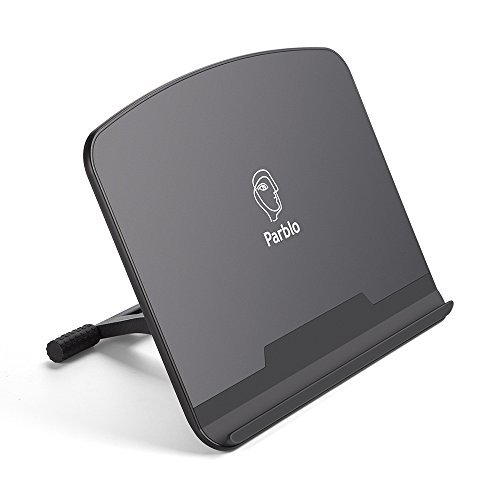
Parblo makes pen displays, and the PR 100 was designed as a companion for them, which is why it behaves more like an easel than a phone holder. The listing specifies a tilt range from 15° up to 90°, supports screens from 10 to 16 inches, and covers the parts that touch the tablet in rubber to stop sliding while you draw. The frame is alloy and plastic.
That 15° low end is what makes it work for iPad painting: a nearly flat angle keeps your shoulder relaxed and your wrist on the desk. Flip it to 70° or 90° and the same stand becomes a reference monitor while you work on paper. The listing does not state weight or folded dimensions, so treat it as a desk stand rather than a travel one until you see it in person.
Best suited for: artists who switch between drawing flat and viewing upright, and anyone who also owns a pen display or a larger Android tablet.
Key features:
- Tilt adjustable from 15° to 90°
- Fits 10 to 16-inch tablets and drawing monitors
- Rubber-covered contact points
- Alloy and plastic construction
Pros:
- Lowest drawing angle and highest viewing angle in one stand
- Works with iPads, pen displays and small laptops
- Rubber grips help with stylus pressure
Cons/limitations:
- No pencil holder or cable slot
- Weight and folded size not listed
Buying consideration: if you only ever draw at one angle, a simpler bamboo stand may feel more solid; buy the PR 100 for its flexibility.
2. ELETIUO Bamboo Adjustable Tablet Stand — Best Desk Stand for 9.7 to 11-Inch iPads

This stand is a small bamboo drawing board with an iPad-shaped slot cut into it. The listing gives the overall size as 15.6 x 10.8 x 1.4 inches with a 7.2 x 10.1-inch slot, and lists compatibility with iPad 5 through 9, every iPad Air through the 5th generation, and 9.7, 10.5 and 11-inch iPad Pro models. A built-in pencil holder and a cable slot keep the Apple Pencil and charger tidy, and the listing says it supports wireless charging for the Pencil.
Four angle settings cover drawing and viewing, and the hand-polished bamboo surface gives you a place to rest your forearm beside the screen, which is the ergonomic win over a bare metal cradle. It folds flat when not in use. The limitation is in the compatibility list: 12.9-inch iPads and the newer 11-inch models with different dimensions should be checked against that slot size before you buy.
Best suited for: Procreate users with a standard 11-inch or smaller iPad who want a permanent, good-looking drawing station on a desk.
Key features:
- Bamboo board with ABS triangular support
- Four adjustable angles
- Pencil holder and charging cable slot
- Slot sized 7.2 x 10.1 inches for 9.7 to 11-inch iPads
Pros:
- Forearm rests on the board, not the desk edge
- Pencil never rolls away
- Folds flat
Cons/limitations:
- Not for 12.9 or 13-inch iPads
- Thick cases may not fit the slot
Buying consideration: measure your iPad in its case against the 7.2 x 10.1-inch slot; if it is tight, go caseless on the stand or pick the Tovvthix.
3. AFOOYO Bamboo Tablet Drawing Stand (L Size) — Best for 12.9 and 13-Inch iPad Pro

Large iPads are heavier and wider than most stands expect, and AFOOYO’s L size is explicitly built for 12.9-inch iPad Pro models from the 3rd to 7th generation, with a case on. The natural bamboo panel wears a walnut varnish, the support is ABS, and silicone pads protect the tablet. The listing describes four viewing angles between 15° and 70° plus a hand support area, and it names reducing hand fatigue as a design goal.
The redesign added a pen slot that fits both 1st and 2nd generation Apple Pencil and routes the charging cable, and the board is hollowed for heat dissipation during long sessions. The listing includes a practical note that bamboo should be kept dry to avoid mildew, which is a fair warning if your studio is humid.
Best suited for: illustrators and painters working on a 12.9 or 13-inch iPad Pro who want wrist support and a stable, wide base.
Key features:
- Sized for 12.9-inch iPad Pro, case included
- Four angles from 15° to 70°
- Hand support and Apple Pencil slot with cable routing
- Walnut-varnished bamboo with silicone pads
Pros:
- One of the few drawing stands sized for large iPads
- Hand rest reduces wrist strain
- Lighter than a steel stand of the same size
Cons/limitations:
- Too large for 11-inch iPads to feel secure
- Bamboo needs a dry environment
Buying consideration: confirm your iPad Pro generation against the listing; the slot and pen position are sized for the 3rd through 7th generation 12.9-inch models.
4. Tovvthix Aluminum Tablet Stand with Wrist Rest — Best for Wrist Support in Metal

Tovvthix takes the drawing-board idea and builds it in aluminum. The listing gives the dimensions as 11.81 x 9.84 x 0.62 inches and the weight as 21 oz, with three angle settings, a non-slip rubber base and a one-touch fold. It fits tablets from 9.7 to 13 inches, so it spans both standard iPads and the 12.9-inch Pro.
The ergonomic argument is the soft silicone wrist rest along the front edge, which the listing says is designed to relieve fatigue in long creative sessions, plus a pen holder for the Pencil. Aluminum also stays cooler than bamboo under a warm iPad. With only three angles you get less fine tuning than the Parblo, but for a stand you set once and draw on daily, three well-chosen positions are usually enough.
Best suited for: artists with wrist or forearm discomfort who want a padded rest and a metal stand that fits both 11 and 13-inch iPads.
Key features:
- Aluminum body, 11.81 x 9.84 x 0.62 inches, 21 oz
- Three angle settings
- Silicone wrist rest and pen holder
- Fits 9.7 to 13-inch tablets
Pros:
- Padded wrist rest is rare at this size
- Covers both iPad sizes
- Folds quickly for a bag
Cons/limitations:
- Only three angles
- Heavier than the folding plastic options
Buying consideration: the lowest of the three angles is the one that matters for drawing; check the product photos to see how flat it goes before buying.
5. XPPen Drawing Tablet Stand — Best for Artists Who Also Use a Pen Display

XPPen built this stand for its own Artist pen displays, from the Artist 10 2nd through the Artist 15.6 Pro and Artist Pro 16, but the listing also rates it for laptops and 10 to 15.6-inch tablets in general, which puts every current iPad in range. It is aluminum, weighs 0.8 lb, ships with a storage bag and uses anti-slip silicone pads to hold the device.
The listing highlights cooling, since alloy pulls heat away from a display, and portability. What it does not offer is a wrist rest, a pen slot or a published angle range, so this is a stand for people whose desk already has a pen holder and who value a light, rigid riser that also works under a MacBook. If you draw on both an iPad and an XPPen display, one stand serving both is a tidy answer.
Best suited for: hybrid artists with an iPad and a pen display or laptop who want one light aluminum riser for everything.
Key features:
- Aluminum, 0.8 lb, with storage bag
- Fits 10 to 15.6-inch tablets, pen displays and laptops
- Anti-slip silicone pads
- Compatible with XPPen Artist series displays
Pros:
- Very light for an aluminum stand
- Doubles as a laptop riser
- Bag included
Cons/limitations:
- No pen holder or wrist rest
- Angle range not stated on the listing
Buying consideration: pick this if versatility across devices outweighs iPad-specific extras.
6. MAX SMART Foldable Tablet Drawing Stand — Best for Travel

At 360 g and 1 cm thick when folded, this is the stand to leave in a sketch bag. The listing covers tablets from 9 to 16 inches, including drawing tablets, e-readers and light laptops, and gives an adjustable range of 15° to 39°. That is a drawing-only range: low enough for comfortable stylus work, not high enough to use as a monitor.
The open structure lets air move around the iPad during long sessions, and the stand folds flat for a drawer or a backpack. It is the lightest and slimmest option here, and the trade-off is predictable: fewer extras, no pencil slot, and a lighter base that will feel less planted than bamboo under heavy pressure.
Best suited for: artists who draw in cafes, classrooms or on trains and need a stand that disappears into a bag.
Key features:
- 360 g, 1 cm thick folded
- Fits 9 to 16-inch devices
- 15° to 39° tilt
- Ventilated open frame
Pros:
- Lightest and slimmest in the group
- Drawing-friendly low angles
- Wide size compatibility
Cons/limitations:
- No upright viewing position
- No pencil or cable management
Buying consideration: treat it as a second stand for the road rather than a replacement for a desk stand.
7. LISEN iPad Stand Tablet Holder — Best Budget Stand for Reference Viewing

LISEN’s holder is the lowest-cost option and the one that behaves most like a phone stand. It weighs 15.2 oz, is made of ABS with a metal base plate and anti-slip silicone, and folds to pocket size. The listing describes a gravity-based system with no clips or magnets: the tablet leans back and stays put, with a bridge screw to tighten the joints if they loosen over time.
It fits devices from 4 to 15.6 inches, as long as they are under 0.7 inches thick, which rules out heavy-duty cases. For actual drawing it is less convincing than the dedicated stands because the lowest angle is designed for typing stability rather than stylus work, but as a second screen for reference photos or tutorials beside your main drawing surface, it is hard to argue with.
Best suited for: artists who need a cheap holder for a reference iPad or phone while drawing on another device.
Key features:
- ABS with metal base plate, 15.2 oz
- Height and angle adjustable with included bridge screw
- Gravity-based hold, no clips
- Fits 4 to 15.6-inch devices under 0.7 inches thick
Pros:
- Lowest price in the roundup
- Pocketable
- Works for phones too
Cons/limitations:
- Not designed as a drawing surface
- Thick cases not supported; phones landscape only
Buying consideration: buy it as a reference-screen holder, not as your primary ergonomic stand for painting.
Buying Guide: How to Choose an Ergonomic Stand for iPad Art
Start with your drawing angle
Most people draw comfortably between 15° and 30°. Any lower and you lean over; any higher and your arm floats without support. Make sure the stand’s lowest setting sits in that window. The Parblo, MAX SMART and AFOOYO listings all state a 15° minimum.
Decide whether you also need a viewing position
If the iPad doubles as your reference screen or you watch tutorials on it, you want a 60° to 90° position too. Parblo goes to 90°, AFOOYO to 70°. Travel stands like the MAX SMART stop at 39°.
Match the stand to your iPad size and case
Slot-style bamboo boards are cut for a specific screen size. The ELETIUO suits 9.7 to 11-inch iPads; the AFOOYO L is for 12.9 and 13-inch Pros with a case. Cradle stands such as the Parblo, Tovvthix and XPPen accept a range, which is safer if you upgrade your iPad later.
Look for wrist and forearm support
Ergonomics is mostly about where your arm rests. A flat board beside the screen (ELETIUO, AFOOYO) or a padded edge (Tovvthix) keeps your wrist from pressing on a hard desk edge for hours. Cradle stands leave your arm on the desk, which is fine at low angles and tiring at steep ones.
Consider pencil and cable management
A pencil slot sounds trivial until you have chased a rolling Apple Pencil under a desk twice in one evening. ELETIUO, AFOOYO and Tovvthix include holders; the AFOOYO and ELETIUO also route the charging cable.
Weigh materials against your workspace
Bamboo looks good and is warm to the touch, but the AFOOYO listing warns it needs a dry environment. Aluminum (Tovvthix, XPPen) sheds heat and shrugs off humidity. Plastic (MAX SMART, LISEN) is lightest and cheapest.
Think about where you draw
A desk-only artist should prioritize stability and extras. Someone who sketches on the go needs the folded thickness and weight the MAX SMART and LISEN listings publish. Many artists end up with one of each.
Set Up Your Drawing Workflow
Once the iPad is at a comfortable angle, the software side is next. Our walkthrough on drawing line art in Procreate covers brush and stabilization settings that reward a steady, well-supported wrist, and the companion guide to coloring line art in Procreate picks up from there.
Common Mistakes to Avoid
- Buying by maximum angle: for painting, the minimum angle matters more.
- Ignoring the case: slot stands and the LISEN holder have thickness limits.
- Choosing a phone stand for stylus work: light cradles wobble under pencil pressure.
- Forgetting heat: long sessions warm an iPad; open frames and aluminum help.
- Skipping the wrist rest: the hard desk edge is the real cause of most drawing fatigue.
- Assuming 12.9-inch compatibility: only the AFOOYO L, Tovvthix, Parblo and XPPen listings clearly cover large iPads.
FAQs
What angle should an iPad be at for drawing?
Between roughly 15° and 30° for most people. It keeps your shoulder down and lets your forearm rest on the desk or stand. Steeper angles suit viewing, not drawing.
Do I need a stand made specifically for drawing?
Not strictly, but drawing stands differ from media stands in two ways: a low minimum angle and enough rigidity to resist stylus pressure. The Parblo, MAX SMART, ELETIUO, AFOOYO and Tovvthix listings all describe drawing as a primary use.
Will a 12.9-inch iPad Pro fit these stands?
The AFOOYO L size is built for it, and the Tovvthix (up to 13 inches), Parblo (up to 16 inches) and XPPen (up to 15.6 inches) listings cover it. The ELETIUO slot is sized for 9.7 to 11-inch models.
Can I charge my Apple Pencil while the iPad is on the stand?
The ELETIUO listing says it supports wireless Pencil charging in its holder, and the AFOOYO describes a pen slot compatible with magnetic charging and a cable channel. Other stands leave the Pencil on the iPad’s magnetic edge.
Is bamboo or aluminum better for a drawing stand?
Bamboo gives a warm, wide surface for your arm but should be kept dry. Aluminum is cooler, more humidity-proof and generally lighter for its stiffness. Pick by your room and preference.
Which stand is best for traveling with an iPad for art?
The MAX SMART, at 360 g and 1 cm folded, is the easiest to pack while still offering drawing angles. The LISEN is smaller still but suits viewing more than drawing.
Final Recommendation
There is no single ergonomic stand for iPad art that wins every case. Desk-bound artists with an 11-inch iPad get the most from the ELETIUO bamboo board and its pencil slot; 12.9 and 13-inch iPad Pro owners should look at the AFOOYO L or the Tovvthix with its wrist rest. If you want one stand that goes from flat drawing to upright reference, the Parblo PR 100’s 15° to 90° range is unmatched in this group. Pack the MAX SMART for travel, and keep the LISEN around as a cheap reference-screen holder.