PaintingProGuide is reader-supported. When you buy through links on this page we may earn an affiliate commission at no extra cost to you.
A pen display is a monitor you can draw on directly, which is why many digital painters prefer it to a screenless graphics tablet: your hand and the brush stroke are in the same place. The best pen displays for digital painting combine accurate pen tracking with real pressure sensitivity, a screen big enough for comfortable arm movement, and low parallax so the cursor sits right under the nib.
This guide covers two Wacom pen displays at very different sizes, two standalone drawing tablets that work without a computer, and two stands that make long painting sessions more comfortable. All were checked on Amazon in October 2026. We also explain how pen displays differ from standalone tablets and screenless tablets, so you buy the right category before comparing models.
Quick answer: For a serious studio setup, the Wacom Cintiq 22 offers a large screen, the Pro Pen 2 with 8192 pressure levels and tilt recognition, and anti-glare glass. For a compact, more affordable pen display that works with Mac, PC and Chromebook, the Wacom One 13.3 (2019 model) has 4096 pressure levels and a customizable pen button. If you want to paint without a computer, the PicassoTab X11 standalone tablet has an 11-inch laminated 2K screen and a 4096-level stylus.
Our Top Picks at a Glance
- Wacom Cintiq 22 with Pro Pen 2 — Best large pen display for studio painting
- Wacom One HD 13.3in Creative Pen Display (2019) — Best compact pen display
- PicassoTab X11 11in Standalone Drawing Tablet — Best standalone tablet, no computer needed
- Frunsi T8 8in Standalone Drawing Tablet — Best small standalone tablet for travel
- XENCELABS Desktop Easel for Pen Display 16 — Best stand for Xencelabs Pen Display 16 owners
- XP-PEN AC18 Metal Pen Display Stand — Best budget adjustable stand
| Product | Best For | Key Spec | Key Strength | Price Tier |
|---|---|---|---|---|
| Wacom Cintiq 22 | Studio painting | Large HD screen, 8192 levels, tilt | Anti-glare glass, 2 pen switches | $$$ |
| Wacom One 13.3 | Compact desk setup | 13.3 in HD, 4096 levels | Mac, PC and Chromebook support | $$$ |
| PicassoTab X11 | Painting without a computer | 11 in 2K laminated, 4096 levels | 6 GB RAM, 128 GB storage | $$$ |
| Frunsi T8 | Travel and beginners | 8 in 1200 x 800, 2048 levels, Android 13 | 4000 mAh, up to 20 hours | $$$ |
| Xencelabs Desktop Easel | Xencelabs Pen Display 16 | Tilt 10 to 80 degrees, VESA | Quick release, portrait rotation | $$$ |
| XP-PEN AC18 Stand | Ergonomic angle on a budget | 0 to 65 degrees in 1-degree steps | Aluminum, collapsible | $$$ |
How We Chose
We compared these products using the Amazon listing details and specifications checked in October 2026: screen size and resolution where stated, pressure levels, tilt support, lamination, connectivity and operating system support, and ergonomic adjustability for stands, along with how widely each is reviewed by Amazon buyers. We did not paint on these devices. Where a listing gives limited specs, such as screen resolution for the Cintiq 22, we say so rather than fill in gaps.
- Pen performance: pressure levels, tilt and pen buttons.
- Screen: size, resolution and lamination to reduce parallax.
- Compatibility: Windows, Mac, Chromebook, or standalone Android.
- Ergonomics: stand angle, rotation and desk footprint.
- Value: what you get for the price tier, including bundles.
Pen Display, Standalone Tablet or Screenless Tablet?
| Type | How it works | Pros | Cons |
|---|---|---|---|
| Pen display | Monitor you draw on, connected to a computer | Draw directly on the image; runs full desktop software | Needs a computer; cables; higher cost |
| Standalone drawing tablet | Self-contained Android or custom OS tablet with pen | Portable; no computer; apps preinstalled | Limited to mobile apps; less powerful |
| Screenless graphics tablet | Pad you draw on while looking at a monitor | Cheapest; ergonomic posture | Hand-eye coordination takes practice |
If you already paint in desktop software such as Krita, Clip Studio Paint or Photoshop, a pen display is the natural upgrade. If you do not have a capable computer, or you want to paint on the couch or while traveling, a standalone tablet is more practical.
Best Pen Displays for Digital Painting Reviewed
1. Wacom Cintiq 22 with Pro Pen 2 — Best Large Pen Display for Studio Painting

The Cintiq 22 is Wacom’s large-format pen display for creative hobbyists, students and studios. It comes with the Pro Pen 2, which the listing describes as having tilt recognition, virtually lag-free tracking, 8192 levels of pressure sensitivity and two customizable switches. The screen is a 22-inch-class HD display with anti-glare glass and is described as having uniform brightness and true-to-life color, with relaxed parallax.
Size is the reason to buy it. A large screen lets you paint with your whole arm rather than your wrist, which matters for gestural brushwork and long sessions. In the box you get the display, Pro Pen 2, three replacement nibs, a nib remover, a 3-in-1 cable, AC adapter, power cable and quick start guide. The listing names Windows and macOS; the detail page lists Windows under operating system.
Best suited for: Dedicated digital painters and illustrators with desk space who want a large drawing surface.
Key features:
- Large HD screen with anti-glare glass
- Pro Pen 2: 8192 pressure levels, tilt, 2 switches
- Relaxed parallax
- 3-in-1 cable, AC adapter, 3 spare nibs
Pros:
- Big canvas for arm-driven strokes
- Wacom pen technology
- Anti-glare surface
Cons:
- Highest price tier
- Takes a lot of desk space
- Exact resolution figure not stated beyond HD in the listing
Buying consideration: Measure your desk; a 22-inch display needs depth for the stand and room for your arm in front of it.
2. Wacom One 13.3 (2019) — Best Compact Pen Display

The Wacom One 13.3 is a compact, high-definition pen display aimed at creative hobbyists and anyone wanting a bigger canvas or a second screen. The listing says it works with Mac, PC and Chromebook and with any software, and the detail page lists 4096 pressure levels, HDMI connectivity and full lamination. The pen has a customizable button for shortcuts like undo.
Note that this is labeled as the older 2019 generation. It remains a sensible entry point into pen displays, particularly for Chromebook users, but compare it with Wacom’s newer models if you want the latest features.
Best suited for: Beginners and hobbyists moving from a screenless tablet to a pen display, and Chromebook users.
Key features:
- 13.3-inch HD display
- 4096 pressure levels
- Works with Mac, PC and Chromebook
- Customizable pen button, HDMI, full lamination per detail page
Pros:
- Compact desk footprint
- Broad platform support
- Trusted brand
Cons:
- Older 2019 generation
- Fewer pressure levels than Cintiq
- Smaller screen limits arm movement
Buying consideration: A small stand that raises the back edge makes a 13-inch display much more comfortable for long sessions.
3. PicassoTab X11 Standalone Tablet — Best Standalone Tablet, No Computer Needed

PicassoTab’s X11 is a fully standalone drawing tablet: no computer required. It has an 11-inch fully laminated 2K screen, described as reducing parallax and glare for a paper-like feel, and a 4096-level pressure-sensitive stylus. It runs on an octa-core processor with 6 GB RAM and 128 GB storage, expandable up to 1 TB.
It ships with preloaded creative apps and bonuses: a lifetime Pro upgrade for the Concepts drawing app, a lifetime VIP upgrade for the Artixo tutorials app, a case, a drawing glove, a power adapter and a pre-installed screen protector. That makes it an attractive all-in-one start for beginners and students.
Best suited for: Beginners, students and hobbyists who want to paint without a computer.
Key features:
- 11-inch fully laminated 2K screen
- 4096-level pressure stylus
- Octa-core, 6 GB RAM, 128 GB storage (expandable to 1 TB)
- Preloaded apps and tutorial upgrades, case, glove, screen protector
Pros:
- Complete package
- Laminated screen
- Portable
Cons:
- Mobile apps rather than desktop software
- Custom OS listed on detail page
- Performance below a computer for very large files
Buying consideration: Check that the painting apps you want are available on the tablet’s operating system before buying.
4. Frunsi T8 Standalone Tablet — Best Small Standalone Tablet for Travel
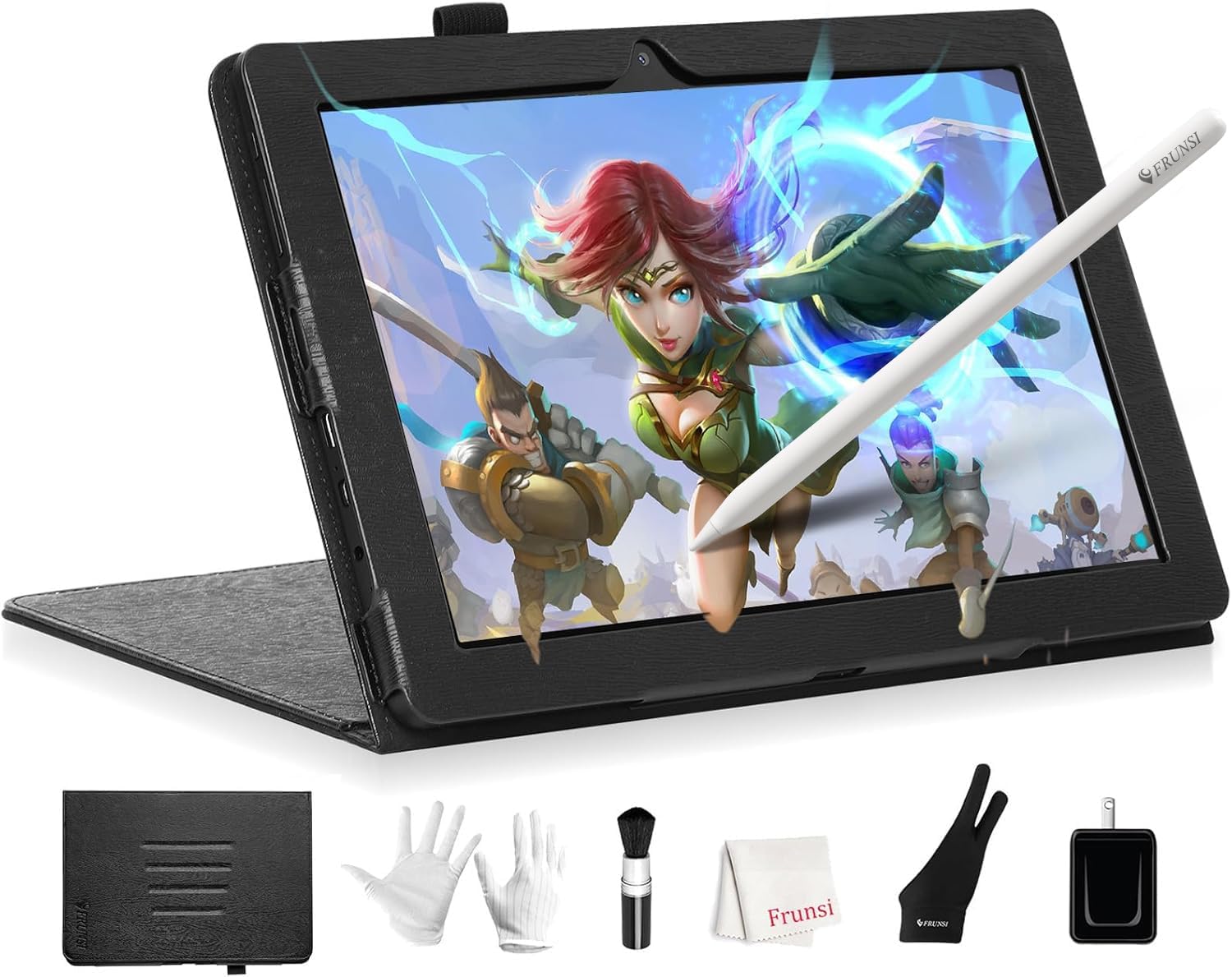
The Frunsi T8 is an 8-inch standalone drawing tablet running Android 13 with a 1200 x 800 display. It has an MTK quad-core CPU, 4 GB RAM and 64 GB storage expandable to 256 GB, and a 4000 mAh battery listed for up to 20 hours of drawing. The detail page lists 2048 pressure levels, and it supports installing apps such as SketchBook, ArtFlow and ibis Paint X.
Its small size makes it a good sketching companion for travel or for a young artist, but the resolution and screen size are modest for detailed painting.
Best suited for: Travel sketching, kids and beginners trying digital painting.
Key features:
- 8-inch, 1200 x 800 display
- Android 13, quad-core, 4 GB RAM, 64 GB storage
- 2048 pressure levels
- 4000 mAh battery, up to 20 hours
Pros:
- Very portable
- Android app flexibility
- Long listed battery life
Cons:
- Small, lower-resolution screen
- Fewer pressure levels
- Less power for big files
Buying consideration: Pair it with a lightweight app like ibis Paint X, which runs well on modest hardware.
Stands That Make Pen Displays More Comfortable
Drawing flat on a desk strains the neck and shoulders. A good stand raises the display to a comfortable angle and keeps it steady under pressure.
5. XENCELABS Desktop Easel — Best Stand for Xencelabs Pen Display 16 Owners

Xencelabs’ Desktop Easel is designed for the Xencelabs Pen Display 16 bundle and Pen Display 16 Essentials. It offers continuous tilt from 10 to 80 degrees in landscape and 16 to 65 degrees in portrait, one-handed adjustment, an extended palm rest, quick-release buttons to attach and remove the display without tools, and a VESA 75/100 mount for third-party arms. It carries a 2-year warranty.
Because it is model-specific, it only makes sense if you own or plan to buy that display.
Best suited for: Owners of the Xencelabs Pen Display 16 who want a fully adjustable, rotating stand.
Key features:
- For Xencelabs Pen Display 16 and 16 Essentials
- Tilt 10 to 80 degrees landscape, 16 to 65 portrait
- Quick release, VESA 75/100
- Extended palm rest, 2-year warranty
Pros:
- Wide continuous tilt range
- Portrait rotation
- VESA option
Cons:
- Model-specific
- About 5 pounds
- Higher price tier for a stand
Buying consideration: If you plan to use a monitor arm, the VESA mount lets you keep quick release while freeing desk space.
6. XP-PEN AC18 Metal Stand — Best Budget Adjustable Stand

XP-PEN’s AC18 is a 5052 aluminum alloy stand, sandblasted and anodized, that adjusts from 0 to 65 degrees in 1-degree increments and folds flat. It is designed for XPPen Artist 12, 13.3 and 15.6 displays, and the listing says it also works with other brands’ tablets and iPads. It weighs about 0.42 kg.
For a compact pen display like the Wacom One 13.3, a stand like this is an inexpensive way to get a comfortable working angle.
Best suited for: Owners of compact pen displays and tablets who want an adjustable, portable stand.
Key features:
- 5052 aluminum alloy, anodized
- 0 to 65 degrees in 1-degree increments
- Fully collapsible, about 0.42 kg
- Designed for XPPen Artist 12, 13.3 and 15.6
Pros:
- Fine angle adjustment
- Light and portable
- Works with many devices
Cons:
- Best suited to smaller displays
- No VESA or rotation
- Check fit for non-XPPen devices
Buying consideration: Confirm your display’s depth and weight suit the stand; it is designed around 12 to 15.6-inch displays.
Setting Up a Pen Display for Painting
- Install the latest driver from the manufacturer before connecting the display; outdated drivers cause most pressure and lag problems.
- Calibrate the pen in the driver settings so the cursor lines up with the nib from your normal viewing angle.
- Map the display correctly if you use two monitors, so the pen controls only the pen display.
- Set a pressure curve that suits your hand; light-handed painters often prefer a softer curve.
- Assign pen buttons to undo and eyedropper, the two actions painters use most.
- Raise the display to 20 to 45 degrees with a stand and sit so your forearm is supported.
- Use a drawing glove to reduce friction and smudges, especially on glossy screens.
Taking twenty minutes to set these up on day one makes a pen display feel far more natural, and it prevents the frustrations that lead many new owners to blame the hardware.
Buying Guide: How to Choose a Pen Display for Digital Painting
Screen size and your desk
Thirteen to 16 inches suits most desks and laptops; 22 inches and up needs dedicated space but gives a better painting experience.
Pressure levels and tilt
4096 levels is plenty for most painters; tilt support helps with natural shading brushes.
Lamination and parallax
A laminated screen keeps the cursor close to the nib, which improves accuracy.
Color and anti-glare
Anti-glare glass reduces reflections; for print work, color accuracy matters more than brightness.
Computer compatibility
Check Windows, Mac or Chromebook support and the connection type your computer needs.
Ergonomics
Budget for a stand if one is not included; drawing at an angle is far easier on your neck.
Put Your Display to Work
Start with subjects that reward pressure control and layering, like digital waves and ocean and digital night scenes. If you are not ready to buy hardware yet, see how to do digital painting without a tablet.
Common Mistakes to Avoid
- Buying a pen display without checking your computer’s ports and operating system.
- Choosing the biggest screen without the desk depth to use it comfortably.
- Drawing with the display flat for hours.
- Expecting a standalone Android tablet to run desktop software.
- Skipping driver updates, which often fix pressure and lag issues.
- Ignoring nib wear; worn nibs scratch and drag.
FAQs
Is a pen display better than a graphics tablet for painting?
Many painters find drawing directly on the screen more intuitive. Screenless tablets are cheaper and can be more ergonomic once you adapt.
Do pen displays need a computer?
Yes. Pen displays like the Wacom One and Cintiq are monitors connected to a computer. Standalone tablets like the PicassoTab X11 do not need one.
How many pressure levels do I need?
Around 2048 to 4096 is enough for most painters; 8192 offers extra smoothness on high-end pens.
Does the Wacom One work with Chromebook?
The listing for the Wacom One 13.3 says it works with Mac, PC and Chromebook. Check your Chromebook model’s support.
What size pen display is best?
Thirteen to 16 inches suits most people; 22 inches or more is ideal for full-arm painting if you have space.
Do I need a stand for my pen display?
It is strongly recommended for comfort. Some displays include a stand; otherwise, an adjustable stand like the XP-PEN AC18 helps.
Final Recommendation
If you have the budget and desk space, the Wacom Cintiq 22 gives you a large, glare-reduced canvas with Wacom’s Pro Pen 2. For a compact first pen display that supports Mac, PC and Chromebook, the Wacom One 13.3 is the sensible choice, ideally paired with a stand such as the XP-PEN AC18.
If you want to paint without a computer, the PicassoTab X11 is the more capable standalone option, while the Frunsi T8 suits travel and young beginners. Xencelabs Pen Display 16 owners should look at the Desktop Easel for the best ergonomic setup.