PaintingProGuide is reader-supported. When you buy through links on this page we may earn an affiliate commission at no extra cost to you.
Digital painters run out of screen fast. Procreate reference images, a Photoshop toolbar, a Krita color picker and a timelapse recording all compete for the same laptop display. A portable monitor solves that for a fraction of the price of a second drawing tablet: plug one USB-C cable into a laptop or tablet, and your reference boards, palettes and layer panels move to a second 15.6-inch screen you can fold into a backpack.
This guide covers the best portable monitor options for digital art based on their Amazon listings as of October 2026. The focus is on what matters for artists: IPS panels for consistent color at an angle, matte versus glossy surfaces, single-cable USB-C power, and how each unit stands on a cluttered desk.
Quick answer: The ASUS ZenScreen MB16AHV is the pick for most artists: an anti-glare IPS panel, a fold-out kickstand with a tripod socket, and the backing of a major display maker. On a tighter budget the KYY 15.6-inch K3 gives a slim metal body and dual full-function USB-C ports. If you want speakers and sunlight-readable brightness for outdoor sketching, the Yodoit 15.6-inch lists 300 nits and a matte coating.
Our Top Picks at a Glance
- ASUS ZenScreen MB16AHV — Best overall for digital artists
- KYY 15.6-inch K3 Portable Monitor — Best value with a metal body
- Yodoit 15.6-inch FHD IPS Travel Screen — Best for bright rooms and outdoor use
- InnoView 15.6-inch FHD Portable Monitor — Best entry-level with speakers
- Anyuse 15.6-inch FHD IPS Monitor — Best ultralight budget option
- MNN 15.6-inch FHD 60Hz Monitor — Best glossy-screen budget pick
- sharanix 14-inch Triple Monitor Extender — Best for a three-screen laptop workflow
| Product | Best For | Key Spec | Key Strength | Price Tier |
|---|---|---|---|---|
| ASUS ZenScreen MB16AHV | Most artists | 15.6 in FHD IPS, anti-glare, kickstand + tripod socket | Brand-grade panel and ergonomic stand | $$$ |
| KYY K3 15.6 in | Value | FHD IPS, 0.3 in thick, 1.7 lb, 2 full-function USB-C | Slim metal build, HDR, magnetic cover | $$$ |
| Yodoit 15.6 in | Bright environments | FHD IPS, 300 nits, matte, speakers | Sunlight-readable, one-cable setup | $$$ |
| InnoView 15.6 in | Entry level | FHD IPS, 2 USB-C + HDMI, speakers, case | Low cost with full connectivity | $$$ |
| Anyuse 15.6 in | Lightest budget pick | FHD IPS, 1.37 lb, low blue light | Very light and inexpensive | $$ |
| MNN 15.6 in 60Hz | Glossy preference | FHD IPS glossy, 2 USB-C, smart cover | Vivid glossy panel at a low price | $$$ |
| sharanix 14 in Triple | Three-screen laptop setup | 2 x 14 in FHD IPS attached to laptop lid | Two extra screens in one unit | $$$ |
How We Chose
Every pick is based on the Amazon listing details and specifications checked in October 2026, judged against what a digital artist needs from a second screen, and on how widely each model is reviewed by Amazon buyers. We did not measure color accuracy or use these displays; the comparison relies on the panel type, surface finish, ports, weight and stand design each listing publishes.
- IPS panel: required, so color does not shift when you glance across at the screen.
- Surface: matte or anti-glare preferred for studios with windows; glossy noted where listed.
- Single-cable USB-C: full-function Type-C ports that carry video and power.
- Stand quality: a kickstand or tripod mount beats a floppy folio cover for drawing-desk use.
- Weight and thickness: for a screen that travels with a tablet and stylus.
- Compatibility notes: especially Apple Silicon Mac support, which one unit excludes.
Best Portable Monitors for Digital Art Reviewed
1. ASUS ZenScreen MB16AHV 15.6-inch Portable Monitor — Best for most digital artists

ASUS builds the ZenScreen line specifically as travel displays, and the MB16AHV’s listing hits the points that matter at a drawing desk. The 15.6-inch FHD IPS panel has an anti-glare finish, so overhead studio lights and window reflections do not wash out your reference photos. A fold-out kickstand sets the angle without a floppy cover, and a tripod socket means you can mount it on an articulating arm beside a pen display.
Connectivity is dual USB-C plus mini-HDMI, with 15W power delivery for a one-cable setup from a laptop. At 10mm thick and about 0.9kg it slides in beside an iPad. ASUS also lists an auto-rotate DisplayWidget utility for switching between landscape and portrait, which is handy when a tall reference image or a vertical toolbar makes more sense.
Best suited for: Illustrators and concept artists who want a second screen from an established display brand and value a real stand over a folding cover.
Key features:
- 15.6-inch 1080p IPS panel with anti-glare surface
- Dual USB-C and mini-HDMI inputs, 15W power delivery
- Fold-out kickstand plus tripod socket
- 10mm thick, approximately 0.9kg
- Auto-rotate software for portrait or landscape use
- Antibacterial ionic silver surface treatment
Pros:
- Kickstand and tripod mount are far more stable than cover-stands
- Anti-glare panel suits bright studios
- Major-brand support and software
Cons and limitations:
- Highest price tier of the standard 15.6-inch units here
- No built-in speakers listed
- 1080p only, like every option in this guide
Buying consideration: If you already own a monitor arm or small tripod, the socket on this unit makes it the easiest to position at eye level next to a tablet.
2. KYY 15.6-inch 1080P Portable Monitor (K3) — Best for value with a metal body

The KYY K3 pairs a 15.6-inch FHD IPS panel with a 0.3-inch, 1.7-pound gray metal chassis, which the listing highlights as a premium finish compared with plastic competitors. Two full-function USB-C ports and a mini-HDMI port cover laptops, tablets and consoles, and a single USB-C cable handles video and power from a Thunderbolt 3 or full-function Type-C laptop.
A magnetic PU-leather smart cover doubles as the stand and lets the screen work in landscape or portrait. HDR support and a 178-degree viewing angle are listed, which matter when the monitor sits off to one side of your drawing position and you glance at it rather than face it squarely.
Best suited for: Artists who want a solid-feeling second screen with modern connectivity without paying for a brand-name badge.
Key features:
- 15.6-inch IPS, 1920 x 1080, HDR
- Two full-function USB-C ports plus mini-HDMI
- 0.3-inch thick metal body, about 1.7 lb
- Magnetic smart cover with stand positions
- Landscape and portrait modes
Pros:
- Metal build at a mid price tier
- Full-function dual USB-C for one-cable use
- Thin and light enough for a tablet bag
Cons and limitations:
- Cover-stand is less rigid than a kickstand
- One-cable mode needs a laptop port that outputs video
- No stated brightness figure in the listing
Buying consideration: Check your laptop supports DisplayPort over USB-C; otherwise you will need the HDMI cable plus a USB-C power cable.
3. Yodoit 15.6-inch FHD IPS Travel Screen — Best for bright rooms and outdoor use

Yodoit is one of the few listings here to state a brightness figure: 300 nits, paired with a matte anti-glare coating that the maker says stays visible in bright sunlight. For plein-air digital sketching on a patio or a sunny studio, that spec matters more than any other on the sheet. The 15.6-inch IPS panel runs at 1920 x 1080 with a 178-degree viewing angle.
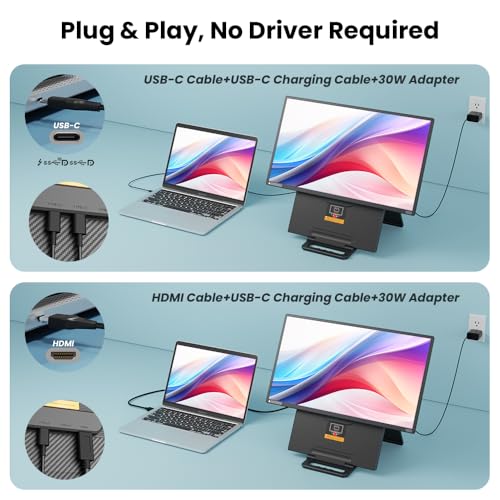
It connects over a single USB-C cable to MacBooks, Windows laptops and USB-C phones, or via mini-HDMI plus USB-C power for consoles and older machines. Dual speakers, HDR and a low-blue-light mode are listed, and the whole unit comes in at 0.43 inches thick and roughly 1.5 pounds including the case.
Best suited for: Artists who work near windows or outdoors, or who want speakers for tutorial videos without reaching for headphones.
Key features:
- 15.6-inch FHD IPS, 300 nits, matte anti-glare
- USB-C single-cable or mini-HDMI + USB-C power
- Built-in dual speakers
- HDR and low blue light mode
- 0.43-inch thick, about 1.5 lb with case
Pros:
- Stated brightness and matte coating for bright spaces
- Speakers built in
- Plug-and-play with no drivers
Cons and limitations:
- Highest price tier in this roundup
- Case-style stand rather than a kickstand
- Weight listed inconsistently between 1.5 and 2.08 lb
Buying consideration: Pay the premium only if you genuinely work in bright light; in a dim studio the cheaper panels show the same resolution.
4. InnoView 15.6-inch FHD Portable Monitor — Best for an entry-level screen with speakers

InnoView’s 15.6-inch unit is the plug-and-play starting point: two full-function USB-C ports and one HDMI, an A+ IPS panel at 1920 x 1080 with HDR and 178-degree viewing, built-in speaker and a PU-leather protective cover with two stand grooves. No app or driver is needed, and the listing stresses compatibility with laptops, MacBooks, phones, tablets and consoles.
One honest note from the listing itself: because output power differs between devices, the screen may flicker or restart on under-powered ports, in which case you power the monitor separately. That is true of every bus-powered display here, but InnoView says so up front and backs the unit with a stated return window and warranty.
Best suited for: First-time buyers who want a dependable, inexpensive second screen for references and palettes and do not need a premium finish.
Key features:
- 15.6-inch FHD IPS with HDR, 178-degree angle
- 2 full-function USB-C + 1 HDMI
- Built-in speaker
- PU-leather cover with two stand angles
- Driver-free plug and play
Pros:
- Low price tier with full port selection
- Speaker included
- Listing is transparent about power requirements
Cons and limitations:
- Cover stand offers only two angles
- Plastic body
- Matte finish listed, but no brightness figure
Buying consideration: Keep a USB-C power cable handy; feeding the monitor from a charger stops flicker on low-power laptop ports.
5. Anyuse 15.6-inch FHD IPS USB-C HDMI Portable Monitor — Best for an ultralight budget option

At a listed 1.37 pounds, the Anyuse is the lightest full-size panel in this guide, which makes it the natural partner for an iPad or Galaxy Tab setup that already lives in a shoulder bag. The 15.6-inch A-grade IPS panel is 1920 x 1080 with HDR, a 178-degree viewing angle and a low-blue-light mode for long sessions.
Two full-featured USB-C ports and a mini-HDMI port handle connections, and the listing describes copy, extend and second-screen modes. Like the other budget options it relies on a cover-stand and asks that your source device support video over USB-C for the one-cable mode.
Best suited for: Tablet-first artists who travel light and want the cheapest reliable way to add a reference screen.
Key features:
- 15.6-inch FHD IPS, HDR, low blue light
- 2 full-function USB-C + mini-HDMI
- About 1.37 lb
- Copy, extension and second-screen modes
- No app or driver required
Pros:
- Lightest 15.6-inch unit here
- Lowest price tier
- Full-function USB-C ports
Cons and limitations:
- Thin plastic build
- No speakers listed
- Cover stand only
Buying consideration: If weight is the deciding factor, this is the one; if you want speakers or a metal body, step up to InnoView or KYY.
6. MNN 15.6-inch FHD 60Hz Portable Monitor — Best for artists who prefer a glossy screen

Most portable monitors ship matte, so the MNN stands out by listing an IPS glossy screen. Glossy panels show deeper apparent contrast and saturated color, which some illustrators prefer for reviewing finished work, at the cost of reflections in a bright room. Resolution is 1920 x 1080 at 60Hz with HDR and a 178-degree viewing angle.
Two full-feature USB-C ports allow single-cable connection to a Thunderbolt or full-function Type-C laptop, and the included PU-leather smart cover supports landscape and portrait orientation. The listing describes copy, extended, second-screen and portrait display modes.
Best suited for: Artists in controlled lighting who like the punch of a glossy display and want a low-cost second screen.
Key features:
- 15.6-inch FHD IPS, glossy, 60Hz, HDR
- Dual full-function USB-C
- Portrait and landscape modes
- Scratch-proof PU-leather smart cover
- Ultra-slim for travel
Pros:
- Glossy panel for vivid color review
- Low price tier
- Portrait mode listed
Cons and limitations:
- Reflections in bright rooms
- Cover stand only
- Device must support video over USB-C
Buying consideration: Pick glossy only if your desk faces away from windows; otherwise one of the matte units will be easier on the eyes.
7. sharanix 14-inch Triple Monitor Laptop Screen Extender — Best for a three-screen laptop workflow

The sharanix takes a different approach: two 14-inch FHD IPS screens clamp to the back of a 13.3- to 17.3-inch laptop lid and swing out either side, turning a laptop into a three-screen workstation. For a digital painter that can mean canvas in the middle, references left and palettes or a tutorial right.
It is plug-and-play over Type-C, HDMI and USB-A with cables included, and the listing notes a low-blue-light mode. The compatibility note is critical: the listing states it is not for M1, M2 or M3 Apple Silicon Macs, so MacBook users should look elsewhere. Windows and Chrome laptops are supported.
Best suited for: Windows laptop artists who want two extra screens without two separate stands and cables on the desk.
Key features:
- Two 14-inch 1080p IPS screens in one extender
- Fits 13.3 to 17.3-inch laptops
- Type-C, HDMI and USB-A connectivity, cables included
- Low blue light mode
- FCC, CE and RoHS certified
Pros:
- Two displays for the price of one premium unit
- Attaches to the laptop, so nothing else to prop up
- Full cable set in the box
Cons and limitations:
- Not compatible with Apple Silicon Macs
- Adds weight and strain to the laptop hinge
- Smaller 14-inch screens, glossy finish
Buying consideration: Confirm your laptop hinge is stiff enough to carry two screens, and that your ports can drive both; a powered hub may be needed.
Buying Guide: How to Choose a Portable Monitor for Digital Art
Panel type and viewing angle
Every unit here lists an IPS panel, and that is non-negotiable for artists. A second screen sits to one side, so you view it at an angle; IPS holds color and contrast out to roughly 178 degrees, while cheaper TN panels shift and wash out. If a listing does not say IPS, skip it.
Matte or glossy surface
Matte or anti-glare coatings diffuse reflections and are the safer choice for studios with windows or overhead lights. Glossy panels look punchier and are fine in controlled lighting. The MNN is the glossy option here; the ASUS and Yodoit explicitly list anti-glare.
Brightness and color claims
Only the Yodoit publishes a brightness figure (300 nits). None of these listings states a color gamut or factory calibration, so treat every one as a reference and palette screen, not a color-critical proofing display. Keep your main canvas on the device you have calibrated.
Single-cable USB-C versus HDMI
A full-function USB-C port carries video and power over one cable, but only if the laptop or tablet port outputs DisplayPort Alt Mode or Thunderbolt. Most recent MacBooks, iPad Pros and Galaxy Tab S models do; many budget laptops do not. If in doubt, you will use HDMI for video plus USB-C for power, which every 15.6-inch unit here supports.
Stand design on a drawing desk
A folio cover that folds into a stand works on a cafe table but wobbles when you tap a pen display next to it. The ASUS kickstand and tripod socket are the most stable options; everything else uses a cover. If you buy a cover-stand model, consider a cheap tablet stand to hold it upright.
Weight, thickness and travel
The 15.6-inch units range from about 1.37 pounds (Anyuse) to around 2 pounds (ASUS, Yodoit). All are under half an inch thick. If the monitor travels with a tablet, stylus and charger, the lighter models are noticeably easier to carry; if it stays on a desk, favor build quality and stand over weight.
Compatibility traps
Read the fine print. The sharanix extender excludes Apple Silicon Macs. Several listings warn that under-powered USB ports cause flicker, which a separate power cable fixes. Tablets that do not support video out over USB-C (many Android tablets and base iPads) can only use these monitors through an adapter, if at all.
Related Reading on the Site
A second screen is most useful when you have a project to put on it. If you like switching between digital and hands-on work, our guides to painting pottery at home and scratch art painting crafts are both easy to follow from a reference screen propped beside your workspace.
Common Mistakes to Avoid
- Assuming any USB-C port will drive the monitor; check for DisplayPort Alt Mode or Thunderbolt first.
- Buying a glossy panel for a desk that faces a window.
- Expecting a portable monitor to be color-accurate enough for final proofing without calibration.
- Choosing a triple-screen extender for an Apple Silicon MacBook when the listing excludes it.
- Running the monitor from a weak laptop port and blaming the panel for flicker.
- Ignoring the stand; a wobbly cover-stand next to a pen display gets knocked over constantly.
FAQs
Is a portable monitor good for digital art?
As a second screen for references, palettes, layer panels and tutorials, yes. Because none of these listings publishes color-gamut or calibration data, keep your actual canvas on your calibrated main display or pen tablet.
Can I connect a portable monitor to an iPad or Android tablet?
Only if the tablet outputs video over USB-C. iPad Pro and recent iPad Air models and Galaxy Tab S models generally do; base iPads and many budget Android tablets do not. Check your tablet’s specs for DisplayPort Alt Mode.
Do these monitors have touch or pen input?
No. Every unit in this guide is display-only. If you want to draw directly on the second screen, you need a pen display, which is a different product category.
Why does my portable monitor flicker or restart?
Usually the source port is not supplying enough power. Plug the monitor’s second USB-C port into a wall charger or power bank; several listings here mention this fix directly.
Matte or glossy for an art studio?
Matte or anti-glare for any room with windows or bright overhead light. Glossy only if you control the lighting and prefer the extra apparent contrast when reviewing finished pieces.
Is 1080p enough for a 15.6-inch second monitor?
For references, palettes and panels, yes. At typical arm’s-length viewing a 15.6-inch 1080p panel is reasonably sharp. Higher-resolution portable panels exist but cost considerably more and were not among the listings reviewed here.
Final Recommendation
The ASUS ZenScreen MB16AHV is the best portable monitor for most digital artists because its kickstand, tripod socket and anti-glare panel solve the two problems cover-stand monitors create on a drawing desk: wobble and glare. If budget matters more, the KYY K3 gets you a thin metal body and full-function USB-C at a mid price tier, and the InnoView or Anyuse units do the basic job for less.
Choose the Yodoit if you draw in bright light and want speakers, the MNN if you specifically prefer glossy, and the sharanix only if you run a Windows laptop and want two extra screens attached to the lid.