
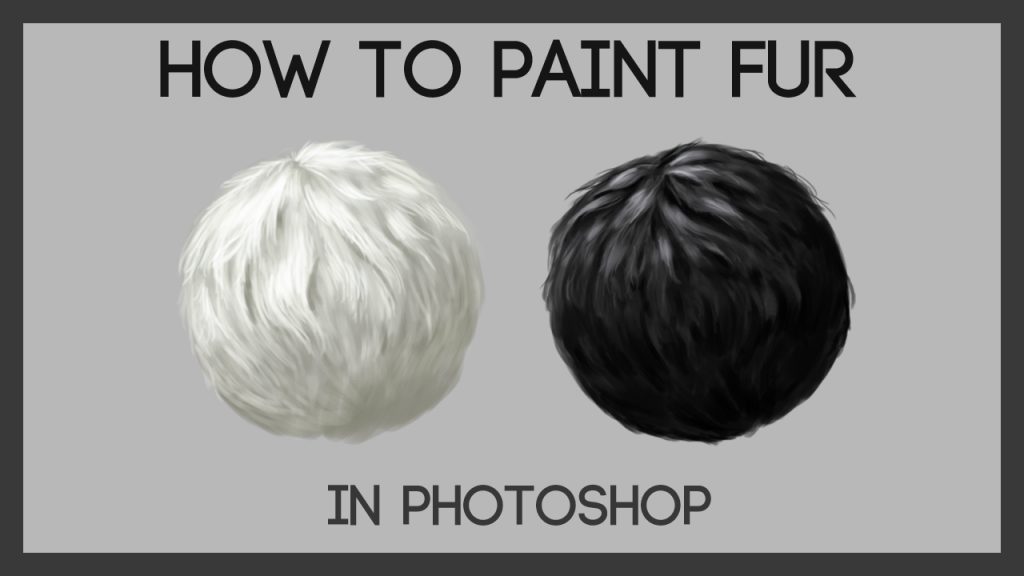
Quick answer: Here is how to paint hair and fur in digital art: treat both as soft masses before strands. Block the overall shape in a mid-tone, shade it as a simple volume with one light source, then divide it into large locks or clumps that follow the growth direction. Add a highlight band (hair) or lit clump tops (fur), break up the silhouette with a few loose strands, and keep fine detail to edges and focal areas. The same process works for human hair, animal fur and stylized characters.
Hair and fur cause similar problems for digital artists: stiff strands, flat helmets of color and noisy scribbles that look nothing like the soft mass you see in a reference photo. The underlying fix is also similar. Paint the volume, then the groups, then a few details.
This guide explains how to paint hair and fur in digital art using techniques that apply across styles, from semi-realistic portraits to stylized characters and animals. It covers the setup, step-by-step methods for both hair and fur, color, common mistakes and how to keep improving.
Why Hair and Fur in Digital Art Are Hard
Both are made of countless thin strands that the eye reads as one surface. If you paint what you think you see, individual lines, you get wire. If you paint what is actually happening, light hitting a soft, layered mass, you get hair.
Key ideas that carry through everything below:
- Volume first. Hair sits on a skull; fur wraps muscle. Both follow the form underneath.
- Clumps over strands. Strands group into locks and tufts, which have their own light and shadow.
- Direction matters. Hair flows from partings and crowns; fur flows in growth patterns.
- Edges tell the story. Soft edges in shadow, defined edges in light, loose strands at the silhouette.
Structured lessons can accelerate this a lot. If you learn best from guided video courses, our roundup of the best digital art courses for beginners includes options that cover hair, fur and other textures in depth.
Setup: Canvas, Tools and Brushes
Best canvas size for digital art involving hair and fur
Fine strands need enough pixels to look clean. For character busts and animal portraits, a canvas around 3000 x 4000 px at 300 PPI gives room for detail. For quick studies, 2000 x 2000 px is enough. If you work in Procreate, the best canvas size for digital art in Procreate depends on your iPad’s memory: larger canvases reduce available layers, so check the layer limit when creating the canvas and size down if you need more layers.
Hardware
Pressure sensitivity is important for tapered strands. A pen tablet, pen display or tablet with a stylus all work. Many beginners start with affordable digital art pads, and a screenless pen tablet is perfectly capable for hair and fur work once you adjust to looking at the monitor. Drawing tablets for beginners in digital art often come with a pressure curve setting; adjust it so light pressure gives genuinely thin lines.
Comfort extras
A drawing glove for digital art reduces friction and prevents palm smudges on screen-based devices, which helps for long, smooth strokes. Good lighting at your desk reduces eye strain during detailed work.
Brushes
| Brush | Use |
|---|---|
| Hard round / flat | Blocking shapes, defining locks |
| Soft round | Volume shading, soft transitions |
| Textured brush | Breaking up masses into clumps |
| Fine tapered round | Strands, flyaways, whiskers |
| Multi-bristle / hair brush | Quick strand texture (use sparingly) |
| Smudge with texture | Blending along flow direction |
How to Paint Hair: Step by Step
1. Sketch the hair mass
Sketch the head shape first, then the hair as a big shape sitting on top and around it, with volume above the skull. Mark the parting, the crown and the main flow lines.
2. Block the base color
Fill the hair shape with a flat mid-tone of the hair color on its own layer. Keep the silhouette simple at this stage.
3. Shade the overall volume
Pick a light source. With a soft brush on a clipped Multiply layer, shade the hair as one large form: darker underneath, at the back and where hair falls into the shadow of the head. Hair near the face often casts a shadow on the forehead and cheeks.
4. Divide into locks
Use a hard or textured brush to separate the mass into large locks. Each lock is a ribbon-like shape that bends and overlaps. Give each lock a slightly lighter top and darker underside. Dark gaps between locks create depth.
5. Paint the highlight band
Shiny hair shows a highlight band where light reflects across the curve of the head. Paint it following the shape of the head, broken up by the locks rather than as a single stripe. Highlights on dark hair are often cool or neutral; on light hair, they can be warm.
6. Refine edges and flyaways
Soften edges where hair meets the face and background, especially in shadow. Add a few loose strands at the silhouette and across the highlight with a fine tapered brush. A handful is plenty.
7. Color variation
Add subtle variation: warmer tones in some locks, cooler in others, a touch of reflected light from the environment on the shadow side. Hair rarely looks like one flat color in real life.
How to Paint Fur: Step by Step
1. Map growth direction
Draw arrows for the fur’s flow over the animal’s body: back from the nose, down the neck and back, and down the legs, with swirls at the chest and joints.
2. Shade the form smoothly
Ignore fur and shade the animal as a smooth form. If it looks right as a sculpture, the fur will sit properly on top.
3. Break into clumps
Use a textured brush to break lit areas and the light-to-shadow transition into pointed clumps following the flow. Each clump has a lit top and a darker gap beneath.
4. Break the silhouette
Pull tufts past the edge and paint small background-colored notches into it so the outline reads as fur rather than a cutout.
5. Fine strands and whiskers
Add a small number of strands at edges and focal areas. Whiskers go last, as long, confident tapered strokes.
Hair vs. Fur: Key Differences
| Aspect | Human hair | Animal fur |
|---|---|---|
| Grouping | Long ribbons or locks | Short clumps and tufts |
| Shine | Often a clear highlight band | Usually softer, broken highlights |
| Direction | From parting and crown, influenced by styling | Natural growth patterns over the body |
| Silhouette | Loose flyaways at edges | Tufted, broken edges all around |
| Form underneath | Skull and shoulders | Muscle and bone structure |
Painting Different Hair Types
- Straight hair: long, smooth locks with a strong highlight band. Keep strokes long and confident.
- Wavy hair: S-shaped locks; highlights break up on each wave crest.
- Curly and coily hair: paint as clusters of spiral or coiled shapes. Each cluster has a lit side and shadow side; highlights are small and scattered. The overall silhouette is often rounded and voluminous.
- Braids: repeating, interlocking shapes; shade each section like a small cylinder.
- Short hair: treat as a textured surface following the skull, with small clumps at the hairline.
Painting Animal Fur Types
Animal coats vary as much as human hair. A few common types and how to handle them:
- Short, sleek coats (many horses, short-haired dogs): paint mostly as smooth form with strong, defined highlights that reveal muscles. Fur texture appears only at the edges and in a few subtle strokes.
- Medium coats (foxes, many cats): visible clumps in the light, softer in shadow, with tufts at the cheeks, chest and tail.
- Long coats (long-haired cats, collies): large, layered S-curved locks with their own light and shadow, behaving a bit like human hair.
- Dense, fluffy coats (huskies, arctic animals): very soft edges and rounded silhouettes; clumps are small and blended.
- Wiry or rough coats (terriers): broken, irregular strokes with varied directions and a spiky silhouette.
Patterns like stripes and spots should be painted after the form and clump stages, ideally on a Multiply layer. Break their edges with fur strokes so they sit inside the coat rather than on top of it.
Lighting Hair and Fur
Lighting changes how much texture shows. Strong side lighting reveals clumps and strands clearly; flat front lighting hides them. Backlighting creates a glowing rim around hair and fur, one of the most attractive effects you can paint. To paint a rim light, add a thin, bright edge on an Add or Screen layer along the silhouette facing the light, letting a few strands glow more brightly. Keep the interior of the hair mass darker so the rim stands out.
Colored light also tints hair strongly. Warm sunset light turns blonde hair golden and dark hair reddish at the edges, while cool moonlight desaturates everything and adds blue highlights.
Stylized vs. Realistic Approaches
Stylized hair often uses cel shading: a flat base, one shadow shape and one highlight shape, with clean edges. The same structural thinking applies: the shadow shape follows the volume, and the highlight follows the curve of the head. Realistic hair uses softer transitions and more color variation. Mixed media digital art, combining painted areas with textures or photo-based elements, can also give hair a unique look, though it takes careful blending to look cohesive.
Color Tips
- Avoid painting shadows with black or gray; use a darker, often more saturated version of the hair color.
- Very dark hair still shows color in highlights: brown, blue or red tints.
- Blonde and white hair rely on subtle temperature shifts and gray-blue shadows.
- Animal fur often varies in color along each strand and across the body, such as darker tips or lighter undercoats.
Common Mistakes
Painting strands first. Strands without volume look like wire. Shade the mass first.
Even detail everywhere. Uniform strands create noise. Concentrate detail where you want focus.
Single solid highlight stripe. Break highlights up across locks.
Hard outline around hair or fur. Soften and break the silhouette.
Ignoring the hairline. Hair grows from the skin gradually. Soften the hairline with small strands and a slightly lighter transition.
Workflow Tips That Save Time
- Use clipping masks for hair shadows and lights so you can adjust them without affecting the base shape.
- Flip the canvas to check that the hair flows naturally and the volume is balanced.
- Work zoomed out for most of the process; zoom in only for the final strands.
- Save brush presets for your favorite hair and fur brushes, so you are not rebuilding them each time.
- Check values in grayscale with a gray Color-mode layer to confirm the volume reads.
How to Keep Improving
Short studies from reference photos are the most efficient practice: 20 minutes on a single head of hair or an animal’s face. Compare your study to the reference side by side and note one thing to improve each time. Explore related techniques too. The guide to digital concept art shows how artists simplify textures like hair and fur for fast character designs, which is useful for developing a lighter, more confident touch.
FAQs
How do you paint realistic hair in digital art?
Block the hair mass, shade it as one volume, divide it into locks with their own light and shadow, paint a broken highlight band following the head’s curve and add a few loose strands at the edges.
What is the best canvas size for digital art with detailed hair?
About 3000 x 4000 px at 300 PPI suits detailed busts and portraits. In Procreate, check that the canvas still allows enough layers on your iPad.
Do I need a drawing tablet to paint hair and fur?
A pressure-sensitive device makes tapered strands much easier. Entry-level pen tablets work well for beginners, and screen-based tablets with a stylus are also popular.
Are drawing gloves useful for digital art?
Many artists find a drawing glove helpful on screen-based tablets because it reduces friction and prevents palm smudges, making long, smooth strokes easier.
How do you paint fur that doesn’t look spiky?
Curve your strokes, vary length and spacing, reduce contrast in most strands and build clumps with their own light and shadow. Limit fine strands to edges and focal areas.
How do I paint curly hair digitally?
Paint curly hair as clusters of coils or spirals, each with a lit side and a shadow side. Keep highlights small and scattered and the overall silhouette rounded and full.
Final Thoughts
Hair and fur get easier the moment you stop painting strands and start painting masses, locks and light. If you want a structured path through these techniques and other core skills, browse our picks for online digital art courses, which highlight beginner-friendly programs that teach rendering, color and character art step by step.


One Comment