PaintingProGuide is reader-supported. When you buy through links on this page we may earn an affiliate commission at no extra cost to you.
The best site for digital painting tutorials depends on what you are missing. If the software itself confuses you, the best site is your app’s official help and tips pages. If you want to understand light, color and form, fundamentals-focused sites such as Ctrl+Paint and Proko are strong starting points. If you want structured courses from working artists, course platforms such as Domestika, Skillshare and Udemy offer breadth, while specialist schools such as Schoolism, CGMA and New Masters Academy go deeper. And YouTube remains the largest free library of all, as long as you choose carefully.
This guide sorts the main tutorial sites by type, explains what each is best for and how they charge in general terms, and gives a simple plan for combining them. Offerings and pricing change often, so check each site for current details. Because books are still one of the most structured ways to learn, we also review six digital painting books on Amazon that pair well with online tutorials.
Quick answer: For most beginners, the best combination is free: your app’s official guide (Procreate’s Handbook, Clip Studio Paint’s Tips site or Krita’s documentation) for tools, plus a fundamentals site such as Ctrl+Paint for value, color and form. Add a structured paid course on a platform like Domestika or Skillshare when you want projects, or a specialist school such as Schoolism or CGMA when you want feedback from professionals. For an offline companion, The Illustrator’s Guide to Procreate by Ruth Burrows is a strong pick for iPad artists.
Types of Digital Painting Tutorial Sites
| Type | Examples | Typical cost model | Best for |
|---|---|---|---|
| Official app resources | Procreate Handbook, Clip Studio Tips, Krita documentation | Free | Learning tools and settings |
| Fundamentals-focused sites | Ctrl+Paint, Proko | Free lessons plus paid courses | Value, color, anatomy, form |
| Video platforms | YouTube | Free, ad-supported | Specific techniques and process videos |
| Course marketplaces | Domestika, Skillshare, Udemy | Per-course or subscription | Project-based courses on many topics |
| Specialist online schools | Schoolism, CGMA, New Masters Academy | Subscription or per-course, sometimes with feedback | Professional-level fundamentals and critique |
| Communities | Art forums, Discord servers, subreddits | Free | Feedback and motivation |
What Each Type of Site Does Best
Official app resources
Every major painting app publishes documentation and tutorials, and they are the most accurate source for current menus, gestures and brush settings. Spend your first week here; it removes the friction of fighting the software.
Fundamentals-focused sites
Sites like Ctrl+Paint focus on digital painting fundamentals in short, sequenced videos, while Proko is known for drawing and anatomy instruction. Fundamentals transfer to every app and every style, so this is where long-term improvement comes from.
YouTube
The largest free library of tutorials, speed paints and process breakdowns. Its weakness is structure: you can watch for months without a plan. Use it to solve specific problems (“how to paint water reflections”) rather than as your main curriculum.
Course marketplaces
Platforms like Domestika, Skillshare and Udemy host project-based courses from many instructors. Quality varies, so check previews, reviews on the platform and the instructor’s portfolio. They are good value for focused topics.
Specialist online schools
Schools such as Schoolism, CGMA and New Masters Academy offer courses taught by industry artists, often with deeper fundamentals and, on some courses, instructor feedback. They cost more but suit artists aiming at professional work.
Communities
Communities do not replace tutorials, but posting work for critique and seeing others’ progress keeps you practicing.
Where to Look by Topic
| Topic | Best source type | What to look for |
|---|---|---|
| App tools and gestures | Official app resources | Current version, short how-to pages |
| Values, edges and color | Fundamentals sites, books | Sequenced lessons with exercises |
| Anatomy and figure drawing | Fundamentals sites known for figure instruction | Construction methods, gesture practice |
| Perspective and environments | Specialist schools, environment books | Box drawing, horizon and vanishing points, value grouping |
| Character design | Course marketplaces, specialist schools | Shape language, silhouettes, iteration |
| Comics and manga | Clip Studio Paint resources, course marketplaces | Paneling, inking, screentones |
| Specific effects (fire, water, glow) | YouTube | Short demos with brush and blend mode settings shown |
When to Move From Free to Paid
Free resources are enough to get you from complete beginner to confident hobbyist. Paid options become worth it when one of these is true: you keep starting tutorials and not finishing, which means you need structure and deadlines; you have hit a plateau and cannot see why, which means you need critique; or you are building a portfolio for work, which means you need instruction aligned with industry expectations. Before paying, try a sample lesson, look at student work from the course, and confirm what feedback is actually included.
Whatever you choose, judge progress by your paintings, not by how many hours of tutorials you have watched. A useful rule of thumb is two hours of painting for every hour of watching or reading.
Getting More From YouTube Tutorials
Because YouTube is free and enormous, it deserves its own strategy. Search for the specific skill rather than a general phrase: “painting soft edges digital” finds more useful lessons than “digital painting tutorial.” Favor videos where the artist narrates decisions and shows brush settings, and treat silent speed paints as inspiration rather than instruction. Save good lessons into a playlist in the order you want to learn them, which turns a scattered library into a simple course. Use the playback speed control to slow down key moments, and pause to paint along rather than watching to the end first. Finally, when an artist’s teaching clicks for you, look for their longer series or courses; consistency of teaching style speeds up learning.
How to Evaluate Any Tutorial Site
- Instructor portfolio: do they make the kind of art you want to make?
- Sequence: are lessons ordered from basic to advanced?
- Exercises: do lessons end with something for you to paint?
- Software match: is the app the same as yours, or are principles general?
- Recency: for tool tutorials, newer is better; for fundamentals, age matters less.
- Feedback options: community, assignments or critiques.
A Simple Plan for Combining Sites
- Week 1: Official app guide for tools and setup.
- Weeks 2–6: A fundamentals sequence (values, edges, color, form), practicing each lesson.
- Weeks 7–10: One project-based course on a subject you love.
- Ongoing: YouTube for specific problems, a community for feedback, and a book for offline reference.
Our Top Picks at a Glance
- The Illustrator’s Guide to Procreate by Ruth Burrows — Best for iPad illustrators
- How to Learn Digital Painting by Mitch Leeuwe — Best for planning your learning
- Drawing Digital by Lisa Bardot — Best low-cost iPad beginner guide
- Beginner’s Guide to Digital Painting in Procreate — Best Procreate project book
- Beginner’s Guide to Digital Painting in Photoshop — Best for Photoshop beginners
- Digital Painting Techniques (Digital Art Masters) — Best for intermediate learners
| Product | Best For | Key Spec | Key Strength | Price Tier |
|---|---|---|---|---|
| Illustrator’s Guide to Procreate | iPad illustration | Paperback; Ruth Burrows | Illustration-focused Procreate | $ |
| How to Learn Digital Painting | Learning strategy | Paperback; Mitch Leeuwe | Practice planning | $ |
| Drawing Digital | iPad beginners | Paperback; Lisa Bardot | Complete beginner guide | $ |
| Beginner’s Guide: Procreate | Procreate projects | Paperback; 3dtotal Publishing | Step-by-step projects | $$ |
| Beginner’s Guide: Photoshop | Photoshop beginners | Paperback; Aleksander and Tilbury | Photoshop painting basics | Varies |
| Digital Painting Techniques | Intermediate | Paperback; Digital Art Masters | Professional techniques | $$ |
How We Chose
Site descriptions are based on widely known information about each type of resource; we have not enrolled in or audited these sites, and their offerings and prices change. The books were selected from Amazon listing details checked in October 2026, based on how well each complements online tutorials, and on how widely each is reviewed by Amazon buyers. Book descriptions are based on titles, subtitles and authors.
- Complement to online learning — books that fill gaps sites leave.
- App coverage — Procreate and Photoshop.
- Stage fit — beginners to intermediates.
Digital Painting Books to Pair With Tutorial Sites
1. The Illustrator’s Guide to Procreate by Ruth Burrows — Best for iPad illustrators

Ruth Burrows’ book is subtitled How to make digital art on your iPad and is aimed at illustrators. An illustration focus means it addresses the practical side of making finished images for books, prints and clients, not just using tools.
It works well alongside free Procreate tutorials, offering a structured path you can follow offline.
Low-to-mid tier.
Best suited for: Procreate users who want to make finished illustrations.
Key features:
- Paperback
- Procreate on iPad
- Illustration focus
- Author: Ruth Burrows
Pros:
- Illustration-specific
- Structured path
- Accessible tier
Cons and limitations:
- Procreate only
- Not a fundamentals text
- Limited listing detail
Buying consideration: Use the book for structure and YouTube for specific brush techniques it mentions.
2. How to Learn Digital Painting by Mitch Leeuwe — Best for planning your learning

With so many tutorial sites, knowing how to learn is as important as where. Mitch Leeuwe’s book focuses on the process of learning digital painting, which helps you build a plan instead of hopping between videos.
It is the lowest-priced title here.
Read it first, then choose sites based on the gaps it helps you identify.
Best suited for: Self-taught learners using free online resources.
Key features:
- Paperback
- Learning process focus
- Author: Mitch Leeuwe
- Beginner-friendly
Pros:
- Lowest tier
- Helps structure online learning
- App-agnostic
Cons and limitations:
- Not a technique manual
- Limited listing detail
- Short format
Buying consideration: Write down a weekly practice plan after reading and stick to it for a month.
3. Drawing Digital by Lisa Bardot — Best for an iPad beginner guide

Lisa Bardot’s Drawing Digital is billed as the complete guide for learning to draw and paint on your iPad. It suits beginners who want one reference covering basics before diving into scattered online tutorials.
Prices varied between listings on the check date.
Pairs well with Procreate’s official handbook.
Best suited for: New iPad artists.
Key features:
- Paperback
- Drawing and painting on iPad
- Author: Lisa Bardot
- Beginner level
Pros:
- Broad coverage
- Low tier
- Clear starting point
Cons and limitations:
- iPad only
- Beginner level
- App updates may change details
Buying consideration: Keep it beside your iPad as a quick reference while watching video lessons.
4. Beginner’s Guide to Digital Painting in Procreate — Best for Procreate projects

3dtotal Publishing’s beginner guide offers step-by-step projects for creating art on an iPad in Procreate. Project books give you complete exercises to practice between online lessons.
3dtotal is a well-known digital art publisher.
Mid tier.
Best suited for: Procreate beginners wanting structured projects.
Key features:
- Paperback
- Procreate projects
- 3dtotal Publishing
- Beginner level
Pros:
- Project-based
- Trusted publisher
- Offline practice
Cons and limitations:
- Procreate only
- Beginner focus
- Menus may change
Buying consideration: Alternate one book project with one online fundamentals lesson each week.
5. Beginner’s Guide to Digital Painting in Photoshop — Best for Photoshop beginners
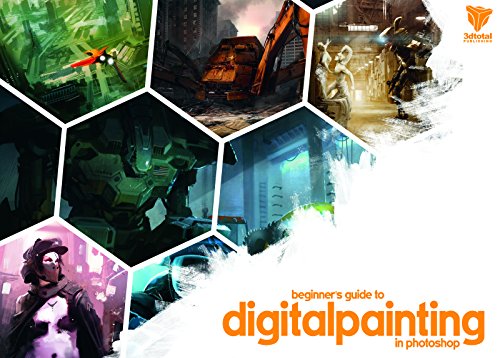
Nykolai Aleksander and Richard Tilbury’s beginner’s guide focuses on digital painting in Photoshop. For Windows and Mac users following Photoshop tutorials online, it adds structured basics.
Price was not available on the check date, so the tier is listed as varies.
Photoshop’s core painting tools are stable, so fundamentals remain relevant.
Best suited for: Photoshop users starting out.
Key features:
- Paperback
- Photoshop painting basics
- Authors: Nykolai Aleksander, Richard Tilbury
- Beginner level
Pros:
- Matches common tutorial software
- Step-by-step
- Transferable skills
Cons and limitations:
- Older interface
- Photoshop-specific
- Price varies
Buying consideration: Use Photoshop’s search bar to locate any tools whose menus have moved since publication.
6. Digital Painting Techniques (Digital Art Masters Series) — Best for intermediate learners

This 3dtotal collection presents practical techniques from digital art masters. It is a good bridge between free beginner tutorials and specialist courses, showing how professionals approach complete images.
Highest-priced book here.
Best once you are comfortable with your app.
Best suited for: Intermediate learners ready for professional techniques.
Key features:
- Paperback
- Digital Art Masters series
- Professional techniques
- Multiple contributors
Pros:
- Professional insight
- Variety of subjects
- Reference value
Cons and limitations:
- Not for beginners
- Highest tier
- Older software versions
Buying consideration: Pick one technique per week and find a related online tutorial to see it in motion.
Buying Guide: Choosing Tutorial Sources
Free first, paid when stuck
Official guides, fundamentals sites and YouTube can take you a long way. Pay for courses when you need structure or feedback.
Match to your goal
Illustration, comics, concept art and fine art each have specialist resources. Choose instructors who work in your target field.
Look for feedback
Communities and courses with critiques accelerate progress more than any video.
Keep one structured source
A book or a single course provides the backbone; everything else fills gaps.
Check recency for tool lessons
Interfaces change; fundamentals do not.
Bookmark a short list
Keep a list of no more than five trusted sources: one official app resource, one fundamentals site, one course or school, one community and one book. Returning to the same few sources builds momentum and makes it easier to notice your own progress.
Avoid tutorial overload
Finish one series before starting another.
Try a Tutorial Here
Practice right now with our step-by-step guides on painting digital waves and ocean and digital night scenes, or learn how to do digital painting without a tablet.
Common Mistakes to Avoid
- Watching without painting. Follow along, then repeat on your own subject.
- Jumping between sites daily. Stick with a sequence.
- Skipping fundamentals for flashy techniques.
- Paying for many courses at once.
- Ignoring official app guides. They are free and accurate.
- Never sharing work. Feedback is part of learning.
FAQs
What is the best free site for digital painting tutorials?
For tools, your app’s official resources. For fundamentals, sites such as Ctrl+Paint offer sequenced lessons, and YouTube has a huge range of free technique videos.
Are paid tutorial sites worth it?
They are worth it when they provide structure, projects or feedback you cannot get free. Check previews and instructor portfolios first.
Where can I learn Procreate?
Start with Procreate’s official Handbook, then follow project-based tutorials or books such as The Illustrator’s Guide to Procreate.
Which site is best for concept art tutorials?
Specialist schools such as Schoolism and CGMA focus on entertainment-industry skills, while fundamentals sites help with the underlying drawing and painting.
Can I learn digital painting only from YouTube?
Many artists do, but it requires discipline. Following a structured playlist or pairing YouTube with a book or course helps.
How do I know if a tutorial is good?
Good tutorials explain why each step works, show settings clearly, and leave you with an exercise to practice.
Final Recommendation
Start free: your app’s official resources for tools and a fundamentals site such as Ctrl+Paint for core skills, with YouTube for specific problems. Move to course platforms or specialist schools when you want projects or feedback. Keep one structured book alongside: The Illustrator’s Guide to Procreate or the Procreate beginner’s guide for iPad, the Photoshop beginner’s guide for desktop, How to Learn Digital Painting for strategy, and Digital Painting Techniques as you advance.