PaintingProGuide is reader-supported. When you buy through links on this page we may earn an affiliate commission at no extra cost to you.
Shopping for a stylus for an Android tablet is confusing because the word “stylus” covers two very different tools. Active styluses have a battery and a fine hard tip that behaves like a pencil. Passive capacitive styluses have a rubber, disc or fiber tip and work on any touchscreen without pairing or charging. Neither type gives you pressure sensitivity on an Android tablet unless the tablet supports a native pen protocol, so the right choice depends on whether you are sketching, taking notes or simply navigating. We compared six styluses sold on Amazon.com and sorted them by how they serve digital painters and sketchers.
Quick answer: For sketching and line work on an Android tablet, the Luntak Active Stylus Pen is the pick: a fine POM tip, USB-C charging and a double-tap power switch. If you want precision without charging, the AmberVec 2-in-1 Disc and Fiber Stylus gives a transparent disc tip for drawing plus a fiber end for scrolling. For a household or classroom, the LINFANC 12-pack is the value option.
Our Top Picks at a Glance
- Luntak Active Stylus Pen — Best for sketching and detailed line work
- AmberVec 2-in-1 Disc Stylus (3-pack) — Best passive stylus for drawing
- Isvo Precision Disc Tip Stylus (3-pack) — Best budget disc stylus
- ChaoQ Dual Rubber Tip Stylus (3-pack) — Best for notes and general use
- LINFANC Stylus Pen 12-pack — Best for families and classrooms
- GCHMDE Stylus Pen 10-pack — Best bulk option with spare tips
| Product | Best For | Key Spec | Key Strength | Price Tier |
|---|---|---|---|---|
| Luntak Active Stylus | Sketching, fine lines | Active POM tip, USB-C, 8-10 hr use per charge | Pencil-like precision | $ |
| AmberVec 2-in-1 Disc Stylus | Drawing without charging | Transparent disc tip + fiber tip, 3-pack | Hidden spare tips, magnetic cap | $ |
| Isvo Disc Tip Stylus | Budget precision | Disc tip, 3 colors | Lowest price tier, no setup | $ |
| ChaoQ Dual Rubber Tip Stylus | Notes, navigation | 5 mm and 6.6 mm rubber tips, 3-pack | Six replacement tips included | $ |
| LINFANC 12-pack | Households, classrooms | 12 pens, 24 spare rubber tips | Two tip sizes per pen | $ |
| GCHMDE 10-pack | Bulk buyers | 10 pens, 7 mm and 5 mm rubber tips | Tool-free tip replacement | $ |
How We Chose
We have not drawn with these styluses ourselves. The ranking is built from the Amazon listing details and specifications recorded in October 2026, how each tip technology and feature set suits drawing versus navigation on an Android tablet, and how widely each product is reviewed by Amazon buyers.
What we weighed for an Android stylus:
- Tip type: fine active tips and transparent disc tips allow accurate line placement; rubber tips are better for tapping and scrolling.
- Power requirements: active pens need charging; passive pens never do. We note battery life where the listing states it.
- Compatibility claims: all six are listed for capacitive screens, including Android tablets and Amazon Fire tablets.
- Spare tips: rubber and disc tips wear, so included replacements extend the life of the purchase.
- Value per pen: multi-packs are useful for families and classrooms, less so for a single artist.
Best Stylus for Android Tablet Options Reviewed
1. Luntak Stylus Pen for Android Tablet — Best for sketching and detailed line work

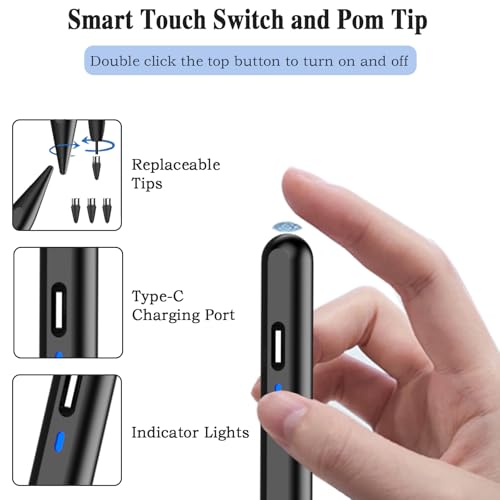
The Luntak pen is the only active stylus in this group, and that matters for anyone sketching. The listing describes a wear-resistant POM tip designed for precision and drawing, a double-tap power switch on the top of the pen, no drivers or Bluetooth pairing, and USB-C charging that delivers 8 to 10 hours of use from a 35 minute charge.
Compatibility is listed for Xiaomi, Huawei, Vivo, Lenovo, Pixel, Amazon Fire tablets and iPhone 6 through 15, which covers most non-Samsung Android tablets. A magnetic body lets it attach to tablets that have a built-in magnet. The box includes the pen, three replacement POM tips, a Type-C cable and a manual.
Best suited for: digital sketchers and note-takers on Android tablets who want a pencil-like tip and are happy to recharge a pen occasionally.
Key features:
- Active capacitive stylus with fine POM tip
- Double-tap on/off, no pairing or drivers
- USB-C charging, listed at 8-10 hours of use per charge
- Magnetic attachment on tablets with built-in magnets
- Three spare tips and a cable included
Pros:
- Finest tip in this comparison for line work
- Aluminum body weighing about 0.3 oz
- One-year warranty stated on the listing
Cons and limitations:
- No pressure sensitivity or palm rejection, like all universal styluses
- Needs charging, unlike the passive options below
- Magnetic feature depends on your tablet
Buying consideration: If your tablet supports its own pen protocol, a native pen will outperform any universal stylus. For tablets without that option, this is the closest thing to a pencil.
2. AmberVec 2-in-1 Universal Stylus Pen, 3-Pack — Best for drawing without charging

AmberVec’s pens take the disc approach to precision. One end carries a flexible, transparent disc tip that the listing describes as accurate enough for notes and drawing, with a clear view of the line underneath. The other end is a fiber tip for browsing and scrolling.
Two details stand out for artists. Each pen hides a spare disc tip inside the body, accessed by rotating the fiber end, and the 3-pack includes three additional disc tips and three fiber tips. The magnetic cap attaches to either end so it is less likely to go missing.
Best suited for: artists who want disc-tip accuracy on an Android tablet or touchscreen laptop without ever charging, and anyone who switches between drawing and scrolling.
Key features:
- Transparent disc tip for drawing, fiber tip for navigation
- Hidden spare disc tip inside each pen, plus extra tips in the box
- Two-way magnetic cap
- Aluminum alloy body, about 0.7 oz for the pack
- Listed for Android tablets, phones, Surface, Chromebooks and iPads
Pros:
- Precise line placement thanks to the see-through disc
- Replacement tips cover years of use
- Three colors make sharing easy
Cons and limitations:
- Disc tips feel different from a pencil and take practice
- No pressure sensitivity
- Lighter than a typical pen, which some users dislike
Buying consideration: Disc styluses reward a light, upright grip. If you draw with heavy pressure, the thinner Luntak active tip may suit you better.
3. Isvo 3-Pack Precision Disc Tip Stylus — Best for budget precision

The Isvo set delivers the disc-tip experience at the lowest price tier here. The listing describes a soft disc tip that glides without scratching, a lightweight body for long sessions, and compatibility with Samsung, Android, Chromebook and iOS devices with no charging or drivers.
You get three pens in different colors, which the brand positions as a shareable alternative to a high-priced pencil. It is a sensible way to test whether disc tips suit your drawing style before spending more.
Best suited for: beginners trying disc-tip drawing for the first time and anyone who needs a few spare styluses around the house.
Key features:
- Disc tip for precise placement
- Three pens in three colors
- Plastic body, about 0.6 oz for the pack
- Works on all capacitive touchscreens with no setup
Pros:
- Cheapest way to try a disc stylus
- Nothing to charge or pair
- Scratch-safe tip
Cons and limitations:
- Plastic body rather than aluminum
- Listing does not mention spare tips
- Disc tips wear faster than hard active tips
Buying consideration: If you find you like disc tips, step up to the AmberVec set for the hidden spares and dual ends.
4. ChaoQ Stylus Pen for Touchscreen, 3-Pack — Best for notes and general use

ChaoQ’s pens are the rubber-tip classic: a lightweight aluminum body with a 5 mm tip at one end and a 6.6 mm tip at the other. The listing frames the smaller tip for detailed work and the larger for bold notes and scrolling, and promises no lag or screen scratches.
Six replaceable tips come with the three pens. There is no charging, no Bluetooth and nothing to configure, which is exactly what you want for a stylus that lives in a tablet case for quick annotations and color-fill work.
Best suited for: note-takers, casual sketchers and anyone who wants a stylus that works on every device in the house.
Key features:
- Dual rubber tips, 5 mm and 6.6 mm
- Three pens plus six replacement tips
- Aluminum body, about 5.5 inches long
- Compatible with iPad, iPhone, Android and Samsung per the listing
Pros:
- Comfortable for extended writing
- Spare tips included
- Bright metal colors are easy to spot
Cons and limitations:
- Rubber tips are broad, so fine detail is harder than with a disc or active tip
- No pressure or tilt response
Buying consideration: Rubber tips are best for blocking in color and gesture sketches. Pair with a disc or active stylus if you also need clean line art.
5. LINFANC 12-Piece Stylus Pen Set — Best for families and classrooms

When several people share tablets, losing a stylus stops being a problem if you have twelve. LINFANC’s set contains 12 multicolor aluminum pens, each with two rubber tips of different sizes, and 24 extra replacement tips.
The listing describes the smaller tip as the precision end for drawing and the larger as the smooth end for scrolling, browsing and gaming. Nothing needs pairing or charging, so every pen in the box is ready on day one.
Best suited for: classrooms, art clubs, families and anyone who wants color-coded styluses for several devices.
Key features:
- 12 aluminum pens in 12 colors
- Two rubber tips per pen, 24 spares in the box
- About 5.6 inches long, 8 mm diameter
- Universal capacitive compatibility per the listing
Pros:
- Best price per pen on this list
- Spare tips for years
- Color coding helps keep track of who owns which
Cons and limitations:
- Rubber tips limit fine detail
- More pens than most individual artists need
Buying consideration: A single artist is better served by one good pen; this set makes sense once you count more than two or three users.
6. GCHMDE 10-Piece Stylus Pen Set — Best for bulk buyers

GCHMDE’s 10-pack sits between a single pen and a classroom set. Each stylus has two silicone rubber tips, 7 mm and 5 mm, and both ends can be replaced without tools. The listing names browsing, writing, drawing and gaming as intended uses.
Compatibility covers phones, tablets, Nintendo Switch, Chromebooks and Surface devices. The black and white finish is more neutral than most multi-packs, which some buyers prefer for an office or studio.
Best suited for: small studios, offices and households that want a stock of simple styluses in a neutral finish.
Key features:
- 10 pens with 7 mm and 5 mm rubber tips
- Tool-free tip replacement
- Aluminum body, about 5.3 inches long
- Listed for Android, iPad, Samsung Galaxy, Switch and Surface
Pros:
- Good value for a stocked drawer
- Neutral color scheme
- Spare accessories included
Cons and limitations:
- Broad rubber tips are not ideal for line art
- Heavier shipping weight than the smaller packs
Buying consideration: Choose this over the LINFANC set if you prefer black and white over bright colors; the tip technology is otherwise similar.
Buying Guide: How to Choose a Stylus for an Android Tablet
Active vs. passive capacitive styluses
An active stylus has a battery and electronics that let a very fine tip register on a capacitive screen. A passive stylus relies on a conductive tip wide enough for the screen to detect, which is why rubber tips are broad and disc tips use a clear plastic disc. Active pens draw finer lines; passive pens never need charging.
Pressure sensitivity and what universal styluses cannot do
Pressure and tilt response require the tablet to support a native pen protocol, such as Samsung’s S Pen or USI on some Chromebooks and tablets. Universal styluses, including every pen on this page, register as a finger touch. Your painting app will apply a constant brush size unless it offers a velocity-based option.
Tip shape for drawing vs. writing
Fine POM tips suit line art and lettering. Disc tips offer accurate placement because you can see the contact point through the disc. Rubber tips are quickest for blocking color, scrolling and tapping. Many artists keep two styluses for this reason.
Palm rejection
Universal styluses cannot provide palm rejection on their own. Look for a palm rejection or “finger touch off” setting in your drawing app, or draw with a glove on your drawing hand.
Weight, length and grip
Most pens here run between 5.3 and 5.6 inches long and under an ounce each. Longer, slightly heavier pens tend to feel more stable for shading, while lighter pens are better for quick notes.
Battery life and charging
Only the Luntak pen needs charging; the listing claims 8 to 10 hours from a 35 minute USB-C charge. If you often forget to charge accessories, a passive pen removes that failure point.
Replacement tips
Every tip type wears. Check the listing for included spares: the Luntak set includes three POM tips, AmberVec includes extra discs and fiber tips, LINFANC includes 24 rubber tips, and ChaoQ includes six.
Set Up Your Tablet for Drawing
A stylus only helps if your workflow is ready for it. If you are drawing on a phone or tablet without a dedicated graphics tablet, our guide to digital painting without a drawing tablet covers app settings and brush choices that make a universal stylus more effective. If you later add a graphics tablet to your setup, the drawing tablet setup guide walks through drivers and pressure curves.
Common Mistakes to Avoid
- Expecting pressure sensitivity from a universal stylus. Only a tablet with a native pen protocol delivers it.
- Buying a broad rubber tip for fine line art and blaming the app for thick lines.
- Using a stylus through a thick or matte screen protector that reduces sensitivity. Test the pen without the protector before judging it.
- Leaving the “only draw with pen” setting on in apps when using a passive stylus, which can block input.
- Forgetting to charge an active pen before a session. Keep the USB-C cable with your tablet.
- Pressing hard with disc tips, which can bend the disc stem over time. Light, upright strokes work best.
FAQs
Will a universal stylus work on any Android tablet?
All six styluses here are listed for capacitive touchscreens, which covers nearly every current Android tablet, including Amazon Fire tablets. They work like a precise fingertip rather than a native pen.
Does a stylus for an Android tablet support pressure sensitivity?
Not unless the tablet has a native pen protocol such as Samsung S Pen or USI. Universal active and passive styluses register as touch input with no pressure or tilt data.
What is the difference between a disc tip and a rubber tip?
A disc tip is a thin stem with a clear plastic disc that lets you see the exact contact point, which helps line work. A rubber tip is a soft dome that is fast for tapping and scrolling but hides the point of contact.
Do I need to charge a stylus for an Android tablet?
Only active styluses need charging. Of the pens above, only the Luntak pen has a battery; it is listed at 8 to 10 hours of use from a 35 minute USB-C charge. The other five are passive and never need power.
Can I use these styluses on an iPad or Chromebook too?
Yes. Every listing states compatibility with iPads, iPhones, Chromebooks or Surface devices as well as Android. On an iPad you may need to turn off the setting that restricts drawing to Apple Pencil.
How long do stylus tips last?
Rubber and disc tips wear with use and screen protectors speed that up. Sets that include spares, like LINFANC with 24 tips or AmberVec with hidden spares, delay the need to rebuy.
Final Recommendation
If you are picking a stylus for an Android tablet primarily to sketch, the Luntak Active Stylus is the one to buy; its fine POM tip is the closest you will get to a pencil feel without a native pen. Artists who refuse to charge another device should choose the AmberVec 2-in-1 Disc Stylus, with the Isvo 3-pack as a cheaper way to try disc tips. For note-taking and navigation, the ChaoQ 3-pack is comfortable and inexpensive, and the LINFANC 12-pack or GCHMDE 10-pack make sense only once several people or devices are involved.