

PaintingProGuide is reader-supported. When you buy through links on this page we may earn an affiliate commission at no extra cost to you.
The best online digital painting course is the one that teaches painting, not just software. Plenty of courses walk you through every brush menu in Procreate or Photoshop and leave you no better at light, color or form. The ones worth your time treat the software as a tool and spend most of their hours on fundamentals: values, edges, color temperature, composition and lighting, with assignments that make you paint and get feedback.
This guide explains the main types of online digital painting courses, what to look for in each, a realistic learning path, and the books that pair well with any course. We do not rank individual paid courses, because course content, instructors and pricing change often; instead we give you a checklist that works for evaluating any of them.
Quick answer: For most beginners, the best online digital painting course is a structured, project-based course in the software you already own that spends more time on fundamentals (value, color, light) than on tool menus, and includes assignments or community feedback. Pair it with a book: Drawing Digital by Lisa Bardot for iPad beginners, the Beginner’s Guide to Digital Painting in Clip Studio Paint for Clip Studio users, and Digital Painting Techniques from the Digital Art Masters series once you are ready for professional workflows.
Our Top Picks at a Glance
- Structured project-based course in your software — Best for most beginners
- Fundamentals course (value, color, light) — Best for long-term improvement
- Free video tutorials plus a practice plan — Best for tight budgets
- Mentorship or critique-based course — Best for intermediate artists
- Drawing Digital by Lisa Bardot (book) — Best companion for iPad beginners
- Beginner’s Guide to Digital Painting in Clip Studio Paint (book) — Best companion for Clip Studio users
- Digital Painting Techniques, Digital Art Masters (book) — Best for professional techniques
Types of Online Digital Painting Courses Compared
| Course type | Best for | Strengths | Watch out for |
|---|---|---|---|
| Software-specific beginner course | Complete beginners | Gets you comfortable with tools fast | Can stop at menus without teaching painting |
| Fundamentals course | Anyone serious about improving | Value, color, light and form transfer to any software | Less immediate “wow” results |
| Subject course (portraits, landscapes, concept art) | Artists with a goal | Focused, motivating projects | Assumes basics |
| Free video tutorials | Budget learners | Huge variety, no cost | No structure or feedback |
| Mentorship or critique class | Intermediate artists | Personal feedback accelerates progress | Higher cost, limited seats |
What Makes a Good Online Digital Painting Course
Before paying for any course, check it against these points. A course that hits most of them will teach you more than a slick one that hits few.
- Fundamentals first: look for lessons on value, edges, color temperature and lighting, not only brushes and layers.
- Project-based structure: each module should end with a painting you complete yourself.
- Real-time demonstrations: watching full paintings develop, including mistakes and corrections, teaches decision-making.
- Downloadable resources: brushes, reference images and layered files let you study the process.
- Feedback: a community, critique sessions or instructor reviews are the biggest accelerator.
- Software match: the course should use the app you have, or teach transferable skills clearly.
- Instructor portfolio: the instructor’s own work should look like what you want to make.
- Preview lessons and refund policy: sample a lesson before committing.
Free vs Paid: What Your Money Actually Buys
Free tutorials are genuinely good, and many professional digital painters learned largely from them. What free material rarely provides is sequence and accountability. A video on painting clouds does not know whether you understand values yet, and nobody checks your homework. That is the gap a paid course should fill.
When you pay, you should be getting at least three things you cannot easily assemble yourself: a curriculum where each lesson builds on the last, complete demonstrations with the instructor’s files or brushes, and some form of feedback, whether a community critique board, live sessions or instructor reviews. If a paid course offers only a playlist of videos with no structure or feedback, a well-chosen set of free tutorials plus one of the books below will usually teach you as much.
A sensible approach is to spend your first month on free material and the software maker’s own tutorials, then invest in one structured fundamentals course once you know you will stick with digital painting.
How We Chose
Our course guidance is based on well-established principles of how painting skills develop and what separates effective courses from tool tours. The companion books come from the Amazon listings checked in October 2026; those listings include title, author or publisher and format, so we describe them only from that information. We have not taken any specific paid course or read these books cover to cover, and we do not make claims about content beyond what their titles and formats indicate.
A Realistic Learning Path
Our guide on how to learn digital painting covers this in depth, but here is the short version most successful self-taught artists follow:
- Weeks 1–2: Learn the software basics. Brushes, layers, selections, undo, color picker. A short software course or the app maker’s own tutorials are enough.
- Weeks 3–8: Values and simple forms. Paint spheres, cubes and simple still lifes in grayscale. This is where most people skip ahead and regret it.
- Weeks 9–14: Color and light. Color temperature, local color versus light color, and limited palettes.
- Weeks 15 onward: Subjects. Landscapes, portraits, environments or characters, applying the fundamentals.
- Throughout: Study from life and photos. Copy masters and do short daily studies alongside any course.
If you are coming from traditional media, read our comparison of digital vs traditional painting; many fundamentals transfer directly, while blending, layers and undo change how you work.
Books That Pair Well With an Online Course
A good book lets you study at your own pace, revisit a technique without scrubbing through video, and keep a reference beside your tablet. These six are available on Amazon.
| Product | Best For | Key Spec | Key Strength | Price Tier |
|---|---|---|---|---|
| Drawing Digital (Lisa Bardot) | iPad beginners | Paperback; draw and paint on iPad | Complete beginner guide | Varies |
| Beginner’s Guide to Digital Painting in Clip Studio Paint | Clip Studio users | Paperback; 3dtotal Publishing | Tutorials by professional artists | $$ |
| A Guide to Digital Painting in Procreate: Landscapes & Plein Air | Procreate landscape painters | Paperback; 3dtotal Publishing | Landscape and plein air focus | $$ |
| Digital Painting Techniques (Digital Art Masters) | Intermediate to advanced | Paperback; 3dtotal | Techniques of digital art masters | $$ |
| Painting Luminous Portraits for Artists | Portrait fundamentals | Features, fleshtones, light and form | Light and form focus | $$ |
| The Complete Painting Course (Wendon Blake) | Traditional foundations | Hardcover; oils, watercolors, acrylics | Classic technique reference | $$ |
1. Drawing Digital by Lisa Bardot — Best for iPad beginners

Lisa Bardot’s Drawing Digital is described in its subtitle as the complete guide for learning to draw and paint on your iPad. For anyone starting with an iPad and an app like Procreate, a book like this covers the setup and early skills a course often rushes through.
It works well as a companion to a beginner course: read a chapter, then apply it in the course projects.
Best suited for: iPad owners starting digital art from scratch.
Key features:
- Paperback
- Focused on iPad drawing and painting
- Beginner level per subtitle
- By Lisa Bardot
- Listed at more than one price on our check date
Pros:
- Beginner-focused
- iPad specific
- Low price tier
Cons and limitations:
- iPad only
- Amazon listing has minimal detail
- Not an advanced text
Buying consideration: Keep the book open next to your iPad and work through each section as you go, rather than reading it all first.
2. Beginner’s Guide to Digital Painting in Clip Studio Paint — Best for Clip Studio users

Published by 3dtotal and featuring artist Devin Elle Kurtz, this guide is subtitled as featuring tutorials by expert professional artists. Clip Studio Paint is popular for illustration, comics and painting, and a dedicated beginner book helps you learn its tools in context.
If your online course uses a different app, this is still useful when you paint in Clip Studio, because it shows how professionals adapt techniques to that software.
Best suited for: Beginners using Clip Studio Paint for illustration and painting.
Key features:
- Paperback
- 3dtotal Publishing
- Featuring Devin Elle Kurtz
- Tutorials by professional artists
- Clip Studio Paint focus
Pros:
- Software-specific
- Professional contributors
- Beginner level
Cons and limitations:
- Clip Studio only
- Listing gives little content detail
- Not a fundamentals text
Buying consideration: Combine it with a fundamentals course; the book handles software, the course handles light and color.
3. A Guide to Digital Painting in Procreate: Landscapes & Plein Air — Best for Procreate landscape painters

Another 3dtotal title, this one focuses on landscapes and plein air painting in Procreate. Landscapes are an excellent training ground for value and color because there is no anatomy to worry about.
Plein air digital painting, working outdoors on an iPad, is a great way to train your eye for light, and pairs naturally with a landscape-focused online course.
Best suited for: Procreate users who want to paint landscapes and outdoor scenes.
Key features:
- Paperback
- 3dtotal Publishing
- Procreate focus
- Landscapes and plein air
- Intermediate-friendly
Pros:
- Clear subject focus
- Encourages painting from life
- Procreate specific
Cons and limitations:
- Landscape only
- Assumes basic Procreate skills
- Listing detail limited
Buying consideration: Take your iPad outside for short 20-minute studies; they teach more than long studio pieces at first.
4. Digital Painting Techniques (Digital Art Masters Series) — Best for professional techniques

Digital Painting Techniques, from 3dtotal’s Digital Art Masters series, is subtitled as practical techniques of digital art masters. It is a step up for artists who have the basics and want to see how professionals approach their work.
Use it after a beginner course, when you are ready to study advanced workflows and apply them to your own projects.
Best suited for: Intermediate and advanced digital painters.
Key features:
- Paperback
- Digital Art Masters series
- 3dtotal
- Professional techniques
- Software-agnostic focus implied by title
Pros:
- Professional-level reference
- Broad techniques
- Long-respected series
Cons and limitations:
- Not for absolute beginners
- Listing detail minimal
- Price varied between listings
Buying consideration: Pick one technique per week and replicate it on your own subject rather than copying the example.
5. Painting Luminous Portraits for Artists — Best for portrait fundamentals
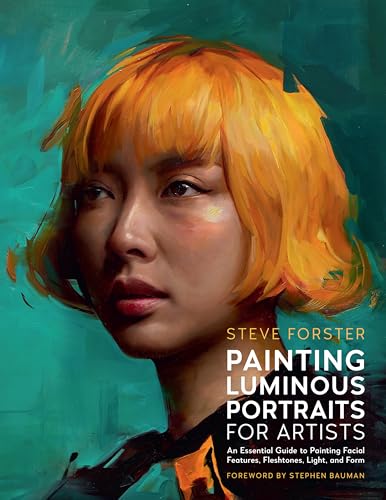
Steve Forster’s book, with a foreword by Stephen Bauman, is subtitled as an essential guide to painting facial features, fleshtones, light and form. It is not a software book; it is a fundamentals book on portraiture.
Light, form and skin tones translate directly into digital painting, so this is a strong companion to any digital portrait course.
Best suited for: Artists working toward portraits, digital or traditional.
Key features:
- Paperback
- By Steve Forster, foreword by Stephen Bauman
- Facial features and fleshtones
- Light and form
- Medium-agnostic fundamentals
Pros:
- Focus on light and form
- Applies to any medium
- Portrait specific
Cons and limitations:
- Not digital-specific
- Portraits only
- Listing detail minimal
Buying consideration: Practice the lessons in grayscale first in your digital app, then add color.
6. The Complete Painting Course by Wendon Blake — Best for traditional foundations

Wendon Blake’s Complete Painting Course is a hardcover guide to techniques in oils, watercolors and acrylics. It is a traditional painting reference rather than a digital one.
Many digital painters simulate traditional media, and understanding how oils, watercolors and acrylics behave helps you choose and use digital brushes more convincingly.
Best suited for: Digital painters who want a grounding in traditional technique.
Key features:
- Hardcover
- Oils, watercolors and acrylics
- By Wendon Blake
- Technique-focused
- Traditional reference
Pros:
- Broad traditional foundation
- Helps with traditional-look brushes
- Durable format
Cons and limitations:
- Not about digital tools
- Older reference
- Listing detail minimal
Buying consideration: Use it alongside a digital course to understand the real-media looks your brushes imitate.
Buying Guide: How to Choose an Online Digital Painting Course
Match the course to your software and device
Procreate is iPad-only; Clip Studio Paint and Krita run on several platforms; Photoshop is desktop-focused. A course that uses your software lets you follow along directly. If you do not have a tablet yet, see our guide to digital painting without a tablet.
Prioritize fundamentals
Software courses get you comfortable fast, but fundamentals make you better. If a course outline is mostly menus and brush settings, pair it with a fundamentals course or book.
Look for feedback
Critique is what turns practice into progress. Courses with communities, assignments or instructor reviews are worth more than video-only courses at the same price.
Check the instructor’s portfolio
Choose instructors whose work you would like to make. Style matters less than clear demonstrations, but you will stay motivated longer if you admire the results.
Start free, then pay
Free tutorials and the software maker’s own lessons are enough for the first few weeks. Pay for a course once you know what you want to learn.
Choose subject courses that motivate you
Once basics are in place, subject courses such as painting digital waves and ocean scenes or digital night scenes keep practice exciting.
Common Mistakes to Avoid
- Collecting courses instead of finishing them. Complete one before buying another.
- Skipping value studies. Color cannot fix a painting with weak values.
- Relying on fancy brushes. A basic round brush and good fundamentals beat a thousand custom brushes.
- Only following along. Repaint each lesson with your own subject.
- Never painting from life. Photos and lessons are not enough; observe real light.
- Working at too high a zoom. Zoom out often to judge the whole image.
FAQs
What is the best online digital painting course for beginners?
A structured, project-based course in the software you own that emphasizes value, color and light, with assignments or feedback. Pair it with a beginner book like Drawing Digital for iPad.
Can I learn digital painting for free?
Yes. Free tutorials and software makers’ own lessons cover the basics. Add a practice plan and occasional paid courses or books for structure.
How long does it take to learn digital painting?
Basic comfort with software takes a few weeks. Solid fundamentals typically take months of regular practice, and skill keeps improving for years.
Do I need a drawing tablet for a digital painting course?
A pen tablet or iPad with a stylus makes it much easier, but you can start with a mouse for simple shapes and value studies.
Should I learn Procreate, Photoshop or Clip Studio Paint?
Learn whichever you have access to. Fundamentals transfer across software, and switching later is easy once you can paint.
Are books still useful when I take an online course?
Yes. Books let you revisit techniques quickly and study at your own pace. They work well alongside video lessons.
Final Recommendation
Choose a structured, project-based online digital painting course in your own software, and make sure it spends serious time on value, color and light. Add a critique-based class once you have the basics, and keep free tutorials for specific techniques.
For companion reading, start with Drawing Digital on iPad or the Clip Studio Paint beginner’s guide, add the Procreate landscapes guide or Painting Luminous Portraits for subject skills, and move to Digital Painting Techniques when you are ready for professional workflows.


One Comment