PaintingProGuide is reader-supported. When you buy through links on this page we may earn an affiliate commission at no extra cost to you.
The best Procreate course online is the one that matches your goal and your learning style, not necessarily the most popular one. Someone who wants to letter greeting cards, someone learning to paint portraits and someone animating short loops need different courses. The good news is that the core Procreate skills, the interface, brushes, layers, selections, adjustments and color tools, are taught well in many places, including free official resources from the app’s makers.
This guide explains the main types of online Procreate courses, how to judge a course before you pay, a practical learning path from first stroke to finished illustration, and how to combine an online class with a good reference book. We do not rank individual paid courses, because course content, pricing and availability change often; instead, we give you the criteria to choose well and point to well-established books that pair with any course.
Quick answer: Start with Procreate’s free official resources (the Procreate Handbook and the app maker’s beginner video series) to learn the interface. Then choose a project-based course on a platform such as Skillshare, Domestika or Udemy that matches your goal: illustration, lettering, painting or animation. Look for courses updated for current Procreate versions, with downloadable brushes and project files. Pair it with a book like the 3dtotal Beginner’s Guide to Digital Painting in Procreate for a structured reference.
Our Top Picks at a Glance
- Official Procreate Handbook and beginner videos — Best free starting point
- Project-based subscription platform classes — Best for trying many teachers and styles
- Single-purchase, in-depth courses — Best for structured, long-form learning
- Free video tutorials — Best for specific techniques and quick answers
- Beginner’s Guide to Digital Painting in Procreate (3dtotal) — Best book to pair with a course
- Get Started with Procreate (Liz Kohler Brown) — Best project-driven book
| Option | Best For | Key Feature | Key Strength | Price Tier |
|---|---|---|---|---|
| Official Procreate resources | Learning the interface | Handbook and beginner videos | Accurate and current | Free |
| Subscription platforms | Variety of teachers | Many short project classes | Try styles cheaply | Varies |
| Single-purchase courses | Deep, structured learning | Long curriculum, lifetime access | Depth on one topic | Varies |
| Free video tutorials | Specific techniques | Short, searchable lessons | Instant answers | Free |
| 3dtotal Beginner’s Guide (book) | Structured reference | Printed lessons | Widely read guide | $$ |
| Get Started with Procreate (book) | Project practice | 20 project tutorials | 10-step learning path | $ |
How We Chose
Our course guidance is based on how online art courses are typically structured and what makes them effective: clear outcomes, current software, practice projects and feedback. For the books in the “Supplies that help” section, picks are based on the Amazon listing details checked in October 2026, how well each title fits beginners learning Procreate alongside a course, and how widely each book is reviewed by Amazon buyers. We left out very new self-published guides with little or no buyer feedback.
What we look for in a Procreate course:
- Clear outcome: you know what you will be able to make by the end.
- Current version: taught in a recent version of Procreate.
- Project-based: you finish real pieces, not just watch demos.
- Resources: brushes, palettes, canvases or project files to download.
- Teacher’s portfolio: the instructor’s own work matches the style you want to learn.
Types of Online Procreate Courses
1. Official Procreate Resources — Best Free Starting Point
Procreate’s makers publish a free online Handbook that documents every tool and gesture, and they have released beginner-focused video lessons covering the basics of canvases, brushes, layers and more. Because these come from the developer, they reflect the current app accurately. Spend your first few hours here before paying for anything.
2. Subscription Platform Classes — Best for Variety
Platforms such as Skillshare host many short, project-based Procreate classes from different teachers. A subscription lets you sample several instructors and styles, from botanical illustration to lettering, before committing. The downside is uneven quality, so check class reviews, project galleries and update dates.
3. Single-Purchase Course Marketplaces — Best for Depth
Marketplaces like Domestika and Udemy sell individual courses you buy once and keep. These are often longer and more structured, with multiple units building toward a final project. Look for frequent sales, read the course outline carefully, and check whether lifetime access is included.
4. Independent Teacher Courses — Best for a Specific Style
Many illustrators sell their own Procreate courses on personal websites or course platforms, often with brush packs and community groups. These can be excellent if you love the teacher’s style, and the community feedback can be valuable. Check refund policies before buying.
5. Free Video Tutorials — Best for Specific Techniques
Free videos are ideal for focused questions: how to use clipping masks, how to make a custom brush, how to color line art quickly. They rarely provide a structured path, so combine them with a course or book.
A Practical Procreate Learning Path
- Interface and gestures: canvases, the brush library, undo gestures, QuickMenu and the color panel.
- Layers: blend modes, alpha lock, clipping masks and reference layers.
- Line art: StreamLine, QuickShape and drawing guides.
- Coloring: ColorDrop fills, reference layer coloring and palettes.
- Shading and light: Multiply and Add layers, soft brushes and gradients.
- Adjustments: hue and saturation, curves, gradient maps and color grading.
- Custom brushes: Brush Studio basics and importing brush sets.
- Finishing and export: canvas size for print, file formats and time-lapse export.
- Specialty paths: lettering, animation assist, 3D painting or comic panels.
Choosing a Course by Goal
Illustration
Look for courses that take you from sketch to line art to flat color to shading in one complete piece. Character illustration courses should cover proportions and expressions as well as Procreate tools; editorial and children’s book courses should cover composition and limited palettes.
Lettering and Calligraphy
Lettering courses focus on pressure control, consistent stroke weight, drawing guides and brush settings such as StreamLine. Good ones include practice sheets you import as reference layers, so you can trace and build muscle memory.
Painterly and Realistic Painting
Choose courses that treat Procreate like traditional painting: value studies, color mixing on the canvas, blending with smudge, texture brushes and lighting. Landscape and still-life courses are a good bridge for traditional painters moving to the iPad.
Comics and Manga
Comic courses should cover panel layouts, perspective guides, inking brushes, screentone or halftone textures and lettering speech balloons. Check that the teacher shows a complete page workflow.
Animation
Procreate includes Animation Assist for frame-by-frame loops. Courses here should cover onion skins, timing, looping and exporting GIFs or video. Short, focused classes are often better than long general courses for this specialty.
Surface Pattern and Print
If you want to design patterns for fabric, stationery or print-on-demand, look for courses that cover repeat tiles, canvas sizes in pixels and inches, color profiles and exporting at print resolution.
How to Judge a Procreate Course Before You Pay
- Watch the preview or first lesson to see if the teaching pace suits you.
- Check the course date and Procreate version used.
- Look at student project galleries rather than marketing images.
- Read the full curriculum to confirm it covers what you need.
- Check what resources are included: brushes, files, palettes.
- Confirm refund policies and whether access expires.
Getting the Most From Any Course
Schedule short, regular sessions rather than occasional marathons; thirty minutes a day builds skill faster than a whole weekend once a month. Paint along with every lesson instead of watching passively, then repeat the project a second time from memory with your own subject. Save time-lapse recordings of your work so you can review your process, and post finished projects in the course community if there is one, since feedback is one of the most valuable parts of a paid class. Keep a simple log of what each lesson taught you, too.
Supplies That Help: Books to Pair With a Course
A good book complements an online course by giving you a structured reference you can flip through while painting. These titles are well suited to beginners.
1. Beginner’s Guide to Digital Painting in Procreate: How to Create Art on an iPad — Best for Structured Reference

Published by 3dtotal, a long-established digital art publisher, this beginner’s guide focuses on creating art on an iPad with Procreate. It is by far the most widely reviewed of the Procreate books in our checked listings, which suggests it has been useful to a lot of readers.
Use it alongside a course: the course shows techniques in motion, and the book gives you a reference to return to when you forget a step.
Best suited for: beginners who want a widely used, structured printed guide.
Key features:
- Paperback
- Beginner-focused digital painting in Procreate
- Published by 3dtotal
Pros:
- Very widely reviewed
- Structured approach
- Good reference format
Cons and limitations:
- Interface details may lag behind the latest app version
Buying consideration: check the edition date and compare it with your Procreate version.
2. Get Started with Procreate: The 10-Step Guide to Drawing on Your iPad — Best for Project Practice
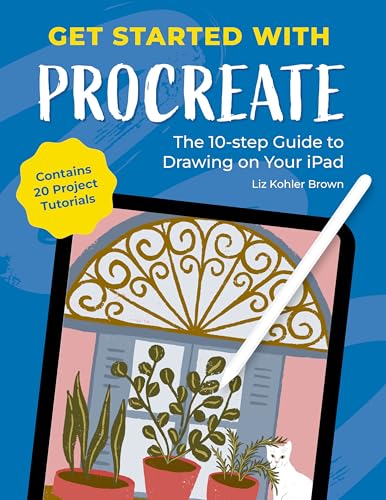
Liz Kohler Brown’s book is organized as a 10-step guide and, according to its title, contains 20 project tutorials. That project focus mirrors how the best online courses work: you learn tools by finishing pieces.
It suits learners who like to work through exercises in order and want a clear sense of progress.
Best suited for: beginners who learn best by completing projects.
Key features:
- Paperback
- 10-step structure
- 20 project tutorials per title
Pros:
- Project-driven
- Clear learning path
- Low price tier
Cons and limitations:
- Fewer reviews than the 3dtotal guide
Buying consideration: complete each project before moving on; the sequence builds skills progressively.
3. The Beginner’s Guide to Procreate: Everything You Need to Know to Master Digital Art — Best for Comprehensive Overview

Roché Woodworth’s guide promises an overview of everything a beginner needs to know to work in Procreate. It is a well-reviewed option for readers who want a broad tour of the app’s features.
Pair it with a project-based course so the overview turns into practical skills.
Best suited for: beginners who want a broad, all-in-one overview.
Key features:
- Paperback
- Beginner-focused overview of Procreate
Pros:
- Well reviewed
- Broad coverage
- Low price tier
Cons and limitations:
- Overview format may be less project-driven
Buying consideration: use it as a reference while working through a course.
4. Get Set Procreate: A Practical Guide for Illustrating on an iPad — Best for Tips and Best Practices

Samadrita Ghosh’s book is described in its title as a practical guide filled with tips, tricks and best practices for illustrating on an iPad. That focus suits learners who already know the basics and want workflow advice.
It has fewer reviews and sits at a higher price tier than the other books, so it is best as a second book once you are comfortable with Procreate.
Best suited for: intermediate learners who want illustration workflow tips.
Key features:
- Paperback
- Practical tips and best practices
- Illustration focus
Pros:
- Workflow-oriented
- Useful after the basics
Cons and limitations:
- Few buyer reviews
- Higher price tier
Buying consideration: read it after finishing a beginner course to refine your process.
5. Procreate for iPad 2026: The Ultimate Beginner-to-Expert Guide — Best for Up-to-Date Coverage

This 2026 title by Briar Hollis is listed as a beginner-to-expert guide to digital art, illustration and animation in Procreate. A recent publication date can be helpful when the app interface changes.
It is very new and had only minimal buyer feedback when we checked, so preview the contents before buying.
Best suited for: learners who want a recent book covering illustration and animation.
Key features:
- Paperback
- Beginner to expert scope
- Covers illustration and animation per title
Pros:
- Recent publication
- Includes animation
Cons and limitations:
- Minimal buyer feedback
- Higher price tier
Buying consideration: use the preview to check the depth before relying on it as your main reference.
Buying Guide: How to Choose the Best Procreate Course Online
Define Your Goal
Illustration, lettering, painting, comics and animation each need different skills. A course that matches your goal will keep you motivated.
Match the Teacher’s Style
Look at the instructor’s portfolio. If you love their work, you will enjoy learning their process.
Prefer Project-Based Learning
Courses where you create finished pieces teach faster than tool-by-tool tours.
Check Version and Update Date
Procreate updates regularly. Courses recorded in older versions still teach fundamentals, but menus may differ.
Look for Resources and Community
Downloadable brushes, palettes and files, plus a community or feedback option, add a lot of value.
Budget Smartly
Start free, then try a subscription or a single discounted course. Buy more only when you know what you want to learn next.
Practice Projects to Try
Put new skills to work with our tutorials on painting realistic clouds in Procreate, using adjustment layers in Procreate and color grading in Procreate.
Common Mistakes to Avoid
- Buying several courses at once and finishing none.
- Watching lessons without painting along.
- Choosing a course in a style you do not actually want to learn.
- Ignoring free official resources that answer basic questions.
- Collecting brush packs instead of learning core tools.
- Skipping fundamentals like layers and selections.
FAQs
What is the best Procreate course for beginners?
Start with Procreate’s free official Handbook and beginner videos, then pick a project-based course that matches your goal. Check the teacher’s portfolio, course date and included resources before buying.
Are free Procreate tutorials enough to learn?
Free resources can teach you a lot, especially for specific techniques. A structured course or book helps you progress in a logical order and finish projects.
How long does it take to learn Procreate?
Most people learn the basics in a few days of practice. Becoming confident with layers, brushes and adjustments usually takes a few weeks of regular painting.
Should I buy a Procreate book or an online course?
Both work well together. Courses show techniques in motion; books give you a quick reference. Many learners use one of each.
Do I need an Apple Pencil for a Procreate course?
Procreate works best with an Apple Pencil because it supports pressure and tilt. Some courses can be followed with a basic stylus, but pressure-dependent techniques will not work the same way.
Which Procreate book is most popular?
Among our checked listings, the 3dtotal Beginner’s Guide to Digital Painting in Procreate is by far the most widely reviewed.
Final Recommendation
Begin with Procreate’s free official resources, then choose one project-based course that matches your goal and teacher preference, finishing it before buying another. Pair it with a book: the 3dtotal Beginner’s Guide is the most widely read, Liz Kohler Brown’s Get Started with Procreate is ideal for project learners, Roché Woodworth’s guide gives a broad overview, Get Set Procreate suits intermediate workflow tips, and the 2026 Procreate for iPad guide offers recent coverage once you have previewed it.