

PaintingProGuide is reader-supported. When you buy through links on this page we may earn an affiliate commission at no extra cost to you.
There is no shortage of digital painting tutorials. The problem is that most of them teach one painting rather than the skills underneath it. The best tutorials for digital painting do three things: they teach a transferable fundamental (value, color, edges, light, perspective or anatomy), they show the software steps clearly enough to repeat, and they leave you with an exercise you can redo on your own subject. Choose tutorials by the skill you need next, not by the most impressive thumbnail.
This guide lays out a learning order that works for most beginners, explains which tutorial formats suit which stage, and recommends six digital painting books from Amazon that work as structured, offline tutorials for Procreate, Photoshop, Clip Studio Paint and concept art environments.
Quick answer: Start with your app’s own beginner guide so the tools stop getting in the way, then follow fundamentals-based tutorials in this order: values, edges, color, light and form, and finally composition. For a single structured resource, the Beginner’s Guide to Digital Painting in Procreate (3dtotal Publishing) is the best starting book for iPad painters, while Photoshop users should pick the Beginner’s Guide to Digital Painting in Photoshop: Characters. Once basics are solid, Digital Painting Techniques from the Digital Art Masters series shows how professionals approach complete images.
The Skills Every Digital Painting Tutorial Should Build
Software changes; fundamentals do not. A tutorial earns its place in your learning plan if it improves one of these:
| Skill | What it fixes | Good tutorial signs |
|---|---|---|
| Values | Flat, muddy or unreadable images | Starts in grayscale; checks the image in black and white |
| Edges | Paintings that look cut out or overly blurry | Explains hard, soft and lost edges with brush choices |
| Color | Garish or dull palettes | Covers hue, saturation and temperature, not just picking swatches |
| Light and form | Objects that look flat | Uses simple shapes (spheres, cubes) before complex subjects |
| Perspective | Wonky rooms and buildings | Uses perspective guides and horizon lines |
| Composition | Busy or boring images | Thumbnails several options before rendering one |
| Software workflow | Fighting the app | Shows layers, selections, blend modes and brush settings step by step |
Which Tutorial Format Fits Which Stage?
- Official app guides and manuals. Procreate, Clip Studio Paint, Krita and other apps publish their own handbooks and tips. Best for learning tools in your first week.
- Short video tutorials. Great for one technique at a time, such as painting clouds or using clipping masks. Weak on progression.
- Speed paints and process videos. Inspiring and good for seeing decision-making, but too fast to learn tools from.
- Books. Structured, offline and easy to revisit. Ideal for fundamentals and step-by-step projects you can follow at your own pace.
- Courses and classes. Best when they include assignments and feedback; covered in our separate guide to online classes.
A Learning Path That Works
- Week 1: Learn the app. Layers, brushes, eraser, selection, transform, color picker, undo gestures and saving files.
- Weeks 2–3: Grayscale value studies. Paint simple objects and photos in three to five values only.
- Weeks 4–5: Edges and brushes. Recreate textures (metal, cloth, foliage) with two or three brushes.
- Weeks 6–7: Color. Paint the same grayscale study in three color schemes using blend modes or fresh layers.
- Weeks 8–10: Light and form. Still lifes and portraits lit from one direction.
- Weeks 11–12: A finished piece. Thumbnail, sketch, values, color, render and polish, using one tutorial as a framework but your own subject.
How to Get the Most From Any Tutorial
The same tutorial can teach you a lot or almost nothing depending on how you use it. This routine turns passive watching or reading into real skill:
- Preview first. Skim the whole tutorial without painting so you know where it is heading and which tools it uses.
- Follow along step by step. Pause often. Match the canvas size, brushes and layer structure as closely as you can.
- Name the lesson. Write one sentence describing the core idea, such as “group the background into two values” or “soft edges where form turns away from light.”
- Redo it from memory. A day later, repeat the painting without the tutorial open. Gaps in your memory show what you have not learned yet.
- Apply it to a new subject. Use the same lesson on your own photo or idea. This is the step that makes the skill yours.
- Compare and critique. Flip both versions horizontally and view them in grayscale; problems jump out.
Signs a tutorial is not worth your time
- It never explains why a step is taken, only what button to press.
- It depends on a paid brush pack you do not own to get the result.
- The canvas, layers and settings are never shown.
- It skips from sketch to finished painting with no intermediate stages.
- It is so old that the interface no longer matches your app version, for tool-focused lessons.
Our Top Picks at a Glance
These books work as complete, offline tutorial series.
- Beginner’s Guide to Digital Painting in Procreate — Best for iPad beginners
- Beginner’s Guide to Digital Painting in Photoshop: Characters — Best for Photoshop character painting
- A Clip Studio Paint 5 User Guide for Beginners 2026 — Best for learning Clip Studio Paint tools
- Digital Painting Techniques (Digital Art Masters) — Best for intermediate technique breakdowns
- Digital Painting Techniques: Volume 8 — Best for more professional workflows
- Designing Imaginative Environments (Nathan Fowkes) — Best for concept art landscapes
| Product | Best For | Key Spec | Key Strength | Price Tier |
|---|---|---|---|---|
| Beginner’s Guide: Procreate | iPad painters starting out | Paperback; 3dtotal Publishing | App-specific, beginner-friendly | $$ |
| Beginner’s Guide: Photoshop Characters | Character artists | Paperback; 3dtotal Publishing | Character focus | $ |
| Clip Studio Paint 5 User Guide 2026 | CSP users | Paperback; step-by-step lessons | Brush setup and tool lessons | $$ |
| Digital Painting Techniques | Intermediate learners | Paperback; Digital Art Masters | Practical technique breakdowns | $$ |
| Digital Painting Techniques: Vol. 8 | Leveling up | Paperback; 3dtotal Publishing | Professional workflows | Varies |
| Designing Imaginative Environments | Concept art and landscapes | Paperback; Nathan Fowkes | Location and landscape design | $$ |
How We Chose
The learning advice on this page reflects established ways digital painting fundamentals are taught. The books were selected from Amazon listing details checked in October 2026, based on how well each title’s stated focus fits a stage of learning and a specific app, and on how widely each is reviewed by Amazon buyers. We have not worked through these books ourselves; descriptions are based on their titles, subtitles and publisher information.
- App relevance — Procreate, Photoshop and Clip Studio Paint are covered.
- Stage fit — beginner guides first, technique collections later.
- Fundamental focus — titles that teach transferable skills, not only one image.
- Specialization — character and environment design for artists with clear goals.
Best Digital Painting Tutorial Books Reviewed
1. Beginner’s Guide to Digital Painting in Procreate — Best for iPad beginners

3dtotal Publishing’s Procreate guide, subtitled How to Create Art on an iPad, is aimed at artists starting out in the app. A dedicated Procreate book saves the trial and error of learning gestures, layer options and brush settings from scattered videos.
Book-based tutorials have an advantage on iPad: you can keep the instructions open beside your device instead of switching between a video and your canvas.
3dtotal’s beginner guides are known for step-by-step projects contributed by working artists.
Best suited for: New Procreate users who want a structured, step-by-step introduction.
Key features:
- Paperback
- Procreate on iPad
- Beginner level
- Published by 3dtotal Publishing
Pros:
- App-specific instruction
- Easy to follow beside the iPad
- Good first book
Cons and limitations:
- Procreate only
- Beginner focus
- App updates may change some menus
Buying consideration: Follow each project once exactly, then repeat it with your own subject to lock in the skills.
2. Beginner’s Guide to Digital Painting in Photoshop: Characters — Best for Photoshop character painting

This 3dtotal title focuses on painting characters in Photoshop, a common goal for illustration and game art learners. Character work combines anatomy, costume design, lighting and rendering, so a focused book helps you practice them together.
Photoshop’s core painting tools have stayed consistent for years, so the fundamentals transfer even as menus evolve.
It is the lowest-priced book here.
Best suited for: Photoshop users interested in character illustration.
Key features:
- Paperback
- Photoshop, character focus
- Beginner level
- 3dtotal Publishing
Pros:
- Clear subject focus
- Skills transfer to other apps
- Lowest tier
Cons and limitations:
- Photoshop-specific menus
- Less on environments
- Some interface details may be dated
Buying consideration: If you use another app, the painting process still applies; just translate tool names.
3. A Clip Studio Paint 5 User Guide for Beginners 2026 — Best for learning Clip Studio Paint

Nathan Brightwell’s 2026 guide targets Clip Studio Paint 5 and, per its subtitle, offers step-by-step lessons on setting up brushes and more. Clip Studio Paint is popular with illustrators and comic artists, and its brush system is powerful but can overwhelm new users.
A current-version guide helps because menu layouts and features change between major releases.
Pair it with fundamentals tutorials once you are comfortable with the tools.
Best suited for: New Clip Studio Paint users.
Key features:
- Paperback
- Clip Studio Paint 5
- Step-by-step lessons
- Brush setup coverage
Pros:
- Current version focus
- Tool-by-tool approach
- Useful for comic and illustration workflows
Cons and limitations:
- Software manual more than art fundamentals
- Mid-to-high tier
- Limited listing detail on contents
Buying consideration: Use it in your first two weeks, then move on to skill-focused tutorials.
4. Digital Painting Techniques (Digital Art Masters Series) — Best for intermediate technique breakdowns

Part of 3dtotal’s Digital Art Masters series, this book is subtitled Practical Techniques of Digital Art Masters. Technique collections show how experienced artists approach specific problems, such as painting skin, metal or atmosphere.
This format suits learners who already know their software and want to see professional decision-making.
Use it as a reference library rather than reading cover to cover.
Best suited for: Intermediate digital painters ready to study professional methods.
Key features:
- Paperback
- Digital Art Masters series
- Technique-focused chapters
- Multiple contributing artists
Pros:
- Professional approaches
- Variety of subjects
- Long-term reference value
Cons and limitations:
- Not for complete beginners
- Highest tier among these books
- Some software versions may be older
Buying consideration: Pick one technique per week and apply it to your own painting.
5. Digital Painting Techniques: Volume 8 — Best for professional workflows

A later volume in 3dtotal’s Digital Painting Techniques line, Volume 8 continues the format of practical tutorials from working artists. If you enjoy the series approach, later volumes add fresh subjects and workflows.
Price information was not available on the check date, so the tier is listed as varies.
Like the first title, it suits intermediate learners.
Best suited for: Learners who liked the series format and want more professional techniques.
Key features:
- Paperback
- Volume 8 in the series
- Tutorial-based chapters
- 3dtotal Publishing
Pros:
- New techniques beyond earlier volumes
- Professional perspectives
- Reference value
Cons and limitations:
- Intermediate level
- Price varies
- Not app-specific
Buying consideration: Check which volume covers the subjects you care about before buying, since each has different chapters.
6. Designing Imaginative Environments by Nathan Fowkes — Best for concept art environments
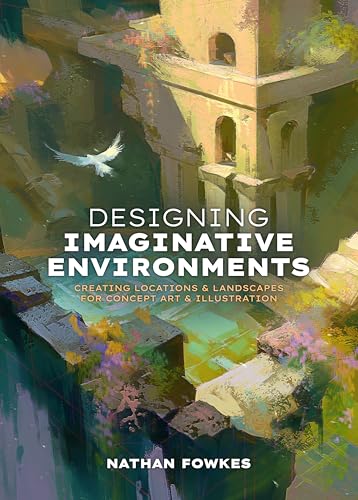
Nathan Fowkes’ book focuses on creating locations and landscapes for concept art and related work. Environment design draws on composition, value grouping, atmospheric perspective and storytelling, which are central to digital painting even outside concept art.
It is a good next step for learners who enjoy landscapes and want to design places rather than copy photos.
Published with 3dtotal Publishing.
Best suited for: Concept art students and landscape-focused digital painters.
Key features:
- Paperback
- Environment and landscape design
- Concept art focus
- Nathan Fowkes with 3dtotal Publishing
Pros:
- Strong composition focus
- Applicable to any medium
- Inspiring for world-building
Cons and limitations:
- Not a software guide
- Higher tier
- Assumes basic painting skills
Buying consideration: Thumbnail many small environment ideas before rendering one; it is the habit concept artists rely on.
Buying Guide: How to Choose Digital Painting Tutorials
Match the tutorial to your app
Early on, app-specific tutorials save time. Later, technique tutorials from any app are useful because the principles transfer.
Look for fundamentals
Tutorials that explain why something works (value grouping, edge control) are worth more than step-by-step recipes for a single image.
Prefer tutorials with files or references
Downloadable references, brushes or layered files let you see exactly how the result was built.
Check the date
Interfaces change. For tool lessons, newer is better; for fundamentals, age matters less.
Mix formats
Combine a book for structure with short videos for specific techniques and a class or community for feedback.
Practice more than you watch
A good rule is to spend at least twice as long painting as watching or reading.
Try a Tutorial Now
Put the learning path into practice with our step-by-step guides on painting digital waves and ocean scenes and digital night scene painting. No tablet yet? Start with digital painting without a tablet.
Common Mistakes to Avoid
- Watching instead of painting. Tutorials only work when you practice.
- Jumping to advanced rendering. Without values, rendering will not save a painting.
- Copying brushes before skills. Fancy brush packs do not fix fundamentals.
- Following one tutorial forever. Repeat it, then apply the lesson to your own subject.
- Skipping the black-and-white check. Desaturate often to test values.
- Ignoring app updates. Old tool tutorials may not match current menus.
FAQs
What should I learn first in digital painting?
Learn your app’s basic tools, then values in grayscale. Values affect every painting more than color or brushes.
Are books still useful for learning digital painting?
Yes. Books offer structured, step-by-step projects you can follow offline and revisit. They complement video tutorials well.
Is Procreate or Photoshop better for learning from tutorials?
Both have extensive tutorials. Choose based on your device: Procreate on iPad, Photoshop on desktop. The fundamentals you learn transfer between apps.
How long does it take to learn digital painting?
With regular practice, most beginners can produce finished, readable paintings within a few months. Mastery takes years, as with any medium.
Do I need a drawing tablet to follow tutorials?
A pen tablet or stylus makes it much easier. Some techniques can be practiced with a mouse, and our guide on painting without a tablet covers options.
Should I use free brushes from tutorials?
They can help, but stick to a few basic brushes while learning. Mastering a round brush and a soft brush teaches more than collecting hundreds.
Final Recommendation
Start with your app’s own guide, then follow fundamentals in order: values, edges, color, light and composition. For a structured book, choose the Procreate or Photoshop Characters beginner’s guide to match your software, or the Clip Studio Paint 5 User Guide if CSP is your app. Move on to Digital Painting Techniques and Volume 8 as you improve, and pick up Designing Imaginative Environments if landscapes and concept art are your goal.



One Comment