PaintingProGuide is reader-supported. When you buy through links on this page we may earn an affiliate commission at no extra cost to you.
Quick answer: Good landscape digital painting rests on the same principles as traditional landscape painting: a clear focal point, three or four grouped values, atmospheric perspective and simplified shapes, built up from big brushes to small. For Procreate users, A Guide to Digital Painting in Procreate: Landscapes & Plein Air is the most targeted book. For designing imaginative scenes, Nathan Fowkes’s Designing Imaginative Environments is the deeper study, and Artists’ Master Series: Perspective and Depth fixes the most common landscape problem: flat space.
Landscapes are one of the best subjects for learning digital painting. They forgive loose brushwork, reward bold color and teach the fundamentals of value, edges and depth without the pressure of getting a likeness right. Digital tools add powerful advantages: undo, layers, adjustable brushes, instant color changes and the ability to test compositions in minutes.
Whether you paint realistic plein air studies or imagined worlds, this guide covers the core techniques of landscape digital painting, a step-by-step workflow you can use in Procreate, Photoshop, Krita or any painting app, common mistakes and the books that will speed up your progress.
Core Principles of Landscape Digital Painting
Composition and focal point
Decide what the painting is about before you start: a sunlit tree, a mountain peak or a winding path. Place it off-center, often near a third of the way across, and design everything else to lead the eye there.
Value grouping
Squint at your reference and group it into three or four values: sky, distance, middle ground and foreground. A landscape that reads in grayscale will work in color. Many painters check this by toggling a black-and-white adjustment layer.
Atmospheric perspective
Objects far away appear lighter, cooler, lower in contrast and less detailed. Near objects are darker, warmer and sharper. Applying this rule alone adds instant depth.
Edges
Use soft edges for distant forms and clouds, firm edges near the focal point. Hard edges everywhere make a painting look like a cut-out.
Color temperature
Warm light usually means cool shadows and vice versa. Decide the light color first, then mix shadows accordingly.
Simplification
Paint the shape of a tree mass before individual leaves, and the shape of a field before grass blades. Detail is the last step and only where it helps the focal point.
A Step-by-Step Digital Landscape Workflow
- Thumbnails: paint three to five tiny compositions in grayscale with a large brush. Pick the strongest.
- Value block-in: on a new layer, block in the chosen thumbnail at full size in three or four values.
- Color pass: use a Color or Overlay layer, or repaint on a new layer, to introduce color while keeping values.
- Big shapes: refine major masses (sky, mountains, tree groups) with large textured brushes.
- Atmosphere: add a soft, light layer of haze over distant planes.
- Mid-level detail: refine edges and add mid-sized forms, such as rocks, tree trunks or paths.
- Focal detail and highlights: add the sharpest accents and brightest lights only at the focal point.
- Final adjustments: flip the canvas horizontally to check balance, adjust levels and add subtle texture if you want a traditional feel.
For full walkthroughs, follow our step-by-step digital landscape tutorial, then try a winter scene with how to paint a digital snow landscape.
Painting Common Landscape Elements Digitally
Skies
Start with a gradient from a warmer, lighter color near the horizon to a deeper, cooler color overhead. Paint clouds as soft shapes with a light top plane and a cooler, darker underside, and keep their edges softer toward the horizon.
Mountains
Use the lasso fill tool for crisp silhouettes, then paint light planes facing the sun. Each range further back should be lighter and bluer, with less contrast between its light and shadow sides.
Trees and foliage
Block in the overall mass with a textured brush in a mid value, add a darker shadow mass on the side away from the light, then dab lighter clusters on top. Leave sky holes in the foliage so trees do not look like solid blobs.
Water
Water mirrors the sky, slightly darker. Reflections sit directly below objects and are usually a little darker than the objects themselves. Horizontal strokes suggest a calm surface; broken highlights suggest ripples.
Grass and fields
Paint fields as broad planes of color with temperature shifts: warmer where the light hits, cooler in shadow. Add a few grass strokes only in the foreground, where detail would actually be visible.
Light effects
Use an Add or Glow layer sparingly for sunbeams and rim light. Overuse flattens values and makes everything look washed out.
Useful Brushes and Tools
- Large flat or chalk brush for block-ins and skies.
- Textured foliage or sponge brush for tree masses.
- Soft airbrush on a low-opacity layer for haze and glow.
- Hard round brush for edges, trunks and accents.
- Smudge or blend tool used sparingly for soft transitions.
- Selection and lasso fill tools for crisp shapes like mountains and buildings.
Our Top Picks at a Glance
- A Guide to Digital Painting in Procreate: Landscapes & Plein Air — Best landscape-specific digital painting book
- Designing Imaginative Environments (Nathan Fowkes) — Best for invented landscapes and concept art
- Artists’ Master Series: Perspective and Depth — Best for creating convincing depth
- Quick & Simple Painting in Procreate — Best for fast, impressive results
- Beginner’s Guide to Digital Painting in Procreate — Best starting point for iPad painters
- Digital Painting in Photoshop: Industry Techniques for Beginners — Best for Photoshop users
- Secrets of Acrylic: Landscapes Start to Finish (Jerry Yarnell) — Best traditional landscape fundamentals
| Product | Best For | Key Spec | Key Strength | Price Tier |
|---|---|---|---|---|
| Procreate Landscapes & Plein Air | iPad landscape painters | Paperback, 3dtotal Publishing | Landscape and plein air focus | $$ |
| Designing Imaginative Environments | Concept art environments | Book, Nathan Fowkes | Imaginative locations | $$ |
| Perspective and Depth | Depth and space | Artists’ Master Series, 3dtotal | Fixes flat landscapes | $$ |
| Quick & Simple Painting in Procreate | Speed painting | 3dtotal Publishing | Fast results on iPad | $$ |
| Beginner’s Guide to Procreate | New iPad artists | Paperback, 3dtotal Publishing | Fundamentals | $$ |
| Photoshop Industry Techniques | Photoshop users | Paperback, 3dtotal Publishing | Comprehensive introduction | $$ |
| Secrets of Acrylic: Landscapes | Traditional fundamentals | Paperback, Jerry Yarnell | Start-to-finish landscapes | $ |
How We Chose
We selected these books from the Amazon listing details checked in October 2026 for how directly their titles and stated focus address landscape painting, digital tools and depth, and how widely each is reviewed by Amazon buyers. We describe the books by their titles, authors and publishers rather than reviewing their contents page by page.
Best Books for Landscape Digital Painting
1. A Guide to Digital Painting in Procreate: Landscapes & Plein Air — Best for landscape-specific digital painting

From 3dtotal Publishing, this paperback focuses specifically on landscapes and plein air painting in Procreate. Painting outdoors on an iPad, or from life rather than photos, trains your eye for light, color and atmosphere in a way photo references often cannot.
It is the most directly relevant book here for anyone painting landscapes digitally.
Best suited for: Procreate users who love landscapes and outdoor painting.
Key features:
- Paperback
- Procreate focus
- Landscapes and plein air
Pros:
- Highly targeted
- Encourages painting from life
Cons and limitations:
- Procreate only
Buying consideration: Try a 30-minute plein air study on your iPad once a week.
2. Designing Imaginative Environments by Nathan Fowkes — Best for invented landscapes and concept art
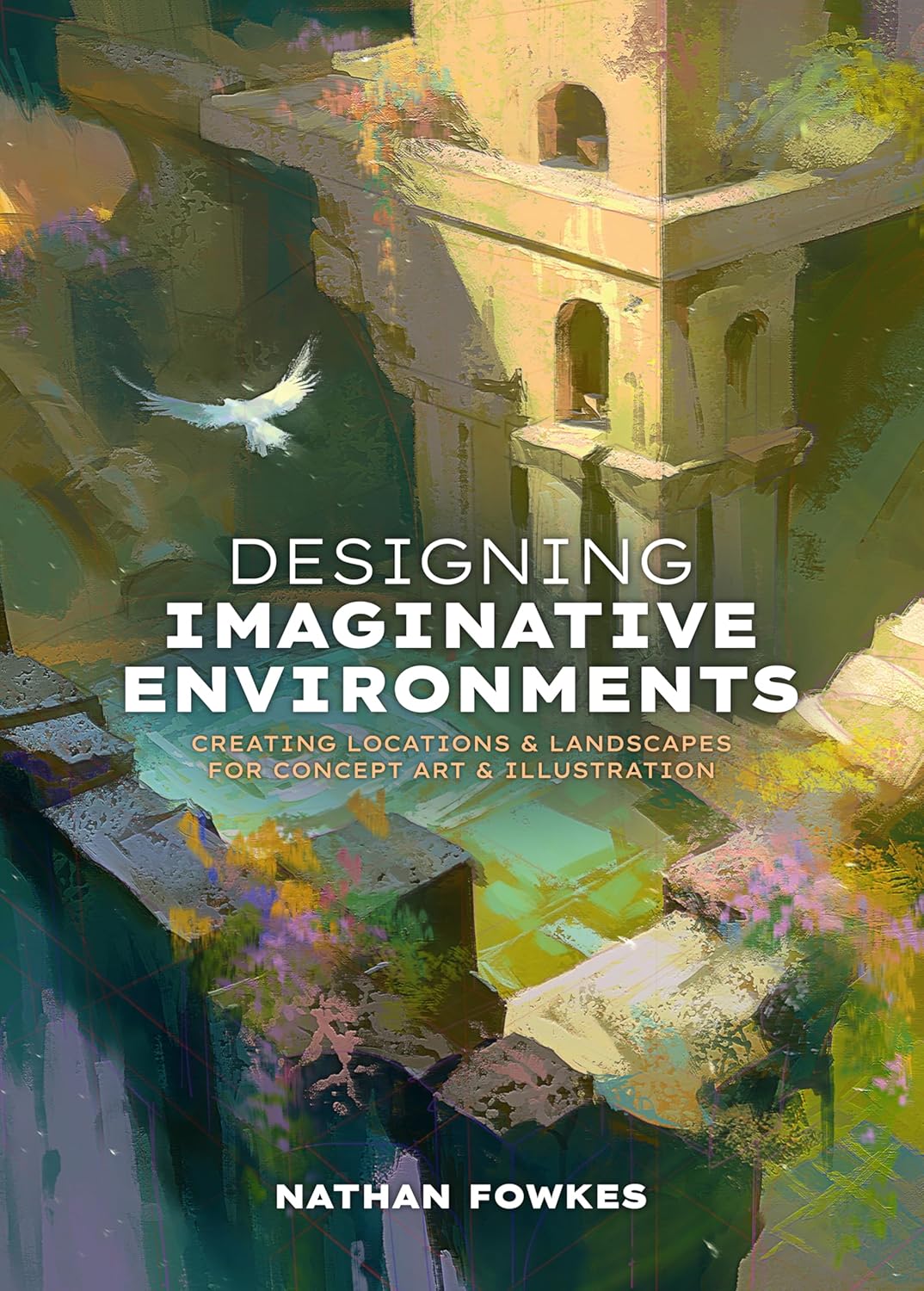
Nathan Fowkes is a well-known concept artist and teacher. This book, subtitled “Creating locations and landscapes for concept art and illustration,” is about designing places rather than copying them.
If your landscapes are imaginary, for games, stories or illustration, design principles matter more than software tips.
Best suited for: concept artists, illustrators and fantasy landscape painters.
Key features:
- Book with 3dtotal Publishing
- Environments and landscapes for concept art
Pros:
- Design-focused
- Respected author
Cons and limitations:
- Highest price tier here
- Less on software basics
Buying consideration: Read alongside a sketchbook and design a location from each chapter.
3. Artists’ Master Series: Perspective and Depth — Best for convincing depth

Part of 3dtotal’s Artists’ Master Series, with an introduction by Mike Hernandez and contributions including Devin Elle Kurtz, this title focuses on perspective and depth.
Flat space is one of the most common problems in beginner landscapes, so a focused study of depth pays off quickly.
Best suited for: painters whose landscapes feel flat.
Key features:
- Artists’ Master Series
- Perspective and depth focus
Pros:
- Addresses a core landscape skill
- Applies to digital and traditional work
Cons and limitations:
- Not landscape-only
Buying consideration: Apply each lesson to a simple three-plane landscape: foreground, middle ground, background.
4. Quick & Simple Painting in Procreate — Best for fast, impressive results

Subtitled “Achieve impressive results with speed on the iPad,” this 3dtotal book suits painters who want to finish pieces quickly. Speed painting naturally encourages simplification, which benefits landscapes.
It includes work from artists such as Derek Domnic D’Souza.
Best suited for: busy hobbyists and speed painters.
Key features:
- Procreate focus
- Speed techniques
Pros:
- Encourages simplification
- Mid price tier
Cons and limitations:
- Procreate only
Buying consideration: Set a 20-minute timer for each landscape study.
5. Beginner’s Guide to Digital Painting in Procreate — Best for a starting point for iPad painters

A 3dtotal guide to creating art on an iPad with Procreate, covering the fundamentals before you specialize in landscapes.
It is the logical first book if you are new to the app.
Best suited for: new Procreate users.
Key features:
- Paperback
- Procreate fundamentals
Pros:
- Clear starting point
- Mid price tier
Cons and limitations:
- General rather than landscape-specific
Buying consideration: Learn layers and blend modes first; landscapes rely on them.
6. Digital Painting in Photoshop: Industry Techniques for Beginners — Best for Photoshop users

If you paint in Photoshop, this 3dtotal paperback offers a comprehensive introduction to industry techniques, many of which concept and environment artists use daily.
It is a broader foundation for landscape and environment work.
Best suited for: Photoshop painters.
Key features:
- Paperback
- Industry techniques
- Comprehensive introduction
Pros:
- In-depth
- Industry focus
Cons and limitations:
- Higher price tier
- Photoshop-specific
Buying consideration: Practice custom brush creation for foliage and rocks.
7. Secrets of Acrylic: Landscapes Start to Finish by Jerry Yarnell — Best for traditional landscape fundamentals

Jerry Yarnell is a long-time landscape painting teacher. This paperback covers acrylic landscapes from start to finish, and the same order of work (background to foreground, big shapes to details) translates directly to digital.
Studying traditional methods can make digital landscapes look more natural and less “filtered.”
Best suited for: digital painters wanting traditional foundations.
Key features:
- Paperback
- Acrylic landscapes
- Start-to-finish demonstrations
Pros:
- Low price tier
- Clear, structured approach
Cons and limitations:
- Traditional media, not digital
Buying consideration: Recreate one of the demonstrations digitally, matching the order of steps.
Buying Guide: Choosing Landscape Digital Painting Resources
Not sure where to start? Choose one software guide and one fundamentals book, and finish both before buying more.
Match the book to your software
Procreate, Photoshop and Krita share principles but differ in tools. Choose a book for your main app, then add principle-based books.
Balance software and fundamentals
Software guides teach tools; books on perspective, design and traditional painting teach seeing.
Consider your goal
Realistic plein air landscapes, stylized illustration and concept art environments each benefit from different resources.
Practice alongside reading
Every chapter should lead to a study. Books are only as useful as the paintings you make from them, so keep a folder of your studies and revisit early ones every few months to see your progress.
Practice Exercises
- Three-value studies: paint 10 landscapes using only three grays.
- Same scene, four times of day: paint one composition at dawn, noon, sunset and night. Our guide on painting digital night scenes helps with the last one.
- Water studies: practice reflections and waves with painting digital waves and ocean.
- Limited palette: choose three colors plus white for an entire painting.
- No tablet? Learn workarounds in digital painting without a tablet.
Organizing Layers in a Landscape File
A simple, consistent layer structure keeps landscape files manageable. Many painters use one layer or group per depth plane: sky, far distance, middle ground, foreground and a top layer for effects such as haze, light rays or texture. Naming layers and keeping the total under about ten makes it easy to adjust one plane without disturbing the others. When a plane is finished, merge its sub-layers so you are not tempted to fiddle endlessly.
Save versions as you go, especially before big changes. Digital painting’s greatest strength is that you can try a bold idea, compare it with the previous version and keep whichever works better.
Common Mistakes to Avoid
- Starting with tiny brushes and detail before the big shapes are right.
- Using pure black for shadows instead of colored darks.
- Making distant mountains as dark and sharp as the foreground.
- Overusing the smudge tool, which makes paintings look blurry and synthetic.
- Copying photo references exactly instead of simplifying.
- Working on one layer and losing flexibility, or on too many layers and losing track.
- Zooming in for long periods; check the whole painting at small size often, the way viewers will first see it.
- Saturating every color to the maximum, which flattens depth and tires the eye.
FAQs
What is the best app for landscape digital painting?
Procreate on iPad, Photoshop and Krita are all excellent. Krita is free; Procreate is a one-time purchase; Photoshop is subscription-based.
How do I make a digital landscape look realistic?
Use atmospheric perspective, group values clearly, vary edges and keep detail mostly at the focal point.
What brushes are best for digital landscapes?
Large textured brushes for block-ins, foliage or sponge brushes for trees, a soft airbrush for haze and a hard round for accents.
Should I paint landscapes from photos or imagination?
Both. Photos and plein air studies teach observation; imaginative landscapes teach design. Alternate between them.
How long does a digital landscape take?
Quick studies take 15 to 30 minutes; finished illustrations can take several hours.
How do I choose colors for a digital landscape?
Pick the light color and time of day first, then build a limited palette around it. Many painters sample colors from a reference photo and then shift them warmer or cooler to suit the mood.
Can I paint digital landscapes without a tablet?
Yes, with a mouse and shape-based techniques, though a tablet makes brushwork more natural.
Final Recommendation
For landscape digital painting in Procreate, start with A Guide to Digital Painting in Procreate: Landscapes & Plein Air, and pick up the Beginner’s Guide to Procreate if you are new to the app. Photoshop users should choose Digital Painting in Photoshop: Industry Techniques for Beginners. Whatever your software, add Perspective and Depth to fix flat space, Nathan Fowkes’s Designing Imaginative Environments for invented scenes and Jerry Yarnell’s Secrets of Acrylic: Landscapes for timeless painting fundamentals.