PaintingProGuide is reader-supported. When you buy through links on this page we may earn an affiliate commission at no extra cost to you.
An anti-fouling glove is a thin, two-finger or one-finger sleeve that covers the side of your drawing hand, the part that rests on the screen. It does three jobs: it stops skin oils from leaving smudges, it reduces drag so your hand glides instead of sticking, and on capacitive screens like the iPad it helps prevent stray palm touches. The best anti-fouling gloves for digital painting fit snugly, breathe during long sessions and cover enough of the palm edge to keep it off the glass.
These gloves are inexpensive, so the real decision is about fit and finger style. This guide compares six options from the listings we checked and explains which design suits which tablet.
Quick answer: For iPad painters who struggle with stray touches, the Kortimu 3-Layer Palm Rejection Glove is the most purpose-built option, with layered padding and an included cleaning cloth. For pen tablets and displays where glide matters most, the classic HUION Artist Drawing Glove is a simple, ambidextrous choice. If you prefer a one-finger design or have small hands, look at the AKX X-Small 2 Pack.
Our Top Picks at a Glance
- Kortimu Artist Drawing Glove, 3-Layer — Best for iPad palm rejection
- HUION Artist Drawing Glove — Best classic glove for pen tablets and displays
- Mixoo Artists Gloves, 2 Pack — Best padded two-finger pair
- AKX Artist Drawing Glove X-Small, 2 Pack — Best one-finger glove for small hands
- SENHAI Digital Artist Gloves, 3 Pack — Best multi-pack for rotating between washes
- OTraki 4 Pack Artist Drawing Gloves — Best value bulk pack
| Product | Best For | Key Spec | Key Strength | Price Tier |
|---|---|---|---|---|
| Kortimu 3-Layer | iPad palm rejection | Two-finger, 3-layer, cleaning cloth | Layered anti-touch padding | $ |
| HUION Glove | Pen tablets and displays | Two-finger, 20 x 8 cm, Lycra and nylon | Ambidextrous, soil-resistant black | $ |
| Mixoo 2 Pack | Padded glide | Two-finger, padding patch, lycra | Extra wear-resistant padding | $ |
| AKX X-Small 2 Pack | Small hands, one finger | One-finger, fingertip open, spandex | Leaves more fingers free | $$ |
| SENHAI 3 Pack | Spares and rotation | Two-finger, Lycra, 3 colors | Three gloves per pack | $ |
| OTraki 4 Pack | Bulk value | Four gloves per pack | Most gloves per pack | $ |
How We Chose
We have not worn these gloves ourselves. The picks are based on the Amazon listing details and specifications checked in October 2026, how well each glove’s finger design, size and material fit digital painting on tablets and pen displays, and how widely each product is reviewed by Amazon buyers. The OTraki listing we checked gave the pack size and intended uses in its title but no detailed bullets, so we describe it generically.
Criteria:
- Finger design: two-finger gloves cover the ring and little finger; one-finger gloves cover only the little finger and leave the rest free.
- Palm coverage: the glove must cover the edge of the hand that rests on the screen.
- Material: Lycra, spandex and nylon blends stretch, breathe and glide.
- Palm rejection features: padding or layered construction that helps on capacitive screens.
- Fit options: free size versus specific sizes like X-Small or Medium.
- Pack size: more gloves means you can wash one while wearing another.
Why Digital Painters Use Anti-Fouling Gloves
Skin is slightly oily and slightly sticky. On a matte pen tablet surface, that stickiness creates drag as your hand slides across, which can make long strokes jerky. On a glossy pen display or iPad, oils leave smudges that you then paint over without noticing, especially in dark areas of a painting.
The glove places a smooth fabric layer between your hand and the surface. The result is a consistent glide and a cleaner screen. On capacitive touchscreens, which is what iPads and most Android tablets use, a glove can also help reduce accidental palm input, although the listings are careful to note that results vary. The HUION listing, for example, says plainly that the glove cannot prevent every touch.
On pen displays and pen tablets that use EMR pen technology, palm rejection is usually handled by the device and software. There, the main benefit is glide and smudge prevention.
Best Anti-Fouling Gloves for Digital Painting Reviewed
1. Kortimu Artist Drawing Glove, 3-Layer Palm Rejection — Best for iPad palm rejection
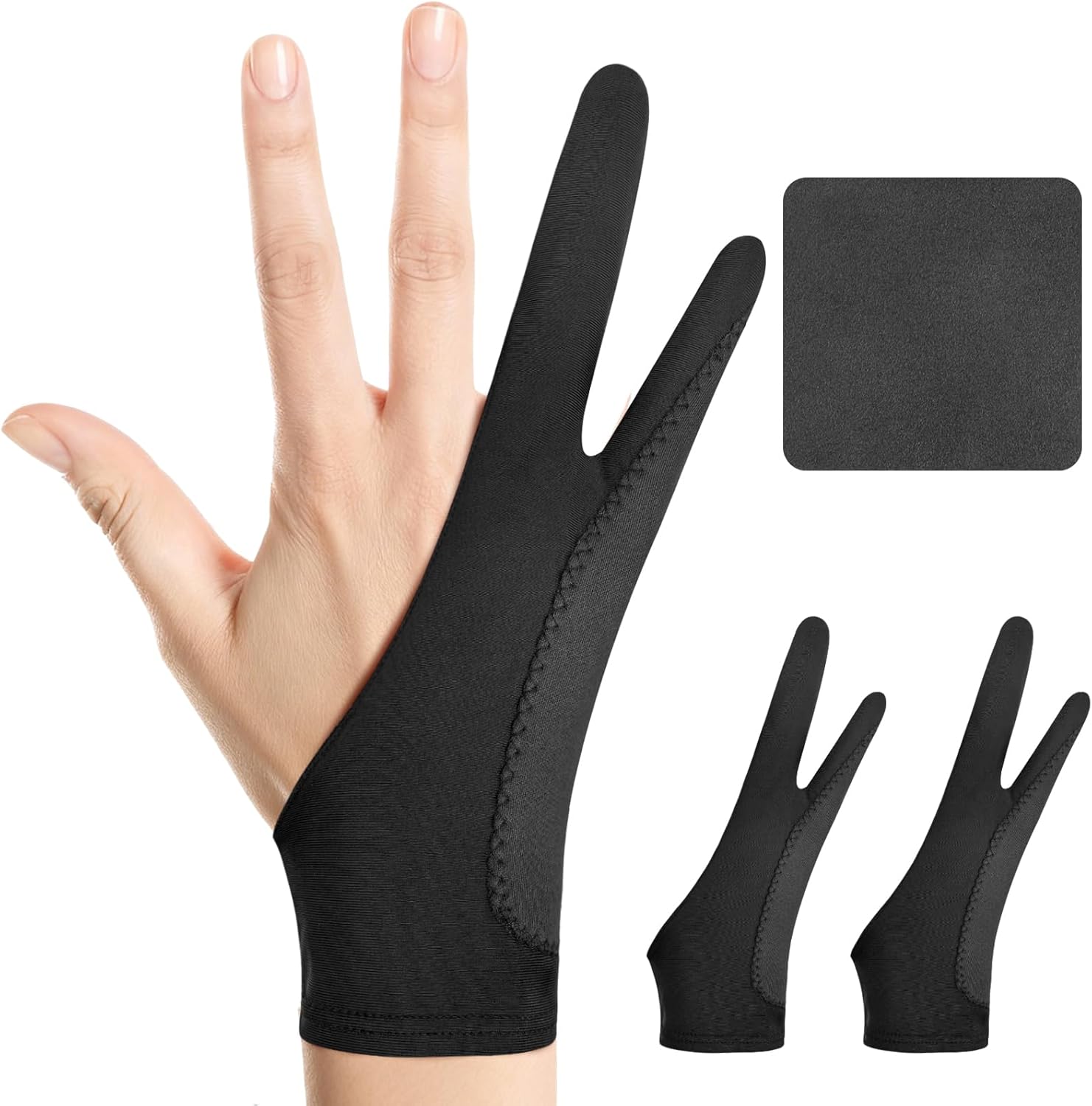
Kortimu’s glove is built around palm rejection. The listing describes a three-layer anti-slip, anti-smudge design intended to prevent accidental palm touches while keeping the screen clean. It is a two-finger, ambidextrous glove made from soft, stretchy, moisture-wicking fabric, and the package includes a cleaning cloth.
For iPad painters, stray palm marks are one of the most annoying problems, especially when an app’s own palm rejection misses a touch while you rest your hand. A thicker, layered palm area gives the glove its best chance of preventing those marks.
Best suited for: iPad and Android tablet painters who see unwanted marks from their palm while drawing.
Key features:
- Two-finger design, either hand
- 3-layer anti-slip, anti-smudge construction
- Moisture-wicking stretch fabric
- Cleaning cloth included
Pros:
- Purpose-built for palm rejection
- Comfortable for long sessions according to the listing
- Cleaning cloth for the screen
- Low price tier
Cons and limitations:
- Layered build may feel warmer than single-layer gloves
- Single glove per pack
- No palm glove guarantees zero stray touches
Buying consideration: Enable your app’s palm rejection settings as well. The glove and the software work best together.
2. HUION Artist Drawing Glove, One Size — Best for pen tablets and pen displays

HUION’s glove is the familiar black two-finger design that many tablet artists picture. The listing gives dimensions of 20 cm long by 8 cm wide, free size, and describes soft Lycra and nylon that reduce friction between your hand and the surface. It works on either hand.
The listing is honest about limits: the glove is described as anti-fouling and smudge-preventing, with a note that it cannot prevent every touch on a touchscreen. That makes it a strong fit for pen tablets and pen displays, where glide is the main goal.
Best suited for: Artists on screenless pen tablets or pen displays who want smoother glide and a cleaner surface.
Key features:
- Two-finger, ambidextrous
- Free size, 20 x 8 cm
- Lycra and nylon blend
- Black, soil-resistant color
Pros:
- Simple, proven design
- Reduces friction on matte tablet surfaces
- Black hides dirt between washes
- Low price tier
Cons and limitations:
- One glove per pack
- Free size may be loose on small hands
- Not marketed primarily for touchscreen palm rejection
Buying consideration: Buy two if you paint daily so one can be washed while you wear the other.
3. Mixoo Artists Gloves, 2 Pack — Best for padded two-finger glide

Mixoo sells two gloves per pack in size Medium. The listing describes soft, elastic lycra and a special padding patch with longer wear resistance that is thick enough to prevent smudges and unexpected palm touches. It is suitable for left or right hands.
The listing also mentions paper sketching. That matters if you mix traditional and digital work: a glove that keeps graphite from smearing on paper is the same glove that keeps oils off your tablet.
Best suited for: Artists who want a pair of padded gloves for both tablet and paper work.
Key features:
- Two gloves per pack
- Two-finger design
- Padding patch for wear resistance
- Lycra, size Medium
- Left or right hand
Pros:
- Two gloves for the price of a pair
- Padding adds durability
- Works for paper sketching too
Cons and limitations:
- Medium size may not suit very small or large hands
- Padding can feel thicker than minimalist gloves
Buying consideration: If you are between sizes, check the size chart on the listing images before ordering. A loose glove bunches under the hand.
4. AKX Artist Drawing Glove X-Small, 2 Pack (One Finger) — Best for small hands and one-finger designs

AKX takes a different approach with a one-finger, fingertip-open glove. Only the little finger goes through the glove, which leaves the other fingers free and, as the listing notes, lets you wear rings and avoid pressing on long nails. The X-Small size is useful for younger artists and anyone with narrow hands.
The listing describes a padding patch to stop capacitive touchscreens detecting the palm, and high-elastic, breathable lycra fiber that is washable.
Best suited for: Artists with small hands, long nails or rings, or anyone who finds two-finger gloves restrictive.
Key features:
- One-finger, fingertip open
- X-Small size
- Two gloves per pack
- Palm padding patch
- Spandex/lycra, washable
Pros:
- Maximum finger freedom
- Fits small hands
- Ring and nail friendly
- Two per pack
Cons and limitations:
- Covers less of the palm edge than two-finger gloves
- X-Small will not fit most adult hands
Buying consideration: Check where your hand actually touches the screen. If your ring finger rests on the glass too, a two-finger design will cover more.
5. SENHAI Digital Artist Gloves, 3 Pack — Best for spares and rotation between washes

SENHAI includes three free-size two-finger gloves in different colors: sapphire blue, pink and black. The listing describes lightweight Lycra that reduces friction between your hand and the tablet or display.
Three gloves makes it easy to keep one at the desk, one in a travel bag and one in the wash. Color variety also helps if more than one person shares a tablet.
Best suited for: Daily painters, households sharing a tablet, and artists who want spares.
Key features:
- Three gloves per pack
- Two-finger, free size
- Lycra
- Three colors
Pros:
- Good number of spares
- Lightweight fabric
- Color options
Cons and limitations:
- No specific palm rejection padding mentioned
- Free size may not fit every hand
Buying consideration: Lighter colors show graphite and dirt faster, which is actually useful as a reminder to wash them.
6. OTraki 4 Pack Artist Drawing Gloves — Best for bulk value

OTraki’s pack contains four artist drawing gloves, and its title positions them for digital tablets and paper sketching. That is the largest count in this guide, which suits classrooms, art clubs or a household with several artists.
The listing we checked did not include detailed bullets on materials or sizing, so check the product images and size information on Amazon before ordering.
Best suited for: Classrooms, families and anyone who wants the most gloves per pack.
Key features:
- Four gloves per pack
- For digital tablets and paper sketching
Pros:
- Most gloves per pack
- Low price tier
Cons and limitations:
- Limited detail in the listing on fit and material
- Fit may vary across hand sizes
Buying consideration: Read the size details on the listing before buying for children or anyone with very small or large hands.
Buying Guide: How to Choose Anti-Fouling Gloves for Digital Painting
Two fingers or one finger?
Two-finger gloves cover the ring and little finger plus the palm edge. They give the most coverage and are the standard choice. One-finger gloves cover only the little finger, which feels freer but protects less of the hand. If your ring finger touches the screen, go with two.
Fit and sizing
A glove should be snug without pinching. Free-size gloves fit most adult hands but can be loose on small hands. Sized gloves like the AKX X-Small or Mixoo Medium give a more precise fit if you know your size.
Material and breathability
Lycra, spandex and nylon blends stretch, glide and breathe. For long sessions, look for words like moisture-wicking or breathable. Thicker padded gloves last longer but can feel warmer.
Palm rejection on touchscreens
On iPads and Android tablets, padding or layered construction can help reduce stray touches, but no glove is perfect. Combine a glove with your app’s palm rejection settings.
Pack size and washing
Gloves pick up oils and graphite. Packs of two to four let you rotate while one is in the wash. Hand-wash in mild soap and air-dry to keep the elastic in shape.
Left or right hand
Most two-finger gloves are ambidextrous because you simply flip them. Confirm this in the listing if you are left-handed.
Glove, Matte Screen Protector or Both?
Many iPad painters pair a glove with a matte, paper-texture screen protector, and it helps to know what each one changes. The protector alters how the pen feels: it adds tooth, slows the nib slightly and cuts glare. The glove alters how your hand feels: it reduces drag under the palm and keeps oils off the glass.
They solve different problems, so they are not either-or choices. If your strokes feel slippery and uncontrolled, a matte protector is the fix. If your hand sticks, smears or triggers stray marks, a glove is the fix. If both happen, use both. Keep in mind that textured protectors wear pen nibs faster, so stock replacement nibs if you add one.
On pen displays with an etched or matte glass surface already built in, such as several current Wacom models, a glove is usually all you need to add.
How to Wear and Care for a Drawing Glove
- Slide the little and ring fingers (or just the little finger) through the openings.
- Pull the fabric so it covers the outer edge of the palm where your hand rests on the screen.
- Check that the glove is smooth, with no bunching under the hand.
- Wipe your screen with a microfiber cloth before you start.
- Wash the glove regularly in mild soap and cool water, then air-dry.
- Replace it when the fabric pills or the elastic loosens.
A glove makes long, smooth strokes easier, which is exactly what large gradient areas need. Put that to work with our tutorial on painting digital night scenes, where clean blends across dark skies show smudges quickly, or try painting digital waves and ocean for practice with long sweeping strokes.
Common Mistakes to Avoid
- Buying a glove that is too loose: loose fabric bunches and creates drag instead of reducing it.
- Expecting perfect palm rejection: gloves help, but app settings still matter.
- Never washing it: a dirty glove transfers oils back onto the screen.
- Wearing a one-finger glove when your ring finger rests on the glass: choose two-finger coverage instead.
- Using the glove instead of cleaning the screen: start each session with a quick wipe.
- Machine-drying gloves: heat can loosen the elastic; air-dry instead.
FAQs
What does an anti-fouling glove do?
It covers the part of your hand that rests on a tablet or screen, preventing smudges from skin oils and reducing friction so your hand glides smoothly. On touchscreens it can also help reduce stray palm touches.
Do drawing gloves work on iPad?
They can help, especially gloves with palm padding like the Kortimu or AKX designs. Combine the glove with your painting app’s palm rejection settings for the best results.
Are two-finger or one-finger gloves better?
Two-finger gloves cover more of the palm edge and suit most artists. One-finger gloves give more finger freedom and suit artists with small hands, rings or long nails.
Do I need a glove for a Wacom pen tablet?
You do not need one for palm rejection, since pen tablets handle that differently, but many artists use a glove to reduce friction and keep the surface clean.
How do I wash a drawing glove?
Hand-wash in cool water with mild soap, rinse well, and air-dry. Avoid high heat, which can weaken the elastic fibers.
Can I use a drawing glove for traditional sketching?
Yes. Several listings, including Mixoo and OTraki, mention paper sketching. The glove helps prevent graphite and charcoal smudging as your hand moves across the page.
Final Recommendation
Choose based on your device and hand. For iPad painters troubled by stray touches, the Kortimu 3-Layer glove is the most targeted option. For pen tablets and pen displays where glide is the goal, the HUION Artist Drawing Glove is a dependable classic. The Mixoo 2 Pack adds padding and a spare, and the AKX X-Small one-finger glove suits small hands or anyone who wants more freedom.
If you paint daily or share supplies, the SENHAI 3 Pack and OTraki 4 Pack make rotation easy. Since these gloves are all in the lowest price tiers, buying a spare is the simplest way to keep a clean one ready.