PaintingProGuide is reader-supported. When you buy through links on this page we may earn an affiliate commission at no extra cost to you.
A drawing glove looks like a small thing, but anyone who has dragged a warm palm across a glossy pen display knows the difference it makes. Skin grips glass, so long strokes stutter; skin oils leave smudges that hide fine lines; and on touchscreens a resting palm can trigger stray marks. A two-finger artist glove covers the part of your hand that touches the surface and solves all three. The best drawing gloves for digital painting are smooth, stretchy, breathable, and fit snugly without bunching.
Quick answer: For most artists, the HUION Artist Drawing Glove is the reliable standard: soft Lycra and nylon, two-finger design, and either hand. For a glove that also emphasizes palm rejection on iPads, the Kortimu 3-layer glove is a strong choice. If you need a smaller, snugger fit, try the GUUGEI 2-pack. For classrooms or spares, a multipack like the YONHTUTU 12-piece set is the most economical.
Below we compare seven gloves and multipacks, then explain sizing, care and when a glove actually helps.
Our Top Picks at a Glance
- HUION Artist Drawing Glove — Best overall drawing glove
- Kortimu 3-Layer Palm Rejection Drawing Glove — Best for iPad palm rejection
- GUUGEI Artist Drawing Glove, 2 Pack — Best snug fit for smaller hands
- XPPen Digital Drawing Glove, Cat Print — Best fun design from a tablet brand
- YONHTUTU 12 Pcs Artist Gloves — Best bulk pack for classes and studios
- OTraki 4 Pack Artist Drawing Gloves — Best value four-pack
- SynHHergyx 4 Pack Drawing Gloves — Best budget spares
| Product | Best For | Key Spec | Key Strength | Price Tier |
|---|---|---|---|---|
| HUION Glove | Everyday use | Lycra and nylon, 20 x 8 cm, either hand | Trusted tablet brand | $ |
| Kortimu Glove | iPad and touchscreens | 3-layer palm rejection, either hand | Cleaning cloth included | $ |
| GUUGEI 2 Pack | Smaller hands | Spandex, Small, 3-layer palm rejection | Snug, breathable | $ |
| XPPen Cat Print | Fun design | High-elastic fabric, either hand | Cat print | $ |
| YONHTUTU 12 Pcs | Classes, spares | 12 gloves, left and right | Bulk value | $ |
| OTraki 4 Pack | Spares | 4 gloves | Low cost per glove | $ |
| SynHHergyx 4 Pack | Budget spares | 4 gloves for capacitive screens | Lowest cost | $ |
How We Chose
These picks are based on Amazon listing details and specifications checked in October 2026, how well each glove addresses friction, smudging and palm rejection, and how widely each product is reviewed by Amazon buyers. We have not worn these gloves ourselves. Three multipack listings had little detail, so we keep claims about them general and suggest checking sizing notes before ordering.
- Material: smooth, stretchy, breathable fabric.
- Design: two-finger coverage of the contact area.
- Fit: snug enough not to bunch; ambidextrous or left and right options.
- Palm rejection claims for touchscreens.
- Pack size for spares and washing.
Best Drawing Gloves for Digital Painting Reviewed
1. HUION Artist Drawing Glove — Best for everyday drawing

HUION’s glove is one of the most familiar in digital art. It has a two-finger design, works on either hand and is one free size, about 20 cm long and 8 cm wide according to the listing. It is made from soft Lycra and nylon that is flexible and reduces friction, and the black color is described as soil resistant so it does not need washing as often.
The listing notes it prevents smudges from your hand on a graphic tablet or monitor. As with all gloves, it does not change pen behavior; it simply lets your hand glide.
Best suited for: Pen display, tablet and iPad artists who want a proven glove.
Key features:
- Two-finger design
- Either hand, free size
- Lycra and nylon
- About 20 x 8 cm
Pros:
- Trusted brand
- Smooth glide
- Soil-resistant black
Cons and limitations:
- One size may be loose on small hands
- Single glove
Buying consideration: Pull it up fully so the fabric sits flat under the side of your palm.
2. Kortimu 3-Layer Palm Rejection Drawing Glove — Best for iPad palm rejection
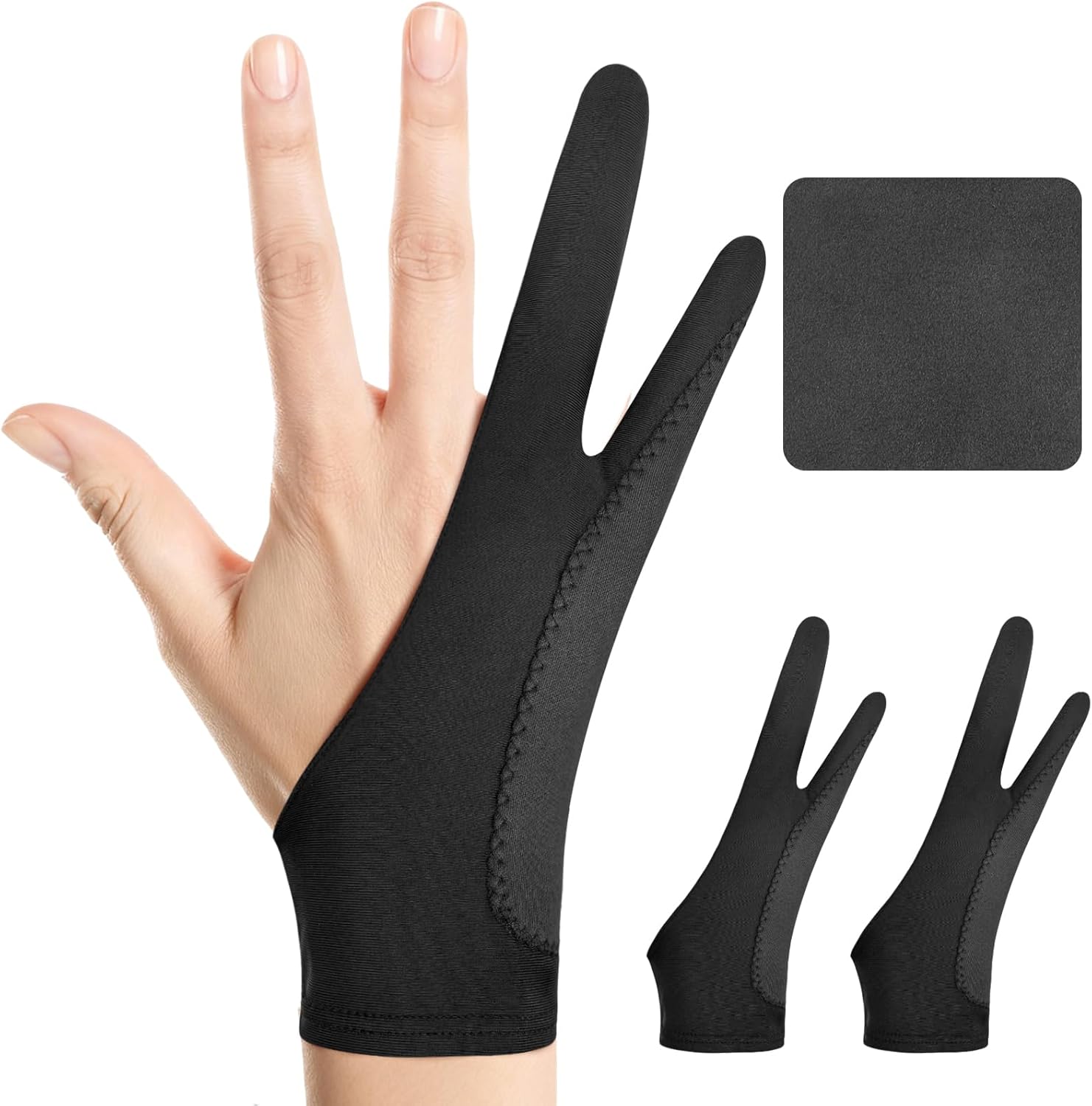
Kortimu emphasizes palm rejection with a three-layer anti-slip, anti-smudge design that the listing says prevents accidental palm touches on touchscreens. It is ambidextrous, made of soft, high-elasticity, moisture-wicking fabric for long sessions, and includes a cleaning cloth.
Extra layers can help on iPads where the app’s own palm rejection occasionally misses.
Best suited for: iPad and Android tablet artists.
Key features:
- 3-layer construction
- Two-finger, either hand
- Moisture-wicking fabric
- Cleaning cloth
Pros:
- Palm rejection focus
- Comfortable for long sessions
- Low cost
Cons and limitations:
- Single size
- Thicker layers may feel warmer
Buying consideration: Use the included cloth to wipe the screen before each session.
3. GUUGEI Artist Drawing Glove, 2 Pack — Best for a snug fit for smaller hands

GUUGEI’s two-pack is designed in a more snug size, per the listing, with three-layer palm rejection, high-elastic smooth fabric and a sweat-wicking, breathable build. It supports iPads, graphics tablets and Android tablets, and fits right or left hand.
A snug glove stays flat and does not bunch under the hand, which many artists with smaller hands find hard to get from one-size gloves.
Best suited for: Artists with smaller hands.
Key features:
- 2 gloves, size Small
- Spandex
- 3-layer palm rejection
- Right or left hand
Pros:
- Snug fit
- Two in a pack
- Breathable
Cons and limitations:
- May be tight on larger hands
- Color varies by listing
Buying consideration: Check your hand width against the listing’s sizing before ordering.
4. XPPen Digital Drawing Glove, Cat Print — Best for a fun design from a tablet brand

From tablet maker XPPen, this two-finger glove uses high-elastic, breathable cloth with a cute cat print. The listing says it fits right or left hand and has a soft, skin-friendly texture that stops smudging and allows an easier glide.
It performs the same job as plain gloves with a bit more personality.
Best suited for: Artists who want a glove with character.
Key features:
- Two-finger design
- High-elastic, breathable fabric
- Either hand
- Cat print
Pros:
- Brand known for tablets
- Fun look
- Low cost
Cons and limitations:
- Single glove
- Size details limited
Buying consideration: Keep a plain spare for washing days.
5. YONHTUTU 12 Pcs Artist Gloves — Best for classes and studios

This YONHTUTU listing offers 12 artist gloves for drawing tablets and paper sketching, with right- and left-hand use in the title. The listing we checked had limited detail beyond that.
Twelve gloves suit art classes, shared studios, or anyone who wants a fresh glove every day of the week.
Best suited for: Teachers, classes and shared studios.
Key features:
- 12 gloves
- Right and left hand
- For tablets and paper
Pros:
- Bulk value
- Plenty of spares
- Good for groups
Cons and limitations:
- Limited listing detail
- Fit and fabric not specified
Buying consideration: Label gloves by size or student if sharing in a class.
6. OTraki 4 Pack Artist Drawing Gloves — Best for a value four-pack

OTraki’s four-pack is listed for digital tablets and paper sketching. Detail on the listing was limited when we checked, so we can only say it provides four two-finger-style gloves at a low price tier.
Four gloves let you rotate between washes without going without.
Best suited for: Artists who want a few spares.
Key features:
- 4 gloves
- For tablets and paper sketching
Pros:
- Low cost per glove
- Rotate between washes
Cons and limitations:
- Limited listing detail
- Sizing unclear
Buying consideration: Read buyer sizing comments on the listing before ordering.
7. SynHHergyx 4 Pack Drawing Gloves — Best for budget spares

SynHHergyx’s four-pack is described in its title as drawing gloves with palm rejection for capacitive touch screens, for right or left hand, graphic tablets and graphics monitors. The listing had little additional detail.
It is the lowest-cost option here for keeping spares in a bag or at a second desk.
Best suited for: Budget spares and backup gloves.
Key features:
- 4 gloves
- For capacitive screens and tablets
- Right or left hand
Pros:
- Lowest cost
- Several spares
Cons and limitations:
- Limited listing detail
- Quality unknown from listing
Buying consideration: Keep one in your tablet sleeve so you always have a glove.
What a Drawing Glove Does, and What It Does Not
It does: reduce friction so your hand glides; keep skin oils off the screen so lines stay crisp; help prevent accidental palm touches on touchscreens; keep hands clean when sketching on paper with graphite or charcoal.
It does not: change pen pressure or accuracy; replace palm rejection settings in your app; fix a poorly calibrated tablet.
Think of a glove the way a traditional artist thinks of a bridge or a sheet of scrap paper under the hand: a simple barrier that keeps the work clean and the hand moving freely.
Do You Need a Glove for Your Device?
Pen displays. This is where gloves shine. Glossy glass plus a warm hand equals drag and smudges, and a glove fixes both. Most pen displays do not respond to touch while the pen is in range, so palm rejection is less of an issue than glide.
iPads and Android tablets. Gloves help glide and reduce smudges, and they back up the app’s palm rejection, which occasionally registers a stray palm touch as a mark or zoom.
Screenless pen tablets. The textured surface already reduces friction, so a glove is optional. Some artists still wear one to keep the tablet clean and the hand cool, and because the surface can feel rough over long sessions.
Paper and light boxes. A glove stops graphite and charcoal smearing as your hand moves across the page, and keeps skin oils off watercolor paper before you paint.
Gloves, Screen Protectors and Glide
Gloves and matte screen protectors work together. A matte protector adds friction for the pen tip, which many artists like for control, but it also adds friction under the hand. A smooth glove counteracts that so your hand glides while the pen still has bite. On bare glass, a glove alone usually gives a pleasant, slippery glide.
Comfort in Warm Rooms
In summer or under studio lights, any glove can feel warm. Breathable, moisture-wicking fabrics help, and thinner single-layer gloves are cooler than padded or multi-layer ones. If your hands sweat, swap to a fresh glove partway through a long session; a damp glove loses its glide and can leave marks on the screen.
Left-Handed Artists
Most two-finger gloves are ambidextrous, so left-handed artists can wear them without issue. Multipacks that include left- and right-specific gloves are also available. If a glove has a printed design, check which side faces outward when worn on the left hand.
Getting the Right Fit
A drawing glove should fit snugly over the ring and little fingers and the edge of the palm, without wrinkles. Loose gloves bunch up and catch on the screen edge; tight gloves are uncomfortable over long sessions. One-size gloves fit most adult hands; smaller or “women’s” sizes suit narrower hands. Ambidextrous gloves can be flipped to either hand, which also lets them wear more evenly.
When to Replace a Drawing Glove
Gloves are cheap consumables, so replace them when they stop doing their job. Signs include thinning fabric where the palm rests, fraying at the finger openings, stretched-out cuffs that let the glove slide around, and a surface that feels sticky even after washing. Pilling fabric can also leave tiny fibers on the screen. With regular use and washing, many artists rotate in a fresh glove every few months, which is why multipacks make sense.
Single Glove or Multipack?
A single branded glove from a tablet maker is a safe, consistent choice if you know it fits. Multipacks trade some certainty about quality and fit for quantity: you get spares for washing, extras for a second desk or travel bag, and gloves to share with students or family. A practical approach is to buy one well-reviewed single glove to learn your preferred fit, then add an inexpensive multipack for spares.
How to Wash and Care for Drawing Gloves
- Hand wash in cool water with a little mild soap.
- Rinse thoroughly so no soap residue transfers to your screen.
- Gently squeeze out water; do not wring.
- Air dry flat, away from heaters.
- Rotate between two gloves so one is always clean.
Ready to put a glove to work? Try our tutorials on painting digital waves and ocean and digital night scenes, or our guide to digital painting without a tablet.
Buying Guide: How to Choose a Drawing Glove for Digital Painting
Smooth, stretchy fabric
Lycra, nylon and spandex blends glide and flex with the hand.
Two-finger design
This covers the contact area while leaving thumb, index and middle fingers free for the pen.
Fit and size
Choose snug over loose. Check sizing notes for one-size versus small options.
Palm rejection layers
Useful on iPads and touchscreens; less important on pen tablets without touch.
Breathability
Moisture-wicking fabric keeps long sessions comfortable.
Cuff and length
A longer cuff stays in place better as your wrist moves across a large pen display. Shorter gloves are cooler and feel less noticeable on small tablets. Some artists also use drawing sleeves that cover the forearm for wide displays where the arm itself rests on the glass.
Color
Black gloves hide dirt; light colors show when it is time to wash. Neither affects performance.
Multipacks
Spares make washing easy and cost very little.
Common Mistakes to Avoid
- Wearing a loose glove. It bunches and catches.
- Never washing. Built-up oils cause smudges anyway.
- Expecting better pressure control. Gloves affect glide, not the pen.
- Turning off app palm rejection. Use both together.
- Using a glove with a frayed edge. Replace worn gloves.
FAQs
Do I really need a drawing glove?
Not strictly, but most artists find gloves make strokes smoother and keep screens cleaner, especially on glossy pen displays and iPads.
Do drawing gloves work on iPad?
Yes. They reduce friction and smudges and can help prevent accidental palm touches.
Which hand do I wear a drawing glove on?
Your drawing hand. Most gloves are ambidextrous or come in left and right versions.
How often should I wash a drawing glove?
Every week or two of regular use, or sooner if strokes start to feel sticky or you see smudges.
Can I use a drawing glove for traditional art?
Yes. Gloves keep graphite and charcoal from smearing and keep hands clean on paper.
Are cheap multipack gloves worth it?
They are useful as spares. Quality and fit vary, so check sizing notes on the listing.
Final Recommendation
For most artists, the HUION Artist Drawing Glove is the reliable everyday pick. Choose the Kortimu glove for extra palm rejection on iPads, or GUUGEI’s snug two-pack for smaller hands. XPPen’s cat-print glove adds personality from a tablet brand.
For spares, classes and shared studios, the YONHTUTU 12-piece set offers the most gloves, with OTraki and SynHHergyx four-packs as budget backups.