

PaintingProGuide is reader-supported. When you buy through links on this page we may earn an affiliate commission at no extra cost to you.
A drawing glove for Procreate is a small, inexpensive accessory that makes long sessions on an iPad noticeably more pleasant. It is a two-finger sleeve, usually Lycra or a spandex blend, that covers the side of your hand where it rests on the glass. It lets your palm glide instead of sticking, keeps sweat and skin oil off the screen, and stops the smudgy patches that make it hard to judge color.
What it does not do is turn your palm into a perfect insulator. Several glove makers note that their gloves cannot fully prevent accidental touches on capacitive screens, so the best setup pairs a good glove with sensible Procreate gesture settings. Below we compare six gloves and explain how to choose the right fit, fabric and style for iPad work.
Quick answer: The Kortimu Artist Drawing Glove is the best drawing glove for Procreate on iPad for most people: it comes as a two-pack in three sizes with a three-layer palm design aimed at stylus use, plus a cleaning cloth. If you want a proven, inexpensive classic, the HUION Artist Glove is one of the most widely reviewed gloves available. For an eco-friendly option with an exposed-fingertip design, choose the Wacom Drawing Glove made from 90% recycled materials.
Our Top Picks at a Glance
- Kortimu Artist Drawing Glove (2-Pack) — Best overall for iPad and Procreate
- HUION Artist Drawing Glove — Best budget classic
- Wacom Artist Drawing Glove — Best eco-friendly glove with exposed fingertips
- XPPen Artist Drawing Glove — Best choice of sizes from a tablet brand
- SENHAI 5-Pack Artist Gloves — Best multipack for sharing or rotating
- HUION Skeleton Artist Glove — Best for a bit of style
| Product | Best For | Key Spec | Key Strength | Price Tier |
|---|---|---|---|---|
| Kortimu Artist Glove | iPad and Procreate | 2 gloves, S/M/L, 3-layer palm | Bonus cleaning cloth | $ |
| HUION Artist Glove | Budget, any tablet | Lycra and nylon, 20 x 8 cm | Huge buyer base | $ |
| Wacom Drawing Glove | Eco-minded artists | 90% recycled polyester and spandex | Exposed fingertips for typing | $ |
| XPPen Drawing Glove | Sizing choice | S, M, L available | High-elastic, breathable fabric | $ |
| SENHAI 5-Pack | Sharing, rotating | 5 colors, free size | Washable with soap and water | $ |
| HUION Skeleton Glove | Style | Lycra and nylon, skeleton print | Dirt-hiding black design | $ |
How We Chose
We compared Amazon listing details and specifications checked in October 2026: material, dimensions and sizing, ambidextrous fit, pack quantity, fingertip design and any palm-rejection or anti-friction claims. We also considered how widely each glove is reviewed by Amazon buyers. We have not worn these gloves, so comfort and performance notes come from the listings and from how two-finger drawing gloves generally work.
- Fit and size options for different hand sizes
- Fabric: Lycra, nylon, spandex, recycled polyester
- Left and right hand compatibility
- Palm coverage and friction reduction
- Washability and pack value
Why Use a Drawing Glove With Procreate?
Smoother strokes
Bare skin drags on glass, especially when your hand warms up. A glove lets your hand slide, which helps with long, confident strokes such as hair, line art and sweeping brush marks.
Cleaner screen
Skin oil and sweat leave smears that make it harder to judge subtle color and value. A glove keeps that palm area clean, so you spend less time wiping the iPad.
Comfort in long sessions
Many artists find that a glove reduces the sticky, warm feeling of resting on glass for hours. Breathable fabrics help keep hands cool.
Help with stray touches
iPadOS and Procreate already have palm rejection for Apple Pencil, but a stray knuckle or pinky can still trigger gestures. A glove reduces the skin area touching the screen. HUION and others are candid that gloves cannot prevent every accidental touch, so combine a glove with Procreate’s gesture settings.
Best Drawing Gloves for Procreate Reviewed
1. Kortimu Artist Drawing Glove, 2-Pack — Best Overall for iPad and Procreate
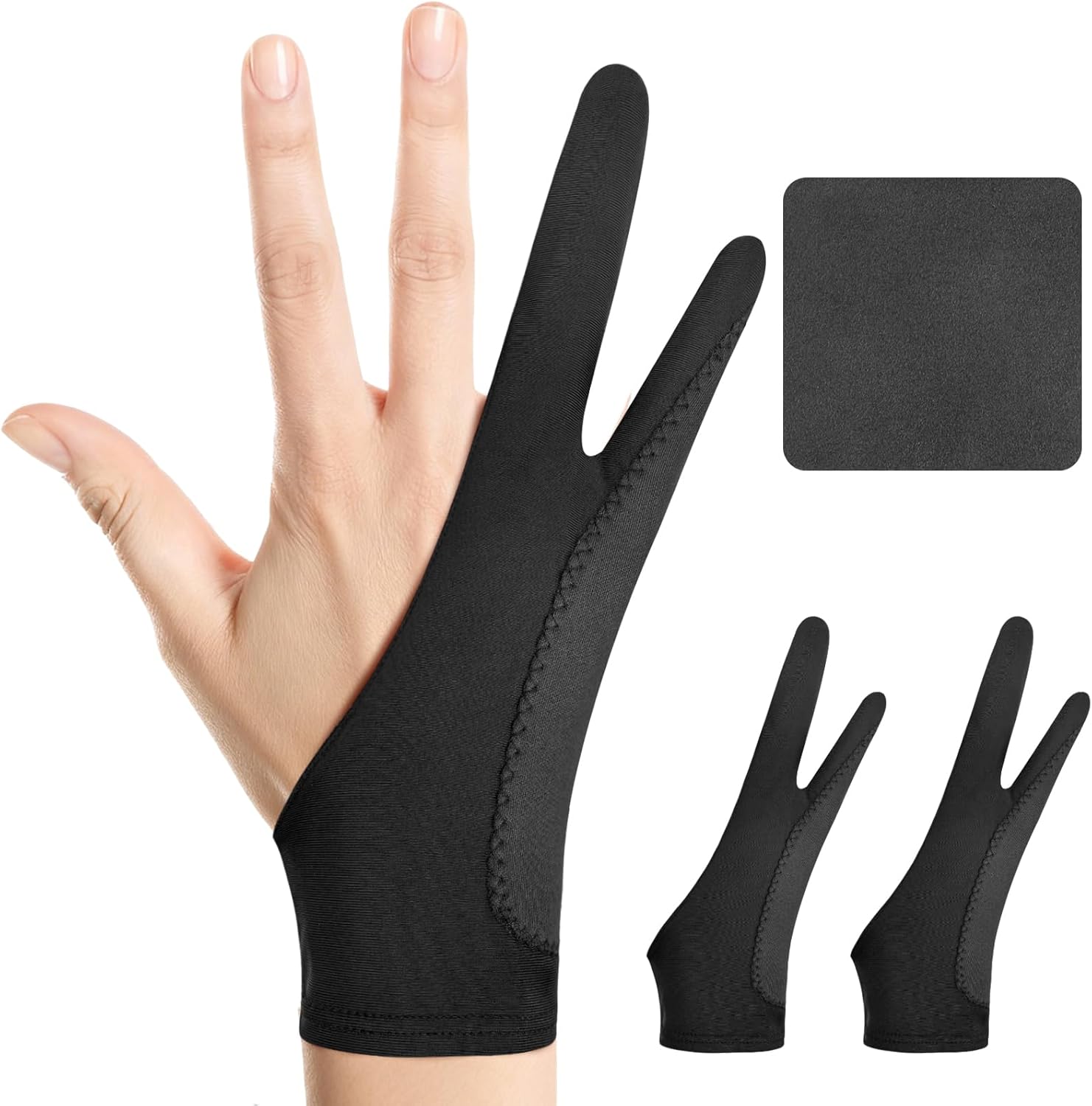
Kortimu’s glove is marketed specifically for stylus use on iPads and tablets. The listing describes a three-layer anti-slip palm design for better grip and fewer accidental touches, a two-finger shape that fits either hand, and soft, stretchy, breathable fabric with moisture-wicking properties for long sessions.
Unusually, it comes in three sizes: Large (3.54 by 8.46 inches), Medium (3.34 by 8.07 inches) and Small (2.95 by 7.44 inches), and each order includes two gloves plus a cleaning cloth. Having a spare means you can wash one while using the other, and the cloth keeps the screen clear.
Best suited for: iPad artists using Procreate daily who want a well-fitting glove and a spare.
Key features:
- Two gloves plus cleaning cloth
- Three sizes with published dimensions
- Three-layer palm design
- Ambidextrous two-finger cut
Pros:
- Sizing options improve fit
- Spare glove included
- Breathable, moisture-wicking fabric
Cons/limitations:
- Thicker palm may feel bulkier than single-layer gloves
- No glove fully eliminates stray touches
Buying consideration: Measure your palm width before choosing a size; a loose glove bunches and defeats the purpose.
2. HUION Artist Drawing Glove — Best Budget Classic

HUION’s black two-finger glove is one of the most widely reviewed drawing gloves on Amazon. It is one free-size glove, 20 cm long and 8 cm wide, that fits either hand. It is made from soft Lycra and nylon for flexibility and reduced friction.
HUION’s listing notes that the glove prevents smudges on tablets and monitors, and states clearly that it cannot prevent accidental touching on some screens. The black color is chosen to resist visible soiling.
Best suited for: Artists who want a simple, inexpensive glove that works with iPad and pen tablets.
Key features:
- Lycra and nylon blend
- 20 x 8 cm, free size
- Left or right hand
Pros:
- Very low price tier
- Long-established product
- Thin fabric for minimal bulk
Cons/limitations:
- One size only
- Single glove per pack
Buying consideration: If you have very small or very large hands, choose a brand with size options instead.
3. Wacom Artist Drawing Glove — Best Eco-Friendly Glove With Exposed Fingertips

Wacom’s glove uses an exposed-fingertip design so you can still tap the touchscreen and type on a keyboard. For Procreate, that means you can use two-finger undo and other gestures with your free fingers while the side of your hand stays covered.
It is made from 90% recycled polyester and spandex, one size fits most, ambidextrous, measuring 7.6 inches long by 3.3 inches wide. The listing emphasizes reduced friction and fewer smudges from oils and sweat.
Best suited for: Artists who switch between drawing, typing and touch gestures, and those who value recycled materials.
Key features:
- Exposed fingertips
- 90% recycled materials
- Ambidextrous, 7.6 x 3.3 inches
Pros:
- Recognized tablet brand
- Touch-friendly design
- Eco-conscious construction
Cons/limitations:
- One size
- Higher tier than basic gloves, though still inexpensive
Buying consideration: Good for laptops plus tablets; if you never type mid-session, a fully covered glove may suit you better.
4. XPPen Artist Drawing Glove — Best Choice of Sizes From a Tablet Brand

XPPen’s two-finger glove is offered in small, medium and large, so you can buy the right fit rather than relying on stretch. The listing describes high-elastic fabric with good air permeability and a soft, skin-friendly texture that stops smudging and allows easier gliding.
It works for left or right hand and comes in dirt-resistant black.
Best suited for: Artists who have had loose or tight free-size gloves before and want a better fit.
Key features:
- Sizes S, M and L
- High-elastic breathable fabric
- Left or right hand
Pros:
- Size options
- Breathable for warm hands
- Widely reviewed
Cons/limitations:
- Single glove
- No palm-layer reinforcement described
Buying consideration: Check the size chart on the listing before ordering; sizes vary by brand.
5. SENHAI 5-Pack Artist Gloves — Best Multipack for Sharing or Rotating

SENHAI’s five-pack gives you gloves in sapphire blue, pink, purple, red and black. They are free size, fit either hand and are made from soft, smooth Lycra. The listing says they clean up easily with water and soap.
A multipack is practical for classrooms, households with more than one artist, or simply rotating gloves so one is always clean.
Best suited for: Families, art classes and artists who want a fresh glove on hand.
Key features:
- Five gloves in five colors
- Lycra, free size
- Washable
Pros:
- Best value per glove
- Color-coding for multiple users
Cons/limitations:
- Free size may not fit very small or large hands
- Lighter colors show dirt sooner
Buying consideration: Air dry after washing to preserve elasticity.
6. HUION Skeleton Artist Glove — Best for a Bit of Style

Functionally similar to HUION’s classic glove, the Skeleton version adds a printed bone pattern to the black fabric. It is a two-finger, free-size glove for either hand, 7.87 by 3.15 inches, made of Lycra and nylon.
The listing describes an anti-dust design to avoid smudges and again notes that it cannot prevent accidental touches on some screens.
Best suited for: Artists who want a fun glove or a gift for a digital art fan.
Key features:
- Skeleton print design
- Lycra and nylon, free size
- Left or right hand
Pros:
- Distinctive look
- Low price tier
Cons/limitations:
- One size
- Same limitations as basic Lycra gloves
Buying consideration: Makes a fun stocking stuffer alongside a new stylus.
Procreate Settings That Work With a Glove
A glove reduces skin contact, but Procreate’s own settings do the rest. These are worth checking once your glove arrives.
Turn off finger painting
In Procreate’s gesture controls you can set painting, smudging and erasing so that only Apple Pencil can draw. That way a stray finger or knuckle cannot leave marks on your canvas.
Review tap gestures
Two-finger tap to undo and three-finger tap to redo are fast but easy to trigger accidentally with a resting hand. If you see unexpected undos, adjust or disable these taps, or rely on the glove covering the pinky and ring finger.
Check iPad accessibility and touch settings
iPadOS includes touch accommodations that can change how long a touch must last to register. Most artists will not need them, but they are an option if accidental touches persist.
Use a matte screen protector if you like more bite
Some artists pair a glove with a paper-texture screen protector. The glove keeps the palm gliding while the pencil tip gets more grip. If your screen protector already feels rough, a glove helps your hand move freely across it.
Drawing Glove vs Other Fixes for Smudges and Stray Touches
A glove is not the only way to deal with a sticky, smudged iPad screen, and it helps to know how it compares with the alternatives before you buy.
Wiping the screen often
A microfiber cloth removes oil, but only after the smudge is there. During a long painting session you will stop repeatedly, and fingerprints still interfere with judging subtle gradients in the meantime. A glove prevents most of the buildup in the first place.
Resting your hand on paper or a cloth
Some artists slide a folded cloth or a sheet of paper under their palm, a habit carried over from traditional drawing. It works, but the paper slips, covers part of the canvas and needs constant repositioning. A glove moves with your hand.
Matte screen protectors
A paper-texture protector reduces glare and adds bite for the pencil, and it can make the palm feel less tacky than bare glass. It does not stop sweat or oil transfer, and it can make the hand drag more on rough textures. Many artists use a protector and a glove together for the best of both.
Software settings alone
Restricting painting to Apple Pencil in Procreate stops stray marks, but it cannot stop a resting palm from triggering zoom, rotation or undo gestures, and it does nothing for friction or smudging. Settings and a glove address different parts of the same problem.
The bottom line: a glove is the cheapest single change that improves comfort, cleanliness and control at once, and it complements the other fixes rather than replacing them.
Buying Guide: How to Choose a Drawing Glove for Procreate
Fit
A glove should be snug enough not to bunch, but not so tight it restricts circulation. Brands with size charts, such as Kortimu and XPPen, make this easier.
Coverage
Two-finger gloves cover the pinky and ring fingers and the outer palm, which is where the hand rests. Make sure the glove extends far enough down the wrist for your drawing posture.
Fabric
Lycra and spandex blends stretch and glide. Breathable, moisture-wicking fabrics help in warm rooms. Recycled polyester options exist for eco-minded artists.
Fingertip design
Covered fingertips reduce stray touches. Exposed fingertips, like Wacom’s, make touch gestures and typing easier.
Pack size
Single gloves are cheapest. Two-packs and multipacks let you rotate and wash without interrupting your work.
Washability
Gloves collect oil and graphite dust over time. Choose fabrics that wash easily and air dry quickly.
Go Further With Procreate
Not sure whether you need a glove at all? Our explainer on what drawing gloves are for covers the benefits for both traditional and digital art. Once your setup is comfortable, put it to work with our tutorial on painting realistic clouds in Procreate, or polish finished pieces using adjustment layers in Procreate.
Common Mistakes to Avoid
- Expecting a glove to block every accidental touch on its own.
- Buying a free-size glove that is too loose and bunches under the hand.
- Never washing the glove, which transfers built-up oil back to the screen.
- Leaving finger painting enabled in Procreate.
- Wearing the glove on the wrong part of the hand for your drawing posture.
- Machine drying gloves on high heat, which can ruin elasticity.
FAQs
Do I need a drawing glove for Procreate?
You do not need one, but many artists find a glove reduces friction, smudges and stray touches during long sessions. It is an inexpensive comfort upgrade.
Does a drawing glove stop palm rejection issues on iPad?
It helps but does not guarantee it. Several makers note that gloves cannot prevent all accidental touches. Pair the glove with Procreate’s setting that limits painting to Apple Pencil.
Which hand do I wear a drawing glove on?
Wear it on your drawing hand. Most gloves, including all six here, are ambidextrous.
What size drawing glove should I buy?
Measure palm width and hand length and compare with the listing. Kortimu and XPPen offer multiple sizes; others are free size.
Can I wash a drawing glove?
Yes. SENHAI notes its gloves clean with soap and water. Hand-wash gently and air dry to keep the fabric stretchy.
Do drawing gloves work with matte screen protectors?
Yes. Many artists use both: the protector adds pencil bite and the glove keeps the hand gliding smoothly.
Final Recommendation
For most Procreate artists, the Kortimu two-pack is the best drawing glove thanks to its sizing options, palm design and spare. The HUION Artist Glove remains the budget classic, Wacom’s recycled glove suits those who type or use touch gestures often, and XPPen is the pick when you need a specific size. Choose SENHAI’s five-pack for families or classes, and the HUION Skeleton glove when a bit of personality is the point.


One Comment