PaintingProGuide is reader-supported. When you buy through links on this page we may earn an affiliate commission at no extra cost to you.
Digital painters search for easels for two different reasons, and it helps to separate them before buying anything. The first is ergonomics: you want your tablet or pen display tilted up like a traditional easel so you are not hunched over a flat screen for hours. The second is physical: you want a stand to hold printed references, traditional sketches you will scan, or framed prints of your digital work at a show or in your studio. The best easels for digital painting depend on which of those problems you are solving.
This guide covers both. First, it explains what kind of stand actually works for drawing on a tablet or pen display and the angles that reduce neck and wrist strain. Then it compares six traditional easels currently on Amazon that digital artists use for reference boards, hybrid workflows and displaying prints. To be clear, none of the six is a dedicated tablet stand, and we do not suggest clamping an expensive device into a canvas easel.
Quick answer: If you want to draw on a tablet at an angle, use a purpose-built adjustable tablet or pen-display stand, ideally one that tilts between roughly 15 and 60 degrees and locks firmly; a canvas easel is not designed to hold a screen safely. For everything around digital painting (holding references, displaying prints at markets, or propping up sketches to photograph), the abitcha adjustable aluminum easel is the sturdiest pick here, holding canvases up to 38 inches high and 25 lbs. For small prints on a desk or sale table, the XCMVCN 6-pack of 9-inch wooden easels is the budget choice.
What “Easel” Means for a Digital Painter
A traditional easel holds a canvas upright so the painter can see the whole image without distortion and work from the shoulder. Digital painters get the same benefits from tilting their screen, but the hardware is different:
| Setup | What it holds | Typical angle range | Good for |
|---|---|---|---|
| Adjustable tablet stand | iPad or Android tablet | Low to steep, often multiple locked positions | Drawing on the couch or desk without hunching |
| Pen-display stand | Screen-based drawing tablet | Usually around 15–60 degrees | Long studio sessions with a large pen display |
| Monitor arm | Pen display or reference monitor | Fully adjustable | Switching between drawing and viewing positions |
| Traditional floor or tabletop easel | Canvas, boards, prints, references | Mostly upright | References, hybrid workflows, displaying finished prints |
Finding a comfortable drawing angle
There is no single correct angle; it depends on your desk height, screen size and posture. As a starting point, many artists find a moderate tilt (somewhere around 20 to 45 degrees) reduces neck bending compared with drawing flat, while still giving the drawing arm a stable surface to rest on. Steeper angles look more like an easel but tire the shoulder over long sessions unless you can rest your forearm. Keep the top of the screen roughly at or slightly below eye level, keep your wrist straight, and take breaks every 30 to 60 minutes.
Where a traditional easel genuinely helps
Plenty of digital painters still start on paper. A quick graphite or ink sketch, propped on an easel and photographed straight on, gives you a clean, undistorted image to import and paint over. Shooting a flat sketch from an angle introduces keystone distortion that you then have to correct, so an upright easel and a camera on a tripod at the same height save time. The same setup works for photographing traditional color studies you want to sample from.
Easels also help with references. Pinning a printed mood board or a sheet of material studies at eye level beside your monitor keeps your screen free for the canvas, rather than splitting it between reference windows. And when a commission or a print run is finished, an easel is how most illustrators present physical work at markets, galleries and conventions.
The picks below are traditional easels for the physical side of a digital art practice.
Our Top Picks at a Glance
- abitcha Portable Adjustable Aluminum Easel — Best overall for display and reference boards
- RRFTOK Heavy Duty Adjustable Easel (Black) — Best for heavier framed prints and boards
- NS JYMB 17–66 Inch Adjustable Easel — Best simple floor or tabletop display
- RRFTOK Metal Tripod Easel with Bag — Best for carrying to conventions and markets
- Amazon Basics Easel Display Stand — Best for lightweight posters and signage
- XCMVCN 6 Pack 9 Inch Wood Easels — Best for small prints and desk references
| Product | Best For | Key Spec | Key Strength | Price Tier |
|---|---|---|---|---|
| abitcha Aluminum Easel | Reference boards and large prints | 17–66 in; holds up to 38 in high, 25 lbs | Highest stated load, carry bag | $$ |
| RRFTOK Heavy Duty | Framed prints | 17–66 in; aluminum and iron | Reinforced bottom crossbar | $$ |
| NS JYMB Easel | General display | 17–66 in; up to 36 in high, 10 lbs | Folds to 21 in | $$ |
| RRFTOK Tripod with Bag | Events and travel | 17–66 in; up to 36 in high, 10 lbs | Carry bag included | $$ |
| Amazon Basics Display | Posters and signs | Tripod; supports 5 lbs | Sets up in seconds | $ |
| XCMVCN Mini Easels | Small prints, desk references | 6 x 9.44 in wood A-frames | Six stands for the price of one | $ |
How We Chose
These easels were selected from Amazon listing details and specifications checked in October 2026, based on how well each one’s height range, load capacity and portability suit the physical tasks around digital art, and how widely each is reviewed by Amazon buyers. We have not used these easels ourselves. Ergonomic guidance reflects widely shared workstation advice rather than testing.
- Load capacity — framed prints and foam boards weigh more than a bare canvas.
- Height range — 17–66 inch easels work on a table or the floor.
- Portability — folded length and carry bags matter for conventions and art markets.
- Clamp security — spring clamps keep boards from sliding.
- Stability — wind resistance and non-slip feet for outdoor events.
Best Easels for Digital Painting Workflows Reviewed
1. abitcha Portable Adjustable Aluminum Easel — Best for reference boards and large prints

abitcha lists the highest load in this group: canvases or panels up to 38 inches high and up to 25 lbs, with a spring-loaded top clamp. Height adjusts from 17 to 66 inches with turn knobs, and the easel folds to 17 inches. Adjustable legs suit uneven ground, and a carry bag with shoulder strap is included.
For a digital painter, this is the easel to hold a foam-core reference board, a large printed concept, or a framed giclée print at a booth. The extra-thick aluminum is described as having good wind resistance, which helps at outdoor markets.
Best suited for: Digital artists selling prints at markets, illustrators who pin up reference boards, and anyone displaying large framed work.
Key features:
- Adjustable 17–66 inches; folds to 17 inches
- Holds up to 38 inches high and 25 lbs
- Spring-loaded top clamp
- Adjustable legs, non-slip base, carry bag
Pros:
- Highest stated weight capacity here
- Compact folded size
- Built for outdoor use
Cons and limitations:
- Not designed to hold tablets or pen displays
- Tripod footprint takes floor space
- Knobs need checking under heavy loads
Buying consideration: For framed prints at events, weigh your heaviest frame before buying; most tripod easels here are rated at 10 lbs, while this one lists 25.
2. RRFTOK Heavy Duty Adjustable Easel (Black) — Best for heavier framed prints

This RRFTOK model combines aluminum and iron and adds an enhanced bottom crossbar to secure the canvas or board. The listing positions it for heavy signs and artwork, as well as whiteboards and display boards.
If you show printed work on thick boards or in frames, the reinforced crossbar is the detail that matters. It adjusts from 17 to 66 inches and folds for storage.
Best suited for: Artists displaying mounted prints and portfolio boards in a studio or at shows.
Key features:
- Adjustable 17–66 inches
- Aluminum and iron build
- Enhanced bottom crossbar
- Collapsible for storage
Pros:
- Sturdier base than lightweight tripods
- Works for signage too
- Easy setup
Cons and limitations:
- Weight limit not stated in the listing
- Heavier than all-aluminum models
- Not a tablet stand
Buying consideration: Ask the seller for the weight limit if your frames are heavy, since the listing describes it as heavy duty without a figure.
3. NS JYMB 17–66 Inch Adjustable Easel — Best for simple floor or tabletop display

NS JYMB’s metal easel adjusts from 17 to 66 inches in height and angle, folds to 21 inches, and holds canvases or panels up to 36 inches high and 1.2 inches deep, with a maximum of 10 lbs. A spring clip at the top holds the board in place.
At 17 inches it sits on a desk to hold a printed reference beside your monitor; extended, it stands on the floor to display a print.
Best suited for: Studio use: references beside your workstation, or a single print on display.
Key features:
- Adjustable 17–66 inches; folds to 21 inches
- Holds up to 36 x 1.2 inches, 10 lbs
- Spring clip top
- Indoor and outdoor use
Pros:
- Works on a desk or floor
- Lightweight and simple
- Low tier
Cons and limitations:
- 10 lb limit
- 1.2 inch depth limit excludes thick frames
- Not designed for devices
Buying consideration: Measure frame depth; anything thicker than 1.2 inches will not fit the clamp.
4. RRFTOK Metal Tripod Easel with Bag — Best for conventions and art markets

This RRFTOK tripod shares the common 17–66 inch range and 36-inch, 10 lb capacity, and adds a carry bag. It folds to 21 inches. For artists who travel to conventions with a print portfolio, a bag keeps the easel together with its parts.
The listing describes uses by function (painting and display), location (indoor and outdoor) and posture (standing or sitting).
Best suited for: Digital illustrators who sell prints at conventions and need a light, packable display.
Key features:
- Adjustable 17–66 inches
- Holds up to 36 inches high, 10 lbs
- Folds to 21 inches; carry bag
- Spring clip top
Pros:
- Easy to transport
- Low tier
- Works at table or floor height
Cons and limitations:
- 10 lb limit
- Light build can tip in wind
- Not a tablet stand
Buying consideration: Bring a small weight or sandbag for outdoor events to stabilize the tripod legs.
5. Amazon Basics Easel Display Stand — Best for lightweight posters and signage

Amazon Basics’ display stand supports up to 5 lbs and sets up without tools. Plastic clips slide to adjust display height, and non-slip rubber feet protect floors.
It is the simplest stand here, suited to unframed posters, foam board signs announcing your booth, or a printed QR code for your portfolio.
Best suited for: Booth signage and lightweight poster prints.
Key features:
- Supports up to 5 lbs
- Tool-free setup
- Adjustable plastic clips
- Non-slip rubber feet
Pros:
- Fast setup
- Lowest-weight tasks covered cheaply
- Collapsible
Cons and limitations:
- Low weight capacity
- Not for framed art
- Plastic clips less secure than spring clamps
Buying consideration: Use it for signage and posters, and choose a sturdier easel for framed work.
6. XCMVCN 6 Pack 9 Inch Wood Easels — Best for small prints and desk references
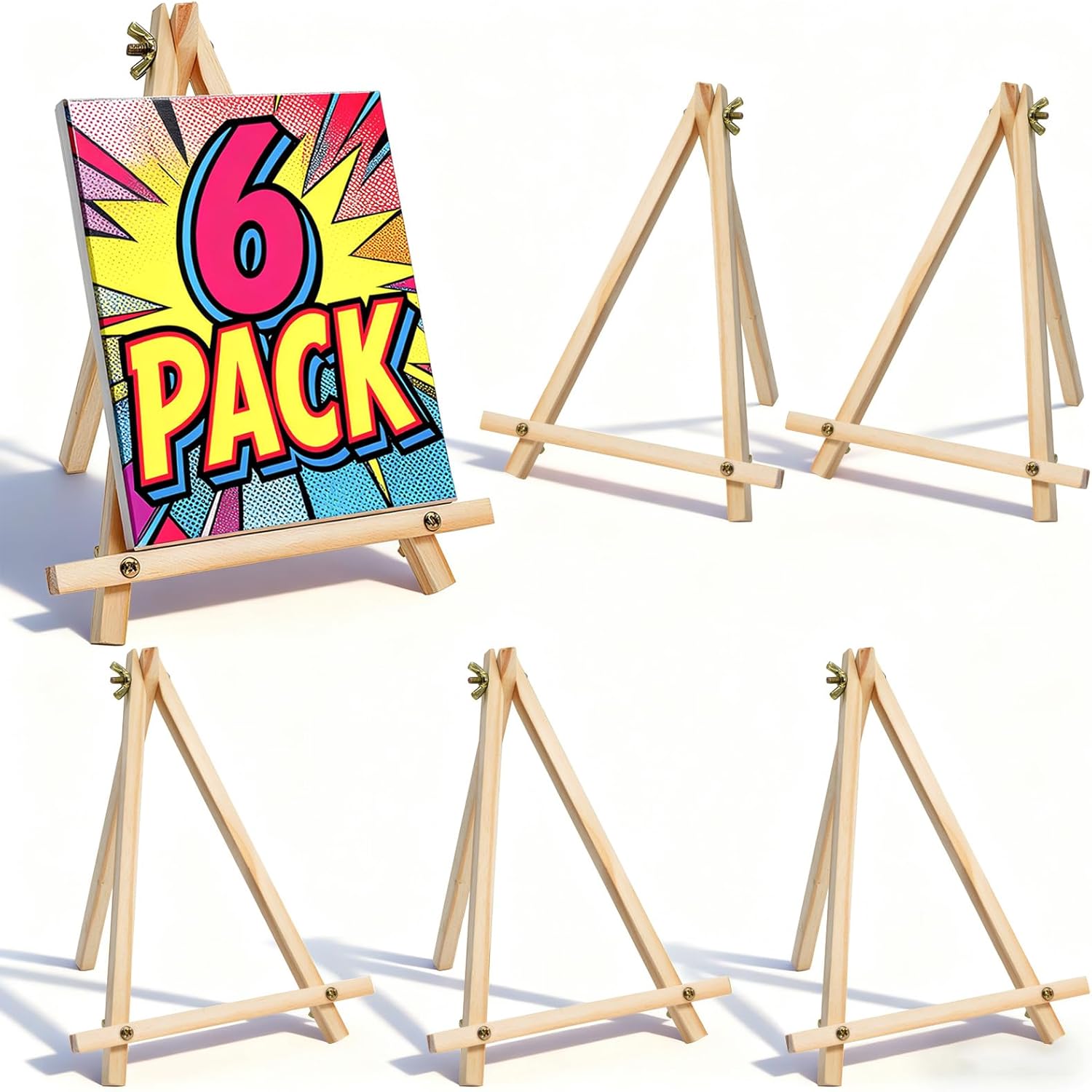
Six A-frame wooden easels, each about 9.44 inches tall and 7 inches wide, made of sanded natural wood. They fold flat and stack, and the triangular design is described as stable and resistant to tipping.
On a sale table they display small prints, postcards and stickers; on a desk they hold a small printed color palette or character sheet beside your screen.
Best suited for: Artists selling small prints and anyone wanting tidy desk references.
Key features:
- Six 9.44 x 7 inch wood easels
- Foldable A-frame design
- Solid sanded wood
- Stackable
Pros:
- Lowest tier for six stands
- Clean look on sale tables
- Handy for desk references
Cons and limitations:
- Small items only
- Not adjustable
- Not suitable for tablets
Buying consideration: Group several at different heights on a booth table to create a tiered display.
Buying Guide: How to Choose an Easel or Stand for Digital Painting
Decide what it will hold
A tablet or pen display needs a stand designed for the device’s weight, size and ports. Prints, boards and references can go on traditional easels.
Check angle adjustment and locking
For drawing on devices, look for multiple angle positions that lock firmly so the screen does not slip when you press with the pen.
Mind the weight rating
Framed prints add up quickly. Most tripod easels here are rated around 10 lbs; the abitcha lists 25 lbs.
Measure clamp depth
Spring clamps often limit depth to around 1.2 inches, which excludes many gallery frames.
Portability
Folded length and a carry bag matter if you show work at events. Tabletop easels pack smallest.
Stability
For outdoor events, look for adjustable legs and wind resistance, and add weights to the legs.
Digital Painting Tutorials
Once your setup is comfortable, try our tutorials on painting digital waves and ocean scenes and digital night scene painting tips. No tablet yet? Learn how to do digital painting without a tablet.
Common Mistakes to Avoid
- Clamping a tablet into a canvas easel. It is not designed to grip a device and may let it slip.
- Drawing flat for hours. Tilt the screen to reduce neck strain.
- Choosing an angle that is too steep. Your arm tires without a resting surface.
- Overloading a 10 lb easel with a heavy frame. Check the rating.
- Forgetting frame depth. Many clamps only open to about 1.2 inches.
- Leaving tripods unweighted outdoors. Wind tips light easels quickly.
FAQs
Do digital artists need an easel?
Not a traditional one for drawing. Digital artists benefit from an adjustable tablet or pen-display stand for ergonomics. Traditional easels are useful for references, hybrid workflows and displaying prints.
What is the best angle for drawing on a tablet?
It varies by person and desk height. Many artists start with a moderate tilt, roughly 20 to 45 degrees, and adjust until their neck is relaxed and their forearm is supported.
Can I put my iPad on an art easel?
It is not recommended. Canvas easels use spring clamps meant for boards and canvases, not devices. Use a stand built for tablets.
Which easel is best for displaying digital art prints?
For large or framed prints, choose an easel with a high weight rating like the abitcha (25 lbs). For small prints, mini tabletop easels such as the XCMVCN 6-pack work well.
Are tabletop easels useful for digital painting?
Yes, for holding printed references, color palettes or character sheets next to your screen so you do not have to switch windows.
How do I set up an ergonomic digital painting station?
Tilt your tablet or pen display, keep the top of the screen near eye level, keep your wrist straight, support your forearm, and take short breaks every half hour to hour.
Final Recommendation
For drawing on a device, buy a dedicated adjustable tablet or pen-display stand rather than a canvas easel. For the rest of a digital artist’s work, the abitcha aluminum easel handles large boards and heavier prints, the RRFTOK heavy duty model adds a reinforced crossbar for framed work, and the NS JYMB and RRFTOK tripod with bag are light options for studio and events. Use the Amazon Basics stand for signage, and the XCMVCN mini easels for small prints and desk references.