

PaintingProGuide is reader-supported. When you buy through links on this page we may earn an affiliate commission at no extra cost to you.
“Paper for digital painting” sounds like a contradiction, but it describes a real and growing workflow. Many digital painters start with a pencil or ink drawing on paper, scan it and paint over it. Others paint a loose acrylic or gouache underpainting, then finish it on screen. Still others scan the grain of canvas paper or cotton drawing paper to use as texture overlays and custom brushes. The best paper for digital painting depends on which of those jobs you need it to do.
This guide matches seven papers from the October 2026 listings to those uses, explains what makes a paper scan well, and clears up one common confusion: these are art papers, not inkjet papers for printing your finished digital work.
Quick answer: For drawings you plan to scan and paint over, Strathmore Mixed Media Vellum (300 gsm) and Stonehenge cotton paper give clean, scan-friendly surfaces. For hybrid paintings that start in acrylic, the heavy wingpaper 400 gsm acrylic pad resists buckling. For scanning canvas textures to use digitally, the Hapikalor 187 gsm canvas paper or Prudiut 200 gsm canvas pad work well.
Our Top Picks at a Glance
- Strathmore Mixed Media Vellum Pad, 9×12 — Best all-round paper for scanned drawings and washes
- Legion Stonehenge Pad, 9×12 — Best for refined pencil and colored pencil underdrawings
- wingpaper Acrylic Paper Pad, 400 gsm — Best for hybrid acrylic-then-digital paintings
- Hapikalor Canvas Paper, 187 gsm — Best for scanning canvas texture overlays
- Prudiut Canvas Paper Pad, 200 gsm — Best value canvas-textured pad
- Hapikalor Mixed Media Sketchbook, 160 gsm — Best spiral book for ink and marker roughs
- UCreate Mixed Media Art Paper, 500 Sheets — Best bulk paper for practice and classes
| Product | Best For | Key Spec | Key Strength | Price Tier |
|---|---|---|---|---|
| Strathmore Mixed Media Vellum | Scanned drawings, light washes | 140 lb / 300 gsm, 15 sheets | Handles wet media | $ |
| Legion Stonehenge Pad | Pencil and colored pencil | Cotton paper, 15 sheets | Supple, printmaking heritage | $$ |
| wingpaper Acrylic Pad | Hybrid acrylic paintings | 400 gsm, 25 sheets, 8.5×11 | Thick, resists bleed-through | $ |
| Hapikalor Canvas Paper | Canvas texture scans | 187 gsm, 20 sheets | Canvas-like texture | $ |
| Prudiut Canvas Paper Pad | Budget canvas texture | 200 gsm, 25 sheets | Glue bound, tear-off sheets | $ |
| Hapikalor Mixed Media Sketchbook | Ink and marker roughs | 160 gsm, 30 sheets, spiral | Lies flat, perforated | $ |
| UCreate Mixed Media 500 Sheets | Bulk practice | Heavyweight sulphite, medium tooth | Huge quantity | $$ |
How We Chose
We did not scan or paint on these papers ourselves. Our picks come from Amazon listing details and specifications checked in October 2026, an assessment of how each paper’s weight, surface and format suit digital painting workflows, and how widely each product is reviewed by Amazon buyers.
- Workflow fit: scanned drawing, hybrid painting or texture capture.
- Weight: heavier papers resist buckling with wet media and scan flat.
- Surface: smooth, vellum or canvas texture.
- Binding: pads that let sheets lie flat or tear off cleanly for scanning.
- Archival claims: acid-free where listed.
Four Ways Paper Fits Into Digital Painting
1. Drawings to scan and paint over
A clean pencil or ink drawing on smooth or vellum paper scans with crisp lines and little paper noise. Set the scanned layer to Multiply and paint beneath it.
2. Hybrid paintings
Some painters block in color and texture with acrylic, gouache or watercolor, scan the result and finish details, lighting and edits digitally. This combines real paint texture with digital flexibility. Heavy paper that stays flat when wet is essential.
3. Texture overlays and custom brushes
Scanning canvas paper, rough drawing paper or a few strokes of real paint gives you textures you can overlay on digital paintings or turn into brush tips and grain textures. Canvas-textured papers are especially useful here.
4. Printing finished digital paintings
Some searchers also mean “paper-like” screen protectors, the matte films that make glass tablets feel more like drawing on paper. Those are a different product category entirely, applied to your device rather than drawn on.
The papers in this guide are made for painting and drawing, not for inkjet printers. For prints of your digital work, look for papers labeled as inkjet fine art or photo papers, which have coatings designed to hold printer ink. None appeared in our product data for this query.
Best Paper for Digital Painting Reviewed
1. Strathmore Mixed Media Vellum Pad, 9×12 — Best All-Round

Strathmore’s mixed media vellum is a heavyweight 140 lb (300 gsm) acid-free paper with a medium drawing surface that handles wet media. The listing names pencil, colored pencil, watercolor, gouache, pen, ink, markers and pastels as suitable media. The pad is 9×12 inches, glue bound, with 15 sheets.
That versatility makes it ideal for a digital painter’s paper stage: you can ink a drawing, add a gouache value study on top, then scan it flat without buckling.
Best suited for: underdrawings and small hybrid studies you plan to scan.
Key features
- 140 lb / 300 gsm, acid-free
- Vellum drawing surface
- Handles wet and dry media
- 9×12 in, 15 sheets, glue bound
Pros
- Heavy enough to stay flat with washes
- Clean surface for scanning
Cons
- Only 15 sheets
- Vellum tooth shows slightly in high-resolution scans
Buying consideration: If you want completely smooth scans, scan at your target resolution and use a levels adjustment to remove paper grain from white areas.
2. Legion Stonehenge Pad, 9×12 — Best for Refined Underdrawings

Stonehenge is a cotton paper originally made for printmakers that spread to drawing, especially colored pencil. The listing describes a supple surface agreeable to many disciplines and lists charcoal, colored pencil, graphite, pastel, pen and ink. The pad has 15 sheets, 9×12 inches, made in the USA.
For digital painters who do detailed tonal drawings before painting, Stonehenge takes layers of graphite or colored pencil smoothly, and those subtle values scan beautifully.
Best suited for: tonal pencil and colored pencil drawings to be scanned and colored digitally.
Key features
- Cotton paper
- Suits graphite, colored pencil, charcoal, pastel, ink
- 15 sheets, 9×12 in
Pros
- Excellent for layered dry media
- Supple, durable surface
Cons
- Not intended for heavy wet media
- Higher tier per sheet
Buying consideration: Save Stonehenge for drawings you care about; use cheaper paper for thumbnails.
3. wingpaper Acrylic Paper Pad, 400 gsm — Best for Hybrid Paintings

Hybrid painters who start in acrylic need paper that will not curl. This wingpaper pad uses 400 gsm (246 lb) paper, the heaviest here, which the listing says provides a firm surface for layered painting and resists moisture and bleed-through. It is compatible with acrylic, pencil, marker and ink, with 25 sheets of 8.5×11 inches, top spiral binding and micro-perforated pages.
The 8.5×11 size is also convenient because it fits standard letter-size flatbed scanners in one pass.
Best suited for: acrylic underpaintings to be finished digitally.
Key features
- 400 gsm / 246 lb
- Acrylic, pencil, marker and ink
- 25 sheets, 8.5×11 in
- Top spiral, perforated
Pros
- Very heavy, stays flat
- Fits standard scanners
Cons
- Smaller than 9×12 pads
Buying consideration: Let acrylic dry completely before scanning; wet paint can damage the scanner glass.
4. Hapikalor Canvas Paper, 187 gsm — Best for Canvas Texture Scans

Canvas paper is printed and embossed to mimic canvas weave, which makes it a handy source of texture. Hapikalor’s 9×12 pad has 20 sheets of 115 lb (187 gsm) acid-free canvas paper designed for acrylics, oils and oil pastels. The listing says it resists warping under repeated corrections and heavy layering.
For digital use, scan a blank sheet or a sheet with dry-brushed paint at high resolution. Overlaid at low opacity, it gives digital paintings a convincing canvas feel.
Best suited for: creating canvas texture overlays and paint-texture brushes.
Key features
- 187 gsm canvas-texture paper
- 20 sheets, 9×12 in
- Acid-free
Pros
- Realistic canvas texture
- Suits real paint for hybrid work
Cons
- Lighter than the acrylic pad
Buying consideration: Light the paper from a low side angle when photographing it to exaggerate the texture before converting it to an overlay.
5. Prudiut Canvas Paper Pad, 200 gsm — Best Value Canvas Pad

Prudiut’s pad gives you 25 sheets of 200 gsm canvas paper at 9×12 inches with single-sided glue binding for clean tear-off. The listing describes a canvas-textured surface that holds paint well and suits acrylics or oils.
Best suited for: painters who want plenty of canvas-textured sheets for experiments.
Key features
- 200 gsm canvas paper
- 25 sheets, 9×12 in
- Glue bound
Pros
- Good sheet count
- Easy tear-off for scanning
Cons
- Acid-free status not stated in the listing
Buying consideration: Test a sheet with your paints before committing an important hybrid piece.
6. Hapikalor Mixed Media Sketchbook, 160 gsm — Best Spiral Book for Roughs
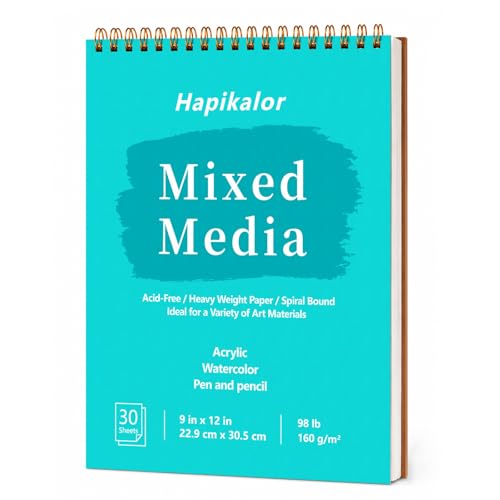
This 9×12 spiral book holds 30 sheets of 98 lb (160 gsm) acid-free mixed media paper, lightly textured and heavily sized, suited to acrylic, light watercolor washes, pen and ink. Pages lie flat and tear out cleanly via micro-perforation.
Best suited for: ink and marker roughs and quick value studies.
Key features
- 160 gsm mixed media
- 30 sheets, spiral bound
- Perforated pages
Pros
- Lies flat for phone scanning
- Handles light wet media
Cons
- Not for heavy washes
Buying consideration: Photograph spiral pages in the book under even light rather than tearing them out if you want to keep a record.
7. UCreate Mixed Media Art Paper, 500 Sheets — Best Bulk Practice Paper

UCreate’s bulk pack has 500 sheets of 9×12 heavyweight sulphite paper with a medium tooth surface, acid-free and recyclable. The listing names pencils, colored pencils, charcoal, pen and ink, markers, oil pastels and most paints, for both wet and dry applications. It is made in the USA and part of the Dixon Ticonderoga family.
Best suited for: thumbnails, gesture practice and classes.
Key features
- 500 sheets, 9×12 in
- Heavyweight sulphite, medium tooth
- Acid-free, recyclable
Pros
- Huge quantity
- Versatile for wet and dry
Cons
- Sulphite paper is less archival than cotton
- Loose sheets, no binding
Buying consideration: Keep this for practice and save cotton or heavier papers for drawings you will turn into finished work.
A Hybrid Workflow, Step by Step
If you have never combined paper and pixels, this simple process is a good first experiment.
- Draw the composition on heavy paper. Keep lines light if you plan to paint over them traditionally, or bold if you plan to color digitally.
- Block in with real paint. Use acrylic or gouache to lay down big shapes and some texture. Do not worry about detail or perfect edges.
- Let it dry, then scan or photograph. Capture it flat, in even light, at high resolution.
- Correct the scan. Adjust levels and white balance so the colors match the original.
- Paint digitally on new layers. Refine edges, push lighting, adjust color and add details. Real paint texture underneath keeps the image from looking too clean.
- Keep the original. Many hybrid artists sell or exhibit the traditional underpainting as a separate piece.
Making your own texture library
Set aside an afternoon to create textures: dry-brush acrylic on canvas paper, splatter ink on mixed media paper, drag charcoal across Stonehenge, sponge gouache onto heavy acrylic paper. Scan each sheet, convert it to grayscale and save it with a descriptive name. Over time, this library becomes a signature part of your digital work, because nobody else has exactly the same textures.
Buying Guide: How to Choose Paper for Digital Painting
Start from the workflow
Scanned drawings need clean, smooth surfaces. Hybrid paintings need heavy paper. Texture captures need interesting surfaces like canvas paper.
Weight
For dry media, 100 to 160 gsm is fine. For washes and acrylic, 300 gsm and up stays flatter, which matters for flatbed scanning.
Surface and tooth
Smooth and vellum surfaces scan with less noise. Toothy and canvas surfaces add character you may want or need to remove later.
Size versus your scanner
Letter-size flatbed scanners take 8.5×11 inch sheets in one pass. Larger sheets need multiple scans stitched together or careful photography.
Paper color
Bright white paper makes it easier to separate lines from background digitally. Natural or off-white papers need more correction.
Archival quality
If the paper original matters, choose acid-free or cotton papers. For scan-only drawings, cheaper paper is fine.
Scanning Tips for Digital Painters
- Scan line art at 600 dpi and textures at 600 to 1200 dpi for flexibility.
- Use a dark cover or black card behind thin paper to avoid show-through.
- Photograph large or textured work in diffuse daylight with the camera parallel to the paper.
- Adjust levels so paper becomes pure white before setting the layer to Multiply.
- Save scans as lossless files such as PNG or TIFF.
- Clean the scanner glass before each session; dust and smudges show up as specks you will spend time removing later.
If you do not have a tablet yet, paper plus a scanner is a surprisingly capable start; our guide to digital painting without a tablet shows how. Ready to paint over a scanned sketch? Try it with our digital waves and ocean tutorial.
Common Mistakes to Avoid
- Using thin paper for wet media. It buckles and scans unevenly.
- Scanning wet paint. Always let it dry fully.
- Scanning at low resolution. You cannot add detail later.
- Printing on painting papers. They are not designed for inkjet inks.
- Ignoring paper color. Off-white needs correction to blend cleanly into a digital canvas.
- Wasting good paper on thumbnails. Use bulk sheets for ideas.
FAQs
What paper is best for sketches I will paint digitally?
Smooth, bright paper scans cleanly. Strathmore Mixed Media Vellum and Stonehenge both suit refined underdrawings.
Can I print digital paintings on these papers?
They are made for drawing and painting, not inkjet printing. For prints, choose inkjet fine art or photo papers designed for your printer.
What is hybrid digital painting?
Starting a painting traditionally, often in acrylic, gouache or ink, then scanning it and finishing it digitally.
How do I make canvas texture for digital paintings?
Scan or photograph canvas paper at high resolution with low side lighting, convert it to grayscale and overlay it at low opacity.
What paper weight is best for acrylic before scanning?
Heavy paper, ideally 300 gsm or more. The wingpaper pad is 400 gsm.
Do I need special paper to scan drawings?
No, but smooth white paper reduces cleanup. Toothy papers scan with more grain.
Final Recommendation
For drawings and washes you will scan and paint over, Strathmore Mixed Media Vellum is the most versatile choice, with Stonehenge for refined pencil work. Hybrid painters who start in acrylic should reach for the heavy wingpaper 400 gsm pad. For texture overlays, scan sheets of Hapikalor or Prudiut canvas paper. Keep the Hapikalor mixed media sketchbook for roughs and the UCreate 500-sheet pack for endless practice.


One Comment