Quick answer: Use reference photos for artistic inspiration by treating them as information, not instructions. Choose photos with clear light and a strong value pattern, crop and simplify them before painting, correct the distortions cameras introduce (flattened shadows, blown highlights, lens warp), and change at least one element such as color, composition or mood so the painting becomes your own. Use your own photos or properly licensed images whenever you plan to share or sell the work.
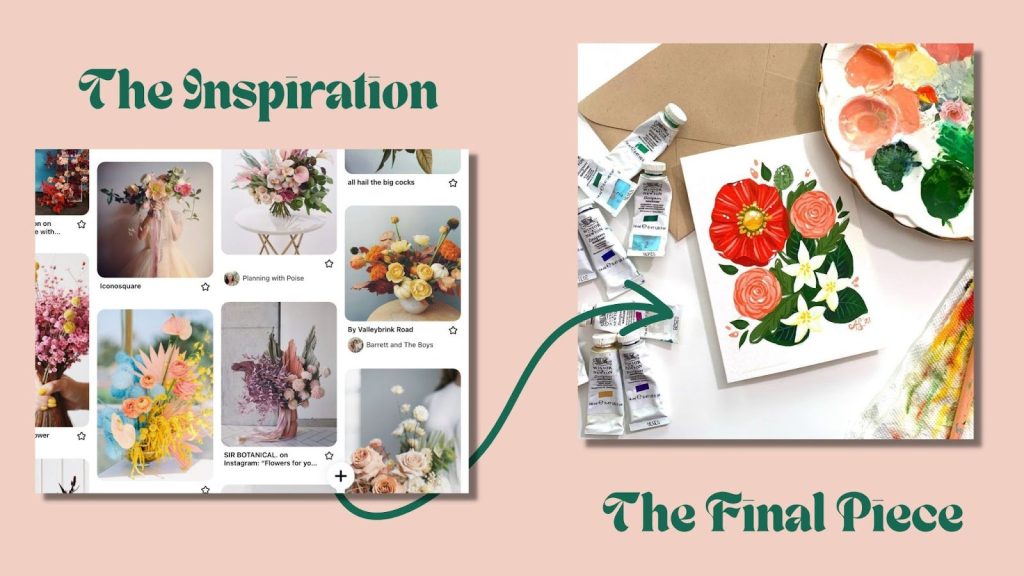
A photograph freezes a moment you could never hold still long enough to paint: a wave breaking, light on a face at golden hour, a dog mid-leap. Knowing how to use reference photos for artistic inspiration is what separates paintings that look copied from ones that feel observed. The camera is a brilliant assistant, but it sees differently than your eyes do, and painters who understand those differences get far better results.
This guide covers how to choose, edit and interpret references, how to avoid the “traced photo” look, and how to handle copyright. If you prefer guided prompts while you build these habits, a good beginner painting inspiration book can supply subjects and exercises alongside your own photos.
Why Artists Use Reference Photos
Working from life remains the best way to train your eye, but references solve real problems:
- Subjects that move: animals, children, water, clouds and crowds.
- Light that changes: sunsets and dappled shade last minutes.
- Access: distant landscapes, travel scenes, or places you cannot set up an easel.
- Time: a painting that takes ten sessions can return to the same light every time.
- Study: zooming in on how a petal folds or how a shadow edge softens teaches structure.
Painters have used optical aids and photography for a long time; the key is using them deliberately.
How Cameras See Differently Than Your Eyes
Before choosing references, know what the camera gets wrong. Correcting these is the single biggest upgrade most painters can make.
| Camera tendency | What it does to a painting | How to correct it |
|---|---|---|
| Limited dynamic range | Shadows go black, highlights go white, losing detail in both | Bracket exposures, or invent subtle color in shadows based on what you know |
| Uniform sharpness | Everything is in focus, so nothing leads the eye | Choose a focal area; soften edges and detail elsewhere |
| Lens distortion | Wide angles stretch edges and enlarge close objects | Shoot with a moderate focal length; check proportions against reality |
| Auto white balance | Golden light turns neutral; shade turns blue-gray | Warm or cool your palette to match the mood you remember |
| Flattened depth | Atmospheric perspective weakens | Push distant values lighter and cooler on purpose |
| Phone processing | Over-sharpened edges and boosted saturation | Reduce saturation when mixing; avoid copying halos |
How to Choose a Good Reference Photo
A strong reference makes painting easier; a weak one makes it a fight. Run through this checklist:
- Clear light direction. Side light or backlight creates shapes. Flat overcast or flash light often makes subjects look like cutouts.
- A readable value pattern. Convert the photo to grayscale. If you can see three to five distinct value groups, it will paint well.
- A focal point. Something should obviously matter most.
- Enough resolution. Tiny thumbnails hide information you will need when zoomed in.
- Emotional pull. If the photo does not interest you, the painting probably will not either.
Taking Your Own Reference Photos
Your own photos are the best references because you were there and you own the rights. A few habits make them far more useful:
- Shoot the same scene at several exposures: one for shadows, one for highlights.
- Take close-ups of textures and details, plus a wide shot for context.
- Photograph subjects at eye level unless you want a dramatic angle.
- Note the time, weather and colors you noticed in a quick written line or voice memo. Memory of color fades fast.
- Avoid the widest lens setting on your phone for portraits, since it enlarges noses and foreheads.
Editing Reference Photos Before You Paint
Editing is part of the creative process, not cheating. Spend ten minutes here to save hours at the easel.
Step-by-Step Prep
- Crop for composition. Try several crops matching your canvas ratio (for example 4:5 for 16×20, 3:4 for 12×16, 1:1 for square). Place the focal point off-center.
- Check values in grayscale. Toggle black and white to see whether light and dark shapes read clearly.
- Posterize or squint. Reducing the image to four or five tones shows the big shapes you should block in first.
- Adjust exposure gently. Lift shadows to reveal hidden information, but do not copy the edited colors blindly.
- Remove distractions. Decide in advance which poles, wires, cars or extra objects you will leave out.
- Make a thumbnail sketch. A 2×3 inch value sketch in pencil confirms the design before you commit paint.
Ways to Use a Reference Without Copying It
The phrase “artistic inspiration” matters. A painting that copies a photo exactly tends to look stiff. These approaches put you back in charge.
Change the Color Story
Repaint a midday scene as dusk, push a green landscape toward autumn, or limit yourself to three colors. A limited palette forces interpretation and harmony.
Combine Multiple References
Take the sky from one photo, the barn from another and the foreground from a third. Check that the light direction matches in all of them, or adjust shadows so the scene is believable.
Simplify Detail
Paint a tree as three or four value masses rather than ten thousand leaves. Save detail for the focal area and let the rest suggest.
Exaggerate Mood
Raise contrast for drama, soften edges for calm, or warm the light to make a scene nostalgic.
Change Scale and Format
Turn a horizontal landscape into a tall vertical, or zoom into one corner of a photo for an intimate close-up.
Paint From Memory Afterward
Study the photo for ten minutes, then put it away and paint. Whatever you remember is usually what was important, and the result looks more personal.
Practical Setup at the Easel
- Screen vs print: Screens show a wider brightness range and let you zoom, but backlit images look more luminous than paint can be. Prints are closer to paint’s range but can shift color. Many painters use both.
- Size and position: Keep the reference near your canvas at a similar viewing distance, so you are not constantly refocusing.
- Grid method: Drawing a light grid on both photo and canvas helps beginners transfer proportions accurately. Use a few large squares, not dozens of tiny ones, so you still look at shapes.
- Lighting your workspace: Paint under neutral, daylight-balanced light so your mixes match what you see on screen.
Reference Photos by Subject
| Subject | What to look for in a reference | Common trap |
|---|---|---|
| Landscapes | Clear foreground, middle ground and background; side light | Copying every detail in the distance |
| Portraits | Soft directional light; lens at 50mm equivalent or longer | Wide-angle distortion, flash flattening |
| Animals | Catchlight in the eye; fur direction visible | Overworking fur texture everywhere |
| Flowers | Backlight through petals; simple background | Over-saturated phone colors |
| Water | Several frames of the same wave or reflection | Freezing water so it looks solid |
| Cityscapes | Strong cast shadows; limited signage clutter | Converging verticals from tilted shots |
Copyright and Ethics of Using Reference Photos
This is the part many beginners overlook. Photographs are generally protected by copyright from the moment they are taken. Painting a close copy of someone else’s photo and showing, selling or entering it in a competition can infringe the photographer’s rights. Laws vary, and this is not legal advice, but these guidelines keep you on safer ground:
- Your own photos: the safest choice.
- Licensed references: sites that offer images under licenses allowing derivative art use. Read the specific license.
- Public domain images: many museum collections and older works are available for free reuse.
- Permission: asking a photographer directly is often successful, especially if you credit them.
- Practice copies: copying any image privately for learning is a long-standing practice, but keep those studies for practice rather than sale.
When in doubt, transform a reference substantially and combine several sources, and always credit the photographer when sharing.
Common Mistakes When Painting From Photos
- Painting every detail equally. The eye needs a hierarchy.
- Copying black shadows. Real shadows contain color and reflected light.
- Ignoring edges. Mix hard, soft and lost edges rather than outlining everything.
- Working too small on the reference. A tiny phone image hides shape information.
- Starting with detail. Block in big value shapes first, then refine.
- Never painting from life. Regular life studies train you to notice what photos miss.
Exercises to Build Reference Skills
- Value study: Paint a reference using only black, white and three grays. Thirty minutes.
- Three crops: Paint three tiny studies from one photo with different crops.
- Color shift: Paint the same scene at “noon” and “sunset” from one photo.
- Memory painting: Study for ten minutes, hide the photo, paint for thirty.
- Life vs photo: Photograph a still life, paint it from the photo, then paint it from life and compare.
Tips by Skill Level
Beginners
Choose simple, well-lit photos with one subject. Use a grid if proportions frustrate you, and focus on values before color.
Intermediate Painters
Combine references, adjust light direction intentionally and experiment with limited palettes.
Advanced Painters
Use references mainly for information and construct the image from design principles, letting color temperature and edge control carry the mood.
Building a Personal Reference Library
Painters who use references well usually keep an organized collection rather than searching from scratch every time. A library saves hours and gradually reflects your own taste, which is part of what gives a body of work a recognizable voice.
- Sort by subject and light, not by date. Folders such as “backlit trees,” “overcast harbors” or “evening portraits” are far easier to use than “Vacation 2025.”
- Keep the originals. Edit copies so you can return to the unprocessed file when colors or exposure look off.
- Tag your favorites. Mark the photos with the strongest value patterns so you can find them when you have only an hour to paint.
- Save notes alongside images. A short text file listing the time of day, weather and the colors you remember adds information the camera missed.
- Record the source and license. For any image you did not take, note where it came from and what reuse the license allows. This makes later decisions about selling or sharing simple.
A Simple Workflow From Photo to Painting
- Pick a reference from your library with clear light and a focal point.
- Crop it to your canvas ratio and check values in grayscale.
- Make a small thumbnail sketch and decide what to leave out.
- Choose a palette and a mood, written as a one-line note (for example, “warm late light, soft background”).
- Block in the largest value shapes with a big brush.
- Refine the focal area, keeping edges elsewhere softer.
- Step back, compare with your intent rather than the photo, and stop when the idea reads clearly.
FAQs
Is it cheating to paint from reference photos?
No. Professional artists widely use photos for information. What matters is how you interpret the reference: making compositional, color and edge decisions rather than copying mechanically.
Can I sell a painting made from someone else’s photo?
Selling a close copy of a copyrighted photo without permission can infringe the photographer’s rights. Use your own photos, licensed or public domain images, or get permission. Laws vary by country, so check if you are unsure.
Where can I find free reference photos for painting?
Look for images explicitly licensed for reuse or in the public domain, including many museum open-access collections. Always read the license terms, since “free to view” is not the same as “free to reuse.”
Should I paint from a screen or a printed photo?
Both work. Screens allow zooming and show detail in shadows, while prints sit closer to paint’s brightness range. Many painters keep a print beside the easel and zoom on a tablet for details.
How do I stop my paintings looking like copies of photos?
Simplify detail outside the focal area, vary your edges, adjust colors toward a chosen mood, and correct camera distortions such as black shadows. Painting from memory for part of the session also helps.
What makes a good reference photo for beginners?
One clear subject, strong directional light, a simple background and good resolution. Convert it to grayscale to check that light and dark areas read clearly.
Next Step
Reference photos are tools for seeing more, not shortcuts for thinking less. Choose them for light and value, edit them before painting, and change something meaningful every time.
If you would like structured prompts and subjects to practice with, browse our picks for inspiration books that help new painters find ideas, then pair those exercises with your own photographs.