Digital painting is an amazing art form. It offers endless possibilities. One key skill in digital art is blending colors. Proper blending can make your artwork look more realistic and beautiful. Here are some tips to help you blend colors like a pro.
Understanding Basic Color Theory
Before you start blending, understand basic color theory. This includes primary, secondary, and tertiary colors. It also involves understanding warm and cool colors. Here is a simple table to help you:
| Type of Color | Examples |
|---|---|
| Primary Colors | Red, Blue, Yellow |
| Secondary Colors | Green, Orange, Purple |
| Tertiary Colors | Red-Orange, Blue-Green, Yellow-Green |
Use the Right Tools
The right tools can make a big difference. Most digital painting software has various brushes. Some are designed for blending colors. Here are some popular tools:
- Soft Brush: Great for smooth transitions.
- Smudge Tool: Helps to smudge colors together.
- Opacity Brush: Adjusts the transparency of colors.
Start with Simple Gradients
Gradients are a great way to start blending. Choose two colors. Then create a gradient between them. Practice making the transition as smooth as possible. This will help you understand how colors mix.
Layer Your Colors
Layers are your best friend in digital painting. Use multiple layers to add colors. Start with a base color. Then add more layers for shadows and highlights. This makes it easier to blend colors without making mistakes.
Experiment with Opacity
Opacity controls how transparent your brush strokes are. Lower opacity can help blend colors more smoothly. Try different opacity settings. Find what works best for you.

Credit: liongirllostandfound.blogspot.com
Use Blending Modes
Blending modes change how layers interact. Most software has blending modes like Multiply, Screen, and Overlay. Experiment with these modes. See how they affect your colors.
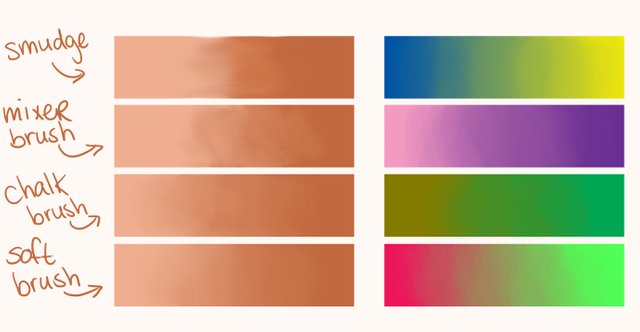
Credit: steemit.com
Practice Color Picking
Picking the right colors is crucial. Use a color picker tool to select colors from your palette. This ensures consistency. Also, study how colors look next to each other. This can help you make better choices.
Blend with Short Strokes
Short, quick strokes can help blend colors better. Avoid long strokes. They can make transitions look harsh. Instead, use small, circular motions. This creates a smoother blend.
Zoom In for Detail
Zoom in to see finer details. This helps you blend small areas more precisely. Don’t forget to zoom out. Always check how your work looks from a distance.
Take Breaks
Blending colors can be tiring. Take breaks to rest your eyes. This helps you see your work with fresh eyes. You’ll notice areas that need more blending.
Learn from Others
Study other artists’ work. See how they blend colors. You can learn a lot from observing. Join online art communities. Share your work and get feedback.
Use Reference Images
Reference images can be very helpful. They show how colors blend in real life. Use them to guide your blending. This can make your digital paintings look more realistic.
Experiment and Have Fun
Don’t be afraid to experiment. Try new techniques and tools. The more you practice, the better you’ll get. Most importantly, have fun. Enjoy the process of creating art.
Frequently Asked Questions
What Is Color Blending In Digital Painting?
Color blending is the process of smoothly mixing colors to create gradients and transitions in digital artwork.
How To Blend Colors Smoothly?
Use soft brushes, adjust opacity, and apply gradients. Experiment with blending modes for smoother transitions.
Which Tools Help In Color Blending?
Popular tools include brushes, smudge tool, and gradient tool. Layer modes also enhance blending effects.
Why Is Color Blending Important?
It adds depth, realism, and dimension to digital paintings. It creates smooth transitions and enhances visual appeal.
Conclusion
Blending colors in digital paintings can be challenging. But with practice, you can master it. Use these tips to improve your skills. Remember, art is about expressing yourself. So, keep experimenting and have fun!
We hope these tips help you on your artistic journey. Happy painting!