

PaintingProGuide is reader-supported. When you buy through links on this page we may earn an affiliate commission at no extra cost to you.
“Pencil” means two things to a digital painter. On an iPad, the pencil is your stylus, and its tilt, palm rejection and responsiveness shape every stroke. Off the screen, a real graphite pencil is still where many digital paintings begin: thumbnails in a sketchbook, a clean drawing scanned in as line art, or value studies done away from the device. The best pencils for digital painting cover both sides of that workflow.
This guide reviews one iPad-compatible stylus pencil and five traditional pencil sets currently on Amazon, picked for how they fit into digital work: sketching, scanning, line art and color planning. It also explains how to scan pencil drawings cleanly and how to make digital pencil brushes feel more like the real thing.
Quick answer: If you need a pencil-style stylus for an iPad from 2018 onward, the MYSTILUCK iPad stylus offers tilt sensitivity, palm rejection and magnetic attachment at a low tier, though it does not list pressure levels. For sketches you will scan and paint over, the Faber-Castell 6-pencil graphite set (2H to 6B) gives the right hardness range in a compact set. For crisp, consistent scan-ready line art, the Four Candies mechanical pencil set with 0.3 to 2.0 mm leads is the most versatile drafting option.
Our Top Picks at a Glance
- MYSTILUCK Stylus Pen for iPad (2018–2026) — Best pencil-style stylus on a budget
- Faber-Castell Graphite Sketch Pencil Set (2H–6B) — Best for thumbnails and scan-ready sketches
- Four Candies 27-Piece Metal Mechanical Pencil Set — Best for clean line art to scan
- PANDAFLY 22-Piece Sketching Set (12B–2H) — Best value set for value studies
- STABILO All Pencil for Film and Glass, Black — Best for drawing on tracing film and lightboxes
- POSCA Soft Core Colored Pencils, 12 Count — Best for color roughs before painting digitally
| Product | Best For | Key Spec | Key Strength | Price Tier |
|---|---|---|---|---|
| MYSTILUCK iPad Stylus | iPad sketching and painting | Tilt sensing; palm rejection; USB-C | Magnetic attachment, fast charge | $ |
| Faber-Castell Graphite 6 | Sketches to scan | 2H, HB, B, 2B, 4B, 6B | Break-resistant, glued lead | $ |
| Four Candies Mechanical Set | Precise line art | 0.3–2.0 mm pencils; 20 lead tubes | Consistent line width | $$ |
| PANDAFLY 22-Piece | Value studies | 12B–2H graphite plus charcoal | Wide value range | $ |
| STABILO All Black | Film, glass and lightboxes | Water-soluble graphite pencil | Marks slick surfaces | $ |
| POSCA Colored Pencils | Color roughs | 12 colors; 4.0 mm soft core | Opaque, matte color | $ |
How We Chose
These products were chosen from Amazon listing details and specifications checked in October 2026, based on how well each one fits a step in a digital painting workflow (stylus work, sketching, line art or color planning), and on how widely each is reviewed by Amazon buyers. We have not used these products ourselves. Scanning and brush advice reflects common digital art practice.
- Workflow fit — each pick solves a specific step between idea and digital painting.
- Line quality for scanning — consistent, dark lines scan more cleanly.
- Hardness range — light leads for construction, soft leads for values.
- Device compatibility — the stylus must list supported iPad models.
- Value for money — sets that cover needs without padding.
Best Pencils for Digital Painting Reviewed
1. MYSTILUCK Stylus Pen for iPad (2018–2026) — Best for a budget pencil-style stylus

MYSTILUCK’s stylus is designed for iPads released from 2018 to 2026, including iPad 6th to 11th generation (A16), iPad mini 5 to 7 and iPad Air models, according to the listing. It charges via USB-C in about 13 minutes and lasts up to 9 hours.
The painting-relevant features are tilt sensitivity, which the listing says varies line thickness and depth with the angle of the pen, palm rejection, and a stated precision of up to 0.1 mm. It also attaches magnetically to the iPad.
The listing describes tilt rather than pressure sensitivity. Tilt is excellent for pencil-style shading in sketch brushes; for pressure-controlled painting in apps that rely on it, a first-party pencil is the safer choice.
Best suited for: iPad owners who want an affordable pencil for sketching, line work and shading.
Key features:
- Compatible with listed iPads 2018–2026
- Tilt sensitivity and palm rejection
- USB-C fast charge; up to 9 hours use
- Magnetic attachment
Pros:
- Lowest tier stylus option
- Natural pencil-style shading via tilt
- Rest your hand on the screen
Cons and limitations:
- No pressure levels listed
- Not for older iPads or other platforms
- Needs charging
Buying consideration: Confirm your iPad model in Settings before buying, and set your sketch brush to respond to tilt for the most pencil-like feel.
2. Faber-Castell Graphite Sketch Pencil Set (2H–6B) — Best for thumbnails and scan-ready sketches

Six artist-quality graphite pencils in 2H, HB, B, 2B, 4B and 6B. That range covers light construction lines (2H), clean drawing lines (HB to 2B) and dark value blocking (4B to 6B). Faber-Castell notes the break-resistant lead is glued along the full length of the pencil.
For digital artists, this small set is all you need for sketchbook thumbnails and drawings you plan to scan and paint over.
The pencils are made from reforested wood with carbon-neutral production according to the listing.
Best suited for: Digital painters who sketch on paper before moving to the screen.
Key features:
- Six pencils: 2H, HB, B, 2B, 4B, 6B
- Break-resistant, fully glued lead
- Hexagonal barrel
- Reforested FSC wood
Pros:
- Ideal hardness range for sketches
- Low tier
- Trusted brand
Cons and limitations:
- No eraser or sharpener
- Soft leads smudge in sketchbooks
- Only six grades
Buying consideration: Draw construction lines with 2H, which scans very faintly, and final lines with 2B so you can separate them easily with levels adjustments.
3. Four Candies 27-Piece Metal Mechanical Pencil Set — Best for clean line art to scan
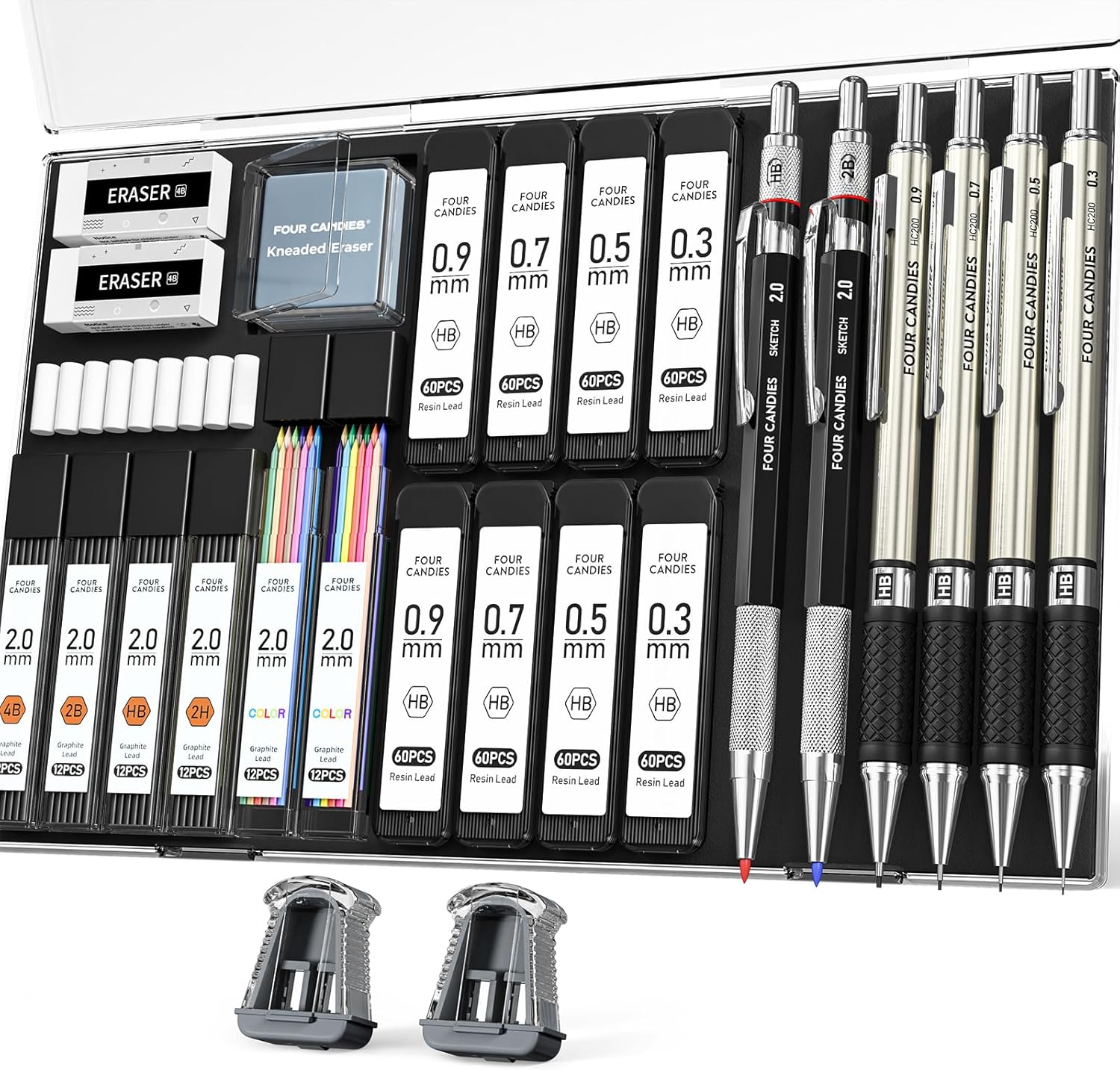
Four Candies includes six metal mechanical pencils in 0.3, 0.5, 0.7, 0.9 and 2.0 mm sizes, plus 20 tubes of lead refills in various diameters and hardnesses, a kneaded eraser and lead sharpeners for the 2.0 mm holder, all in a case.
Mechanical pencils keep line width consistent, which is exactly what you want for scan-ready line art. Thin leads (0.3–0.5 mm) suit details, while the 2.0 mm lead holder handles loose sketching and shading.
Metal bodies and textured grips are described as anti-slip for longer drawing sessions.
Best suited for: Illustrators and comic artists who scan pencil line art before inking or coloring digitally.
Key features:
- Six metal mechanical pencils: 0.3–2.0 mm
- 20 lead tubes in various hardnesses
- Kneaded eraser and lead sharpeners
- Storage case
Pros:
- Consistent line width
- Wide range of lead sizes
- Everything in one case
Cons and limitations:
- Mid tier
- Thin leads break under heavy pressure
- More pieces than a casual sketcher needs
Buying consideration: For scanning, use a slightly harder lead (HB) in thin pencils; softer leads can smear and leave gray halos.
4. PANDAFLY 22-Piece Drawing and Sketching Set (12B–2H) — Best for value studies on a budget

PANDAFLY packs eight graphite pencils (12B, 10B, 8B, 6B, 4B, 2B, HB and 2H) and four black charcoal pencils, plus additional sketching tools, into a 22-piece set. The very soft grades (8B to 12B) produce rich darks quickly.
Value studies, small grayscale thumbnails that plan light and shadow, are one of the most useful exercises for digital painters. Soft pencils and charcoal make them fast.
The listing describes the leads as smooth, break-resistant and non-toxic.
Best suited for: Painters practicing value studies and anyone wanting a broad pencil range cheaply.
Key features:
- Eight graphite grades from 12B to 2H
- Four charcoal pencils
- Extra sketching tools
- Non-toxic
Pros:
- Very wide value range
- Lowest cost per tool
- Charcoal for bold darks
Cons and limitations:
- Soft grades smudge and need fixing
- Brand less established
- Charcoal is messy to scan
Buying consideration: Limit each value study to three or four tones. The goal is to plan the painting, not to render it.
5. STABILO All Colored Pencil for Film and Glass, Black — Best for tracing film and lightbox work

STABILO’s All pencil is known for marking on slick surfaces such as film and glass. The listing describes it as made from quality graphite, easy to sharpen and water-soluble.
Digital artists who trace a rough onto film over a lightbox, or mark up printed proofs and glass references, will find it useful where ordinary graphite skips.
It is the lowest-cost item in this guide.
Best suited for: Artists who work on tracing film, acetate or glass, or mark up printed proofs.
Key features:
- Black, writes on film and glass
- Water-soluble
- Easy to sharpen
- Graphite-based
Pros:
- Marks slick surfaces
- Lowest tier
- Water-soluble for wash effects
Cons and limitations:
- Single pencil
- Smudges on glossy surfaces until fixed
- Not a fine detail pencil
Buying consideration: Use it to draw over a printout of your digital painting to plan corrections, then scan or photograph the marked-up page.
6. POSCA Soft Core Colored Pencils, 12 Count — Best for color roughs before painting

POSCA’s colored pencils use a highly pigmented wax-hybrid core, 4.0 mm thick and described as break-resistant. The listing emphasizes smooth blending, layering and an opaque, matte finish on paper, canvas, wood and painted surfaces.
Quick color roughs on paper help you decide a palette before opening the app, and opaque pencils work well on toned sketchbooks.
Twelve colors keep the decision simple.
Best suited for: Illustrators who plan color on paper and sketchbook artists working on toned paper.
Key features:
- 12 colors, 4.0 mm soft core
- Wax-hybrid formula for blending
- Opaque, matte finish
- Multi-surface
Pros:
- Opaque on toned paper
- Blends smoothly
- Trusted brand
Cons and limitations:
- Only 12 colors
- Soft cores wear quickly
- Mid tier for 12 pencils
Buying consideration: Scan color roughs and use them as a palette reference layer while you paint.
Where Pencils Fit in a Digital Painting Workflow
Seeing the whole process makes it easier to choose the right tools. A typical sketch-to-screen workflow looks like this:
| Stage | Tool | Purpose |
|---|---|---|
| Thumbnails | HB or 2B pencil, small sketchbook | Try many compositions in minutes |
| Value study | 4B to 8B pencil or charcoal | Plan light and shadow in three or four tones |
| Color rough | Colored pencils on toned paper | Test a palette before committing |
| Final drawing | Mechanical pencil, HB lead | Clean, consistent lines for scanning |
| Scan and clean | Scanner or phone app | Turn the drawing into a line layer |
| Painting | Stylus in your painting app | Block in, render and finish digitally |
Not every artist uses every stage. Some skip paper entirely and do thumbnails on the tablet; others ink traditionally and only color digitally. The point is that a few inexpensive pencils can save hours on screen by solving composition and value problems before you start painting.
From Pencil Sketch to Digital Painting: Scanning Tips
- Draw darker than you think. Scanners and phone cameras lose faint lines.
- Scan at 300–600 dpi in grayscale. Higher resolution keeps line detail for large paintings.
- Use levels or curves. Push the paper to pure white and lines to dark gray or black.
- Set the layer to Multiply. White disappears, leaving lines over your color layers.
- Clean stray marks. Erase smudges digitally rather than overworking the paper.
- Lock the line layer. Paint underneath, or color the lines themselves with a clipping layer.
Making Digital Pencil Brushes Feel Real
Most apps include pencil brushes, but a few adjustments make them much closer to graphite: map brush size and opacity to pressure if your stylus supports it, map shading to tilt if it does not, add a subtle paper grain texture, and reduce the stabilization for loose sketching. A matte screen protector adds friction that many artists find more pencil-like than bare glass.
Buying Guide: How to Choose Pencils for Digital Painting
Decide which “pencil” you need
If you paint on an iPad, a compatible stylus is essential. If you sketch first, traditional pencils matter just as much. Many artists use both.
Check stylus compatibility and features
Confirm your iPad model. Look for palm rejection and note whether the listing claims pressure or only tilt.
Choose a hardness range
2H for light construction, HB to 2B for lines, 4B and softer for values. A six-pencil set covers most needs.
Mechanical for line art
Mechanical pencils keep lines consistent for scanning; wooden pencils are better for expressive sketching.
Specialty pencils
Film-and-glass pencils for lightboxes and proofs; colored pencils for palette roughs.
Erasers and paper matter too
A kneaded eraser lifts graphite without leaving crumbs that show up as specks in scans, and it can be shaped to pull highlights out of value studies. For paper, a smooth drawing or bristol surface gives the cleanest scans of line art, while a sketchbook with slight tooth suits thumbnails and value work. Very textured paper adds grain that you will need to clean up digitally.
Keep it simple
You do not need dozens of pencils. A few grades, an eraser and a sharpener support a whole digital workflow.
Practice Projects
Sketch your composition on paper, then paint it digitally using our tutorials on digital waves and ocean painting or digital night scenes. If you do not have a stylus yet, learn how to do digital painting without a tablet.
Common Mistakes to Avoid
- Buying a stylus without checking your iPad model. Compatibility varies by generation.
- Expecting pressure from tilt-only styluses. Check the listing.
- Sketching too faintly to scan. Go darker on final lines.
- Using very soft graphite for line art. It smudges and scans gray.
- Scanning in color. Grayscale scans are cleaner and smaller.
- Overloading on pencils. A small, well-chosen set is enough.
FAQs
What is the best pencil for digital painting on iPad?
Apple’s own pencils offer pressure sensitivity on supported iPads. Budget alternatives like the MYSTILUCK offer tilt shading and palm rejection on iPads from 2018 onward, but check whether pressure is supported.
Do digital artists still use real pencils?
Many do. Paper sketches, thumbnails and value studies are common first steps, and scanned pencil line art is widely used in illustration and comics.
What pencil hardness is best for sketches I will scan?
Use 2H for light construction and HB to 2B for final lines. Very soft pencils smudge and scan less cleanly.
How do I turn a pencil sketch into digital line art?
Scan in grayscale at 300–600 dpi, adjust levels to whiten the paper, set the layer to Multiply and paint beneath it.
Is a tilt-only stylus good for painting?
It is good for pencil-style shading and sketching. For painting with pressure-controlled brush size and opacity, a pressure-sensitive pen is better.
Can I use colored pencils to plan digital paintings?
Yes. Quick color roughs on paper help decide a palette, and you can scan them as a reference layer.
Final Recommendation
For iPad sketching on a budget, the MYSTILUCK stylus offers tilt and palm rejection. For paper sketches you will scan, start with the Faber-Castell 2H–6B set, add the Four Candies mechanical set for precise line art, and choose the PANDAFLY 22-piece set for value studies. Keep a STABILO All pencil for film and proofs, and use POSCA colored pencils to rough out palettes before you paint.


One Comment