

PaintingProGuide is reader-supported. When you buy through links on this page we may earn an affiliate commission at no extra cost to you.
Digital painters spend long hours in one posture: head forward, shoulder raised, wrist anchored on a tablet. A standing desk breaks that pattern, but a regular flat standing desk only solves half the problem. If you paint on a pen display or a large tablet, the surface angle matters as much as the height. The best standing desks for digital painting combine smooth height adjustment with a tilting top, so you can switch between sitting and standing and set your drawing surface at a comfortable angle in either position.
Quick answer: For most digital artists, the TIQLAB electric drafting standing desk is our top pick: a generous 47 x 27.5 inch surface, stepless 0 to 60 degree tilt and a dual work zone for a keyboard or laptop. For a compact electric option with a tilting top and a side table, the FLEXISPOT electric drafting table is excellent. On a tighter budget, the Gibbon Mounts 40 inch tilting standing desk adds storage and casters.
Below we compare seven standing and drafting desks by size, height range, tilt and lift system, then explain how to set up a desk ergonomically for pen displays and tablets.
Our Top Picks at a Glance
- TIQLAB Electric Drafting Standing Desk, 47 x 27.5 in — Best overall for digital painting
- FLEXISPOT Electric Drafting Table, 47.2 x 23.6 in — Best compact electric tilt desk
- JOY worker Electric Drafting Table, 40 x 20 in — Best split-top design for pen displays
- Gibbon Mounts 40 in Standing Desk, 60 Degree Tilt — Best value with built-in storage
- Liftsync 35 in Glass Standing Desk, 90 Degree Tilt — Best glass-top electric desk
- Stand Up Desk Store Adjustable Drafting Table — Best manual, motor-free option
- Liftsync 28 in Glass Standing Desk, Pneumatic — Best small mobile desk for tablets
| Product | Best For | Key Spec | Key Strength | Price Tier |
|---|---|---|---|---|
| TIQLAB 47 x 27.5 | Full workstation | Electric, 0 to 60 degree tilt | Large dual work zone | $$$ |
| FLEXISPOT 47.2 x 23.6 | Compact studios | Electric, 0 to 40 degree tilt, 4 presets | Fold-away side table | $$$ |
| JOY worker 40 x 20 | Pen displays | Electric, 28.3 to 46.5 in, 0 to 90 degree downward tilt | Split top, 3 memory presets | $$$ |
| Gibbon Mounts 40 x 24 | Value with storage | Electric, 28.3 to 46.5 in, 0 to 60 degree tilt | Shelf, drawer, casters | $$$ |
| Liftsync 35 in Glass | Modern look | Electric, 28.3 to 46.5 in, 0 to 90 degree tilt | One-piece tempered glass | $$$ |
| Stand Up Desk Store 40 x 26 | No motor | Manual 26.5 to 38.5 in, 0 to 45 degree | BIFMA certified | $$$ |
| Liftsync 28 in Glass | Tablets, small spaces | Pneumatic, 29.5 to 44 in, 0 to 90 degree | Mobile, slim base | $$$ |
How We Chose
We compared these desks using Amazon listing details and specifications checked in October 2026, judging how well each suits digital painting on pen tablets and pen displays, and how widely each product is reviewed by Amazon buyers. We have not assembled or used these desks, so stability, motor noise and build quality are described only as the listings state.
- Height range that reaches comfortable sitting and standing elbow height.
- Tilt range for pen displays and large tablets.
- Surface size for a tablet, keyboard and references.
- Lift system: electric, pneumatic or manual.
- Extras: memory presets, stop bars, side tables and storage.
Best Standing Desks for Digital Painting Reviewed
1. TIQLAB Electric Drafting Standing Desk, 47 x 27.5 in — Best for digital painting overall

TIQLAB’s desk combines an electric sit-stand base with a stepless 0 to 60 degree tilting surface. The listing describes a dual work zone, letting you draw on the tilting side while keeping other work on a flat area, and positions it for drafting, drawing, crafting and computer work. The 47 x 27.5 inch footprint is the largest here.
For digital painters, that layout is practical: a pen display or large tablet on the tilted section and a keyboard, shortcut remote or laptop on the flat side.
Best suited for: Artists who want one desk for painting, admin and references.
Key features:
- 47 x 27.5 in surface
- Electric height adjustment
- Stepless 0 to 60 degree tilt
- Dual work zone
Pros:
- Large work area
- Flat and tilted zones together
- Electric sit-stand
Cons and limitations:
- Large footprint
- Height range not detailed in our data
Buying consideration: Lock the tilt and check stability with your pen display before long sessions.
2. FLEXISPOT Electric Drafting Table, 47.2 x 23.6 in — Best for compact electric tilting

FLEXISPOT’s electric drafting table adjusts height at about 1 inch per second with four preset levels, according to the listing. The tabletop tilts from 0 to 40 degrees with infinite angle control, with suggested ranges for writing, reading and drawing. A collapsible side table and drawer add storage, and the top is described as extendable to 47.2 x 23.6 inches.
A 40 degree maximum covers most comfortable angles for pen displays and tablets.
Best suited for: Smaller studios that still want electric sit-stand and tilt.
Key features:
- Electric, 4 presets
- 0 to 40 degree tilt
- Fold-away side table and drawer
- Extendable top
Pros:
- Presets for quick switching
- Space-saving side table
- Trusted desk brand
Cons and limitations:
- Lower max tilt than some
- Narrower depth
Buying consideration: Save one preset for sitting and one for standing elbow height.
3. JOY worker Electric Drafting Table, 40 x 20 in — Best for pen displays

JOY worker splits the surface into a 27.56 x 19.69 inch tilting panel and a fixed 11.81 x 19.69 inch panel with cable management. The listing says the tilting panel goes 0 to 90 degrees downward, sitting closer to your body at its lowest point to reduce arm raising. Height adjusts electrically from 28.3 to 46.5 inches at 25 mm/s with three memory buttons.
An 18.9 inch stop bar folds flush when not needed, which avoids wrist discomfort, a thoughtful detail for long drawing sessions.
Best suited for: Artists with pen displays who want the drawing surface close to the body.
Key features:
- Split top: tilting 27.56 x 19.69 in, fixed 11.81 x 19.69 in
- Electric, 28.3 to 46.5 in
- 0 to 90 degree downward tilt
- 3 memory presets, flush stop bar
Pros:
- Ergonomic downward tilt
- Fixed side for keyboard or phone
- Memory presets
Cons and limitations:
- Smaller total surface
- Unusual tilt direction takes getting used to
Buying consideration: Use the fixed side for a shortcut keypad and coffee, away from the display.
4. Gibbon Mounts 40 in Standing Desk, 60 Degree Tilt — Best for value with storage

Gibbon Mounts’ 40 x 24 inch desk supports 0 to 60 degree partial tilting, with a storage shelf, monitor stand, drawer and slot. Height adjusts electrically from 28.3 to 46.5 inches with noise rated at or below 55 dB, and optional lockable casters raise the range to 30.8 to 49 inches.
The partial tilt keeps part of the desk flat, and the built-in monitor stand is useful for a reference screen.
Best suited for: Budget-conscious artists who want storage built in.
Key features:
- 40 x 24 in
- Electric, 28.3 to 46.5 in
- 0 to 60 degree partial tilt
- Shelf, monitor stand, drawer, casters
Pros:
- Lots of storage
- Quiet motor per listing
- Casters for moving
Cons and limitations:
- Partial tilt limits tilted area
- Smaller than full drafting tables
Buying consideration: Use the monitor stand for references and the tilted section for your tablet.
5. Liftsync 35 in Glass Standing Desk, 90 Degree Tilt — Best for a glass-top electric desk
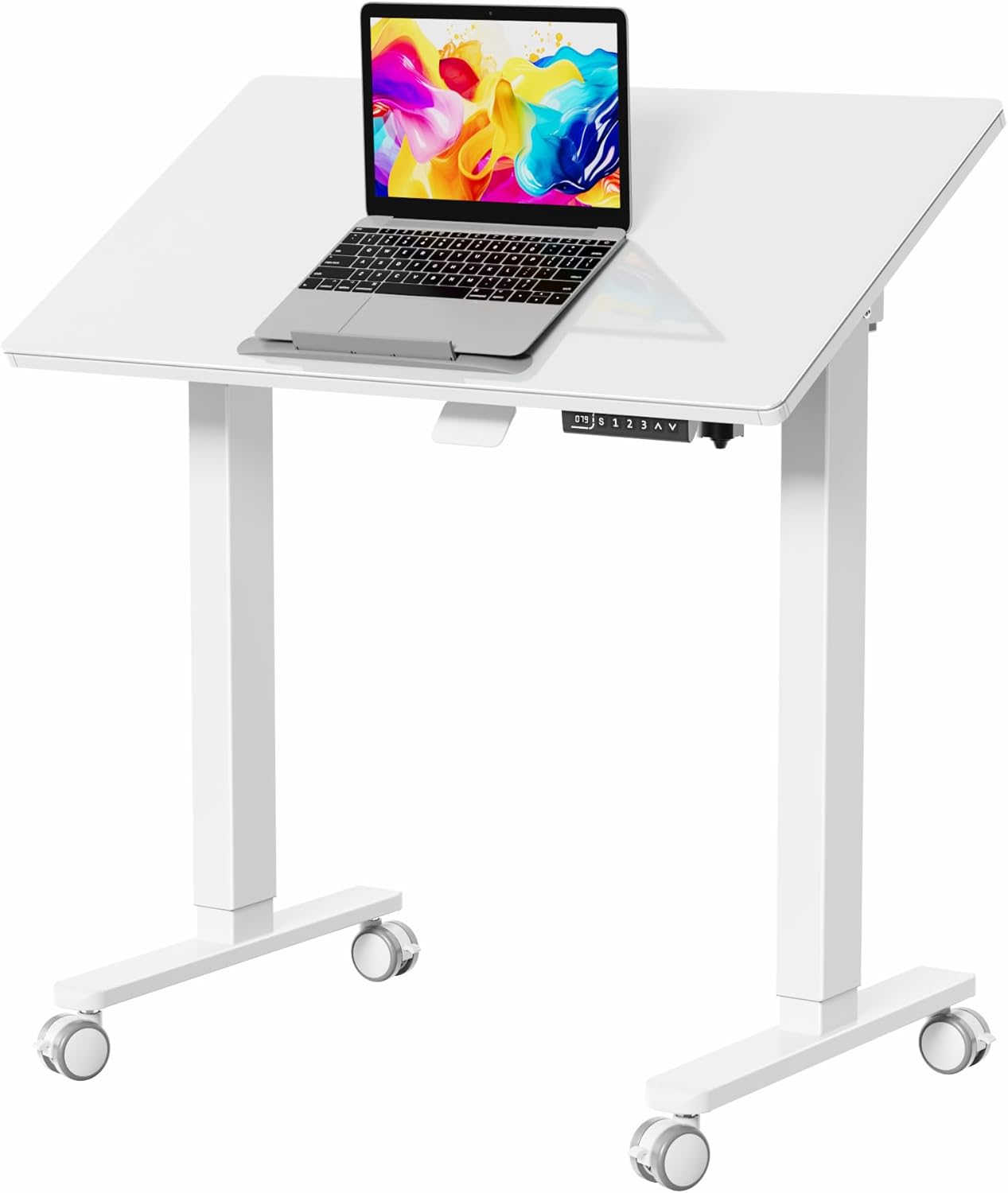
Liftsync’s 34.6 x 19.7 inch one-piece tempered glass top tilts freely from 0 to 90 degrees. Height adjusts from 28.3 to 46.5 inches with three memory buttons at 20 mm/s and under 55 dB, according to the listing. Lockable casters can replace the foot pads.
Glass is easy to wipe and looks clean in a modern studio. It can also be written on with dry-erase markers for notes and thumbnails.
Best suited for: Modern studios with a single tablet or pen display.
Key features:
- 34.6 x 19.7 in tempered glass top
- 0 to 90 degree tilt
- Electric, 28.3 to 46.5 in, 3 presets
- Optional casters
Pros:
- Full tilt range
- Easy to clean
- Memory presets
Cons and limitations:
- Glass can be cold and slippery for wrists
- Smaller surface
Buying consideration: Add a matte desk mat under your wrist area if the glass feels slippery.
6. Stand Up Desk Store Adjustable Drafting Table — Best for a manual, motor-free option

If you prefer no motors, this drafting table adjusts height with tools in 2-inch increments from about 26.5 to 38.5 inches, with 11 angle settings from flat to 45 degrees. It measures about 39.5 x 26 inches, has a full-length pencil tray, oversized rubber feet, a 50 lb capacity and BIFMA certification for safety and durability, according to the listing.
Tool adjustment means you set it and leave it, so it suits artists who mostly sit or mostly stand rather than switching often.
Best suited for: Artists who want a sturdy, simple drafting surface at a fixed height.
Key features:
- About 39.5 x 26 in
- Manual height 26.5 to 38.5 in, 2 in steps
- 11 angles, 0 to 45 degrees
- BIFMA certified, 50 lb capacity
Pros:
- No motor to fail
- Certified build
- Pencil tray
Cons and limitations:
- Max height may be low for tall users standing
- Tool adjustment is not quick
Buying consideration: Measure your standing elbow height to confirm the range suits you.
7. Liftsync 28 in Glass Standing Desk, Pneumatic — Best for a small mobile tablet desk

This compact Liftsync desk uses a gas spring for one-hand height adjustment from 29.5 to 44 inches, with no power needed. The tempered white glass top tilts 0 to 90 degrees and has a 2-tier shelf with a 4.4-pound limit. Hidden casters and a slim base let it roll next to a couch or bed.
It suits iPad or small tablet painting in a living room rather than a full desktop setup.
Best suited for: iPad and small tablet artists in small spaces.
Key features:
- Pneumatic lift, 29.5 to 44 in
- 0 to 90 degree glass top
- 2-tier shelf, 4.4 lb max
- Mobile, slim base
Pros:
- No electricity needed
- Very portable
- Space-saving
Cons and limitations:
- Small surface
- Not for heavy pen displays
Buying consideration: Keep heavy items off the upper shelf to respect its weight limit.
Drafting Table or Standard Standing Desk?
A standard flat standing desk is fine if you paint on a screen tablet propped on a stand, or use a small pen tablet beside a keyboard. A drafting-style standing desk with a tilting top is better when your drawing surface is the main event, such as a 16 inch or larger pen display, or when you also sketch on paper. Tilt brings the surface toward your eyes instead of making you lean over it.
Ergonomic Setup for Digital Painting
Set height by your elbows
Whether sitting or standing, your forearms should rest roughly level or slightly downward with shoulders relaxed. Measure your elbow height in both positions and save them as presets if your desk allows.
Tilt the drawing surface
A tilted tablet or pen display reduces neck flexion. Many artists find somewhere between about 15 and 45 degrees comfortable, depending on screen size and whether they sit or stand.
Raise your reference screen
If you use a separate monitor, its top edge should be around eye level to avoid looking down.
Alternate, do not just stand
Standing all day is not the goal. Switching positions regularly is what helps. Many artists sketch standing and render sitting.
Use an anti-fatigue mat
A cushioned mat makes standing sessions much more comfortable.
Pair it with the right chair
Standing desks reach higher than standard office desks, so a drafting chair with a foot ring lets you sit at a raised height, perched rather than fully standing. This in-between posture is popular with artists who find full standing tiring.
Manage cables
Leave slack in tablet and power cables so they do not pull when the desk moves or tilts.
A good desk is the foundation; next, try our tutorials on painting digital waves and ocean and digital night scenes.
Buying Guide: How to Choose a Standing Desk for Digital Painting
Tilt range and lock
Look for at least 0 to 40 degrees of tilt and a secure lock. A stop bar keeps tablets from sliding.
Height range for your body
Check that the lowest and highest settings match your seated and standing elbow heights.
Surface size
Measure your tablet or pen display and add room for a keyboard, references and a drink.
Electric, pneumatic or manual
Electric desks with presets make switching easy. Pneumatic desks are portable. Manual desks are simple and sturdy.
Stability
Pen displays need a steady surface. Wider bases and solid frames reduce wobble at standing height.
Noise and speed
If you share a space or stream, motor noise matters. Several listings quote noise figures around 55 dB or below. Faster lift speeds make switching positions feel effortless, which encourages you to actually do it.
Storage and extras
Drawers, side tables and shelves keep pens and remotes close.
Common Mistakes to Avoid
- Buying a flat desk for pen display work. Tilt makes a big difference to neck strain.
- Standing for hours without breaks. Alternate positions.
- Ignoring weight limits. Pen displays and monitor arms add up.
- Wrong height. Too high raises shoulders; too low hunches you over.
- Short cables. They tug or disconnect when the desk moves.
- Tilting without a stop bar. Tablets can slide.
FAQs
Are standing desks good for digital art?
Yes, especially models with tilting tops. Switching between sitting and standing reduces stiffness, and tilt improves neck posture.
What angle should my drawing tablet be at?
Many artists like between about 15 and 45 degrees. Experiment to find the angle that keeps your neck neutral.
Do I need an electric standing desk?
Not necessarily. Electric desks with presets make switching easy, but manual and pneumatic desks work if you change positions less often.
Can a drafting table hold a pen display?
Many can. Check weight capacity, tilt lock strength and whether there is a stop bar.
How long should I stand while painting?
Alternate regularly. Short standing sessions mixed with sitting are generally more comfortable than standing all day.
What size desk do I need for digital painting?
Allow space for your tablet or display plus a keyboard and references. Larger pen displays benefit from deeper desks.
Final Recommendation
For most digital painters, the TIQLAB electric drafting desk is the best all-round choice, with a large surface and a dual work zone. FLEXISPOT suits smaller rooms, and JOY worker’s downward-tilting split top is ideal for pen displays. Gibbon Mounts offers the best value with storage.
The Liftsync 35 inch glass desk is a sleek electric option, the Stand Up Desk Store table is the sturdy manual pick, and the Liftsync 28 inch pneumatic desk is perfect for iPad painting in small spaces.



One Comment