PaintingProGuide is reader-supported. When you buy through links on this page we may earn an affiliate commission at no extra cost to you.
Digital painters spend hours locked in one posture, often leaning over a pen display or craning toward a monitor. A regular flat office desk works, but it pushes you into hunching. The best desks for digital painting give you a surface that tilts toward you, enough depth for a display and keyboard, storage for cables and accessories, and ideally power right where you need it.
We compared seven tilting desks and drafting tables from the October 2026 listings, from a compact folding desk on wheels to a 55-inch workstation with built-in outlets. Each suits a different room and setup, and the buying guide explains how to match a desk to the way you paint.
Quick answer: For most digital painters with a pen display or computer setup, the Verano Garden 55.1 inch Drafting Table is the best desk here, with a 0–80° tilting section, a flat side, storage and built-in AC, USB and Type-C outlets. If you need height adjustment for sitting and standing, the Yaheetech Tilting Drafting Table adjusts up to 43.7 inches. For small rooms, the GreenForest Folding Desk with Wheels folds to 3.8 inches thick.
Our Top Picks at a Glance
- Verano Garden 55.1 in Drafting Table — Best overall desk for a digital studio
- Tribesigns Drafting Table with Storage — Best split-surface desk with high load capacity
- Yaheetech Tilting Drafting Table with Stool — Best for height adjustment
- BBBuy Drafting Table with Stool — Best for one-hand tilt and an extended surface
- JupiterForce Glass Drafting Table — Best tall range with a glass top and wheels
- MoNiBloom 41.5 in Glass Drafting Table — Best for light-pad tracing and mobile setups
- GreenForest Small Folding Desk with Wheels — Best for small spaces
| Product | Best For | Key Spec | Key Strength | Price Tier |
|---|---|---|---|---|
| Verano Garden 55.1 in | Full digital studio | 55.1 x 23.6 in, 0–80° tilt | 2 AC, USB and Type-C outlets | $$$ |
| Tribesigns Drafting Table | Split tilt and flat surfaces | 47.2 in wide, 0–80° tilt | Up to 250 lb load listed | $$$ |
| Yaheetech Tilting Table | Sit-to-stand heights | 29.7–43.7 in height, 0–40° tilt | Stool and side countertop | $$$ |
| BBBuy Drafting Table | Quick tilt changes | One-hand tilt to 45° | Extended flat surface, stool | $$$ |
| JupiterForce Glass Table | Tall working heights | 31.5–49.5 in, 0–60° tilt | Glass top, casters | $$$ |
| MoNiBloom 41.5 in Glass | Tracing and mobility | 0–65° tilt, tempered glass | Casters or rubber feet | Varies |
| GreenForest Folding Desk | Small rooms | 0–90° gas-strut tilt | Folds to 3.8 in, wheels | $$$ |
How We Chose
We did not assemble or paint at these desks. Our picks are based on Amazon listing details and specifications checked in October 2026, on how well each desk’s surface, tilt range, height and storage suit a digital painting setup, and on how widely each product is reviewed by Amazon buyers.
- Tilt range and mechanism: how far and how easily the surface angles.
- Surface size: room for a pen display or tablet plus keyboard.
- Flat area: whether part of the desk stays flat for a monitor, laptop or mouse.
- Height adjustment: sitting, perching or standing.
- Load and stability: listed capacities and frame materials.
- Practical extras: outlets, cable management, storage and casters.
Why Digital Painters Need a Different Desk
Traditional drafting tables were built for paper. Digital painters have different needs. Electronics are heavier and more fragile than a sheet of paper. Cables need routing so they do not drag a pen display off a tilted surface. You may want one part of the desk tilted for drawing and another flat for a monitor, keyboard or laptop. And your eye line matters: for a pen display, the screen should tilt up toward your face, while for a screenless tablet the monitor should sit at eye level with the tablet flat or slightly angled in front of you.
The safest approach is a desk that offers both a tilting zone and a flat zone, plenty of depth and a lip or ledge to stop devices sliding.
Best Desks for Digital Painting Reviewed
1. Verano Garden 55.1 in Drafting Table — Best Overall

This desk combines a tilting drawing board with a full computer desk. The 55.1 x 23.6 inch surface includes an adjustable section that tilts from 0 to 80 degrees across 12 positions, while the rest stays flat. Underneath are open shelving, a drawer and a base cabinet with an adjustable shelf that can be removed to house a computer tower.
The feature that sets it apart for digital work is the built-in charging station: two AC outlets, one USB port and one Type-C port on a 4.9-foot cord, plus cable management. That keeps pen display, tablet and phone chargers off the floor. The listing describes engineered wood with a sturdy structure for heavy computers or drawing tablets.
Best suited for: painters with a pen display and a computer who want everything in one workstation.
Key features
- 55.1 x 23.6 in surface
- Tilting section 0–80°, 12 angles
- 2 AC, 1 USB, 1 Type-C outlets
- Drawer, shelves and cabinet for a tower
Pros
- Tilting and flat zones on one desk
- Power where you need it
- Lots of storage
Cons
- No height adjustment listed
- Large footprint
Buying consideration: At steep angles, secure your pen display on its own stand or with a non-slip mat. Tilting surfaces are designed for paper first.
2. Tribesigns Drafting Table with Storage — Best Split Surface with High Capacity
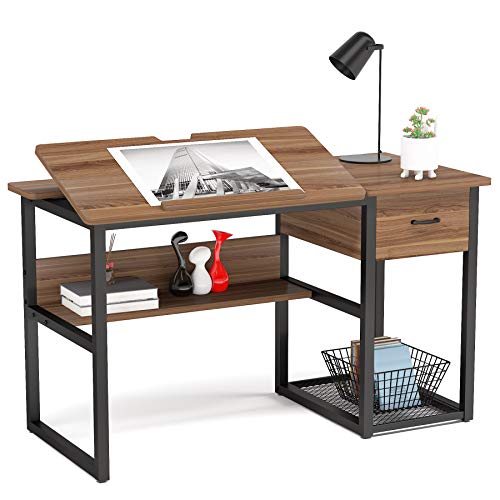
Tribesigns offers a similar split-surface concept in a smaller footprint: 47.2 x 23.6 inches overall, with one section tilting from 0 to 80 degrees across 12 angles while the other stays flat for books or supplies. It has an open storage shelf, a drawer and a bottom shelf. The listing cites 0.6-inch-thick particleboard on a sturdy metal frame with a maximum desktop load of up to 250 lb, and includes 18 months of quality assurance.
Best suited for: painters who want a split desk in a medium-size room.
Key features
- 47.2 in wide, split tilt and flat
- 0–80° tilt, 12 angles
- Up to 250 lb load listed
- Drawer and shelves
Pros
- High listed load capacity
- Flat zone for monitor or keyboard
Cons
- No built-in power
- No height adjustment listed
Buying consideration: Put your monitor on the flat side and your tablet or display on the tilting side for a natural screenless-tablet setup.
3. Yaheetech Tilting Drafting Table with Stool — Best for Height Adjustment

Yaheetech’s table adds the feature many drafting desks lack: height adjustment. The overall height ranges from 29.7 to 43.7 inches, locking in 10 positions, which lets you work seated or perched higher on a stool. The 35.4 x 23.6 inch tabletop tilts to 40 degrees, a removable pencil ledge holds pens, and a 15.7 x 14.2 inch side countertop holds a lamp or laptop. Three fabric drawers and a long shelf add storage, and six levelers keep it steady on uneven floors.
A PU leather stool is included. The materials are powder-coated steel and PVC-coated MDF.
Best suited for: painters who want to vary their posture or need a taller working height.
Key features
- Height 29.7–43.7 in, 10 positions
- Tilt 0–40°
- Side countertop, 3 drawers, shelf
- Stool included
Pros
- Height adjustment for posture changes
- Separate flat countertop
- Levelers for uneven floors
Cons
- Smaller main surface
- Lower maximum tilt than some rivals
Buying consideration: A 40-degree maximum is plenty for pen displays, which rarely need steeper angles.
4. BBBuy Drafting Table with Stool — Best for One-Hand Tilt

The BBBuy table is built from MDF with PVC on a powder-coated steel frame. Its large work surface uses a one-hand tilt to adjust up to 45 degrees, and a 23.6 x 15 inch extended flat surface gives you a separate area. There is a 23.6-inch slide-up pencil ledge, a sheet stopper on the lip, non-woven drawers, non-slip feet and a matching stool. Overall dimensions are listed as 24.5 x 55 x 35.8 inches.
Best suited for: painters who change angle frequently and want a stool included.
Key features
- One-hand tilt to 45°
- Extended flat surface
- Slide-up pencil ledge
- Stool and drawers
Pros
- Quick angle changes
- Ledge helps stop devices sliding
Cons
- Non-woven drawers are less durable than wood
- No built-in power
Buying consideration: Raise the pencil ledge before tilting with a tablet on the surface.
5. JupiterForce Glass Drafting Table — Best Tall Height Range

JupiterForce’s table has a toughened glass top that tilts from 0 to 60 degrees and an unusually wide height range of 31.5 to 49.5 inches, approaching standing height. The 41.25 x 24 inch surface sits on a powder-coated steel frame with four 360-degree casters, two lockable. Two sliding drawers and four removable supply trays hold tools.
Glass is easy to wipe clean and suits light-pad tracing, but a glass top with electronics needs care: use a non-slip mat under devices.
Best suited for: painters who want to work standing or need a tall desk.
Key features
- Height 31.5–49.5 in
- Tilt 0–60°
- Toughened glass top
- Casters, 2 lockable
Pros
- Near standing height
- Easy to move and clean
Cons
- Glass can be slippery for devices
- No separate flat zone
Buying consideration: Lock the casters before drawing to prevent the desk rolling as you lean on it.
6. MoNiBloom 41.5 in Glass Drafting Table — Best for Tracing and Mobility

MoNiBloom’s desk has a 41.5-inch tempered glass top with rounded corners that tilts from 0 to 65 degrees, with a pencil ledge to hold paper and tools. Four removable trays with honeycomb pen holes sit on both sides, plus two fabric drawers. It ships with four casters, two lockable, and four rubber feet if you prefer a stationary setup. The listing mentions tracing comic pages over a light pad, which is useful if you ink traditionally before coloring digitally.
Best suited for: hybrid traditional and digital artists who trace or use light pads.
Key features
- 41.5 in tempered glass top
- Tilt 0–65°
- Casters or rubber feet
- Trays and drawers
Pros
- Choice of wheels or fixed feet
- Good for light-pad work
Cons
- No height range listed
- Price not shown at the time of checking
Buying consideration: Use the rubber feet on wood floors if you want maximum stability while painting.
7. GreenForest Small Folding Desk with Wheels — Best for Small Spaces

For apartments and dorms, GreenForest’s folding desk is the space-saver. Its 31.5-inch tabletop tilts smoothly from 0 to 90 degrees on a gas strut, with an anti-slip guardrail to stop items sliding and a side area for a mouse, bottle or pens. Four lockable casters let you move it between rooms, and it folds flat to 3.8 inches thick to slide under a bed or into a closet.
The listing is honest that it is a light-duty workstation and that minor wobble may occur with heavy loads, so it suits tablets and laptops better than large pen displays.
Best suited for: iPad and laptop painters in small rooms.
Key features
- 0–90° gas-strut tilt
- Anti-slip guardrail
- Folds to 3.8 in thick
- Lockable casters
Pros
- Saves space
- Smooth tilt adjustment
Cons
- Light duty; not for heavy displays
- Smaller surface
Buying consideration: Keep heavy items centered and the angle moderate to avoid wobble.
Buying Guide: How to Choose Desks for Digital Painting
Tilt range and how you will use it
Pen displays usually sit best between 15 and 45 degrees. Screenless tablets often work flat or slightly angled. Very steep tilts are for traditional drafting and reading.
Surface depth and width
Measure your display or tablet plus keyboard. A 16-inch pen display with a keyboard needs roughly 24 inches of depth to sit comfortably.
Flat zone
Split desks with a flat section let you keep a monitor, laptop or mouse level while the drawing area tilts.
Height adjustment
Adjustable height lets you change posture through the day. Look at the listed range and compare it with your seated and standing elbow heights.
Stability and load
Electronics are heavier than paper. Check listed load capacities and frame materials, and prefer steel frames for heavier setups.
Cable and power management
Built-in outlets, like those on the Verano Garden, and cable routing keep cords from tugging devices on a tilted surface.
Surface material
Glass tops are easy to clean and good for light pads but slippery for devices. Wood or laminate grips better. A non-slip mat solves most problems.
Ergonomic Setup for Digital Painters
- Keep elbows near 90 degrees with shoulders relaxed.
- Tilt pen displays so you look at them without bending your neck sharply.
- Place monitors at or slightly below eye level for screenless tablets.
- Use a chair with good lumbar support, or a stool at the right height for drafting desks.
- Take short breaks every 30 to 60 minutes to stretch.
- Light the room evenly so your screen is not the brightest thing in view; glare and contrast fatigue your eyes faster than the painting itself.
With your workspace set, try a long-form piece such as our digital night scene tutorial, which rewards comfortable, extended sessions.
Common Mistakes to Avoid
- Tilting a heavy display without securing it. Use a stand, ledge or non-slip mat.
- Buying a desk too shallow for a display and keyboard. Measure first.
- Ignoring cable slack. Short cables pull devices on a tilted surface.
- Leaving casters unlocked. The desk can drift while you draw.
- Choosing glass tops without grip. Add a mat under electronics.
- Skipping chair height. The best desk cannot fix the wrong chair.
FAQs
Do I need a drafting table for digital art?
Not strictly, but a tilting surface makes pen displays and tablets more comfortable and reduces neck strain on long sessions.
What is the best desk angle for a pen display?
Most painters work between about 15 and 45 degrees. Start low and increase until your neck feels relaxed.
Can a drafting table hold a computer monitor?
Yes, on its flat section. Split desks like the Verano Garden and Tribesigns keep one area flat for a monitor or laptop.
Is a glass-top drafting table good for digital painting?
It works, and it is great for light-pad tracing, but glass is slippery. Use a non-slip mat under tablets and displays.
What desk is best for a small room?
The GreenForest folding desk folds to 3.8 inches thick and rolls on lockable casters, making it easy to store.
Should a digital painting desk be height adjustable?
It helps. Being able to change posture, as with the Yaheetech or JupiterForce, reduces fatigue over long sessions.
Final Recommendation
For a complete digital studio, the Verano Garden 55.1 inch drafting table stands out with its split tilting and flat surface, storage and built-in power. The Tribesigns desk offers a similar split design in less space with a high listed load capacity. If posture changes matter most, choose the height-adjustable Yaheetech or the tall-ranging JupiterForce. Hybrid artists who trace will like the MoNiBloom glass desk, and anyone short on space should look at the GreenForest folding desk.