

PaintingProGuide is reader-supported. When you buy through links on this page we may earn an affiliate commission at no extra cost to you.
“Digital ink” means two things to digital painters. The first is the ink brushes inside your software: pressure-sensitive pens, G-pens, wet-ink and dry-ink brushes that imitate dip pens, markers and brush pens. The second is real ink used in a hybrid workflow: you ink or paint washes and textures on paper, scan them, and finish digitally. The best digital inks for digital painting therefore start with a clean, stabilized inking brush in your app, and for hybrid artists, a set of fluid, lightfast physical inks whose marks and textures scan well.
Quick answer: In software, start with your app’s default inking pen plus line stabilization; Clip Studio Paint’s G-pen and Procreate’s Studio Pen are popular starting points. For hybrid work, Liquitex Professional Acrylic Ink is our top physical pick: ultra-fluid, permanent and made with lightfast pigments, ideal for washes and line work you will scan. For a budget color range, Nicpro’s 12-color acrylic ink set includes dropper bottles, and Daler-Rowney FW white handles highlights and corrections before scanning.
Below we explain how to choose and set up digital ink brushes, then review seven physical inks and tools for hybrid painters who scan ink work into their digital pieces.
Our Top Picks at a Glance
- Liquitex Professional Acrylic Ink, Essential Set of 6 — Best overall ink for hybrid digital work
- Nicpro 12 Colors Acrylic Ink with Droppers — Best budget color range for scanned washes
- Daler-Rowney FW Acrylic Ink, White — Best for highlights and corrections
- Dr. Ph. Martin’s Hydrus Liquid Watercolor, Set 1 — Best for watercolor-style textures to scan
- Limino Alcohol Ink Set, 12 Colors — Best for abstract texture overlays
- CYFUN Ink Air Blower, 2 Pack — Best tool for moving ink into organic textures
- Xosjska Long Drawing Sleeve, 2 Pcs — Best for keeping hands clean between paper and screen
| Product | Best For | Key Spec | Key Strength | Price Tier |
|---|---|---|---|---|
| Liquitex Acrylic Ink | Line work and washes | 6 x 30 ml, ultra-fluid | Lightfast, permanent | $$$ |
| Nicpro Acrylic Ink | Color washes | 12 x 30 ml with droppers | Quick-drying, water-resistant | $$ |
| Daler-Rowney FW White | Highlights | 29.5 ml acrylic ink | Works in dip and technical pens | $ |
| Dr. Ph. Martin’s Hydrus | Watercolor textures | 12 x 0.5 oz with palette | Lightfast, transparent | $$$ |
| Limino Alcohol Ink | Abstract textures | 12 x 0.35 oz | Highly concentrated | $ |
| CYFUN Air Blower | Moving ink | 2 rubber bulb blowers | No power needed | $ |
| Xosjska Sleeve | Clean hands | 2 long two-finger sleeves | Anti-smudge | $ |
How We Chose
For the software side, we describe widely used inking tools and settings. For physical inks, our picks rely on Amazon listing details and specifications checked in October 2026, how well each product suits creating line work and textures to scan into digital paintings, and how widely each product is reviewed by Amazon buyers. We have not scanned work made with these products, and one sleeve listing had limited detail, so we keep claims general where listings were thin.
- Flow and opacity for clean lines and even washes.
- Lightfastness and permanence so originals last and layers do not lift.
- Scan-friendliness: strong, consistent color that reads well when digitized.
- Texture potential for overlays and backgrounds.
- Practicality: droppers, bottle sizes and clean handling.
Digital Ink Brushes: Choosing and Setting Them Up
Pick a few core inking brushes
Most programs include a hard, pressure-sensitive pen (often called a G-pen, studio pen or technical pen), a softer brush pen for tapered strokes, and a marker for flat fills. Start with those and learn them deeply before downloading packs.
Turn on stabilization
Line stabilization or smoothing reduces hand wobble. Clip Studio Paint is known for its stabilization controls; Procreate offers StreamLine; Photoshop has a smoothing setting; Krita has several stabilizer modes. Moderate settings feel natural; very high settings add lag.
Tune pressure curves
Adjust your tablet’s pressure curve and the brush’s size and opacity response so light pressure gives thin lines and firm pressure gives bold lines. A well-tuned curve matters more than the brush itself.
Ink on separate layers
Keep line art on its own layer above flats and color. Vector layers, where available, let you resize and edit lines without quality loss.
Use wet-ink brushes for painterly work
Many programs include ink-wash or wet-ink brushes that pool and bleed. They are great for sumi-e style washes and loose illustration.
Inking Techniques That Look Professional
Line weight variation. Thicker lines on the shadow side and at overlaps, thinner lines in light and on distant forms. Pressure-sensitive brushes make this natural.
Tapered ends. Lines that start and finish thin look confident. Many apps offer start and end taper settings.
Confident strokes. Draw long lines in one motion, from the elbow or shoulder, and undo rather than patching. Rotating the canvas so strokes go in your natural direction helps.
Spot blacks. Filling selected shadow areas with solid black adds graphic punch, especially in comics.
Colored line art. Once inks are done, lock the line layer’s transparency and paint over lines with darker versions of the local colors. It softens the outline and integrates line work into the painting.
Why Use Physical Ink in a Digital Workflow?
Real ink produces textures that are hard to fake: the bloom of a wet wash, the dry-brush break of a loaded brush, the spatter of a flicked pen. Many illustrators ink by hand and color digitally, or paint ink textures on paper and use them as overlays. Others simply prefer the feel of a dip pen for line art. Scanned ink gives digital work an organic quality, and the original becomes a sellable piece in its own right.
Best Physical Inks and Tools for Hybrid Digital Painting Reviewed
1. Liquitex Professional Acrylic Ink, Essential Set of 6 — Best for hybrid digital work

Liquitex describes its Professional Acrylic Ink as ultra-fluid, permanent acrylic made with lightfast, high-quality pigments, intermixable with other Liquitex acrylics and mediums. The listing highlights watercolor effects, color blocking and underpainting. Each bottle holds 30 ml.
Permanent ink is useful in hybrid work because you can layer washes or ink over dry lines without lifting them, giving clean scans of complex layered pieces.
Best suited for: Illustrators who ink or paint washes on paper and finish digitally.
Key features:
- 6 colors, 30 ml each
- Ultra-fluid acrylic ink
- Lightfast, permanent
- Intermixable with Liquitex acrylics
Pros:
- Professional quality
- Permanent when dry
- Fluid for washes and pens
Cons and limitations:
- Higher price tier
- Only six colors
Buying consideration: Scan at a high resolution and keep original files untouched in a separate folder.
2. Nicpro 12 Colors Acrylic Ink with Droppers — Best for a budget color range

Nicpro’s set includes 12 high-pigment colors in 1 oz (30 ml) bottles with built-in dropper pipettes. The listing describes quick-drying, permanent, lightfast and water-resistant ink with ultra-fine pigments for smooth application in fine detail and wash effects.
Twelve colors at a moderate price let you experiment with colored washes and textures to scan.
Best suited for: Artists experimenting with colored ink textures.
Key features:
- 12 colors, 30 ml each
- Dropper bottles
- Quick-drying, water-resistant
- Lightfast per listing
Pros:
- Good range
- Clean dropper application
- Affordable
Cons and limitations:
- Fewer professional mixing options
- Lightfastness not independently rated in listing
Buying consideration: Make a swatch sheet and scan it so you know how each color digitizes.
3. Daler-Rowney FW Acrylic Ink, White — Best for highlights and corrections

Daler-Rowney FW acrylic ink is made from premium pigments and described as water-based, permanent, highly lightfast and intermixable. The listing says it works as airbrush ink, in a technical pen or dip pen, for miniatures, or diluted as a watercolor ink. FW comes in 45 colors; this is white in 29.5 ml.
White ink is handy for fixing mistakes and adding highlights on paper before scanning, so the original stays clean.
Best suited for: Inkers who want to correct and highlight on paper.
Key features:
- 29.5 ml, white
- Acrylic, permanent
- Dip pen, technical pen and airbrush use
- Highly lightfast per listing
Pros:
- Versatile
- Opaque corrections
- Part of a 45-color line
Cons and limitations:
- Single color
- Shake well; pigment settles
Buying consideration: Apply with a fine brush or dip pen over fully dry black ink.
4. Dr. Ph. Martin’s Hydrus Liquid Watercolor, Set 1 — Best for watercolor-style textures

Hydrus is a fine-art liquid watercolor described as brilliant, lightfast and transparent, with the same brilliance and permanence as traditional tubes. Set 1 includes 12 colors in 0.5 oz bottles with droppers and a mixing palette.
Liquid watercolor produces blooms, granulation and soft gradients that scan beautifully as background textures or overlays for digital paintings.
Best suited for: Artists building watercolor texture libraries.
Key features:
- 12 colors, 0.5 oz each
- Droppers and mixing palette
- Lightfast, transparent
Pros:
- Beautiful washes
- Concentrated color
- Fine-art quality
Cons and limitations:
- Highest price tier
- Transparent; not for opaque line work
Buying consideration: Paint textures on watercolor paper and scan them in grayscale for flexible use as overlays.
5. Limino Alcohol Ink Set, 12 Colors — Best for abstract texture overlays

Limino’s 12 alcohol inks in 0.35 oz bottles are highly pigmented for diffusion, layering and sinking effects. The listing focuses on resin art, petri dishes and coasters, but alcohol ink on non-porous paper such as synthetic sheets creates flowing, cellular patterns.
Scanned, those patterns make striking abstract backgrounds, galaxy effects and texture overlays in digital work.
Best suited for: Artists who want unique abstract textures.
Key features:
- 12 colors, 0.35 oz
- Highly concentrated
- Diffusion and layering effects
Pros:
- Distinctive textures
- A little goes far
- Low price tier
Cons and limitations:
- Needs non-porous paper
- Strong odor; ventilate
Buying consideration: Work on synthetic paper and scan once fully dry.
6. CYFUN Ink Air Blower, 2 Pack — Best for moving ink into textures

These rubber squeeze-bulb air blowers need no electricity, batteries or refills. The listing says you can blow steadily or fast for varying results, and that they are useful for manipulating alcohol ink and creating designs.
Blowing ink across paper creates organic, branching shapes: trees, smoke, coral and abstract flows that are hard to paint directly.
Best suited for: Artists making alcohol ink and ink-blown textures.
Key features:
- 2 hand blowers
- Rubber squeeze bulb
- No power needed
Pros:
- Simple and reliable
- Fine air control
- Very low cost
Cons and limitations:
- Single purpose
- Effort for large areas
Buying consideration: Combine with alcohol ink or thinned acrylic ink for branching textures.
7. Xosjska Long Drawing Sleeve, 2 Pcs — Best for clean hands between paper and screen
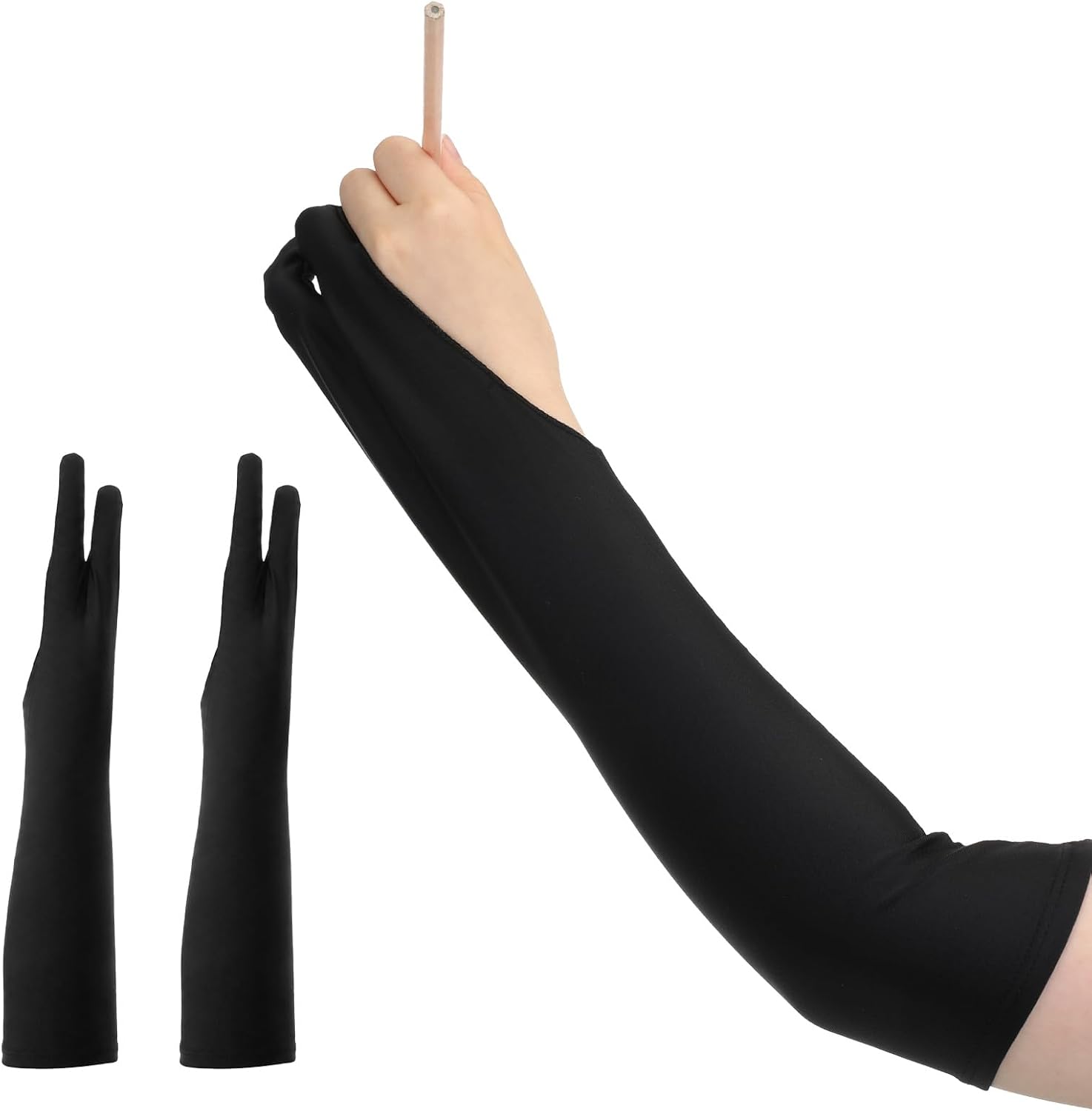
This Xosjska listing offers two long, two-finger anti-smudge drawing sleeves. Detail on the listing was limited when we checked, so we can only say they are designed to keep the hand and forearm from smudging work.
In hybrid workflows, a sleeve keeps ink off your hand and skin oils off your tablet when you switch between paper and screen.
Best suited for: Hybrid artists moving between paper and tablet.
Key features:
- 2 sleeves
- Long, two-finger design
- Anti-smudge
Pros:
- Covers more of the arm
- Low cost
- Works on paper and screens
Cons and limitations:
- Limited listing detail
- Fit not specified
Buying consideration: Wash sleeves after ink sessions so pigment does not transfer to your tablet.
Scanning Ink Work for Digital Painting
- Let ink dry completely. Wet ink smears and can damage the scanner glass.
- Scan at high resolution. Higher resolutions preserve line quality and texture.
- Scan in color, even for black ink. It captures subtle tones you can remove later.
- Clean up. Use levels or curves to push paper to white and ink to black.
- Separate line art. Set the layer to Multiply, or convert white to transparency, so color goes underneath.
- Save textures in a library. Name and organize scanned washes and blots for reuse.
Ink textures and digital ink brushes both help with atmosphere and water effects; put them to use in our tutorials on painting digital waves and ocean and digital night scenes. No pen tablet yet? Start with digital painting without a tablet, where scanned ink work is especially useful.
Buying Guide: How to Choose Inks for Digital Painting
Decide: digital brushes, physical ink or both
If you only paint on screen, focus on brush settings and stabilization. Hybrid artists benefit from a small set of physical inks.
Permanent vs re-wettable
Permanent acrylic inks let you layer without lifting; liquid watercolors re-wet for soft blending.
Lightfastness
Important if you plan to sell or keep the originals.
Black and white first
A good black and an opaque white cover most line work and corrections.
Texture tools
Alcohol ink, blowers, sponges and salt create textures you can scan once and use forever.
Paper matters too
Smooth bristol board gives crisp ink lines that scan cleanly; watercolor paper holds washes without buckling; synthetic paper is needed for alcohol ink flow. Match the paper to the ink effect you want to capture.
Clean workflow
Sleeves, gloves and a separate inking area keep ink off your tablet.
Common Mistakes to Avoid
- Downloading hundreds of ink brushes. Master a few.
- Stabilization set too high. It causes lag and unnatural curves.
- Scanning wet ink. Wait until fully dry.
- Low-resolution scans. They limit print size and texture detail.
- Inking directly on the color layer. Keep lines separate.
- Using alcohol ink without ventilation. Work in a well-aired space.
FAQs
What are digital inks in digital painting?
Usually the inking brushes in your software, such as G-pens and brush pens, used for line art. Some artists also use physical inks, scanned into a digital workflow.
What is the best brush for digital inking?
A hard, pressure-sensitive pen brush with line stabilization is the usual starting point, such as Clip Studio’s G-pen or Procreate’s Studio Pen.
Should I ink traditionally or digitally?
Digital inking is faster to edit; traditional inking gives organic texture and an original artwork. Many artists combine them.
How do I scan ink drawings for coloring?
Scan at high resolution, clean up with levels, set the line layer to Multiply and color on layers beneath.
What ink scans best?
Strong, opaque black inks give the cleanest line scans. Lightfast colored inks and liquid watercolors are good for textures.
Can I use alcohol ink textures in digital art?
Yes. Scan finished alcohol ink pieces and use them as backgrounds or texture overlays.
Final Recommendation
On screen, the best “digital ink” is a simple, well-tuned pressure pen with moderate stabilization on a dedicated line layer. For hybrid work, Liquitex Professional Acrylic Ink is our top physical pick, Nicpro’s 12-color set is the budget choice, and Daler-Rowney FW White handles highlights and corrections.
For texture libraries, Dr. Ph. Martin’s Hydrus gives beautiful watercolor washes, Limino alcohol inks plus the CYFUN air blowers create abstract overlays, and a Xosjska sleeve keeps hands clean as you move between paper and screen.


One Comment