PaintingProGuide is reader-supported. When you buy through links on this page we may earn an affiliate commission at no extra cost to you.
The best color palettes for digital painting are small, deliberate and built around value. A palette of five to nine colors, with a clear dominant hue, one accent and a full range from light to dark, will produce a more convincing painting than a swatch panel holding every color in the picker. Digital tools give you sixteen million colors; good palettes are about choosing which few to use.
This guide covers the palette types that work best on screen, how to build and save them in apps like Procreate, Photoshop, Krita and Clip Studio Paint, and the reference decks, books and tools that make palette building faster.
Quick answer: Start with a limited palette: one dominant hue family, one complementary accent and a neutral range, checked in grayscale for value contrast. For ready-made combinations with hex codes you can type straight into your app, Color Palettes for Artists by Sienna Colorstone and Curated Color Palettes for Artists are the quickest shortcuts. For building your own, the Infodeck 200 Color Cards list RGB, CMYK and HEX codes on every card.
What Makes a Color Palette Work in Digital Painting
A digital palette fails for the same reasons a traditional one does: too many saturated colors, no value structure, and no dominant temperature. A few principles fix most problems.
Value first, hue second
Convert your palette to grayscale before you paint. If two colors you plan to use for light and shadow look the same in gray, the painting will look flat no matter how good the hues are. Most apps let you add a black-and-white adjustment layer or a saturation-zero layer on top to check this in real time.
One dominant hue family
Pick a family that covers most of the canvas, such as warm oranges for a sunset or cool blue-greens for an underwater scene. Let the other colors play supporting roles. Equal amounts of competing hues read as chaotic.
A small accent
A complementary or high-saturation accent, used sparingly, draws the eye to the focal point. A touch of orange against a blue scene, or a cool highlight in a warm portrait, does more than a canvas full of saturated color.
Desaturated neutrals do the heavy lifting
Grayed-down versions of your main hues fill backgrounds, shadows and transitions. Saturated colors look more intense when surrounded by neutrals.
Palette Types That Suit Digital Painting
- Limited palette: three to five hues plus white and black equivalents. Great for studies and speed paintings.
- Analogous: neighboring hues, such as yellow, orange and red. Harmonious and calm; add value contrast to keep it lively.
- Complementary: opposites, such as blue and orange. High energy; let one dominate and use the other as an accent.
- Split complementary: one base hue plus the two colors beside its complement. Contrast with less tension than a straight complement.
- Triadic: three evenly spaced hues. Vibrant, but easy to overdo; desaturate two of the three.
- Monochrome: a single hue in many values. The best training palette for learning value control.
- Zorn-style: a warm yellow ochre, red, white and black. A classic oil limited palette that translates well to portrait studies on screen.
How to Build and Save a Palette in Your App
- Choose a source: a photo, a palette book, a color card deck or a scene you observed.
- Pick five to nine swatches: dominant hue in light, mid and dark; neutrals; one accent.
- Enter hex codes or sample: type codes into the color picker or eyedropper a reference image.
- Save as a named palette: Procreate, Photoshop, Krita and Clip Studio Paint all support custom swatch sets.
- Check in grayscale: add a black-and-white adjustment layer to confirm value spread.
- Paint a small test: a quick thumbnail shows whether the colors work together before you commit to a full piece.
Blending is where palettes either hold together or turn muddy. Our guide to blending colors in digital paintings explains how brush settings, opacity and color picking from the canvas affect the transitions between your palette colors.
Supplies That Help: Our Top Picks at a Glance
- Color Palettes for Artists (Sienna Colorstone) — Best ready-made combinations with hex codes
- Curated Color Palettes for Artists (EM SANS) — Best for brushstroke-style palette inspiration
- Infodeck 200 Essential Color Cards — Best physical deck with RGB, CMYK and HEX codes
- Essential Color Card Deck (Joen Wolfrom) — Best for learning tints, tones and shades
- The Oil Painter’s Color Handbook (Todd M. Casey) — Best for color theory and harmony that transfers to digital
- COLOR MUSE Colorimeter — Best for capturing real-world colors as HEX and RGB values
| Product | Best For | Key Spec | Key Strength | Price Tier |
|---|---|---|---|---|
| Color Palettes for Artists (Colorstone) | Instant palettes | 64 combinations with hex codes | Codes ready for any app | $$ |
| Curated Color Palettes (EM SANS) | Inspiration | Brushstroke-inspired combinations | Painterly presentation | $$ |
| Infodeck 200 Color Cards | Building custom palettes | 200 cards, 7 tints/shades each, RGB/CMYK/HEX | Codes on every card | $$ |
| Essential Color Card Deck (Wolfrom) | Learning value and tone | 200 cards: hues, tints, tones, shades | Teaches color variations | $$ |
| Oil Painter’s Color Handbook (Casey) | Color theory | Hardcover; mixing, pigments, palettes, harmony | Depth on harmony | $$$ |
| COLOR MUSE Colorimeter | Sampling real colors | Scans surfaces; app shows HEX, RGB, LAB and more | Physical-to-digital capture | $$$ |
How We Chose
We have not used these decks, books or tools. The selection is based on the Amazon listing details and specifications checked in October 2026, how well each product helps a digital painter choose, record or understand palettes, and how widely each product is reviewed by Amazon buyers. Several items are books whose listings give only the title, author and format; we describe those by their stated scope only.
- Digital-ready information: HEX, RGB or similar codes you can enter directly into an app.
- Teaching value: whether the product helps you understand harmony, value or tone, not just copy colors.
- Breadth: how many combinations or swatches are included.
- Practicality: how easily it fits into a painting session.
Best Color Palettes for Digital Painting: Tools and References Reviewed
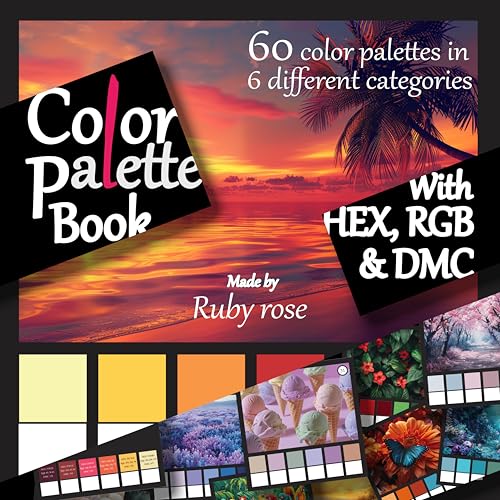
1. Color Palettes for Artists by Sienna Colorstone — Best for ready-made combinations with hex codes

According to its title, this paperback contains 64 color combinations with hex codes, aimed at artists, graphic designers, interior designers and coloring enthusiasts. Hex codes are the key detail for digital painters: you can type them directly into the color picker of Procreate, Photoshop, Krita or Clip Studio Paint and save them as a swatch set.
Use a combination as a starting point, then adjust the values so you have a clear light, mid and dark for the main hue.
Best suited for: Digital painters who want fast, proven palettes to start studies or break out of color habits.
Key features:
- Paperback
- 64 color combinations
- Hex codes included
- Multi-discipline audience
Pros:
- Codes go straight into any app
- Quick inspiration
- Mid price tier
Cons and limitations:
- Pre-made combinations still need value adjustment for painting
- Not a color theory course
Buying consideration: Pick a combination, paint a small monochrome value study first, then apply the palette on a Color or Overlay layer to see how it behaves.
2. Curated Color Palettes for Artists by EM SANS — Best for painterly palette inspiration

This paperback presents ready-to-use, brushstroke-inspired color combinations for artists, creatives, graphic designers and interior designers, according to its title. The brushstroke presentation shows how colors sit next to each other in a painterly context, which is closer to how they will look in a painting than flat squares.
For digital painters who use textured brushes, that kind of presentation is a helpful preview of how a palette reads when strokes overlap.
Best suited for: Painters who look for mood and inspiration before building a palette.
Key features:
- Paperback
- Brushstroke-inspired combinations
- Ready-to-use palettes
Pros:
- Painterly presentation
- Good for mood boards
- Mid price tier
Cons and limitations:
- Listing does not confirm whether codes are included
- Inspiration rather than instruction
Buying consideration: Check the preview pages on Amazon to see whether codes are printed. If not, you can eyedropper a photo of the page into your app.
3. Infodeck Color Cards Deck, 200 Essential Color Cube Cards — Best for building custom palettes

Infodeck’s deck includes 200 color cards. The front of each card shows a solid swatch with a number, and the back includes seven tints and shades with RGB, CMYK and HEX codes, according to the listing. The cards have a laminated glossy finish to resist wear and spills.
Physical cards are useful because you can lay several side by side and see how they interact, then enter the codes into your app. The tint and shade strips on the back give you a ready-made value range for each hue.
Best suited for: Painters who like to assemble palettes by hand and want precise codes.
Key features:
- 200 cards
- Seven tints and shades per card
- RGB, CMYK and HEX codes
- Laminated glossy finish
Pros:
- Codes for every swatch
- Built-in value range per hue
- Durable cards
- Mid price tier
Cons and limitations:
- Printed colors can shift slightly from screen colors
- A deck takes desk space
Buying consideration: Trust the codes over the printed swatch. Ink on paper and pixels on a screen never match exactly; the hex value is what your app will use.
4. Essential Color Card Deck by Joen Wolfrom — Best for learning tints, tones and shades

This deck’s title promises 200 cards to mix, match and plan, including hues, tints, tones, shades and values, with the aim of helping you break out of the standard color wheel. Those four variations, adding white, gray or black to a hue, are exactly how digital painters build depth within a palette.
It is a learning tool as much as a reference, ideal for understanding why a muted tone often looks better in a shadow than a pure dark.
Best suited for: Painters who want to understand color variation rather than copy ready-made combinations.
Key features:
- 200 cards
- Hues, tints, tones, shades and values
- Card deck format
Pros:
- Teaches the vocabulary of color variation
- Useful for both traditional and digital work
- Mid price tier
Cons and limitations:
- Listing does not confirm digital codes
- Designed originally for broader color planning, including quilting and design
Buying consideration: Use it to practice: pick a hue card, then recreate its tint, tone and shade in your app by adjusting saturation and brightness.
5. The Oil Painter’s Color Handbook by Todd M. Casey — Best for color theory and harmony

The title describes a contemporary guide to color mixing, pigments, palettes and harmony. Although written for oil painters, harmony and palette planning are the same on screen. Digital artists who struggle with muddy or oversaturated work often benefit from learning how traditional painters restrict and organize color.
It is a hardcover and sits in the highest price tier here.
Best suited for: Digital painters who want a deeper foundation in palettes and harmony from a traditional perspective.
Key features:
- Hardcover
- Covers color mixing, pigments, palettes and harmony
Pros:
- Depth on harmony and palette planning
- Principles transfer to any medium
Cons and limitations:
- Pigment and mixing sections are oil-specific
- Highest price tier here
Buying consideration: Focus on the palette and harmony sections and translate pigment names into their nearest digital hue.
6. COLOR MUSE Colorimeter, Mobile Color Matching Tool — Best for capturing real-world colors as digital values

COLOR MUSE is a handheld colorimeter that scans a flat surface and, through its free app, shows matching paint colors plus the scan’s HEX, CMYK, RGB, LAB, LCH, LRV, HSB and HSV values, according to the listing. It pairs with the app wirelessly.
It is built mainly for matching house paint, and its product library lists home paint brands. For digital painters, the interesting part is the HEX and RGB readout: scan a fabric, leaf or wall you love and drop that value into your palette.
Best suited for: Artists who want to pull colors from physical objects into digital palettes.
Key features:
- Scans flat surfaces
- App shows HEX, RGB, CMYK, LAB, LCH, HSB, HSV
- Wireless pairing
- Anodized aluminum body
Pros:
- Captures real-world colors precisely
- Outputs digital color values
- Portable
Cons and limitations:
- Designed primarily for house paint matching
- Highest price tier for a single-purpose tool
- Flat surfaces only
Buying consideration: A phone camera and eyedropper can approximate this for free. The colorimeter is worthwhile mainly if accurate physical color capture matters to your work.
Buying Guide: How to Choose Palette Resources for Digital Painting
Look for digital codes
HEX or RGB values let you reproduce a color exactly in any app. Printed swatches alone require eyedropping from a photo, which introduces lighting and camera shifts.
Decide between inspiration and instruction
Palette books give quick combinations. Theory books and card decks that explain tints, tones and shades teach you to build your own. Most artists benefit from one of each.
Check the value range
A palette for painting needs light, mid and dark versions of the main hue. Resources that show tint and shade steps, like the Infodeck cards, save you building those yourself.
Account for screen versus print
Printed colors depend on ink and paper; screens depend on calibration. If you sell prints, calibrate your monitor and soft-proof before printing.
Match the resource to your workflow
If you plan at your desk, a book or deck works well. If you gather color from the world around you, a colorimeter or phone photos are better.
Ready to try a palette on a real subject? Our tutorial on painting digital night scenes is a great test of a cool, limited palette with a single warm accent, and painting digital waves and ocean shows how analogous blues and greens hold together.
Common Mistakes to Avoid
- Using fully saturated colors everywhere: saturated accents need neutral surroundings to stand out.
- Skipping the grayscale check: a beautiful palette can still have no value contrast.
- Picking colors from the full spectrum each stroke: work from a saved palette and sample from the canvas instead.
- Using pure black for shadows: shadows usually look better as darker, cooler or warmer versions of the local color.
- Ignoring monitor calibration: an uncalibrated screen can make a balanced palette look wrong on other devices.
- Treating ready-made palettes as final: adjust values and saturation to fit your subject and lighting.
FAQs
How many colors should a digital painting palette have?
Five to nine is a practical range: a dominant hue in light, mid and dark values, a few neutrals and one accent. Limited palettes are easier to control.
How do I make a custom palette in Procreate?
Open the Colors panel, go to Palettes, create a new palette, then tap empty slots to add the current color. You can enter hex codes in the Value tab before adding each swatch.
What is the best color palette for beginners?
A monochrome or very limited palette, such as a single hue with white and dark values, teaches value control before hue choices complicate things.
Why do my digital paintings look muddy?
Often it is low value contrast, too many desaturated colors mixed together, or blending complementary colors without control. Check values in grayscale and review your blending approach.
Are palette books useful for digital artists?
Yes, especially those with hex codes like Color Palettes for Artists. They provide tested combinations you can enter directly into your app and adjust.
Do printed color cards match screen colors?
Not exactly. Printing and screens reproduce color differently. Use the printed HEX or RGB code, not the printed swatch, as the reference for your app.
Final Recommendation
The best palette for digital painting is a limited, value-checked set built around one dominant hue and one accent. To get there faster, Color Palettes for Artists by Sienna Colorstone offers combinations with hex codes you can enter immediately, and Curated Color Palettes for Artists adds painterly inspiration.
If you prefer to build your own, the Infodeck 200 Color Cards provide codes and value steps for each hue, while the Essential Color Card Deck and The Oil Painter’s Color Handbook teach the theory behind good palettes. The COLOR MUSE Colorimeter is a specialized extra for artists who want to capture colors from physical objects with precise digital values.