PaintingProGuide is reader-supported. When you buy through links on this page we may earn an affiliate commission at no extra cost to you.
A lighting setup for digital painting is less about one great lamp and more about where the light comes from. The screen is already a bright light source in front of you, so the room needs gentle, even light that does not reflect off the display, keeps your eyes comfortable and stays consistent from morning to night. If you film your process or stream, the setup also has to light you and your hands without glare on the tablet. The best digital painting lighting setups use two soft, adjustable lights placed to the sides and slightly behind the screen line, with dimming and color temperature control.
Quick answer: For the softest room and camera light, the Skytex two-softbox kit is our top pick, with 2700 to 6400K bulbs, remote dimming and stands up to 79 inches. For a compact two-light panel setup, the NEEWER Basics BP66 two-pack offers bi-color 3200K and 5600K panels on adjustable stands. On a tight budget, a single NiceVeedi USB studio light can serve as a bounce or bias light.
Below we compare seven lights for building three practical setups: a comfortable everyday painting room, a streaming or tutorial setup, and an overhead filming rig. Then we cover placement, color temperature and glare control.
Our Top Picks at a Glance
- Skytex Softbox Lighting Kit, 2 Pack — Best overall for soft, even studio light
- NEEWER Basics BP66 LED Panel Kit, 2 Pack — Best compact two-light panel setup
- Torjim 16 x 16 in Softbox Kit, 85W — Best single softbox for small rooms
- UBeesize 2-Pack 12 in LED Video Light Kit — Best bright panels with phone holders
- Torjim 12 in Video Light Kit, 2 Pack — Best kit for tutorial recording
- Anautin 2-Pack LED Video Lighting Kit — Best wide color temperature range
- NiceVeedi USB Studio Light with Tripod — Best budget single light
| Product | Best For | Key Spec | Key Strength | Price Tier |
|---|---|---|---|---|
| Skytex 2 Softboxes | Room and camera | 2 x 20 x 28 in, 85W, 2700 to 6400K | Very soft, remote dimming | $$$ |
| NEEWER BP66 x2 | Compact desk setup | 10W panels, 3200K and 5600K, stands 19.7 to 53.2 in | Bi-color, 10 levels | $$$ |
| Torjim Softbox | Small rooms | 16 x 16 in, 85W, 3000 to 7500K | 210 degree rotating head | $$$ |
| UBeesize x2 | Bright panels | 12 in, 26W, 3000 lumens, 3000 to 6500K | Tripod to 72 in, phone holder | $$$ |
| Torjim 12 in x2 | Tutorial recording | 30W, 3000 to 6500K, 9 levels | Phone holders, remote | $$$ |
| Anautin x2 | Color range | 15W, 2500 to 8500K, 1700 lux | Built-in diffuser, compact | $$$ |
| NiceVeedi Single | Budget fill | 15W, 2800 to 6500K, USB | Tripod to 73 in, carry bag | $$ |
How We Chose
We selected these lights from Amazon listing details and specifications checked in October 2026, based on how well each fits a digital painting room or recording setup (softness, dimming, color temperature range and positioning) and how widely each product is reviewed by Amazon buyers. We have not set up these lights ourselves, so we report listed specifications; none of these listings state a CRI figure, so if you also need color-accurate light for physical artwork, look for a high-CRI art lamp.
- Softness: diffusers and softboxes for even light.
- Dimming to balance room light with screen brightness.
- Color temperature range reaching around 6500K.
- Stands and heads that position light away from the screen.
- Power: mains or USB, depending on your desk.
Best Digital Painting Lighting Setups: Lights Reviewed
1. Skytex Softbox Lighting Kit, 2 Pack — Best for soft, even studio light

Softboxes turn a bulb into a large, diffused source, which is exactly what a painting room needs. Skytex includes two 20 x 28 inch softboxes, two 85W LED bulbs adjustable from 2700K to 6400K and 1 to 100 percent brightness by remote, and two aluminum stands adjustable from 26 to 79 inches.
Placed either side of your desk, slightly behind the screen line, they light the room and your hands evenly without hot spots on the display.
Best suited for: Dedicated studios, streaming setups and evening painting.
Key features:
- 2 softboxes, 20 x 28 in
- 85W LED bulbs, 2700 to 6400K
- Remote dimming 1 to 100 percent
- Stands 26 to 79 in
Pros:
- Softest light here
- Adjustable color temperature
- Doubles as camera lighting
Cons and limitations:
- Large footprint
- More setup than panels
Buying consideration: Set both lights to the same color temperature as your monitor.
2. NEEWER Basics BP66 LED Panel Kit, 2 Pack — Best for a compact two-light setup

NEEWER’s Basics line focuses on essential functions. The BP66 kit includes two 10W panels with 66 LEDs, up to 750 lux at 0.5 m with the filter attached, and switchable 3200K and 5600K color via filters. Ten brightness levels can be stepped or adjusted continuously, panels tilt 180 degrees, and stands adjust from 19.7 to 53.2 inches.
Small panels fit on a desk either side of a monitor, making them ideal for a tidy two-light setup.
Best suited for: Desk-based setups with limited floor space.
Key features:
- 2 x 10W panels
- 3200K and 5600K
- 10 brightness levels
- Stands 19.7 to 53.2 in, 180 degree tilt
Pros:
- Compact
- Two lights for balanced setups
- USB powered
Cons and limitations:
- Lower output than large panels
- Two fixed color temperatures
Buying consideration: Use the 5600K setting for a daylight feel close to typical monitor white.
3. Torjim 16 x 16 in Softbox Kit, 85W — Best for a single softbox for small rooms

Torjim’s softbox kit uses PET fabric with a foldable nylon cover for soft, even, reflective light, and an 85W bulb with a 3000 to 7500K range. The tripod has independent locking knobs, and a 210-degree rotating head lets you aim the light precisely.
One softbox bounced off a wall or ceiling can light a small room evenly for painting.
Best suited for: Small rooms and single-light setups.
Key features:
- 16 x 16 in softbox
- 85W bulb, 3000 to 7500K
- 210 degree rotating head
- Aluminum tripod with locking knobs
Pros:
- Soft light from one unit
- Wide color range
- Flexible aiming
Cons and limitations:
- Single light
- Bulb type details vary in listing
Buying consideration: Point it at a white wall behind your monitor for gentle bias lighting.
4. UBeesize 2-Pack 12 in LED Video Light Kit — Best for bright panels with phone holders

UBeesize’s 12-inch panels each have 420 LEDs and deliver up to 3000 lumens at 26W, per the listing, with 3000 to 6500K color temperature and nine brightness levels. Panels tilt 180 degrees on aluminum tripods that extend to 72 inches, and phone holders are included.
They are bright enough to light a room or a filming setup and can be dimmed for comfortable painting.
Best suited for: Filming process videos and lighting larger rooms.
Key features:
- 2 x 12 in panels, 420 LEDs
- 26W, up to 3000 lumens
- 3000 to 6500K, 9 levels
- Tripods to 72 in, phone holders
Pros:
- Bright output
- Phone holders for filming
- Tall stands
Cons and limitations:
- May be too bright without diffusion
- Bulky stands
Buying consideration: Aim them at a wall or ceiling to soften the light.
5. Torjim 12 in Video Light Kit, 2 Pack — Best for tutorial recording

Torjim’s creator kit includes two 12-inch LED lights at 30W, two tripod stands, two phone holders, a remote and storage. The listing gives 3000K to 6500K color temperature and nine brightness levels.
With phone holders on the stands, you can film a top-down view of your tablet while lighting it.
Best suited for: Artists recording tutorials and time-lapses.
Key features:
- 2 x 12 in LED, 30W
- 3000 to 6500K, 9 levels
- Tripods, phone holders, remote
- Storage included
Pros:
- Complete filming kit
- Remote control
- Good brightness
Cons and limitations:
- Panels can glare on glossy tablets if aimed directly
- Stands take space
Buying consideration: Position lights at about 45 degrees to the tablet to avoid reflections.
6. Anautin 2-Pack LED Video Lighting Kit — Best for a wide color temperature range
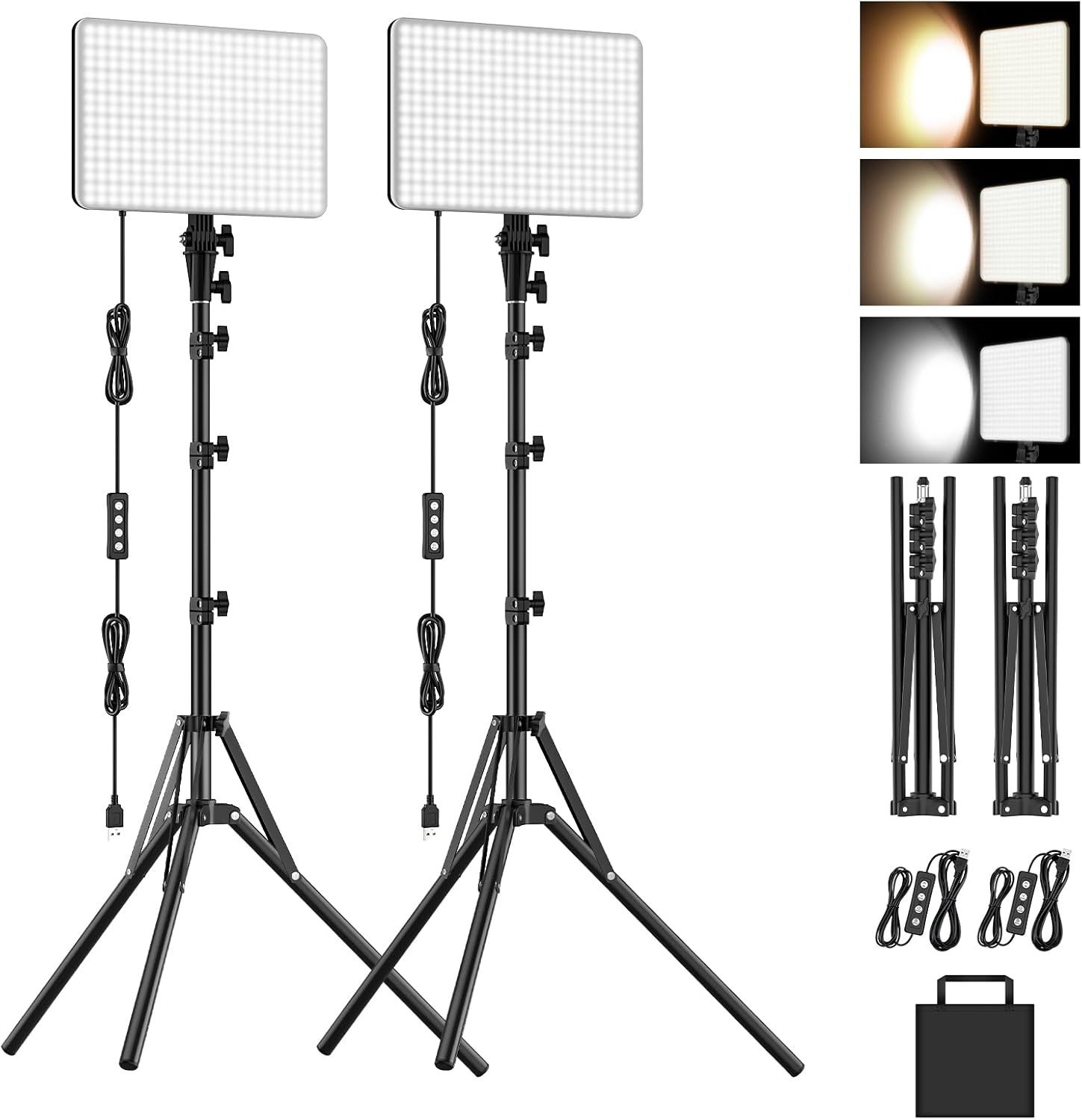
Anautin’s kit offers two 15W panels with 352 LEDs each, up to 1700 lux, and a wide 2500 to 8500K range. The compact 6.85 x 10 inch panels have built-in diffusers, foldable tripods and a heat-dissipation design for long sessions, per the listing.
The wide range lets you match warm room light in the evening or cooler light to your monitor.
Best suited for: Artists who want fine control over color temperature.
Key features:
- 2 x 15W panels
- 2500 to 8500K
- Up to 1700 lux
- Built-in diffusers, foldable tripods
Pros:
- Widest color range here
- Compact panels
- Diffusers included
Cons and limitations:
- Lower output than larger panels
- Smaller light source
Buying consideration: Match the panels to your monitor’s white point for color work.
7. NiceVeedi USB Studio Light with Tripod — Best for a budget single light

NiceVeedi’s single 15W panel has 356 LEDs with an adjustable 2800 to 6500K range. It is USB powered, so it runs from a laptop, power bank or adapter, and a USB-to-USB-C adapter is included. The 10 x 8 inch panel tilts 180 degrees on a tripod up to 73 inches, and everything packs into a carry bag.
As a bounce light behind your monitor, or a fill light for filming, it is an inexpensive starting point.
Best suited for: Budget setups and portable lighting.
Key features:
- 15W, 356 LEDs
- 2800 to 6500K
- USB powered with USB-C adapter
- Tripod to 73 in, carry bag
Pros:
- Low cost
- USB power
- Portable
Cons and limitations:
- Single light
- Modest output
Buying consideration: Use it as bias lighting by aiming it at the wall behind your screen.
Three Lighting Setups for Digital Painters
Setup 1: The comfortable everyday painting room
Place two soft lights, softboxes or diffused panels, either side of your desk and slightly behind the line of the screen, aimed at the wall or ceiling rather than at you. Set both to the same color temperature, ideally near your monitor’s white point, and dim until the room is roughly as bright as the screen. Add a small bias light behind the monitor if the wall is dark. This keeps glare off the display and reduces the contrast between screen and room.
Setup 2: Streaming and face-cam tutorials
Use a key light at about 45 degrees in front of you, a softer fill light on the other side, and keep both above eye level and angled down. Keep lights out of the reflection path of your pen display. If you show your hands or tablet on camera, a third light or a bounce off the ceiling helps evenly light the desk. Avoid colored RGB light on your workspace; reserve it for the background.
Setup 3: Overhead tablet filming
For top-down shots of a tablet or sketchbook, mount the camera above and place two lights at roughly 45 degrees either side, angled so their reflections fall outside the camera’s view. Diffusion is essential to avoid hot spots on glossy screens. Turn the tablet brightness up slightly so it balances with the lit desk.
Lighting knowledge also feeds your painting. Practice light and atmosphere with our tutorials on digital night scenes and painting digital waves and ocean, or see digital painting without a tablet.
Controlling Daylight
Daylight is beautiful but unpredictable. It shifts from cool in the morning to warm in the late afternoon, and a sunny window can wash out a screen. Position your desk so windows are to the side rather than directly behind or in front of the monitor. Light-filtering or blackout curtains let you shut out direct sun during color-critical work and rely on your consistent artificial setup instead. Many artists keep daylight for sketching and switch to controlled light for final color passes.
A Quick Placement Checklist
- Lights to the sides, not behind you or directly in front of the screen.
- Light sources above eye level, angled down or bounced off walls.
- All lights at the same color temperature.
- Room brightness roughly balanced with screen brightness.
- No visible reflections when you look at the screen from your normal seat.
- No colored light falling on your desk or tablet.
Buying Guide: How to Choose Lighting for a Digital Painting Setup
Soft beats bright
Diffused, indirect light is more comfortable and reflects less on screens than bright, bare panels.
Look for adjustable color temperature
Being able to reach around 6500K helps match common monitor settings during color work.
Dimming matters
Balance room light to screen brightness rather than running lights at full power.
Two lights are better than one
Symmetrical lighting reduces shadows across your desk and face, and makes it easier to film without one side of the frame falling into darkness.
Check stand height and footprint
Tall stands help aim light down; desk-height stands save floor space.
Power and cable runs
USB-powered lights are convenient on a desk next to a computer, while mains-powered softboxes need outlets nearby. Plan cable routes so stands are not tethered across walkways.
Consider CRI for physical work
If you also paint traditionally, add a high-CRI art lamp; many video lights do not list CRI.
Common Mistakes to Avoid
- Lights behind you. They reflect in the screen.
- Bare, bright panels aimed at your eyes. Diffuse or bounce them.
- Mismatched color temperatures. Set all lights the same.
- Colored light on the desk. It distorts color judgment.
- Painting in the dark. High screen-to-room contrast tires the eyes.
- Ignoring daylight. Control windows for consistent color.
FAQs
What is the best lighting setup for digital art?
Two soft, dimmable lights placed to the sides and slightly behind the screen line, set to a color temperature near your monitor, plus optional bias lighting behind the display.
Should my lights match my monitor color temperature?
Many artists aim for around 6500K to match a typical sRGB monitor, which helps consistent color perception.
Are video lights good for a painting studio?
Yes, when diffused and dimmed. They are adjustable and affordable, though many do not list CRI.
How do I avoid glare on my tablet when filming?
Place lights at about 45 degrees and outside the reflection angle, and use diffusion.
Do I need softboxes?
Not necessarily. Diffused panels or bouncing light off a wall can achieve similar softness.
What is bias lighting?
A soft light behind the monitor that illuminates the wall, reducing contrast between a bright screen and a dark room.
Final Recommendation
For the softest, most comfortable studio light, the Skytex two-softbox kit is our top pick. The NEEWER BP66 kit is the compact two-light choice for desks, and the Torjim softbox works well as a single bounce light in small rooms.
For filming, UBeesize and the Torjim 12-inch kit add brightness and phone holders, Anautin offers the widest color temperature range, and NiceVeedi is the budget single light for bias or fill.