Are you ready to boost your creative process and save time on your digital art projects? Learning how to do thumbnail sketching digitally is the key to unlocking faster, clearer ideas without getting lost in details too soon.
Thumbnail sketches act like quick visual notes — small, simple, and packed with potential. They help you experiment with layouts, compositions, and concepts before diving into your final piece. You’ll discover easy steps and practical tips to master digital thumbnail sketching, so you can sharpen your ideas and create with confidence every time.
Let’s dive in and transform the way you plan your artwork!
Basics Of Thumbnail Sketching
Thumbnail sketching is a key step in digital art creation. It helps artists plan ideas quickly and clearly. These small sketches guide the final work. Understanding the basics improves your workflow and creativity.
This section covers the purpose of thumbnails, how they differ from detailed drawings, and common mistakes to avoid. These points make thumbnail sketching easier and more effective.
Purpose Of Thumbnails
Thumbnails serve as quick visual notes. They capture the main idea in a simple form. Artists use them to explore different compositions fast. This saves time before starting detailed work. Thumbnails keep the focus on the big picture.
Difference Between Thumbnails And Detailed Drawings
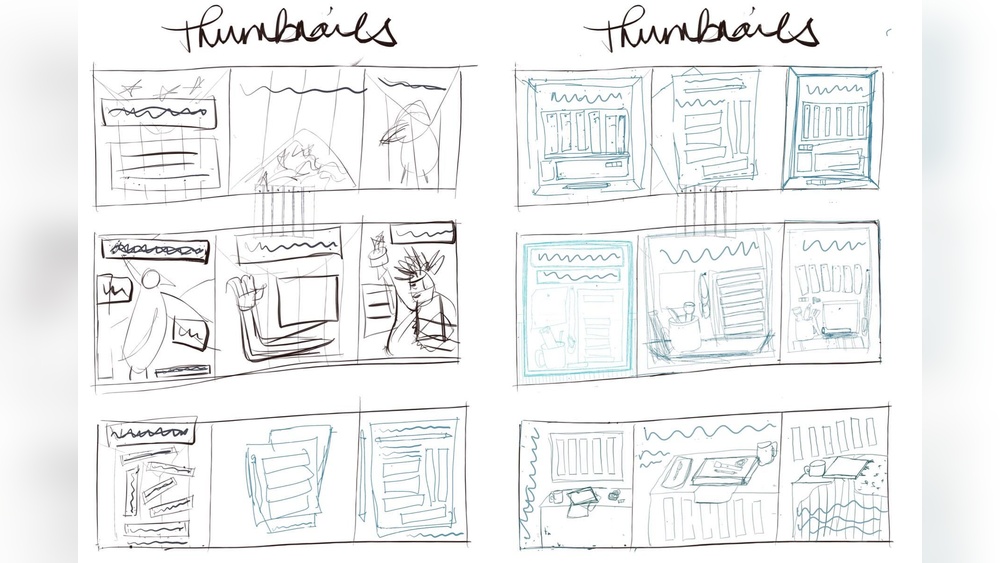
Thumbnails are small, loose, and rough sketches. They show shapes and layout, not fine details. Detailed drawings have clear lines and refined elements. Thumbnails help plan the scene; detailed drawings finalize it. Avoid spending too much time on thumbnails.
Common Mistakes To Avoid
Adding too much detail in thumbnails is a common error. It slows down the process and hides the main idea. Another mistake is making thumbnails too large. Keep them small and simple. Avoid sticking to one idea only; try many thumbnails for variety.

Credit: www.reddit.com
Tools For Digital Sketching
Choosing the right tools makes digital thumbnail sketching easier and more fun. The right setup helps you draw quickly and explore many ideas. This section covers popular apps, hardware, and workspace tips to improve your digital sketching experience.
Popular Apps And Software
Many apps offer simple tools for fast sketches. Procreate is a favorite for its ease and brush variety. Adobe Photoshop provides powerful features for detailed work. Clip Studio Paint is great for drawing and comic artists. Autodesk SketchBook offers a free and easy interface. These apps support layering, undo, and quick adjustments. They help you focus on your ideas, not technical issues.
Essential Hardware Choices
A good tablet or computer is key for smooth sketching. iPads with Apple Pencil are popular for their precision. Wacom tablets connect to your computer and offer natural drawing feel. A stylus with pressure sensitivity improves line control. A high-resolution screen shows details clearly. Choose hardware that feels comfortable for long sketching sessions.
Setting Up Your Digital Workspace
Organize your digital workspace to avoid distractions. Keep your app toolbars easy to access. Use shortcuts to speed up common actions. Arrange layers and brushes for quick switching. Adjust screen brightness and contrast for comfort. A tidy digital space helps keep your mind clear and creative.
Starting Your Digital Thumbnails
Starting digital thumbnails is an important step in your creative process. It helps you plan your artwork clearly and quickly. You can explore many ideas without worrying about details. This stage focuses on shapes, composition, and balance. Digital tools make this easier and faster than traditional sketching. Follow simple steps to get your thumbnails ready for further development.
Creating A Grid For Sketching
A grid helps keep your thumbnails organized and evenly spaced. It divides your canvas into small boxes for each sketch. Use your digital software’s grid feature or draw one manually. Choose a grid size that fits your project and screen. This structure guides your hand and speeds up sketching. It also keeps your ideas clear and easy to compare.
Choosing Brush Settings
Select a simple brush that mimics pencil or pen strokes. Use a small size for better control in tiny sketches. Lower the opacity slightly to keep lines soft and light. Avoid brushes with too much texture or detail. These settings let you draw quickly without distractions. Adjust as needed to match your style and device.
Working Small And Fast
Keep your sketches small to focus on the big picture. Do not spend time on details or perfect lines. Use quick, loose strokes to capture shapes and layout. This speed helps generate more ideas in less time. Remember, thumbnails are rough drafts, not finished art. Let your hand move freely and trust your instincts.

Credit: www.youtube.com
Techniques For Effective Sketching
Effective thumbnail sketching relies on clear techniques that save time and boost creativity. These methods help you focus on ideas without distractions. Keeping your sketches simple and flexible allows quick exploration of different concepts. Below are key techniques to enhance your digital thumbnail sketches.
Keeping Sketches Loose And Simple
Start with basic shapes and avoid detailed lines. Use rough strokes to capture the main idea fast. This approach helps maintain creativity and prevents getting stuck on small details. Loose sketches let you try many ideas quickly. It is better to draw many small sketches than one complex one.
Focusing On Composition And Layout
Think about where elements will appear in your sketch. Good composition guides the viewer’s eye and balances the design. Use simple boxes and shapes to block out spaces for key parts. Test different layouts to find the strongest visual flow. Composition is the backbone of every successful sketch.
Using Layers For Flexibility
Layers help organize your sketch elements separately. Place backgrounds, objects, and text on different layers. This setup allows easy changes without redrawing the whole sketch. You can hide, move, or adjust layers quickly. Layers keep your workflow clean and adaptable.
Iterating And Refining Ideas
Iterating and refining ideas is a crucial step in digital thumbnail sketching. It helps artists improve their concepts and find the best visual solutions. By revisiting and adjusting sketches, you can explore new directions and enhance your work. This process leads to stronger, clearer designs that communicate your message well.
Experimenting With Different Concepts
Try various ideas without fear of mistakes. Use different shapes, angles, and compositions to see what works best. Digital tools make it easy to create multiple versions quickly. This experimentation sparks creativity and helps you discover unique options. Do not settle on the first idea; explore many possibilities instead.
Knowing When To Simplify
Simplicity often improves clarity. Remove unnecessary details that distract from the main idea. Focus on the core elements that tell the story. Simplifying helps keep thumbnails clear and easy to understand. Step back and ask if each part adds value. If not, trim it down for a cleaner look.
Balancing Quantity And Quality
Create enough thumbnails to cover different ideas. Quantity fuels creativity and provides choice. At the same time, aim for quality in each sketch. Avoid rushing or making sloppy thumbnails. A balance between many ideas and thoughtful execution leads to the best results. Keep practicing to improve speed and skill.
Credit: theelearningcoach.com
Integrating Thumbnails Into Larger Projects
Integrating thumbnails into larger projects helps artists plan their work clearly. Thumbnails act as small sketches that guide the whole creative process. They offer a quick way to explore ideas without wasting time on details. Using thumbnails in bigger projects makes the workflow smoother and more organized.
Using Thumbnails As Visual Maps
Thumbnails serve as visual maps for your project’s layout. They show the placement of main elements and balance in the composition. Artists can see the flow and structure at a glance. This helps in adjusting the design early before creating detailed work. Visual maps reduce mistakes and improve overall coherence.
Transferring Ideas To Final Artwork
Thumbnails are the first step to final artwork creation. They capture the core idea simply and quickly. Artists can easily enlarge or redraw thumbnails on digital canvases. This makes transferring concepts faster and less stressful. The final piece stays true to the original vision shaped during thumbnailing.
Benefits For Planning And Problem Solving
Thumbnail sketching aids in planning project steps clearly. It reveals potential issues in composition or perspective early on. Artists solve problems before investing time in detailed work. Thumbnails encourage experimentation with different ideas safely. This process saves time and leads to better results.
Tips For Beginners
Starting digital thumbnail sketching can feel overwhelming. Simple tips make the process easier. Focus on building good habits early. These tips help beginners create effective thumbnails faster and with less stress.
Staying Consistent With Practice
Practice daily, even for a few minutes. Regular sketches improve your hand-eye coordination. Consistency builds confidence and speeds up your workflow. Set small goals, like five thumbnails per day. Over time, your skills will grow steadily.
Avoiding Over-detailing Early
Keep thumbnails simple and rough at first. Avoid adding details too soon. Details can distract from the main idea. Use basic shapes to capture the composition quickly. Focus on the big picture, not perfection. Save details for later stages.
Embracing Mistakes As Learning Tools
Mistakes are part of the learning process. Don’t erase or hide them right away. Study errors to understand what went wrong. Each mistake teaches you something new. Use them to improve your next sketch. Stay positive and keep experimenting.
Frequently Asked Questions
How To Create A Thumbnail Sketch?
Create a thumbnail sketch by drawing small, simple boxes on paper or digitally. Quickly sketch basic shapes and compositions. Focus on layout and ideas, not details. Use loose lines to explore multiple concepts. Keep sketches small and fast for effective visual planning.
What Are Common Mistakes In Thumbnail Sketches?
Common mistakes in thumbnail sketches include adding too much detail, losing the big picture, and making sketches too tight instead of loose.
How Do Artists Use Thumbnail Sketches?
Artists use thumbnail sketches to quickly explore ideas, test compositions, and plan larger artworks efficiently. They keep sketches small and simple to focus on the overall design. This process helps visualize concepts, solve problems, and refine creative direction before detailed work begins.
What Apps Do Most Digital Artists Use To Draw?
Most digital artists use Procreate, Adobe Photoshop, Clip Studio Paint, and Krita for drawing. These apps offer versatile brushes and tools.
Conclusion
Digital thumbnail sketching helps you plan your artwork fast and clear. Keep sketches small and simple to explore many ideas quickly. Use digital tools to edit and adjust your sketches easily. Practice often to improve your speed and creativity. Remember, thumbnails guide your bigger projects with strong visual plans.
Try different compositions and shapes without worrying about details. This way, your final work will be well thought out and balanced. Start sketching now and enjoy the creative process.