
PaintingProGuide is reader-supported. When you buy through links on this page we may earn an affiliate commission at no extra cost to you.
Video tutorials are free and endless, so why buy a digital painting book at all? Because a good one is edited. It puts the fundamentals in order, it does not skip the boring parts about value and edges, and it sits open next to your tablet without autoplaying something else. The best digital painting book for you depends on three things: which software you use, whether you need drawing basics first, and whether your real gap is the tool or the theory of color and light.
This guide covers six current digital painting books available on Amazon, grouped by who they serve: absolute beginners on an iPad, Procreate users who want structured walkthroughs, Photoshop painters heading toward concept art, landscape painters working from life, and anyone whose paintings look flat because the lighting is wrong. We note the publisher, format and intended level for each, and leave out claims we cannot verify from the listing.
Quick answer: If you are new to digital painting on an iPad, start with Beginner’s Guide to Digital Painting in Procreate (3dtotal Publishing). If you cannot draw yet, Drawing Digital by Lisa Bardot comes first. Photoshop users should pick Digital Painting in Photoshop: Industry Techniques for Beginners. And when your software skills are fine but your paintings look lifeless, Artists’ Master Series: Color and Light is the theory book that fixes it.
Our Top Picks at a Glance
- Beginner’s Guide to Digital Painting in Procreate (3dtotal) — Best first digital painting book for iPad users
- Drawing Digital by Lisa Bardot — Best for learning to draw and paint on an iPad from zero
- Digital Painting in Photoshop: Industry Techniques for Beginners (3DTotal) — Best for Photoshop and aspiring concept artists
- Artists’ Master Series: Color and Light (3dtotal) — Best for color and lighting theory
- Procreate for Digital Artists by Mellisa Aning — Best structured walkthroughs for intermediate Procreate users
- A Guide to Digital Painting in Procreate: Landscapes & Plein Air (3dtotal) — Best for landscape and outdoor painting
| Product | Best For | Key Spec | Key Strength | Price Tier |
|---|---|---|---|---|
| Beginner’s Guide to Digital Painting in Procreate | iPad beginners | Paperback; 3dtotal Publishing | Procreate-specific, beginner-focused | $$ |
| Drawing Digital | Learning to draw first | Paperback; Lisa Bardot | Covers drawing and painting on iPad | $ |
| Digital Painting in Photoshop: Industry Techniques for Beginners | Photoshop, concept art | Paperback; 3DTotal Publishing | Industry-oriented introduction | $$ |
| Artists’ Master Series: Color and Light | Theory for any software | Hardcover; 3dtotal Publishing | Dedicated to color and light | $$$ |
| Procreate for Digital Artists | Intermediate Procreate | Paperback; 50+ walkthroughs | Project-based practice | $$ |
| Digital Painting in Procreate: Landscapes & Plein Air | Landscape painters | Paperback; 3dtotal Publishing | Subject-specific focus | $$ |
How We Chose
These selections are based on the Amazon listing details available in October 2026 (title, author or editor, publisher and format), how clearly each book’s stated scope matches a specific reader, and how widely each title is reviewed by Amazon buyers. We have not read every page of these books and do not quote from them; where we describe contents, we stick to what the title and subtitle state. Descriptions of what a reader should look for in a digital painting book come from general knowledge of how the medium is taught.
We weighed:
- Software match — a Procreate book is close to useless for a Krita or Photoshop user, and vice versa.
- Stated level — “beginner” in the title means something; so does “master series”.
- Scope — whether the book covers a tool, a subject (landscapes), or a principle (color and light).
- Publisher track record — 3dtotal Publishing has a long catalog of digital art instruction books, which matters when you cannot flip through before buying.
- Format — a hardcover reference stays flat on a desk; a paperback travels with an iPad.
- Price tier — all six sit in the $ to $$$ range, so cost is a secondary factor.
Best Digital Painting Book Reviewed
1. Beginner’s Guide to Digital Painting in Procreate: How to Create Art on an iPad — Best for iPad users starting from scratch

3dtotal Publishing’s Beginner’s Guide series is where many digital artists start, and this volume targets the most popular tablet painting app. The subtitle says exactly what it is: how to create art on an iPad using Procreate. It is a paperback, which suits sitting beside the tablet.
For a reader who has just bought an iPad and a stylus and does not know where the layers panel is, a book organized around the app itself is the right shape. It gives you a sequence to follow rather than a pile of disconnected tips.
Best suited for: Complete beginners to Procreate who want a start-to-finish introduction to the app and to digital painting at the same time.
Key features:
- Paperback format
- Published by 3dtotal Publishing
- Procreate and iPad specific
- Aimed explicitly at beginners
Pros:
- Software-specific, so every screenshot matches what you see
- Beginner-first structure
- Mid price tier
- Publisher known for digital art instruction
Cons and limitations:
- Only useful if you use Procreate on iPad
- App updates can date interface screenshots over time
- Not a drawing fundamentals book
Buying consideration: Check which Procreate version the edition covers against the version on your iPad; the core painting concepts carry over, but menu locations can shift between major releases.
2. Drawing Digital by Lisa Bardot: The Complete Guide for Learning to Draw & Paint on Your iPad — Best for learning to draw and paint on an iPad from zero

Most digital painting books assume you can already draw. Lisa Bardot’s Drawing Digital does not, which is why it sits second on this list: its subtitle promises a complete guide to learning to draw and paint on an iPad. If your lines wobble and your proportions drift, no amount of brush knowledge will rescue a painting; this is the book that addresses the step before.
It is a paperback and the lowest price tier in the group, which makes it an easy companion purchase alongside a Procreate manual.
Best suited for: Absolute beginners who need drawing skills and iPad painting skills at the same time, and parents buying for teens.
Key features:
- Paperback format
- Author: Lisa Bardot
- Covers both drawing and painting on iPad
- Positioned as a complete beginner guide
Pros:
- Starts earlier in the learning curve than other titles here
- Lowest price tier on this list
- iPad-focused, so relevant to Procreate users
- Single-author voice tends to be consistent
Cons and limitations:
- Less useful for desktop Photoshop or Krita painters
- Readers who already draw well will find the early material slow
- Not aimed at professional concept-art workflows
Buying consideration: Buy this first if you are unsure whether your problem is the software or your drawing. If it is the drawing, this is the cheaper fix.
3. Digital Painting in Photoshop: Industry Techniques for Beginners — Best for Photoshop users and aspiring concept artists

Photoshop remains the standard in game and film concept art, and this 3DTotal title is built around that reality. The subtitle calls it a comprehensive introduction to techniques and approaches, with “industry techniques” signaling that the workflows described are the ones used in studios, not only hobby methods.
It is a paperback aimed at beginners, but beginners to digital painting in Photoshop specifically, so some familiarity with the software’s basic interface will help. For anyone with a Wacom or XP-Pen tablet plugged into a desktop, this is the most relevant book here.
Best suited for: Desktop painters using Photoshop, students aiming at concept art or illustration careers, and anyone moving from a tablet app to a full desktop workflow.
Key features:
- Paperback format
- Published by 3DTotal Publishing
- Photoshop-specific
- Beginner-level introduction to industry techniques
Pros:
- Matches the software used in most studios
- Industry framing gives context for why techniques matter
- Comprehensive scope stated in the subtitle
- Transferable to other layer-based desktop apps
Cons and limitations:
- Requires a Photoshop subscription to follow along exactly
- Not for iPad-only artists
- Higher price tier than the Procreate beginner guide
Buying consideration: If you use Krita, Clip Studio Paint or Affinity Photo instead, most of the painting principles will transfer, but expect to translate tool names and shortcuts as you read.
4. Artists’ Master Series: Color and Light — Best for color and lighting theory in any software

This is the one book on the list that is not about a program at all. Color and Light is part of 3dtotal’s Artists’ Master Series, a hardcover devoted to the two things that most often separate an amateur digital painting from a professional one. Software can be learned in a weekend; understanding how light falls on a form and how color shifts in shadow takes deliberate study.
Because it is theory rather than tutorial, it suits any software, including traditional media. It is the highest price tier here and the only hardcover, which is appropriate for a reference you will keep open on a desk for years.
Best suited for: Intermediate digital painters whose work looks flat or muddy, and anyone who has mastered their tools but not the principles behind them.
Key features:
- Hardcover format
- Published by 3dtotal Publishing, Artists’ Master Series
- Dedicated to color and light
- Software-independent
Pros:
- Addresses the most common weakness in digital paintings
- Not tied to any app version, so it does not date
- Hardcover suits desk reference use
- Relevant to traditional painters too
Cons and limitations:
- Not a how-to for any specific software
- Highest price tier on this list
- Beginners may want a tool-focused book first
Buying consideration: Pair it with a software guide rather than choosing between them. Read a chapter, then paint a study applying that single idea before moving on.
5. Procreate for Digital Artists by Mellisa Aning — Best for structured walkthroughs for intermediate Procreate users
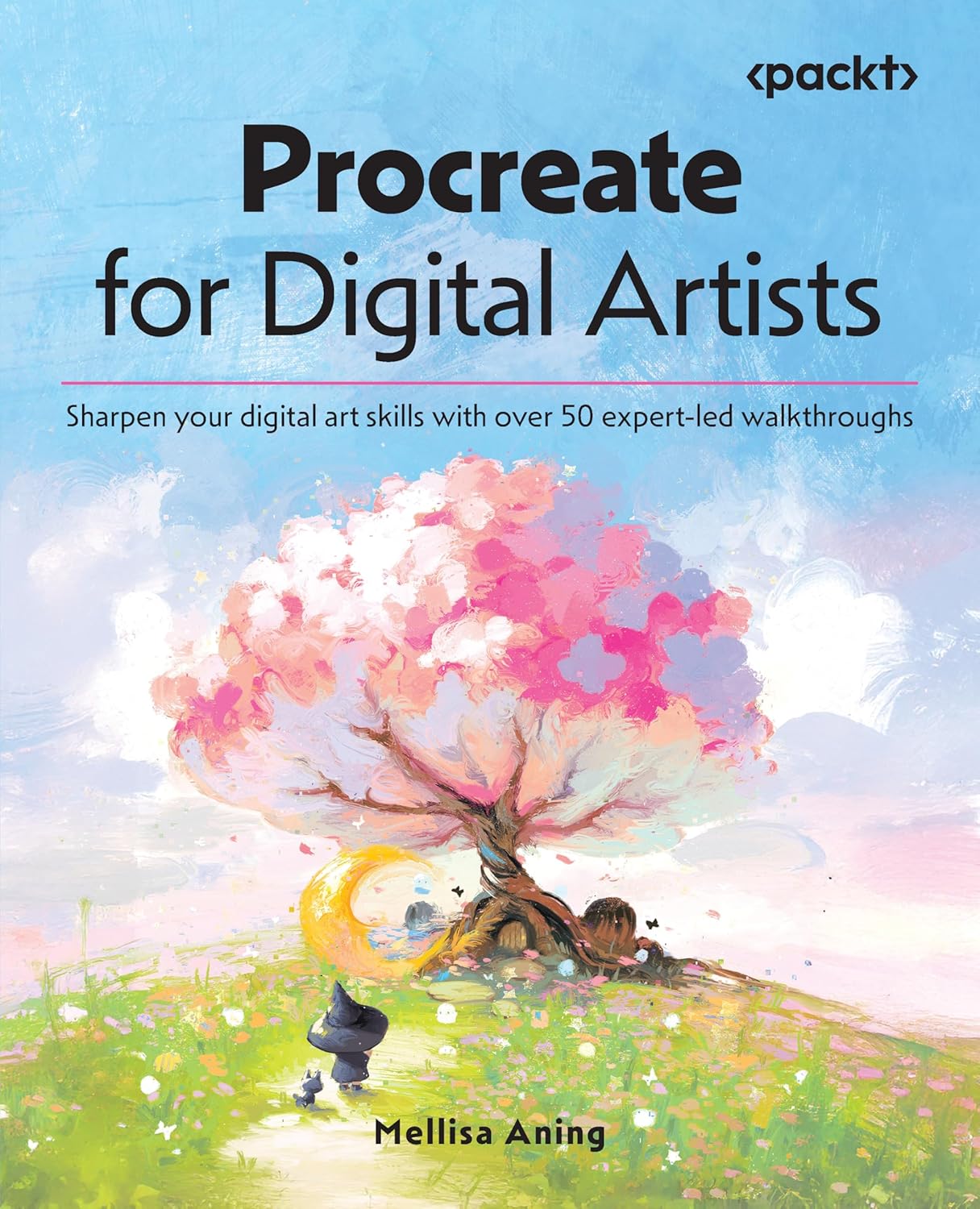
Mellisa Aning’s book promises over 50 expert-led walkthroughs to sharpen digital art skills in Procreate. That framing suits a reader who already knows the basics and wants practice projects with a guided structure, rather than another explanation of the layers panel.
Walkthrough-based books work well for Procreate because the app’s workflow is linear enough to follow from a page. The paperback format is practical next to an iPad, and the walkthrough count means there is enough material for weeks of daily practice.
Best suited for: Procreate users past the beginner stage who learn best by following complete projects, and self-taught artists who want structure.
Key features:
- Paperback format
- Author: Mellisa Aning
- Over 50 expert-led walkthroughs stated in the subtitle
- Procreate-specific; positioned for sharpening existing skills
Pros:
- Project-based practice rather than theory alone
- Large number of walkthroughs for the price tier
- Good follow-on from a beginner guide
Cons and limitations:
- Assumes some Procreate familiarity
- iPad only
- Walkthrough books can encourage copying rather than independent problem-solving if used alone
Buying consideration: After finishing each walkthrough, repeat it with your own subject matter. That is where the skill actually transfers.
6. A Guide to Digital Painting in Procreate: Landscapes & Plein Air — Best for landscape and outdoor painting on iPad

The iPad made plein air digital painting practical: a tablet, a stylus and a park bench are a complete setup. This 3dtotal title focuses on exactly that, landscapes and plein air painting in Procreate. Subject-specific books are useful once you know the app, because they teach the decisions that matter for one kind of picture: simplifying a scene, handling atmospheric depth, working quickly before the light changes.
It is a paperback in the mid price tier and a natural next purchase for a Procreate user who has outgrown the Beginner’s Guide and wants to paint outdoors.
Best suited for: Procreate users who want to paint landscapes, travel sketches and outdoor scenes, and traditional plein air painters moving to a tablet.
Key features:
- Paperback format
- Published by 3dtotal Publishing
- Procreate-specific
- Focused on landscapes and plein air painting
Pros:
- Subject focus delivers depth a general guide cannot
- Plein air is the natural strength of iPad painting
- Mid price tier
- Complements a beginner Procreate book
Cons and limitations:
- Narrow scope; not for character or portrait painters
- Assumes basic Procreate knowledge
- iPad only
Buying consideration: Work through it outdoors, not at a desk. A landscape book read indoors teaches half as much as one applied to the view in front of you.
Buying Guide: How to Choose a Digital Painting Book
Match the book to your software
This is the first filter. Three of the books here are Procreate-only, one is Photoshop-only, one is iPad-general and one is software-independent. A Procreate book will frustrate a desktop Krita user because every screenshot and shortcut is wrong. If you have not chosen software yet, start with the theory book or a drawing book and decide later.
Be honest about your level
Books with “beginner” in the title start at the interface. Books promising walkthroughs or a “master series” assume you already know where things are. Buying above your level is a common waste; the book sits unread because the first chapter assumes a skill you do not have.
Decide: tool, subject or principle
Tool books (Procreate, Photoshop) get you productive fast. Subject books (landscapes) deepen one kind of painting. Principle books (color and light) raise the ceiling on everything you make. Most serious learners end up with one of each; the order is usually tool, then principle, then subject.
Check the edition date against your app version
Software books age. Procreate and Photoshop both change their interfaces, and a book written for an older version may show menus that have moved. The painting principles survive; the screenshots do not. Theory books have no such problem.
Format and where you will read it
Paperbacks lie flat badly but travel well, and five of these six are paperbacks. The hardcover Color and Light is a desk reference. If you paint on a couch with an iPad, a paperback propped on the armrest is the realistic setup.
Walkthroughs versus explanation
Walkthrough books (Procreate for Digital Artists) show you a finished piece step by step. Explanatory books (Color and Light) tell you why. Walkthroughs feel productive but can leave you unable to paint anything the book did not show. Mixing both styles avoids that trap.
Do not expect a book to replace practice
No book on this list will improve your painting unless you paint while reading it. Budget one hour of painting for every chapter and the cheapest paperback here will outperform a shelf of unread hardcovers.
Put the Book to Work: Guides on This Site
A book gives you structure; these tutorials give you projects to apply it to. Begin with the basics in how to paint digital and the overview of what digital paintings are. Then pick exercises that match your book: Procreate landscape readers can try painting a digital sky and atmosphere, digital raindrops and rain or digital fire, while Photoshop readers heading toward concept art will get more from digital speed painting and comic-style digital painting.
Two stylistic guides worth reading alongside any of these books are lineless digital painting and developing your style in digital painting. If you do not own a tablet yet, digital painting on a phone shows how far you can get with what is in your pocket. And before you blame the book for a bad result, check the list of common digital painting mistakes; most of them are habits, not knowledge gaps.
Common Mistakes to Avoid
- Buying a Procreate book for a desktop setup, or a Photoshop book for an iPad. Check the software in the title.
- Choosing a “master series” or walkthrough book before you can navigate the app. Start with a beginner guide.
- Reading a landscape or color book cover to cover without painting a single study. Read a chapter, paint, repeat.
- Expecting a software book to teach drawing. If proportions are the problem, Drawing Digital addresses that; app manuals do not.
- Dismissing theory books as “not practical”. Color and light is where most flat-looking digital paintings fail.
- Ignoring the edition date. A book for an older app version still teaches painting, but expect interface differences.
FAQs
What is the best digital painting book for complete beginners?
For iPad users, Beginner’s Guide to Digital Painting in Procreate from 3dtotal Publishing is the most direct starting point. If you also need to learn to draw, Lisa Bardot’s Drawing Digital covers drawing and painting on the iPad from zero. Photoshop users should start with Digital Painting in Photoshop: Industry Techniques for Beginners.
Do I need a Procreate-specific book or will a general digital painting book do?
If you use Procreate, a Procreate-specific book saves a lot of translation because the screenshots and gestures match your screen. General principles books, like Artists’ Master Series: Color and Light, work with any software and are worth owning alongside an app guide.
Are digital painting books worth it when YouTube tutorials are free?
A book is edited into a sequence, covers fundamentals that videos skip, and does not distract you. Videos are better for watching a brush stroke in motion. Most learners do best with one structured book plus videos for specific techniques.
Which book should I read to make my digital paintings look less flat?
Artists’ Master Series: Color and Light addresses exactly that. Flat paintings are almost always a lighting and value problem, not a brush problem, and this is the only title on the list devoted to those principles.
Is there a good digital painting book for landscapes?
A Guide to Digital Painting in Procreate: Landscapes & Plein Air is the subject-specific option here. It assumes basic Procreate knowledge, so pair it with a beginner guide if you are new to the app.
Will a digital painting book go out of date?
Software-specific books can date as app interfaces change, though the painting concepts remain valid. Theory books about color, light and drawing do not go out of date.
Final Recommendation
There is no single best digital painting book, because the right one depends on where you are stuck. New iPad painters should buy the Beginner’s Guide to Digital Painting in Procreate, adding Drawing Digital if drawing itself is the gap. Desktop and aspiring concept artists should take Digital Painting in Photoshop: Industry Techniques for Beginners.
Once the software is comfortable, Procreate for Digital Artists supplies structured practice and Landscapes & Plein Air deepens one subject. And for anyone at any level whose paintings look lifeless, Artists’ Master Series: Color and Light is the purchase most likely to change the work itself.


2 Comments