If you’ve ever felt limited by traditional line art in your digital paintings, it’s time to discover the freedom of lineless digital painting. Imagine creating vibrant, smooth artwork where colors and shapes blend seamlessly, giving your pieces a fresh, modern look.
You might wonder how to start or how to make your lineless paintings stand out without losing detail or depth. This guide will walk you through simple, effective tips that anyone can use to master lineless digital painting. By the end, you’ll have the confidence to create stunning artworks that capture attention and express your unique style—no lines required.
Ready to transform your digital art? Let’s dive in!
Lineless Art Basics
Lineless digital painting is a unique art style that skips the traditional black outlines. It relies on colors and shapes to define the image. This approach creates a smooth, soft look that feels fresh and modern. Understanding lineless art basics helps artists create beautiful work without outlines.
This section explains what lineless digital painting is, its benefits, and common challenges. It gives a clear start for anyone wanting to try this style.
What Is Lineless Digital Painting
Lineless digital painting means creating art without any visible outlines. Artists use blocks of color and shading to show forms. Instead of drawing lines first, they focus on light, shadow, and color edges. This method makes the artwork look more natural and less rigid.
Benefits Of Lineless Style
The lineless style offers a softer, more blended appearance. It allows smooth transitions between colors. This style can make characters and objects feel more three-dimensional. Also, it encourages creativity since artists must think about shapes and colors differently. Lineless art often looks cleaner and more modern.
Common Challenges
Creating lineless art can be tricky. Without outlines, it can be hard to separate objects clearly. Colors may blend too much and lose detail. Artists must carefully plan where to place shadows and highlights. It takes practice to balance colors so the image stays readable. Avoiding a flat look is another challenge in lineless painting.
Essential Tools
Creating lineless digital paintings requires the right set of tools. These tools help artists work smoothly without outlines. Choosing the best software and adjusting brush settings are key steps. Using stabilization and smoothing features also improves the final result. This section covers essential tools to help you start your lineless art journey.
Best Software Options
Many digital artists prefer software that supports custom brushes and layers. Programs like Procreate, Clip Studio Paint, and Adobe Photoshop offer great options. Procreate is popular for its user-friendly interface and powerful brush engine. Clip Studio Paint has strong line control and coloring tools. Adobe Photoshop works well for detailed texture and blending. Each software fits different needs but all support lineless painting.
Brush Settings For Lineless Art
Brush settings greatly affect how your artwork looks without lines. Soft brushes with low opacity help create smooth color transitions. Try using airbrush or watercolor brushes for natural shading. Adjust brush size and flow to control paint spread. Use pressure sensitivity on your tablet to vary stroke weight. Experiment with blending modes to achieve seamless color mixing.
Using Stabilization And Smoothing
Stabilization reduces shaky strokes during painting. It helps create clean and smooth shapes without outlines. Most digital art software has a stabilization or smoothing option. Increase stabilization to slow your brush but gain steadier lines. This feature is useful even in lineless art to keep edges neat. Adjust smoothing settings based on your drawing speed and style.
Starting Your Artwork
Starting your lineless digital painting sets the tone for the entire artwork. This stage helps you build a solid foundation. It guides your choices for colors, shapes, and composition. Taking time here improves your final result and keeps the process smooth.
Sketching Without Lines
Begin by sketching with soft brushes or low opacity. Avoid using hard or dark lines. Use simple shapes and light tones to suggest form. This approach helps keep the sketch loose and flexible. Focus on capturing the basic pose and proportions.
Think of this sketch as a rough guide. It will not show detailed outlines. Instead, it maps the flow and movement of your subject. Keep the strokes short and gentle to avoid clutter.
Choosing A Color Palette
Select colors that work well together before painting. Use a limited palette to keep harmony in your artwork. Pick base colors for skin, hair, and clothes first. Add accent colors to highlight important areas.
Test your palette by painting small color patches. See how the colors blend and contrast. Adjust brightness and saturation to create a balanced look. This step saves time and prevents color clashes later.
Blocking In Shapes
Start filling in large shapes with flat colors. Use broad brush strokes to cover main areas. Focus on the overall form, not details. Separate different parts like face, hair, and background clearly.
Work with layers to manage each section easily. This method helps you correct mistakes without affecting other parts. Concentrate on shape and color mass to build volume and depth. Let edges be soft or sharp depending on the object.

Credit: www.youtube.com
Shading And Lighting
Shading and lighting are key to lineless digital painting. They help show form and volume without outlines. Good shading gives your artwork a natural and soft feel. Lighting guides the eye and adds mood. Focus on how light hits the subject and where shadows fall. This section covers techniques to make your painting clear and lively.
Creating Depth Without Outlines
Depth comes from value changes, not lines. Use darker tones to push areas back. Lighter tones bring parts forward. Gradual shifts in color create smooth transitions. Blocky or harsh edges flatten the image. Soften edges around shadows and highlights. This makes objects feel round and real. Overlapping shapes with different shades also add depth. Avoid relying on outlines to separate parts.
Blending Techniques
Blending smooths the transition between colors. Use soft brushes with low opacity for gradual blends. Layer colors lightly and build up slowly. Smudge tools help mix colors but use them sparingly. Try painting with textured brushes for a natural look. Keep edges soft where light fades. Sharp edges can be used selectively to show hard surfaces. Practice blending to avoid harsh color jumps.
Using Highlights And Shadows
Highlights show where light hits strongest. Place them on raised or shiny areas. Shadows form where light is blocked. Study real objects to see shadow shapes. Use cool colors in shadows for contrast. Warm colors in highlights add brightness. Avoid pure black or white for a natural feel. Mix colors to keep shadows and highlights rich. Proper use of light and dark makes your painting pop.
Adding Details
Adding details to lineless digital painting brings your artwork to life. It creates depth and interest without outlines. Details help define shapes and textures clearly. Focus on layering colors and subtle variations. This section guides you on enhancing your lineless art with simple, effective techniques.
Texture Tips
Use brushes that mimic natural textures like skin, fabric, or hair. Apply small strokes or dots to build texture gently. Vary brush opacity for a soft, realistic feel. Avoid harsh edges to keep the lineless style smooth. Experiment with blending modes to add richness. Textures add touchable quality to your painting.
Color Transitions
Blend colors smoothly to avoid sharp contrasts. Use gradual shading from light to dark or between hues. Soft gradients create natural-looking shadows and highlights. Layer colors lightly and build them up slowly. Avoid sudden changes in color to keep a seamless look. Smooth transitions guide the eye and enhance form.
Avoiding Flatness
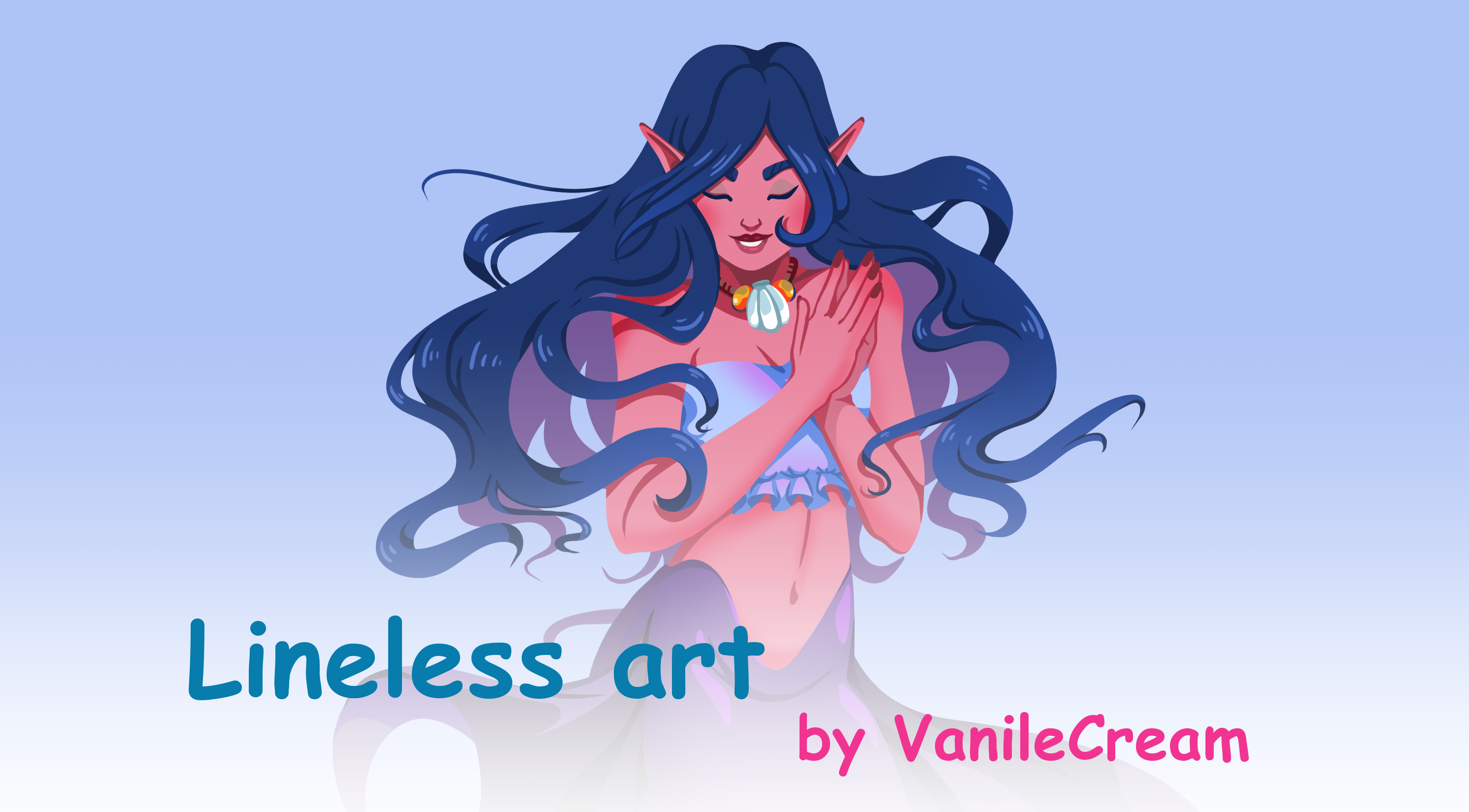
Introduce slight variations in color and value to add depth. Highlight raised areas and darken recessed parts carefully. Use subtle shadows to create volume and dimension. Avoid using one color for large areas. Break up flat spaces with gentle color shifts or texture. This prevents your painting from looking dull or lifeless.
Credit: tips.clip-studio.com
Tips For Clean Results
Achieving clean results in lineless digital painting requires attention to detail and smart techniques. Clean artwork looks polished and professional. It also helps the colors and shapes stand out clearly.
Simple tricks can improve your workflow and final look. Use tools to keep colors inside shapes. Refine edges for smooth transitions. Organize layers to avoid confusion and mistakes.
Clipping Masks Tricks
Clipping masks keep your colors inside the base shape. Paint on a new layer clipped to the shape below. This stops colors from spilling over edges. You can add shadows and highlights easily without extra cleanup.
Use clipping masks to build depth. Apply different tones on separate clipped layers. Change the opacity to blend colors softly. This method saves time and keeps your painting neat.
Refining Edges
Sharp edges improve the overall clarity of your artwork. Use a small, soft brush to smooth rough edges. Zoom in to work on details precisely. Erase stray pixels carefully to avoid jagged lines.
Try blending tools to soften harsh edges where needed. Layer masks help control where your edits appear. Clean edges give your painting a professional, finished feel.
Layer Management
Organize layers with clear names and groups. Separate base colors, shadows, and highlights on different layers. Lock layers you do not want to change. This prevents accidental mistakes and color mixing.
Keep your file tidy by deleting unused layers regularly. Use folders to group related layers. Good layer management speeds up your work and helps keep the painting clean.
Common Mistakes To Avoid
Lineless digital painting offers a fresh and smooth style, but it comes with challenges. Avoiding common mistakes helps your artwork look polished and natural. These pitfalls often reduce the impact and clarity of your painting. Recognizing them early improves your skill and final result.
Overusing Effects
Using too many effects can overwhelm your painting. Effects like glows, blurs, or textures should support the image, not distract from it. Keep effects subtle to maintain focus on your main shapes and colors. Overdoing effects makes the artwork look messy and unclear.
Ignoring Color Harmony
Colors must work well together in lineless painting. Random or clashing colors break the unity of the piece. Choose a limited color palette that fits your mood and subject. Pay attention to warm and cool tones to create balance and depth. Good color harmony makes your painting feel complete and pleasing.
Neglecting Composition
Composition guides the viewer’s eye and creates interest. Skipping this step can make your painting feel empty or confusing. Arrange elements to lead attention to important parts. Use shapes and color contrasts to create movement and focus. A strong composition strengthens your artwork’s message and appeal.
Inspiration And Practice
Inspiration and practice are the foundation of lineless digital painting. They fuel creativity and improve skills. Without regular inspiration, art can feel flat or repetitive. Practice builds confidence and sharpens technique. Combining both helps artists develop a unique style and smoother workflow.
Studying Lineless Artists
Observe the work of skilled lineless artists online. Notice how they use color and shapes to define forms. Pay attention to their blending and shading techniques. Try to understand their color choices and how they suggest light. Study different genres to see various approaches. This insight guides your own experiments and growth.
Daily Practice Ideas
Set small daily goals for lineless painting. Start with simple objects like fruits or flowers. Focus on creating smooth transitions and clear shapes. Use a limited color palette to practice color harmony. Try quick sketches to improve speed and intuition. Track your progress by saving daily works for review.
Experimenting With Styles
Explore various art styles to find what suits you. Try realism, minimalism, or abstract lineless techniques. Mix styles by blending sharp and soft edges. Change your brush settings to create different textures. Experimenting helps discover new effects and keeps art fresh. Don’t be afraid to break rules and try bold ideas.

Credit: www.youtube.com
Frequently Asked Questions
What Is The 70 30 Rule In Drawing?
The 70 30 rule in drawing means 70% of your work focuses on main shapes, while 30% adds details and refinement.
What Is The 80/20 Rule In Painting?
The 80/20 rule in painting means 80% of effort goes to mastering basics, 20% to creative details. This boosts efficiency and skill growth.
How To Smooth Out Lines On Digital Art?
Adjust your brush’s stabilization setting to reduce wobble and create smoother digital art lines. Increase stabilization for cleaner strokes. Use clipping masks to blend or color lines seamlessly for a lineless effect. Practice steady hand movements and zoom in for finer control over details.
What Is The 50/50 Rule In Art?
The 50/50 rule in art means balancing an artwork with 50% positive space and 50% negative space. This creates harmony and visual interest.
Conclusion
Lineless digital painting offers a fresh way to create smooth, vibrant art. Focus on blending colors and shapes carefully to build depth. Use soft brushes and layer your work to avoid harsh edges. Practice patience, as this style takes time to perfect.
Keep experimenting with techniques to find what suits your style best. Remember, every stroke adds life to your painting without lines. Enjoy the freedom and creativity lineless art brings to your digital canvas.