
PaintingProGuide is reader-supported. When you buy through links on this page we may earn an affiliate commission at no extra cost to you.
Procreate ships with a thin manual and an enormous feature set, which is why so many new iPad artists stall after drawing a few shaky lines. A good Procreate book for beginners fixes that by walking through the interface in order, explaining layers and brushes before you need them, and giving you projects to finish instead of menus to memorize. Paper also has a practical advantage over video: it sits open next to the iPad while both your hands are busy.
This guide compares seven beginner-oriented Procreate books available on Amazon as of October 2026. Because book listings carry little beyond title, author and format, the comparison focuses on what each title promises, who publishes it, and the type of learner it suits, so you can match a book to how you like to learn.
Quick answer: For a visual, project-driven introduction, the Beginner’s Guide to Digital Painting in Procreate from 3dtotal Publishing is the safest first book. If you want a plain-language walkthrough of brushes, layers and color, The Beginner’s Guide to Procreate by Roché Woodworth is the alternative. Learners who prefer doing over reading should look at Get Started with Procreate, built around 20 project tutorials.
Our Top Picks at a Glance
- Beginner’s Guide to Digital Painting in Procreate (3dtotal) — Best overall for aspiring digital painters
- The Beginner’s Guide to Procreate (Roché Woodworth) — Best plain-language app walkthrough
- Get Started with Procreate: The 10-Step Guide (Liz Kohler Brown) — Best project-based learning
- Drawing Digital (Lisa Bardot) — Best for people who are also new to drawing
- The Illustrator’s Guide to Procreate (Ruth Burrows) — Best for aspiring illustrators on a budget
- Procreate for Digital Artists (Mellisa Aning) — Best for walkthrough-heavy learners ready to go deeper
- Procreate User Guide for Beginners (Cassian D. Rove) — Best reference-style manual
| Product | Best For | Key Spec | Key Strength | Price Tier |
|---|---|---|---|---|
| 3dtotal Beginner’s Guide to Digital Painting in Procreate | Aspiring painters | Paperback, 3dtotal Publishing | Established art publisher, painting focus | $$ |
| The Beginner’s Guide to Procreate (Woodworth) | App walkthrough | Paperback | Everything-you-need-to-know structure | $$ |
| Get Started with Procreate (Kohler Brown) | Hands-on learners | Paperback, 20 project tutorials | Learn by finishing pieces | $ |
| Drawing Digital (Bardot) | New to drawing too | Paperback, draw and paint on iPad | Covers drawing fundamentals | $ |
| The Illustrator’s Guide to Procreate (Burrows) | Illustration on a budget | Paperback | Lowest price tier | $ |
| Procreate for Digital Artists (Aning) | Going deeper | Paperback, 50+ walkthroughs | Volume of guided exercises | $$ |
| Procreate User Guide for Beginners (Rove) | Reference manual | Paperback, plain-English guide | Brushes, layers, colors in order | $$ |
How We Chose
These selections are based on the Amazon listings checked in October 2026: title, stated scope, author or publisher and format, weighed against how well each promises to serve a true beginner, and on how widely each book is reviewed by Amazon buyers. We have not read these books cover to cover for this article, so treat the descriptions as a map of what each title sets out to do rather than a verdict on how well it does it.
- Beginner scope: does the title promise to start from the interface, or assume you already draw?
- Learning style: project tutorials, reference manual or illustrated walkthrough.
- Publisher credibility: established art publishers versus self-published guides.
- Breadth: painting focus, illustration focus or general app coverage.
- Price tier: books range from under $15 to over $40 on the listing date.
Best Procreate Books for Beginners Reviewed
1. Beginner’s Guide to Digital Painting in Procreate (3dtotal Publishing) — Best for aspiring digital painters

3dtotal Publishing has produced art-instruction books for professional concept artists and illustrators for years, and its Beginner’s Guide series applies the same approach to Procreate: explain the tools, then show working artists using them to build finished paintings. The subtitle, How to Create Art on an iPad, signals the painting-first angle.
For a beginner who wants to paint rather than merely operate the app, that framing matters. You learn layers because a demonstration needs them, not because a chapter heading says Layers. It is a paperback in the mid price tier.
Best suited for: Beginners whose goal is digital painting and illustration, who learn best from seeing finished artwork built step by step.
Key features:
- Paperback from 3dtotal Publishing
- Painting-focused introduction to Procreate on iPad
- Editor-compiled, drawing on multiple contributing artists
- Part of an established Beginner’s Guide series
Pros:
- Reputable art-education publisher
- Teaches tools in the context of real paintings
- Visual format suits the subject
Cons and limitations:
- Less exhaustive on menus than a manual-style guide
- Procreate updates can outpace any printed book
- Mid price tier
Buying consideration: Check the edition date on the listing; Procreate’s interface has changed since early editions, though core concepts remain the same.
2. The Beginner’s Guide to Procreate by Roché Woodworth — Best for a plain-language app walkthrough

Woodworth’s book promises everything you need to know to master digital art in Procreate, and its structure is the conventional beginner path: interface, gestures, brushes, layers, color, then techniques. If your frustration is not knowing where things are or what a setting does, this is the kind of book that resolves it.
It sits in the same mid price tier as the 3dtotal guide and is a paperback. Choose between them by temperament: Woodworth for a methodical tour of the app, 3dtotal for a painting-led introduction.
Best suited for: Methodical learners who want the app explained in order before attempting ambitious artwork.
Key features:
- Paperback
- Comprehensive beginner walkthrough of Procreate
- Covers interface, brushes, layers and color
- Single-author voice
Pros:
- Logical, start-to-finish structure
- Clear beginner positioning
- Mid price tier
Cons and limitations:
- Less emphasis on finished artwork than 3dtotal
- Interface screenshots may lag app updates
Buying consideration: A good companion to a project book: use this to understand the tools, then a tutorial book to apply them.
3. Get Started with Procreate: The 10-Step Guide to Drawing on Your iPad by Liz Kohler Brown — Best for project-based learning
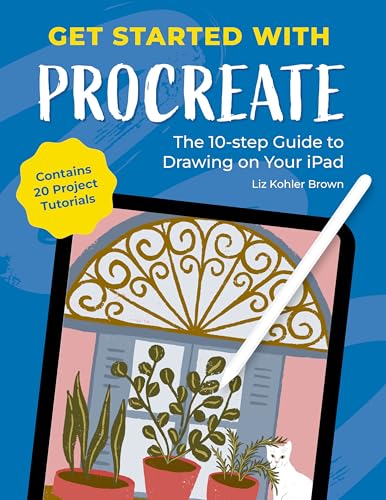
Liz Kohler Brown structures her book as a 10-step guide and backs it with 20 project tutorials, which is the clearest hands-on proposition in this list. For learners who retain more by doing, finishing twenty small pieces teaches brush, layer and color habits far faster than reading about them.
At a mid-low price tier it is also one of the more affordable titles here. The 10-step framing is helpful for anyone who feels overwhelmed and wants a defined path from blank canvas to finished artwork.
Best suited for: Hands-on beginners who want a sequence of achievable projects rather than a reference book.
Key features:
- Paperback
- 10-step learning structure
- 20 project tutorials included
- Focused on drawing and illustration on iPad
Pros:
- Learn-by-doing format
- Defined path for overwhelmed beginners
- Mid-low price tier
Cons and limitations:
- Less depth on individual features
- Projects reflect the author’s style
Buying consideration: Pick this if you have tried to learn from the manual and quit; the project structure keeps momentum.
4. Drawing Digital: The Complete Guide for Learning to Draw and Paint on Your iPad by Lisa Bardot — Best for people who are also new to drawing

Most Procreate books assume you can already draw and need to learn the app. Lisa Bardot’s Drawing Digital addresses the beginner who is new to both, promising a complete guide to learning to draw and paint on the iPad. That dual focus makes it the right pick for someone who bought an iPad and a pencil as their very first art supplies.
It is a paperback in the low price tier, which makes it an inexpensive foundation that other, more app-specific books can build on.
Best suited for: Complete beginners to art who want drawing fundamentals and Procreate basics in one book.
Key features:
- Paperback
- Covers drawing and painting fundamentals as well as the iPad workflow
- Positioned as a complete beginner guide
Pros:
- Addresses drawing skill, not just software
- Low price tier
- Good starting point before more specialized books
Cons and limitations:
- Less Procreate-specific depth
- Experienced sketchers may find early chapters basic
Buying consideration: If you can already draw on paper, skip to a Procreate-specific guide; if not, start here.
5. The Illustrator’s Guide to Procreate by Ruth Burrows — Best for aspiring illustrators on a budget

Ruth Burrows’s guide is the cheapest title in this group and is aimed at making digital art on the iPad with an illustrator’s eye: character, composition and finish rather than painterly rendering. For beginners whose goal is stickers, children’s-book style work or editorial illustration, that focus is more useful than a general painting guide.
Published as a paperback, it is from the same publisher family as Get Started with Procreate, so expect a similar practical tone.
Best suited for: Beginners with an illustration goal who want a low-cost, focused introduction.
Key features:
- Paperback
- Illustration-oriented Procreate guide
- Low price tier
Pros:
- Lowest price in this list
- Clear illustration angle
- Compact scope for quick reading
Cons and limitations:
- Not aimed at realistic painting
- Fewer pages likely means less reference depth
Buying consideration: Pair with the Kohler Brown project book for an affordable illustration-focused starter pair.
6. Procreate for Digital Artists: Over 50 Expert-Led Walkthroughs by Mellisa Aning — Best for walkthrough-heavy learners ready to go deeper

With more than 50 expert-led walkthroughs, Mellisa Aning’s book is the most exercise-dense title here, and it is pitched at sharpening digital art skills rather than opening the app for the first time. That makes it a second book for a motivated beginner, or a first book for someone who already knows the basics from videos and wants structured practice.
It is the highest price tier of the group, reflecting its length and scope.
Best suited for: Beginners who already know the interface and want a large volume of guided practice to build skill.
Key features:
- Paperback
- Over 50 step-by-step walkthroughs
- Skill-building focus for digital artists
Pros:
- Large quantity of guided exercises
- Covers more advanced techniques than pure beginner books
Cons and limitations:
- Highest price tier here
- Assumes some familiarity with Procreate
- Heavy for a first read
Buying consideration: Buy this after a true beginner guide, or alongside one if you are confident you will stick with the app.
7. Procreate User Guide for Beginners: Stop Feeling Lost on the Canvas by Cassian D. Rove — Best for a reference-style manual

The subtitle lays out the pitch: master brushes, layers, colors and digital art on your iPad from day one, in plain English. This is the manual-style option, organized around features rather than projects, and useful to keep beside the iPad for looking things up.
It appears to be self-published, which generally means fast updates for new Procreate versions but less consistent editing and photography than the traditional publishers above. Check the preview pages for layout quality before buying.
Best suited for: Beginners who want a look-it-up reference for features and settings rather than a course.
Key features:
- Paperback
- Feature-by-feature plain-English guide
- Covers brushes, layers, colors and workflow
Pros:
- Reference structure is easy to dip into
- Explicitly written for the lost beginner
Cons and limitations:
- Self-published; quality varies
- Few finished-artwork demonstrations
- Mid price tier for a self-published title
Buying consideration: Use the Amazon preview to check screenshot clarity; reference books live or die on legible images.
What a Beginner Should Learn in the First Month
Whichever book you choose, the first month of Procreate should cover the same ground, and you can judge a book by how clearly it handles these topics. Start with the gallery and canvas setup: size, DPI and color profile, because a canvas created at the wrong resolution cannot be fixed later. Then learn gestures, since two-finger undo and the pinch-to-fit motion are used hundreds of times a session.
Next come layers: creating, grouping, alpha lock and clipping masks, which is where most beginners first feel the power of digital painting. Brushes follow, with the default library explored before any brush packs are bought. Finish the month with the color panel, the selection tools and exporting at the right size for printing or sharing. A book that reaches these in roughly that order, with a project at each stage, is doing its job.
Buying Guide: How to Choose a Procreate Book for Beginners
Decide what kind of beginner you are
New to drawing and to Procreate? Start with Drawing Digital. Can draw but lost in the app? Woodworth’s walkthrough or Rove’s manual. Want to paint? 3dtotal. Want to finish projects? Kohler Brown. Matching the book to your gap saves money and frustration.
Project tutorials versus reference manuals
Tutorial books build skill and confidence but can leave gaps in your understanding of features. Reference manuals explain everything but rarely result in finished artwork. Many learners end up with one of each; if you buy only one, pick the style that matches how you learned other skills.
Publisher and edition date
Procreate updates several times a year, and the interface has shifted noticeably over major versions. Established publishers revise less often but edit carefully; self-published authors update faster but inconsistently. Check the publication date in the listing and favor the most recent edition when two books are otherwise equal.
Painting versus illustration focus
Painting-focused books emphasize blending, texture brushes and layer modes for rendering. Illustration books emphasize line work, flat color, selections and composition. The core tools overlap, but the examples differ, and examples are what you will copy while learning.
Format: paperback beside the iPad
All seven titles are paperbacks, which is the right format for this subject: a book lies open while you hold the iPad and pencil. Kindle editions exist for some, but reading a Procreate tutorial on the same iPad you are drawing on means constant app switching.
Price tier and what it buys
Low-tier books (Burrows, Bardot) are compact and focused. Mid-tier books (3dtotal, Woodworth, Kohler Brown, Rove) offer broader coverage. The high-tier Aning book trades price for volume of walkthroughs. More pages are not automatically better for a beginner who needs a clear path.
Put the Book to Work
Once a book has you comfortable with the interface, our own tutorials fill in specific skills. Start with how to use the Procreate app for beginners for a quick orientation, then try animating in Procreate for beginners when you are ready for the Animation Assist panel, and color grading in Procreate to polish finished pieces.
Common Mistakes to Avoid
- Buying an advanced walkthrough book first and giving up because it assumes knowledge you do not have.
- Choosing a book by cover art rather than by its learning structure.
- Ignoring the edition date and getting confused by an outdated interface.
- Reading the whole book before opening Procreate; work alongside the app from chapter one.
- Expecting a book to replace practice; twenty short drawings teach more than two hundred pages.
- Buying several books at once instead of finishing one.
FAQs
Is a book better than YouTube for learning Procreate?
They serve different purposes. Videos show motion and gestures well; a book gives a structured path and stays open beside the iPad without pausing. Many beginners progress fastest by following a book and looking up specific gestures in videos.
Which Procreate book is best if I cannot draw yet?
Drawing Digital by Lisa Bardot is the only title here that explicitly teaches drawing fundamentals alongside the iPad workflow. Pair it later with an app-focused guide.
Do these books cover Procreate Dreams or animation?
The listings do not indicate Dreams coverage. Procreate’s built-in Animation Assist is a common topic in general guides, but for animation specifically, look for a dedicated title or tutorials.
Will an older edition still be useful?
Mostly yes. Layers, brushes, selections and color theory have not changed conceptually. Menu locations and some icons have, so expect occasional hunting if the edition predates a major update.
Are self-published Procreate guides worth buying?
They can be, and they often update faster. Use the Amazon preview to check that screenshots are legible and the writing is clear before committing.
What else do I need besides a book?
An iPad that supports Procreate, an Apple Pencil or compatible stylus, and time. A matte screen protector is optional but popular for a paper-like feel.
Final Recommendation
For most beginners, the 3dtotal Beginner’s Guide to Digital Painting in Procreate is the best first book: a credible publisher and a painting-led approach that teaches tools in context. If you would rather tour the app methodically, Roché Woodworth’s guide covers the same ground in a walkthrough format, and Liz Kohler Brown’s 20-project book is the choice for anyone who learns by finishing things.
Complete beginners to art should start with Drawing Digital, budget-minded illustrators with Ruth Burrows’s guide, and anyone who already knows the basics can move straight to Mellisa Aning’s 50-plus walkthroughs.


One Comment