

PaintingProGuide is reader-supported. When you buy through links on this page we may earn an affiliate commission at no extra cost to you.
Video tutorials are great for watching a technique once. A Procreate tutorials book is better for the second, third and tenth time, when you want to check which gesture opens the color picker, what an alpha lock actually does, or how a professional builds up a painting layer by layer, without scrubbing back and forth through a video with paint on your fingers. A good book also gives you a sequence: lesson one leads to lesson two, so you build skills in order rather than jumping between random clips.
The seven books below fall into three groups. Interface guides teach you the app. Project books teach you by making finished pieces. Skill-building books, aimed at intermediate artists, teach you to paint better in Procreate rather than simply to use it. Pick the group that matches where you are now.
Quick answer: For most beginners, the best Procreate tutorials book is Get Started with Procreate by Liz Kohler Brown: a 10-step guide to drawing on iPad that contains 20 project tutorials, so you learn the app by finishing pieces. If you want a broader painting-focused introduction from a professional art publisher, choose 3dtotal’s Beginner’s Guide to Digital Painting in Procreate. Once the basics are in place, Procreate for Digital Artists by Mellisa Aning offers more than 50 expert-led walkthroughs.
Our Top Picks at a Glance
- Get Started with Procreate (Liz Kohler Brown) — Best Procreate tutorials book for beginners
- Beginner’s Guide to Digital Painting in Procreate (3dtotal) — Best painting-focused introduction
- The Beginner’s Guide to Procreate (Roché Woodworth) — Best complete feature reference
- Procreate User Guide for Beginners (Cassian D. Rove) — Best plain-English interface guide
- Quick & Simple Painting in Procreate (3dtotal) — Best for fast, impressive results
- Procreate for Digital Artists (Mellisa Aning) — Best for intermediate skill building
- Get Set Procreate (Samadrita Ghosh) — Best for illustrators wanting best practices
| Product | Best For | Key Spec | Key Strength | Price Tier |
|---|---|---|---|---|
| Get Started with Procreate | First projects | 10-step guide, 20 project tutorials | Learn by finishing pieces | $ |
| Beginner’s Guide to Digital Painting in Procreate | Painting fundamentals on iPad | Paperback, 3dtotal Publishing | Painting-focused publisher | $$ |
| The Beginner’s Guide to Procreate | Complete overview | Paperback, Roché Woodworth | “Everything you need to know” scope | $$ |
| Procreate User Guide for Beginners | Feeling lost in the interface | Brushes, layers, colors in plain English | Interface-first approach | $$ |
| Quick & Simple Painting in Procreate | Speed painting | Paperback, 3dtotal, Derek Domnic D’Souza | Fast results | $$ |
| Procreate for Digital Artists | Intermediate artists | 50+ expert-led walkthroughs | Most walkthroughs listed | $$ |
| Get Set Procreate | Illustrators | Tips, tricks and best practices | Practical illustration focus | $$ |
How We Chose
The Amazon listings for these books, checked in October 2026, include title, subtitle, author or publisher, format and price, but no detailed descriptions. We therefore describe each book only from that information and from the stated scope in its subtitle, and we have not read them cover to cover. We weighed how well each book’s stated approach fits a particular stage of learning, and how widely each is reviewed by Amazon buyers.
- Stated scope: interface guide, project book or skill builder.
- Project count: books that name a number of tutorials or walkthroughs give a sense of hands-on content.
- Publisher focus: art-specialist publishers tend to emphasize painting skills, not only software.
- Level: whether the subtitle targets beginners or artists who want to sharpen existing skills.
- Format and price tier: paperback guides at accessible price tiers.
Best Procreate Tutorials Books Reviewed
1. Get Started with Procreate by Liz Kohler Brown — Best for beginners who learn by doing

Liz Kohler Brown’s book is subtitled “The 10-Step Guide to Drawing on Your iPad” and states that it contains 20 project tutorials. That combination, a short structured path plus a set of projects, is exactly how most people learn software best: understand the basics in a few steps, then cement them by making finished pieces.
For a new iPad owner, finishing twenty pieces is also motivating in a way that reading about menus never is. It is the lowest price tier of the books here on our check date, which makes it an easy first purchase.
Best suited for: Absolute beginners who want to make finished drawings quickly and learn the app along the way.
Key features:
- Paperback
- 10-step learning structure
- 20 project tutorials
- Drawing on iPad focus
- By Liz Kohler Brown
Pros:
- Project-based learning
- Clear structure
- Lowest price tier here
Cons and limitations:
- Drawing-oriented rather than painting-oriented
- Amazon listing has no content detail
- May be too basic for intermediates
Buying consideration: Do each project twice: once following along, once with your own subject using the same techniques.
2. Beginner’s Guide to Digital Painting in Procreate (3dtotal) — Best for a painting-focused introduction

3dtotal Publishing specializes in books for digital artists, and this title, subtitled “How to Create Art on an iPad,” is its beginner’s guide to painting in Procreate. Where interface guides teach you where things are, a painting guide from an art publisher is more likely to focus on how to make a picture.
It is a natural first book for people who want to paint, not just doodle, and it pairs well with the same publisher’s Quick & Simple Painting title later on.
Best suited for: Beginners who want to paint finished digital artworks in Procreate.
Key features:
- Paperback
- 3dtotal Publishing
- Beginner level
- Digital painting focus
- iPad and Procreate
Pros:
- Art-specialist publisher
- Painting rather than interface focus
- Good first book
Cons and limitations:
- Listing gives no page or project count
- Mid price tier
- Assumes you will practice beyond the book
Buying consideration: Pair each chapter with a short daily study, such as painting a single object under one light, to apply what you read.
3. The Beginner’s Guide to Procreate by Roché Woodworth — Best for a complete feature reference

Roché Woodworth’s guide is subtitled “Everything You Need to Know to Master Digital Art,” which positions it as a broad, start-to-finish reference to the app.
A complete reference is useful to keep beside the iPad: when you want to know how a feature works, you can look it up rather than searching through videos.
Best suited for: Beginners who want one reference that covers the whole app.
Key features:
- Paperback
- Beginner’s guide
- Broad “everything you need” scope
- By Roché Woodworth
- Digital art focus
Pros:
- Comprehensive scope
- Good desk reference
- Beginner level
Cons and limitations:
- Content detail not listed
- May overlap with free tutorials
- Mid price tier
Buying consideration: Keep sticky tabs on the sections you look up most often, such as layers and selections.
4. Procreate User Guide for Beginners by Cassian D. Rove — Best for anyone who feels lost in the interface

The subtitle of this guide speaks directly to a common frustration: “Stop Feeling Lost on the Canvas.” It promises to cover brushes, layers, colors and digital art on your iPad from day one, in plain English.
For people who find app interfaces intimidating, a plain-language guide to the core features can be the difference between quitting and continuing.
Best suited for: Beginners who are overwhelmed by Procreate’s menus and want clear explanations of the core tools.
Key features:
- Paperback
- Brushes, layers and colors
- Day-one beginner focus
- Plain-English approach
- By Cassian D. Rove
Pros:
- Directly addresses interface confusion
- Core tools focus
- Beginner-friendly tone
Cons and limitations:
- Interface rather than art skills
- Listing detail minimal
- Mid price tier
Buying consideration: Once you are comfortable with the tools, move on to a project or painting book to build art skills.
5. Quick & Simple Painting in Procreate (3dtotal) — Best for fast, impressive results

Edited by 3dtotal Publishing with artist Derek Domnic D’Souza among the contributors, this book is subtitled “Achieve impressive results with speed on the iPad.” Speed painting is a valuable skill: working quickly forces you to focus on big shapes, values and color rather than fiddly detail.
It suits artists who have the basics and want to produce satisfying pieces in a single session.
Best suited for: Beginners and intermediates who want quick, satisfying paintings and better decision-making.
Key features:
- Paperback
- 3dtotal Publishing
- Speed-focused painting
- Featuring Derek Domnic D’Souza
- iPad and Procreate
Pros:
- Encourages good painting habits
- Satisfying short projects
- Art-specialist publisher
Cons and limitations:
- Not an interface guide
- Assumes some Procreate familiarity
- Content detail not listed
Buying consideration: Set a timer for 30 minutes per painting; the constraint improves your choices.
6. Procreate for Digital Artists by Mellisa Aning — Best for intermediate skill building
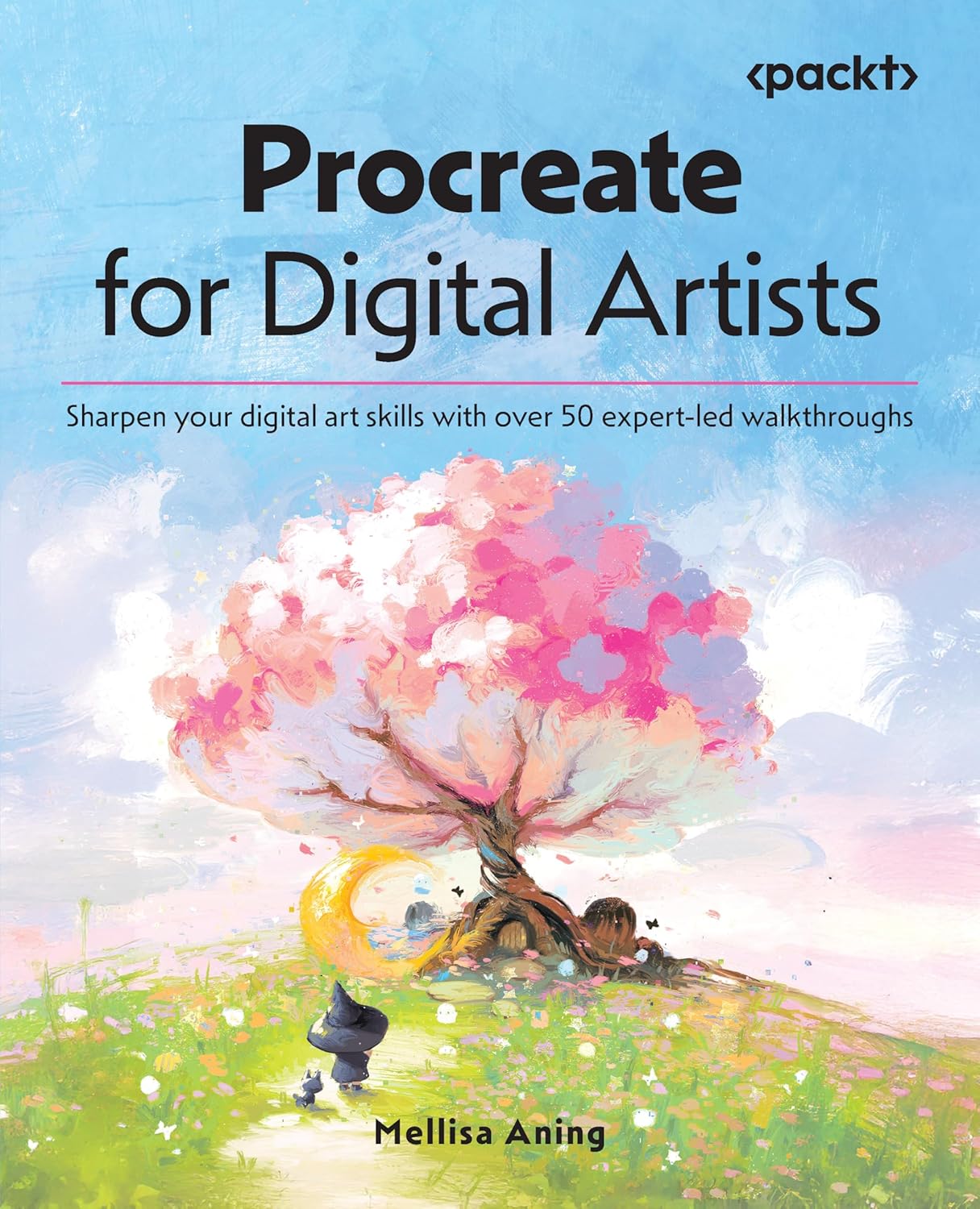
Mellisa Aning’s book is subtitled “Sharpen your digital art skills with over 50 expert-led walkthroughs.” Fifty walkthroughs is the largest stated count among these books, and “sharpen” signals that it is aimed at artists who already use Procreate.
Walkthroughs are especially useful at the intermediate stage, when you know the tools and want to see how experienced artists combine them.
Best suited for: Artists who know the basics and want to improve techniques and workflow.
Key features:
- Paperback
- 50+ expert-led walkthroughs
- Skill-sharpening focus
- By Mellisa Aning
- Intermediate level
Pros:
- Most walkthroughs stated
- Good next step after a beginner book
- Workflow-oriented
Cons and limitations:
- Upper price tier
- Not for complete beginners
- Content detail not listed
Buying consideration: Pick walkthroughs that match the art you want to make rather than working through every one in order.
7. Get Set Procreate by Samadrita Ghosh — Best for illustrators wanting best practices

Samadrita Ghosh’s guide is subtitled “A practical guide, filled with tips, tricks, and best practices, for illustrating on an iPad.” The emphasis on illustration and best practices suggests a workflow-focused book for people creating finished illustrations.
It is the highest price tier here on our check date, so it makes most sense for artists who know illustration is their goal.
Best suited for: Illustrators and aspiring illustrators working on iPad.
Key features:
- Paperback
- Practical illustration guide
- Tips, tricks and best practices
- By Samadrita Ghosh
- iPad focus
Pros:
- Illustration-specific
- Best-practice approach
- Practical orientation
Cons and limitations:
- Highest price tier here
- Content detail not listed
- Less suited to painters
Buying consideration: Use its best practices to set up a repeatable file template: canvas size, layer structure and brushes.
Buying Guide: How to Choose a Procreate Tutorials Book
Interface guide, project book or skill builder?
If you do not know where the tools are, start with an interface guide like Cassian D. Rove’s or a structured beginner guide like Woodworth’s. If you learn best by making things, choose a project book like Liz Kohler Brown’s. If you are comfortable with the app, a skill builder such as Aning’s helps you improve.
Painting versus drawing focus
Some books emphasize drawing and lettering; others emphasize painting light, color and form. 3dtotal’s titles lean toward painting.
Check the Procreate version
Procreate updates regularly, and menus can move. Fundamentals do not change, but check the publication date if you want screenshots that match your version exactly.
Device fit
Procreate runs on iPad, with Procreate Pocket for iPhone. If you are not sure whether Procreate is right for you, read Procreate vs Adobe Fresco, and if you are on Windows, see whether you can use Procreate on a PC before buying a book.
Combine with free resources
Books give structure; videos and the app’s own handbook fill in details. Use both.
Practice beyond the book
Every book works better when you repeat techniques on your own subjects. Try our tutorials on painting realistic clouds in Procreate and using adjustment layers in Procreate to apply what you learn.
Core Procreate Skills to Practice Alongside Any Book
Whichever book you pick, these are the skills that unlock most of Procreate. Practicing each with a tiny exercise makes the chapters stick.
| Skill | Why it matters | Quick exercise |
|---|---|---|
| Layers and blend modes | Separate sketch, color and shading so you can change one without wrecking the others | Paint a simple fruit with sketch, base color and shadow on three layers |
| Alpha lock and clipping masks | Paint inside shapes without going over the edges | Fill a flat shape, lock it, then add texture inside |
| Selections and transform | Move, resize and fix proportions after drawing | Draw a face, then use selection to adjust eye placement |
| Brush settings | Understand pressure, opacity and size response | Make a page of strokes with one brush at different pressures |
| Color tools | Pick, harmonize and adjust colors quickly | Repaint the same sketch with three different color palettes |
| Adjustments | Fix values and color after painting | Desaturate a finished piece to check its values |
For color work after painting, our guide to color grading in Procreate shows how adjustments can unify a finished piece.
Suggested Reading Order
- Week 1: an interface guide (Rove or Woodworth) to learn the tools.
- Weeks 2–6: a project book (Liz Kohler Brown) or painting guide (3dtotal Beginner’s Guide).
- Weeks 7–10: Quick & Simple Painting in Procreate for faster, more confident pieces.
- After that: Procreate for Digital Artists or Get Set Procreate, depending on whether you paint or illustrate.
Common Mistakes to Avoid
- Reading without painting. Keep your iPad open and try each technique immediately.
- Buying three beginner books. They overlap heavily; one is enough.
- Skipping layers and selections. These tools unlock almost everything else.
- Collecting brushes instead of practicing. Master a few default brushes first.
- Ignoring fundamentals. Value and color matter more than features.
- Not backing up. Export artwork regularly to Files or cloud storage.
FAQs
What is the best Procreate tutorials book for beginners?
Get Started with Procreate by Liz Kohler Brown is our top pick because it combines a 10-step guide with 20 project tutorials. The 3dtotal Beginner’s Guide to Digital Painting in Procreate is the alternative if you want a painting focus.
Are Procreate books better than YouTube tutorials?
They complement each other. Books give a structured path and quick reference; videos show techniques in motion. Many learners use both.
Which Procreate book is best for intermediate artists?
Procreate for Digital Artists by Mellisa Aning, with more than 50 expert-led walkthroughs, is aimed at sharpening existing skills.
Do Procreate books go out of date?
Interface details can change with updates, but core techniques remain the same. Check the publication date if exact screenshots matter to you.
Can I use Procreate books with other apps?
Painting principles transfer, but interface instructions are Procreate-specific. For Adobe Fresco or other apps, a general digital painting book may be more useful.
Which book is best for speed painting?
Quick & Simple Painting in Procreate from 3dtotal is focused on achieving impressive results quickly.
Final Recommendation
Start with Get Started with Procreate if you want to learn by making 20 projects, or the 3dtotal Beginner’s Guide to Digital Painting in Procreate if painting is your goal. If the interface itself is the hurdle, Cassian D. Rove’s User Guide or Roché Woodworth’s Beginner’s Guide covers the tools.
Next, build confidence with Quick & Simple Painting in Procreate, then move to Procreate for Digital Artists for painters or Get Set Procreate for illustrators.


One Comment