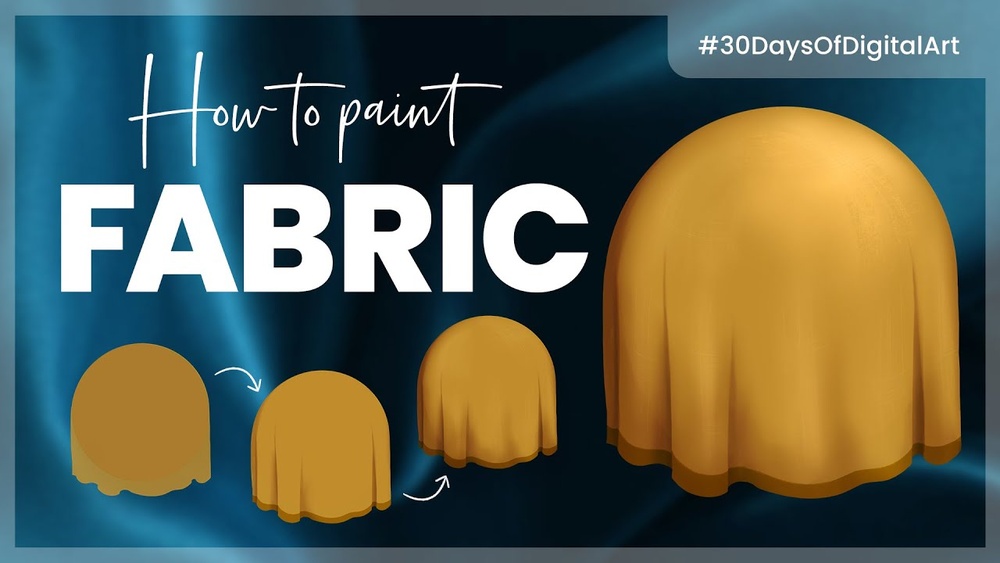
Are you ready to bring your digital art to life with realistic fabric textures? Knowing how to paint digital fabric texture can instantly elevate your artwork, making clothes and materials look soft, rich, and full of character.
Whether you’re aiming for smooth silk, rough denim, or cozy wool, mastering this skill will give you the power to add depth and authenticity to your creations. In this guide, you’ll discover simple techniques and tips that anyone can follow, even if you’re new to digital painting.
Stick with me, and by the end, you’ll be able to create stunning fabric textures that grab attention and make your art stand out. Let’s get started!

Credit: www.youtube.com
Choosing The Right Brushes
Choosing the right brushes is key to painting digital fabric texture well. The brush you pick shapes how the fabric looks and feels. It affects the detail and depth of your work. Using the proper brush can make the fabric appear soft, rough, smooth, or patterned.
Many brushes mimic real fabric textures. Others create unique digital effects. Knowing which brush to use helps you paint with confidence and precision. This section explains the best brush types and settings for fabric texture.
Types Of Texture Brushes
Texture brushes come in many forms. Some mimic natural fibers like cotton or wool. Others imitate rough surfaces like burlap or denim. Soft round brushes help create smooth fabric folds. Hard edge brushes add sharp creases and details.
Choose brushes that match the fabric style you want. For example, a fuzzy brush works well for velvet. A scratchy brush suits linen or burlap textures. Test several brushes to find the best fit for your design.
Custom Pattern Brushes
Custom pattern brushes add repeating fabric patterns easily. They save time and keep patterns consistent. Use them for plaid, stripes, or polka dots. You can create your own brush from a fabric sample. This lets you paint complex textures quickly.
Custom brushes also allow adjusting scale and spacing. This helps blend patterns naturally with the fabric shape. They are perfect for detailed fabric designs and patterned clothing.
Brush Settings For Fabric
Adjust brush settings to improve fabric texture effects. Change opacity to create soft shadows and highlights. Use flow controls for smooth color transitions. Set scatter to add random texture spots. Size jitter helps mimic uneven fabric surfaces.
Experiment with pressure sensitivity to control brush strength. This adds realism to fabric folds and creases. Turn on texture settings in the brush panel. It applies subtle grain to match fabric fibers. Fine-tuning these settings creates lifelike digital fabric.
Base Colors And Layering
Base colors and layering form the foundation of realistic digital fabric textures. They set the tone and depth for your artwork. Using the right colors and layering techniques helps simulate the look and feel of fabric on a digital canvas.
Start with a solid base color to represent the fabric’s primary shade. Then, build layers to add richness and texture. This process mimics how light and shadow interact with real fabric, giving your digital piece more life.
Selecting Fabric Colors
Choose colors that match the fabric type you want to paint. Cotton, silk, denim, and wool each have unique tones. Use a color palette with subtle variations to reflect these differences. Avoid overly bright colors unless the fabric is meant to be vibrant. Soft, muted tones often work best for natural fabrics.
Building Color Depth
Layer multiple shades of the base color to add dimension. Start with lighter shades for highlights and darker tones for shadows. Use a soft brush to blend these layers smoothly. This technique creates a sense of volume and texture. It helps the fabric look three-dimensional and realistic.
Using Layer Modes
Experiment with layer modes like Multiply, Overlay, and Soft Light. These modes change how colors interact between layers. Multiply darkens colors, great for shadows. Overlay boosts contrast and brightness, useful for highlights. Soft Light adds subtle shading without harsh lines. Adjust the opacity to control the effect’s strength.
Creating Realistic Folds
Creating realistic folds in digital fabric texture brings your artwork to life. Folds add depth and movement to flat surfaces. They make fabric look natural and believable. Understanding how light interacts with folds is key to realism.
Start by observing real fabric and how it creases. Notice where shadows fall and highlights appear. This knowledge helps you paint convincing folds in digital art.
Sketching Fabric Wrinkles
Begin with a light sketch of the fabric’s general shape. Draw simple lines where the fabric bends and folds. Use curved, irregular lines to mimic natural wrinkles. Avoid straight or uniform lines. Focus on areas where tension or movement occurs. Keep your sketch loose to allow changes later.
Shadows And Highlights Placement
Shadows show where fabric folds inward or overlaps. Paint shadows with soft, dark tones close to the fold lines. Highlights appear on raised areas catching light. Use lighter colors on edges facing the light source. Balance shadows and highlights for a three-dimensional look. Adjust contrast to match fabric type and lighting.
Soft Vs. Hard Edges
Soft edges blend shadows and highlights smoothly. Use soft edges for gentle curves and flowing fabric. Hard edges define sharp creases and tight folds. Apply hard edges sparingly to show tension points. Mixing soft and hard edges creates realistic fabric texture. Experiment to find the right edge style for each fold.

Credit: pngtree.com
Adding Fabric Texture
Adding fabric texture to digital paintings makes the artwork feel real and tactile. This step brings life to plain colors. It helps show the type of cloth, whether smooth silk or rough burlap. Using texture techniques can change the mood and depth of your design.
By layering textures carefully, you create interest and detail. The right texture adds softness or toughness, matching the fabric’s nature. Let’s explore simple ways to add fabric texture effectively in digital art.
Using Texture Overlays
Texture overlays are images placed over your painting. Choose fabric textures like linen or cotton. Set the overlay layer to blend modes such as Multiply or Overlay. These modes mix the texture with your colors naturally.
Adjust the opacity to control how strong the texture looks. Use masks to limit texture to certain fabric areas. This method saves time and adds realistic detail fast.
Applying Watercolor Paper Effects
Watercolor paper effects add a subtle grain to fabric textures. Place a watercolor paper image above your painting layer. Change the layer mode to Multiply for natural shadows.
Lower the opacity to keep the effect soft. This technique works well for light, flowy fabrics. It creates a handmade, organic feel that simple colors cannot.
Blending Textures Smoothly
Blending textures avoids harsh lines or spots. Use soft brushes or smudge tools to merge edges gently. Lower brush opacity for gradual texture transitions.
Blend textures with the fabric’s folds and highlights. This balance keeps the texture visible but not overpowering. Smooth blending makes the fabric appear soft and wearable.
Simulating Different Fabric Types
Simulating different fabric types in digital painting adds depth and realism to your artwork. Each fabric has unique characteristics like texture, sheen, and weave. Capturing these details requires distinct techniques and brushwork. Understanding fabric properties helps you paint convincingly.
Cotton And Linen Textures
Cotton and linen fabrics have a matte, slightly rough surface. Use a soft, textured brush to create small, irregular patterns. Add subtle weave lines to suggest fibers. Keep colors flat with gentle shading to show natural folds. Avoid strong highlights since these fabrics do not reflect much light.
Silk And Satin Sheen
Silk and satin are smooth and shiny fabrics. Use smooth brush strokes with soft edges to mimic the sleek surface. Add bright, sharp highlights to show the glossy sheen. Blend colors smoothly to emphasize light reflection. Use gentle gradients for folds, enhancing the fabric’s fluidity and elegance.
Denim And Rough Fabrics
Denim and other rough fabrics have a coarse texture with visible fibers. Use a rough, grainy brush to create uneven surfaces. Add tiny dots and lines to simulate the weave. Use darker shadows to emphasize thickness and texture. Combine sharp edges and soft shading to capture rugged, worn look.
Enhancing With Light And Shadow
Light and shadow bring life to digital fabric textures. They make flat surfaces feel real and touchable. Adding light and shadow helps the fabric look soft, rough, or shiny. It also shows how the fabric folds and bends. Using these effects correctly makes your art more believable and attractive.
Creating Depth With Contrast
Contrast between light and dark areas creates depth. Dark shadows show where fabric folds or overlaps. Bright highlights appear on raised or stretched parts. Use a soft brush to blend shadows smoothly. Keep shadows darker near creases and lighter on flat areas. This contrast makes the texture look three-dimensional.
Edge Highlights For Dimension
Edge highlights add sharpness to fabric folds. Paint thin, bright lines along fabric edges. This shows where light hits the fabric directly. Use a smaller brush for these highlights. Avoid overdoing it; subtle edges work best. These highlights separate fabric layers and add clear shape.
Reflecting Surrounding Colors
Fabric reflects colors from nearby objects and light. Add faint colors from the environment onto the fabric. For example, a red wall might cast a soft red glow. Use a low opacity brush to paint these reflections gently. This makes the fabric feel part of the scene. It adds realism and richness to your texture.
Final Touches And Refinements
After building the base of your digital fabric texture, final touches make it come alive. Refining details and adjusting layers enhance realism. These steps bring depth and softness to your fabric painting. Follow simple tips to polish your work beautifully.
Adjusting Opacity And Blending
Lower the opacity of texture layers to soften harsh edges. Blend colors gently to create smooth transitions. Use soft brushes or smudge tools for seamless merging. This step helps layers interact naturally. Avoid overdoing it to keep texture visible but subtle.
Adding Subtle Patterns
Introduce faint patterns like weave or thread details. Use custom brushes or textures on low opacity. Patterns add interest without overpowering the fabric look. Keep them light and consistent with the fabric type. This small detail increases realism and visual appeal.
Reviewing And Polishing Details
Zoom in to check small areas for rough spots or mistakes. Clean edges and sharpen highlights where light hits fabric. Soften shadows to keep volume believable. Make tiny adjustments to color balance for harmony. Step back often to see the whole texture clearly.

Credit: www.vecteezy.com
Frequently Asked Questions
How Do I Make My Digital Art Look Textured?
Use textured brushes and overlay texture images on layers with blending modes. Adjust opacity for subtle effects. Add highlights and shadows to enhance depth. Experiment with pattern brushes to mimic fabric or rough surfaces. This approach creates realistic, tactile digital art textures.
How Do You Paint To Look Like Fabric?
Paint fabric by layering colors, adding fine lines for threads, and using dry brushing to mimic texture. Highlight folds with shadows.
How To Paint A Textured Effect?
Use a textured brush or sponge to apply paint in layers. Drag a dry brush through wet glaze for fabric-like patterns. Adjust opacity and blend edges for depth. Seal with a clear coat to preserve texture and finish.
How To Make Digital Art Look Metallic?
Use strong highlights and sharp contrasts to mimic metallic shine. Add reflections and subtle shadows for realism. Apply smooth gradients to enhance the metal effect.
Conclusion
Painting digital fabric texture takes practice and patience. Focus on light, shadow, and subtle details. Use textured brushes to add depth and realism. Experiment with different fabric patterns and colors. Keep layers organized to adjust effects easily. Enjoy the process and learn from each attempt.
Your skills will improve with time and effort. Digital fabric painting can bring art to life. Try these tips in your next digital project.