Have you ever struggled to make your digital artwork’s fabric look real and touchable? Painting digital fabric texture can be tricky, but once you master a few simple techniques, your art will come alive with depth and realism.
Whether you want silky smooth satin, cozy wool, or rough denim, knowing how to create convincing fabric textures will take your digital paintings to the next level. In this guide, you’ll discover easy-to-follow steps and insider tips that will help you bring texture and life to every piece of cloth you paint.
Ready to transform your digital fabric into something stunning? Let’s dive in!

Credit: www.vecteezy.com
Choosing Fabric Types
Choosing the right fabric type is crucial for painting realistic digital fabric textures. Each fabric has unique qualities that affect how light interacts with it. Understanding these qualities helps create more believable and detailed artwork.
Characteristics Of Common Fabrics
Cotton is soft and has a matte finish. It shows fine weave patterns clearly. Silk is smooth and shiny with subtle reflections. Wool has a coarse texture and looks fuzzy. Denim is rough with visible diagonal lines. Linen shows a natural, uneven weave. Each fabric type demands a different painting approach.
Matching Texture To Fabric
Observe the fabric’s surface closely before painting. Use rough brush strokes for wool and denim. Smooth, gentle strokes work well for silk and satin. Add small weave details for cotton and linen. Adjust light and shadow to match fabric shine. Layering helps build texture depth and realism.

Credit: www.freepik.com
Setting Up Your Canvas
Setting up your canvas is the first step to paint digital fabric texture effectively. It creates a solid base for your artwork and impacts the final quality. A well-prepared canvas helps you work smoothly and achieve the right details in fabric texture.
Consider your project’s needs carefully. This guide helps you choose the best settings for your digital fabric painting.
Selecting Resolution And Size
Choose the right canvas size based on your final output. Larger sizes give more detail but need more computer power. A good start is 3000 by 3000 pixels for fabric texture.
Set the resolution to 300 dpi for clear and sharp images. Lower resolution can cause blurry details. High resolution helps print quality and zooming in while painting.
Keep your file manageable. Too large files may slow your device down. Balance size and performance to work comfortably.
Choosing Color Palette
Select colors that match the fabric type you want to paint. Natural fabrics like cotton or linen need soft, earthy tones. Silk or satin may need brighter, shinier colors.
Limit your palette to 5-7 colors. This keeps your painting simple and realistic. Use light, mid, and dark shades for depth and shadow.
Pick colors that blend well. This helps create smooth transitions and natural fabric texture. Test colors on a small area before you start painting.
Brush Selection And Customization
Choosing the right brush is key to painting digital fabric texture. The brush affects how the fabric looks and feels. Customizing brushes helps mimic real fabric surfaces in your digital art. It allows you to add depth and detail that bring fabric to life.
Different brushes create different effects. Some brushes add roughness, while others add smoothness or patterns. You can use built-in texture brushes or create your own custom brushes. Both options give you control over the fabric’s final appearance.
Using Texture Brushes
Texture brushes add natural fabric details quickly. They create roughness, softness, or grain that matches fabric types. Use brushes designed for cotton, wool, or linen textures. Adjust brush size and opacity for subtle or bold effects.
Layering texture brushes builds complexity. Start with a soft base, then add sharper textures on top. This method creates a realistic fabric surface. Experiment with brush settings like scattering and flow to control texture strength.
Creating Pattern Brushes
Pattern brushes repeat a design along your brush stroke. They are perfect for fabric patterns like stripes, dots, or checks. Create a small pattern tile and save it as a brush. Paint fabric details faster and more accurately this way.
Customize pattern brushes by changing spacing and rotation. This makes patterns look natural and varied. Use pattern brushes to add decorative fabric elements without drawing each detail by hand.
Base Color And Shading
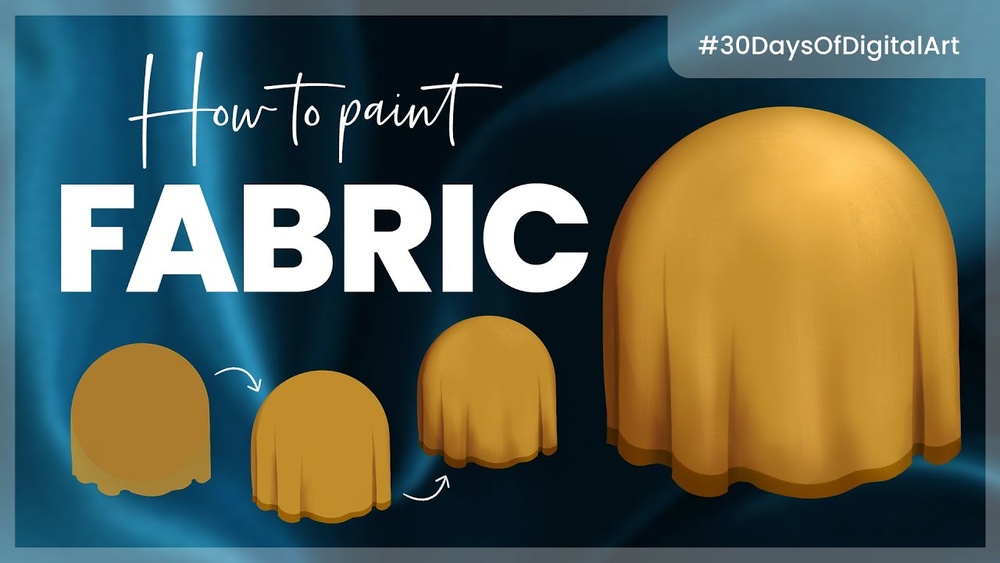
Base color and shading form the foundation of digital fabric texture painting. The base color sets the fabric’s overall tone. Shading adds depth and shape. These steps help the fabric look real and touchable. Careful layering of colors creates the illusion of texture and folds.
Start with a clean, solid base. Then, add light and shadow to show the fabric’s form. This process brings life to your digital fabric art.
Laying Down Flat Colors
Begin by choosing a flat color that matches your fabric type. Use a soft brush to fill the entire fabric area. Avoid sharp edges or details at this stage. The flat color acts as a canvas for all shading and highlights. Keep the color consistent but adjust brightness for different fabric parts if needed.
Pick colors that suit the fabric’s material. Cotton, silk, and denim all have distinct base tones. Use simple hues without texture yet. The flat color layer makes shading easier and clearer later.
Adding Light And Shadow
Next, add shadows where the fabric folds or curves. Use a darker shade of your base color. Paint softly along edges and creases. Shadows give the fabric volume and weight. They show how the fabric bends and folds in space.
Apply highlights with a lighter color on raised areas. These spots catch the most light. Use a soft brush and lower opacity for smooth blending. Balance shadows and highlights to keep the fabric natural. This step creates the illusion of light falling on cloth.
Work slowly. Build shading in layers. This method avoids harsh contrasts and keeps fabric smooth. Use reference images to see how light hits real fabric. This practice improves your shading accuracy.
Creating Fabric Texture
Creating fabric texture in digital painting adds realism and character. It gives your artwork a tactile feel that viewers can almost touch. To paint fabric convincingly, focus on details like weave patterns and subtle surface variations. These small touches make your fabric appear natural and lively.
Understanding how light interacts with fabric helps you paint texture better. Shadows and highlights reveal the fabric’s shape and material. Use different brush techniques and layer effects to build up texture gradually. This approach keeps your fabric looking soft and realistic.
Applying Weave And Grain Effects
Start by sketching the basic weave or grain pattern of your fabric. Use small, repeated strokes to mimic threads crossing each other. Adjust brush size and opacity for a natural look. Avoid making the pattern too uniform to keep it believable.
Use textured brushes that replicate cloth fibers. These brushes add subtle irregularities to the weave. Vary the direction of your strokes to follow fabric folds and curves. This technique enhances the fabric’s flow and structure.
Using Layer Modes For Depth
Layer modes help create depth and complexity in fabric texture. Set a texture layer above your base color and try modes like Multiply or Overlay. Multiply darkens the fabric, revealing shadows and folds. Overlay brightens highlights and adds richness.
Experiment with opacity to blend texture layers smoothly. Add noise or grain on separate layers to mimic fabric fuzziness. These effects add realism without overpowering the main colors. Layer modes let you build texture step by step for better control.
Painting Folds And Creases
Painting folds and creases in digital fabric textures gives your artwork depth. It creates a sense of realism and movement. Capturing these details makes fabric look soft and natural. This section explains how to observe and paint fabric folds effectively.
Observing Fabric Behavior
Study how fabric bends and folds in real life. Notice where it tightens and where it loosens. Folds form around joints or where fabric hangs freely. Different materials behave differently; cotton folds softly, silk folds sharply. Observe the direction and shape of each crease carefully. Use photos or real fabric as references to understand these behaviors.
Shaping Folds With Highlights And Shadows
Use light and shadow to shape fabric folds. Highlights show where light hits the fabric directly. Shadows indicate where the fabric curves away or overlaps. Paint highlights on raised areas of folds. Add shadows in the deep creases and under layers. Vary the softness of shadows to match fabric type. This contrast between light and dark adds volume and realism to folds.
Incorporating Patterns And Details
Incorporating patterns and details adds life to digital fabric textures. It transforms plain surfaces into rich, realistic fabric designs. Small touches like prints, stitches, and seams create depth and authenticity. These details help the viewer feel the fabric’s material and style. Painting these elements carefully enhances the overall artwork and makes it more appealing.
Applying Printed Patterns
Start by choosing the right pattern for your fabric type. Use simple shapes or repeating motifs for clarity. Place the pattern softly on the fabric layer to avoid harsh edges. Adjust opacity and blending modes to blend the pattern naturally. Use warp or distort tools to follow the fabric’s folds. Patterns should flow with the fabric’s curves and creases. This approach keeps the pattern believable and integrated into the texture.
Adding Stitching And Seams
Stitching and seams add structure and realism to fabric textures. Use fine, short strokes to simulate thread lines along edges. Vary stroke length and direction to mimic hand or machine stitching. Highlight one side of the seam to suggest raised edges. Add subtle shadows on the opposite side for depth. Seams should follow the fabric’s shape and movement. These small details make fabric appear sewn and tactile.
Enhancing Realism
Enhancing realism is key to making digital fabric textures believable. Real fabric has tiny details that catch the eye. Adding these details helps your artwork feel alive and tactile.
Simple shapes and colors are not enough. You need to mimic the small flaws and layers found in real fabric. This creates depth and interest in your digital painting.
Adding Subtle Imperfections
Perfect fabric looks unnatural. Tiny flaws like wrinkles, loose threads, or slight color changes add life. Use a soft brush to paint faint irregular lines or spots. These imperfections break the smoothness and make fabric feel real.
Focus on areas where fabric bends or folds. Add gentle shadows and highlights with uneven edges. This simulates how light hits real cloth. Avoid overdoing it; keep imperfections light and natural.
Using Overlay Textures
Overlay textures give fabric a tactile feel. Find or create subtle fabric patterns like linen weave or cotton grain. Place these texture layers over your base colors using blending modes like Overlay or Soft Light.
Adjust opacity to keep the texture subtle but visible. This method adds complexity without heavy painting. Experiment with different textures to match the type of fabric you want. Overlay textures help your digital fabric look rich and realistic.
Final Adjustments
Final adjustments bring your digital fabric texture to life. These tweaks refine colors and details. They make the texture more realistic and visually appealing. Small changes at this stage can greatly enhance your artwork’s overall quality.
Color Correction And Contrast
Check the colors closely. Adjust hue and saturation to balance the palette. Use contrast to add depth and shape. Increasing contrast helps define fabric folds and texture. Avoid overdoing it to keep the natural look. Subtle shifts create a more vibrant and true-to-life fabric texture.
Sharpening And Softening
Sharpen edges to highlight fabric details like threads or patterns. This step adds crispness and clarity. Soften areas where the fabric naturally blurs or folds. Softening blends harsh lines and creates smooth transitions. Use these tools carefully to maintain texture realism without harshness.

Credit: pngtree.com
Frequently Asked Questions
How Do I Make My Digital Art Look Textured?
Use textured brushes and overlay texture images on layers with blending modes. Adjust opacity for subtle effects. Add shading and highlights to enhance depth.
How Do You Paint To Look Like Fabric?
Use a dry brush to drag glaze over paint, creating fine lines that mimic fabric texture. Add subtle shadows and highlights for depth.
How To Paint A Textured Effect?
To paint a textured effect, apply a base coat, then use a textured brush or sponge. Add glaze and drag a dry brush through it to create depth. Layer multiple colors for richness. Finish with a sealant to protect the texture and enhance durability.
How To Make Digital Art Look Metallic?
Use sharp highlights and strong contrasts on edges to mimic metal reflections. Add subtle reflections of surroundings for realism. Apply smooth gradients with shiny spots to enhance the metallic look. Use a textured brush sparingly to simulate surface imperfections.
Conclusion
Painting digital fabric texture takes patience and practice. Start with simple shapes and basic colors. Use textured brushes to add depth and detail. Pay attention to light and shadow for realism. Layer your strokes to mimic fabric folds. Experiment with different patterns to create variety.
Keep refining your work step by step. Soon, your fabric will look natural and lively. Enjoy the creative process and keep learning new techniques.