
PaintingProGuide is reader-supported. When you buy through links on this page we may earn an affiliate commission at no extra cost to you.
“Drawing tablet for kids” covers three very different products. For toddlers and preschoolers it usually means an LCD writing board: a pressure-sensitive doodle pad with a stylus and an erase button, no screen time and no apps. For kids around five to twelve, LED light-up boards add glowing neon markers and tracing. And for older children who are serious about art, it means a real digital drawing tablet with a pressure-sensitive pen and drawing apps.
Picking the right type matters more than picking the right brand. Below we sort the best options currently sold on Amazon.com by age and purpose, then cover what parents should check before buying: screen time, durability, battery type and whether the tablet grows with your child.
Quick answer: For most kids ages 3 to 8, the bravokids 10-Inch LCD Writing Tablet is the best drawing tablet for kids: a large, glare-free doodle screen, one-button erase and no apps or screen time. For siblings or travel, the TQU 4-Pack 8.5-Inch LCD Tablets are better value. For older kids ready for real digital art, the PicassoTab A10 Standalone Drawing Tablet works without a computer and includes drawing apps and a 4096-level pen.
Our Top Picks at a Glance
- bravokids 10-Inch LCD Writing Tablet — Best overall for ages 3 to 8
- TQU 4-Pack 8.5-Inch LCD Writing Tablets — Best value for siblings and travel
- PicassoTab A10 Standalone Drawing Tablet — Best real digital drawing tablet for older kids
- Ritkes 16-Inch LED Drawing Board — Best light-up board with tracing designs
- JUOIFIP 16.7-Inch LED Drawing Board — Best LED board with the most accessories
- Szhsk 20-Pack 8.5-Inch LCD Tablets — Best for classrooms and party favors
| Product | Best For | Key Spec | Key Strength | Price Tier |
|---|---|---|---|---|
| bravokids 10-Inch LCD Tablet | Ages 3-8, everyday doodling | 10 in color LCD, 150 g | Large screen, one-second erase | $ |
| TQU 4-Pack 8.5-Inch LCD | Siblings, car trips | 4 × 8.5 in LCD, lock key | Value multi-pack | $ |
| PicassoTab A10 | Ages 8+ learning digital art | 10 in laminated screen, 4096-level pen | No computer needed, preloaded apps | $$$ |
| Ritkes 16-Inch LED Board | Ages 3-12, tracing and display | 16 in LED, 7 colors, 10 brightness levels | 20 tracing designs, rechargeable | $$ |
| JUOIFIP 16.7-Inch LED Board | Ages 3+, gift with extras | 16.7 in LED, 14 light effects | 12 markers, 15 tracing papers, USB-C | $$ |
| Szhsk 20-Pack LCD Tablets | Teachers, party favors | 20 × 8.5 in LCD, 5 colors | Lock switch, tethered stylus | $$ |
How We Chose
We did not give these tablets to children to test. The picks are based on Amazon listing details and specifications checked in October 2026, how well each product’s size, power source, features and age guidance match real family use, and how widely each product is reviewed by Amazon buyers.
- Age fit: doodle boards for young kids, pen tablets for older kids.
- Screen-time impact: LCD and LED boards involve no apps or internet; standalone tablets do.
- Durability: rounded corners, light weight and drop resistance.
- Power: replaceable coin batteries versus built-in rechargeable batteries.
- Creative depth: pressure-sensitive lines, colors, tracing guides or full drawing apps.
- Practical extras: lock buttons to save drawings, tethered styluses, stands and cases.
We skipped one 4-pack LCD listing whose details contradicted its description, and kept the TQU 4-pack as the clearer multi-pack option.
Best Drawing Tablet for Kids Reviewed
1. bravokids 10-Inch LCD Writing Tablet — Best for everyday doodling for ages 3 to 8

The bravokids board is a classic LCD writing tablet with a generous 10-inch colorful screen. Kids press the stylus, a fingernail or any hard object on the surface and colorful lines appear, thicker or thinner depending on how hard they press. One press of the erase button clears the screen in a second.
The listing highlights a no-glare, no-radiation screen with no backlight, a round-corner, anti-fall design and a weight of only 150 grams, light enough for a school bag. Dimensions are listed as 6.8 x 10 inches, and the stylus is included.
Best suited for: toddlers, preschoolers and early elementary kids who want to doodle, practice letters and play games like tic-tac-toe.
Key features:
- 10-inch colorful LCD screen
- Pressure-sensitive line thickness
- One-touch erase
- Lightweight 150 g, rounded corners
- Stylus included
Pros:
- Big screen for small hands
- No apps, no internet, no backlight
- Light and travel friendly
Cons and limitations:
- Drawings cannot be saved digitally
- Lines appear in preset rainbow colors only
- Battery type and replacement not detailed in the bullets
Buying consideration: LCD boards are about play, not artwork. If your child wants to keep their drawings, plan on taking photos before erasing.
2. TQU 4-Pack 8.5-Inch LCD Writing Tablets — Best for siblings and travel

Four tablets in one box means no fighting over a single board on road trips. Each TQU tablet has an 8.5-inch colorful LCD screen with pressure-sensitive lines, an erase button and a lock key that stops the screen from being wiped accidentally, according to the listing.
The listing positions it as a quiet, take-along toy for cars, restaurants and church, and suggests it for ages 3 to 8. The body is listed as ABS plastic.
Best suited for: families with multiple kids, grandparents, travel bags and backup boards for the car.
Key features:
- Pack of four 8.5-inch LCD tablets
- Pressure-sensitive lines
- Erase button and lock key
- ABS plastic body
Pros:
- Great value per tablet
- Lock key protects finished drawings
- Compact for travel
Cons and limitations:
- Smaller screen than the 10-inch bravokids
- Same limitation: no saving or color choice
Buying consideration: Keep one in the car and one in a bag; LCD tablets are the easiest no-mess activity for travel.
3. PicassoTab A10 10-Inch Standalone Drawing Tablet — Best for real digital art for older kids

When a child outgrows doodle boards and wants to draw “like real artists,” a standalone tablet is the next step. The PicassoTab A10 runs drawing apps directly on the device, so no computer is needed. The listing describes a 10-inch laminated display that reduces glare and parallax and a 4096-level pressure-sensitive pen.
It runs Android 14 with an octa-core processor, 6 GB RAM and 64 GB of storage expandable up to 1 TB. The listing says it comes preloaded with five creative apps and includes upgrades for the Concepts drawing app and the Artixo tutorials app, plus a tablet case, drawing glove, power adapter and a pre-installed screen protector.
Best suited for: kids around 8 and up, tweens and teens who want to learn digital drawing, animation and painting without sharing a family computer.
Key features:
- 10-inch laminated display
- 4096-level pressure-sensitive pen
- Android 14, octa-core, 6 GB RAM, 64 GB storage (expandable)
- Preloaded creative apps and tutorial app upgrades
- Case, glove and adapter included
Pros:
- Works without a computer
- Real pressure sensitivity for line weight
- Tutorials help beginners progress
- Doubles as a general tablet for schoolwork
Cons and limitations:
- Highest price tier on this list
- Wi-Fi and apps mean parental controls are needed
- Fragile compared with a plastic doodle board
Buying consideration: Set up parental controls and a child account before handing it over. Decide in advance which apps are allowed beyond the drawing tools.
4. Ritkes 16-Inch LED Drawing Board — Best for tracing and glowing display art

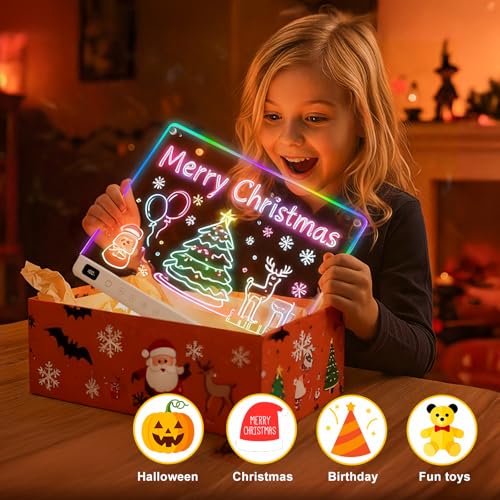
LED boards are a different experience from LCD tablets: kids draw with neon markers on an acrylic panel that glows with edge lighting. The Ritkes board is a large 16 inches, with seven light colors (blue, purple, red, yellow, green, cyan and white) and ten brightness levels, according to the listing.
It includes seven neon markers and a double-sided tracing book with 20 designs, so kids can start creating immediately. The board is rechargeable and cordless, shows the remaining battery level, and has an integrated stand to display finished art.
Best suited for: kids ages 3 to 12 who like color, tracing and showing off their drawings, and as a night-light style display in a bedroom.
Key features:
- 16-inch LED panel
- 7 light colors and 10 brightness levels
- 7 neon markers and 20 tracing designs
- Rechargeable with battery display
- Built-in stand; tabletop or wall mount
Pros:
- Large drawing area
- Tracing book builds confidence
- Displays art like a lit sign
Cons and limitations:
- Markers can dry out and need replacing
- Wiping is messier than an LCD erase button
Buying consideration: Cap markers immediately after use and wipe the board with a damp cloth rather than paper towels to avoid streaks.
5. JUOIFIP 16.7-Inch LED Drawing Board with 14 Light Effects — Best for gift-ready LED kit

JUOIFIP’s LED board competes closely with Ritkes but leans into accessories and light modes. The listing describes 14 light effects, a built-in rechargeable battery with up to 8 hours at maximum brightness or longer at lower settings, and USB-C charging.
The kit includes the board with two built-in stands, 12 colored markers, 15 tracing papers, a USB-C cable, a spray bottle, two cleaning cloths, a hanging chain and hook. The board weighs 1.65 pounds.
Best suited for: gift buyers who want a complete box, and kids who like switching light effects.
Key features:
- 16.7-inch LED board
- 14 light effects
- Rechargeable, up to 8 hours at max brightness
- 12 markers and 15 tracing papers
- Spray bottle, cloths, stand, hanging chain
Pros:
- Most accessories in the LED category
- USB-C charging
- Can be hung on a wall as display
Cons and limitations:
- Heavier than LCD tablets
- Markers and cleaning add some mess
Buying consideration: Use the included spray bottle and cloth; dry wiping can smear neon marker across the panel.
6. Szhsk 20-Pack 8.5-Inch LCD Writing Tablets — Best for classrooms and party favors

Teachers and party planners need quantity. This Szhsk pack includes 20 LCD writing tablets in five colors (four each of blue, green, red, pink and another color), according to the listing.
Each board has a glare-free, no-backlight LCD screen, an erase button, a lock switch on the back to prevent accidental deletion and a stylus secured to the board so it does not get lost. They are ultra-thin and made of HIPS plastic.
Best suited for: classroom rewards, small-group activities, birthday party favors and therapy or tutoring sessions.
Key features:
- 20 × 8.5-inch LCD tablets in five colors
- Erase button and lock switch
- Tethered stylus
- Ultra-thin and lightweight
Pros:
- Lowest cost per tablet
- Tethered stylus reduces losses
- Color-coding helps in classrooms
Cons and limitations:
- Basic features only
- Not intended as a premium single-child gift
Buying consideration: Assign a color per table group in class so boards return to the right place.
LCD vs LED vs Digital Drawing Tablets
| Type | Typical Age | How It Works | Saves Art? | Screen Time |
|---|---|---|---|---|
| LCD writing tablet | 3-8 | Pressure on liquid crystal shows lines; button erases | No (photo only) | None |
| LED drawing board | 3-12 | Neon markers on lit acrylic; wipe to clean | No (photo only) | None |
| Standalone drawing tablet | 8+ | Pen and apps on a built-in screen | Yes | Yes |
| Screenless pen tablet | 10+ | Pen on pad, drawing shows on a computer | Yes | Yes, via computer |
Screenless pen tablets from brands like Huion and Wacom are excellent and affordable for older kids who already use a computer. If you are considering one, our explainer on whether Huion makes a good drawing tablet and our roundup of Huion drawing tablet reviews are useful starting points, and our guide on how to use a drawing tablet without a screen explains the learning curve kids should expect.
Buying Guide: How to Choose a Drawing Tablet for Kids
Match the tablet to age and attention span
Toddlers and preschoolers do best with simple LCD boards: one stylus, one button, instant results. Elementary-age kids enjoy LED boards and tracing. Once a child asks to save, edit or share drawings, they are ready for a real pen tablet or standalone tablet.
Decide how you feel about screen time
LCD and LED boards have no apps, no internet and no backlit screen in the case of LCD boards. Standalone tablets are full devices; they need parental controls and time limits.
Screen size
Larger boards give more room for drawing and reduce frustration. Ten inches is a comfortable size for LCD boards; 16-inch LED boards suit tabletop drawing and display. Smaller boards travel better.
Durability and safety
Look for rounded corners, lightweight bodies and tethered or easy-to-replace styluses. For young children, avoid small detachable parts and check battery compartments are secured with a screw.
Battery and charging
Many LCD boards use replaceable button-cell batteries that last a long time. LED boards and standalone tablets are rechargeable; USB-C charging is convenient. Keep coin batteries away from young children.
Lock and save features
A lock button prevents accidental erasing, which matters to kids proud of a drawing. Real saving requires a standalone or computer-connected tablet.
Room to grow
If your child is already drawing seriously, skip the toy and invest in a pen tablet with pressure sensitivity and drawing apps. Our guide to setting up a drawing tablet walks parents through the first-day setup.
Getting Kids Started With Digital Drawing
Older kids moving to a pen tablet benefit from short, fun exercises: tracing simple shapes, coloring a line drawing on a separate layer and trying different brushes. Keep sessions short and celebrate experiments rather than finished pictures. When they are ready for a project, a colorful scene like our digital waves and ocean painting tutorial teaches layers and blending in a forgiving way. And if you do not have a tablet yet, our guide on digital painting without a tablet shows what kids can do with a touchscreen or mouse.
Common Mistakes to Avoid
- Buying a full digital tablet for a toddler who just wants to scribble.
- Expecting LCD boards to save or store drawings.
- Handing over an internet-connected tablet without parental controls.
- Using ballpoint pens or sharp objects on LCD screens, which can scratch them.
- Leaving LED markers uncapped; they dry out quickly.
- Ignoring age labels and small-part warnings for young children.
- Choosing the smallest board to save money when a child gets frustrated by limited space.
FAQs
What is the best drawing tablet for a 5-year-old?
An LCD writing tablet like the bravokids 10-inch board is ideal. It is light, simple, has no apps or internet, and erases with one button.
Are LCD writing tablets bad for kids’ eyes?
LCD writing tablets have no backlight, so they behave more like paper than a phone screen. Listings describe them as glare-free. Normal breaks are still a good habit.
At what age can a child use a real drawing tablet?
Many kids are ready around 8 to 10, when they want to save and edit their art and can handle a pen and apps responsibly.
Do kids drawing tablets need a computer?
LCD and LED boards do not. Standalone tablets like the PicassoTab A10 do not either. Screenless pen tablets from Huion or Wacom do need a computer.
Can you save drawings on an LCD writing tablet?
Not digitally. Some boards have a lock key to keep a drawing on screen, but to keep it permanently you need to take a photo.
Are LED drawing boards messy?
They use neon markers that wipe off with a damp cloth. They are cleaner than paint but messier than an LCD board.
Final Recommendation
For young kids, the bravokids 10-Inch LCD Writing Tablet is the best mix of size, simplicity and price, and the TQU 4-pack is the smart buy for siblings and travel. Choose the Ritkes or JUOIFIP LED boards if your child loves color, tracing and showing off their work. For classrooms, the Szhsk 20-pack keeps costs low. And when your child is ready for real digital art, the PicassoTab A10 gives them a pressure-sensitive pen and drawing apps without needing a computer.



One Comment